This repository is based on Ultralytics/yolov5, with adjustments to enable rotate prediction boxes.

Overview

Rotate-Yolov5

This repository is based on Ultralytics/yolov5, with adjustments to enable rotate prediction boxes.

Section I. Description

The codes are based on Ultralytics/yolov5, and several functions are added and modified to enable rotate prediction boxes.

The modifications compared with Ultralytics/yolov5 and their brief descriptions are summarized below:

  1. data/rotate_ucas.yaml : Exemplar UCAS-AOD dataset to test the effects of rotate boxes

  2. data/images/UCAS-AOD : For the inference of rotate-yolov5s-ucas.pt

  3. models/common.py :
    3.1. class Rotate_NMS : Non-Maximum Suppression (NMS) module for Rotate Boxes
    3.2. class Rotate_AutoShape : Rotate Version of Original AutoShape, input-robust polygon model wrapper for passing cv2/np/PIL/torch inputs. Includes preprocessing, inference and Rotate_NMS
    3.3. class Rotate_Detections : Rotate detections class for Rotate-YOLOv5 inference results

  4. models/rotate_yolov5s_ucas.yaml : Configuration file of rotate yolov5s for exemplar UCAS-AOD dataset

  5. models/yolo.py :
    5.1. class Rotate_Detect : Detect head for rotate-yolov5 models with rotate box prediction
    5.2. class Rotate_Model : Rotate yolov5 models with rotate box prediction

  6. utils/iou_cuda : CUDA extension for iou computation of polygon boxes
    6.1. extensions.cpp : CUDA extension file
    6.2. inter_union_cuda.cu : CUDA code for computing iou of polygon boxes
    6.3. setup.py : for building CUDA extensions module polygon_inter_union_cuda, with two functions polygon_inter_union_cuda and polygon_b_inter_union_cuda

  7. utils/autoanchor.py :
    7.1. def rotate_check_anchors : Rotate version of original check_anchors
    7.2. def rotate_kmean_anchors : Create kmeans-evolved anchors from rotate-enabled training dataset

  8. utils/datasets.py :
    8.1. def polygon_random_perspective : Data augmentation for datasets with polygon boxes (augmentation effects: HSV-Hue, HSV-Saturation, HSV-Value, rotation, translation, scale, shear, perspective, flip up-down, flip left-right, mosaic, mixup)
    8.2. def polygon_box_candidates : Polygon version of original box_candidates
    8.3. def rotate_random_perspective : Data augmentation for datasets with rotate boxes (augmentation effects: HSV-Hue, HSV-Saturation, HSV-Value, rotation, translation, scale, shear, perspective, flip up-down, flip left-right, mosaic, mixup)
    8.4. class Rotate_LoadImagesAndLabels : Rotate version of original LoadImagesAndLabels
    8.5. def rotate_load_mosaic : Loads images in a 4-mosaic, with rotate boxes
    8.6. def rotate_load_mosaic9 : Loads images in a 9-mosaic, with rotate boxes
    8.7. def rotate_verify_image_label : Verify one image-label pair for rotate datasets
    8.8. def create_dataloader : Has been modified to include rotate datasets
    8.9. class Albumentations : For albumentation augmentation

  9. utils/general.py :
    9.1. def xyxyxyxyn2xyxyxyxy : Convert normalized xyxyxyxy or segments into pixel xyxyxyxy or segments
    9.2. def polygon_segment2box : Convert 1 segment label to 1 polygon box label
    9.3. def polygon_inter_union_cpu : iou computation (polygon) with cpu
    9.4. def polygon_box_iou : Compute iou of polygon boxes via cpu or cuda
    9.5. def polygon_b_inter_union_cpu : iou computation (polygon) with cpu
    9.6. def polygon_bbox_iou : Compute iou of polygon boxes via cpu or cuda
    9.7. def polygon_nms_kernel : Non maximum suppression kernel for polygon-enabled boxes
    9.8. def order_corners : Return sorted corners
    9.9. def xywhrm2xyxyxyxy : Convert rotate xywhrm into xyxyxyxy, suitable for both pixel-level or normalized
    9.10. def xyxyxyxy2xywhrm : Convert xyxyxyxy into rotate xywhrm, suitable for both pixel-level and normalized
    9.11. def xywhn2xywh : Convert normalized xywh into pixel xywh
    9.12. def rotate_segments2boxes : Convert segment labels to rotate box labels, i.e. (xy1, xy2, ...) to rotated boxes (x, y, w, h, re, im)
    9.13. def rotate_scale_coords : Rescale coords (x, y, w, h, re, im) from img1_shape to img0_shape
    9.14. def rotate_box_iou : Compute iou of rotate boxes via cpu or cuda
    9.15. def rotate_bbox_iou : Compute iou of rotated boxes for class Rotate_ComputeLoss in loss.py via cpu or cuda
    9.16. def rotate_non_max_suppression : Runs Non-Maximum Suppression (NMS) on inference results for rotated boxes

  10. utils/loss.py :
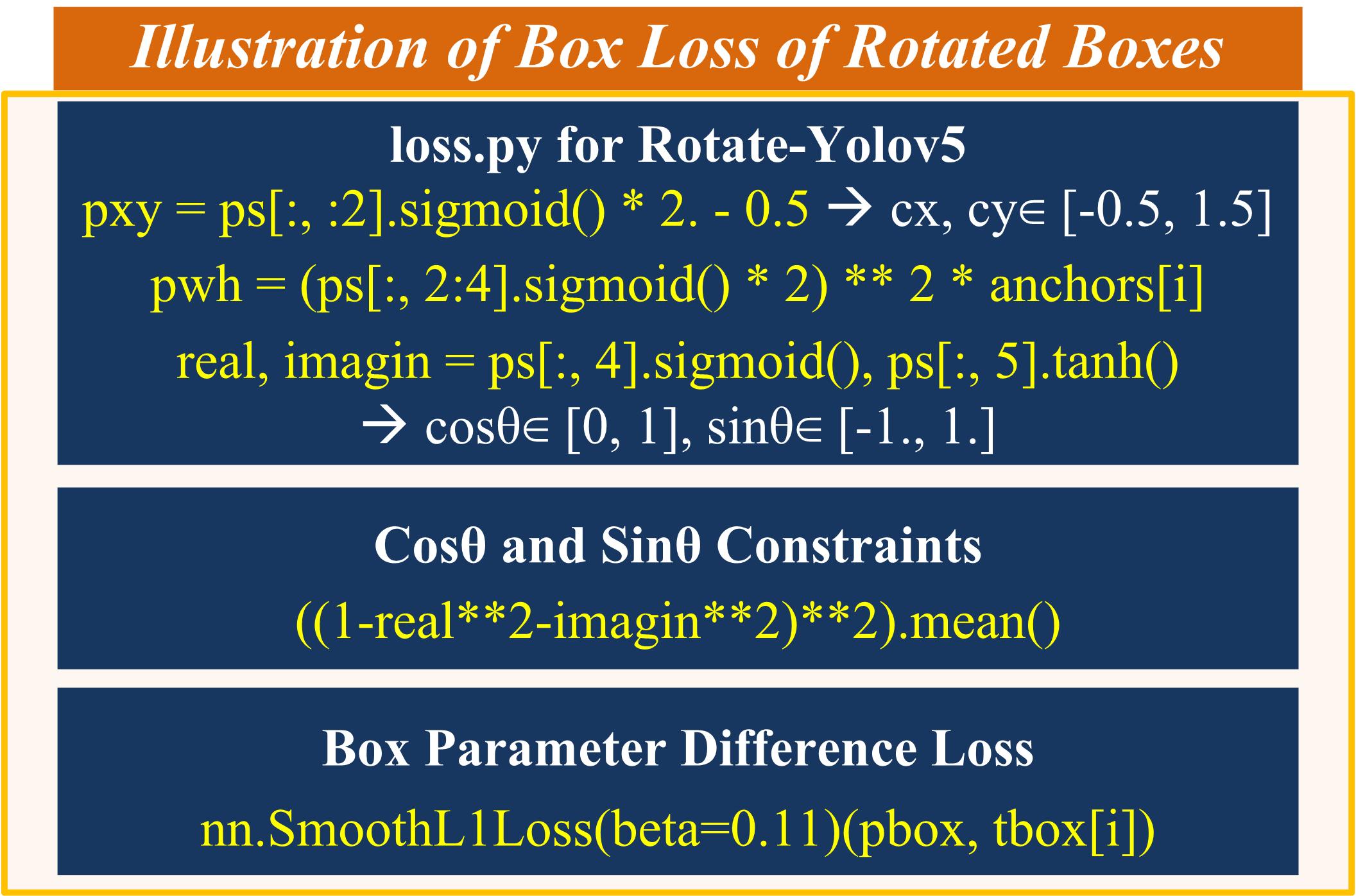
    10.1. class Rotate_ComputeLoss : Compute loss for rotate boxes

  11. utils/metrics.py :
    11.1. class Rotate_ConfusionMatrix : Rotate version of original ConfusionMatrix

  12. utils/plots.py :
    12.1. def polygon_plot_one_box : Plot one polygon box on image
    12.2. def polygon_plot_one_box_PIL : Plot one polygon box on image via PIL
    12.3. def polygon_plot_images : Polygon version of original plot_images
    12.4. def rotate_plot_one_box : Plot one rotate box on image
    12.5. def rotate_plot_one_box_PIL : Plot one rotate box on image via PIL
    12.6. def rotate_output_to_target : Convert model output format [x, y, w, h, re, im, conf, class_id] to target format [batch_id, class_id, x, y, w, h, re, im, conf]
    12.7. def rotate_plot_images : Rotate version of original plot_images
    12.8. def rotate_plot_test_txt : Rotate version of original plot_test_txt
    12.9. def rotate_plot_targets_txt : Rotate version of original plot_targets_txt
    12.10. def rotate_plot_labels : Rotate version of original plot_labels

  13. rotate_train.py : For training rotate-yolov5 models

  14. rotate_test.py : For testing rotate-yolov5 models

  15. rotate_detect.py : For detecting rotate-yolov5 models

  16. requirements.py : Added python model shapely

Section II. How Does Rotate Boxes Work? How Does Rotate Boxes Different from Polygon Boxes?

  1. Comparisons between Rotate-Yolov5 and Polygon-Yolov5

2. Model Head of Rotate-Yolov5

3. Illustration of Box Loss of Rotated Boxes

Section III. Installation

For the CUDA extension to be successfully built without error, please use CUDA version >= 11.2. The codes have been verified in Ubuntu 16.04 with Tesla K80 GPU.

# The following codes install CUDA 11.2 from scratch on Ubuntu 16.04, if you have installed it, please ignore
# If you are using other versions of systems, please check https://tutorialforlinux.com/2019/12/01/how-to-add-cuda-repository-for-ubuntu-based-oses-2/
# Install Ubuntu kernel head
sudo apt install linux-headers-$(uname -r)

# Pinning CUDA repo wget https://developer.download.nvidia.com/compute/cuda/repos/ubuntu1604/x86_64/cuda-ubuntu1604.pin sudo mv cuda-ubuntu1604.pin /etc/apt/preferences.d/cuda-repository-pin-600
# Add CUDA GPG key sudo apt-key adv --fetch-keys http://developer.download.nvidia.com/compute/cuda/repos/ubuntu1604/x86_64/7fa2af80.pub
# Setting up CUDA repo sudo add-apt-repository "deb https://developer.download.nvidia.com/compute/cuda/repos/ubuntu1604/x86_64/ /"
# Refresh apt repositories sudo apt update
# Installing CUDA 11.2 sudo apt install cuda-11-2 -y sudo apt install cuda-toolkit-11-2 -y
# Setting up path echo 'export PATH=/usr/local/cuda-11.2/bin${PATH:+:${PATH}}' >> $HOME/.bashrc # You are done installing CUDA 11.2
# Check NVIDIA nvidia-smi # Update all apts sudo apt-get update sudo apt-get -y upgrade
# Begin installing python 3.7 curl -o ~/miniconda.sh -O https://repo.anaconda.com/miniconda/Miniconda3-latest-Linux-x86_64.sh chmod +x ~/miniconda.sh ./miniconda.sh -b echo "PATH=~/miniconda3/bin:$PATH" >> ~/.bashrc source ~/.bashrc conda install -y python=3.7 # You are done installing python

The following codes set you up with the Rotate Yolov5.

# clone git repo
git clone https://github.com/XinzeLee/RotateObjectDetection
cd RotateObjectDetection/rotate-yolov5
# install python package requirements
pip install -r requirements.txt
# install CUDA extensions
cd utils/iou_cuda
python setup.py install
# cd back to rotate-yolov5 folder
cd .. && cd ..

Section IV. Rotate-Tutorial 1: Deploy the Rotate Yolov5s

Try Rotate Yolov5s Model by Following Rotate-Tutorial 1

  1. Inference
     $ python rotate_detect.py --weights rotate-yolov5s-ucas.pt --img 1024 --conf 0.75 \
         --source data/images/UCAS-AOD --iou-thres 0.4 --hide-labels

  2. Test
     $ python rotate_test.py --weights rotate-yolov5s-ucas.pt --data rotate_ucas.yaml \
         --img 1024 --iou 0.65 --task val

  3. Train
     $ python rotate_train.py --weights rotate-yolov5s-ucas.pt --cfg rotate_yolov5s_ucas.yaml \
         --data rotate_ucas.yaml --hyp hyp.ucas.yaml --img-size 1024 \
         --epochs 3 --batch-size 12 --noautoanchor --rotate --cache
  4. Performance
    4.1. Confusion Matrix

    4.2. Precision Curve

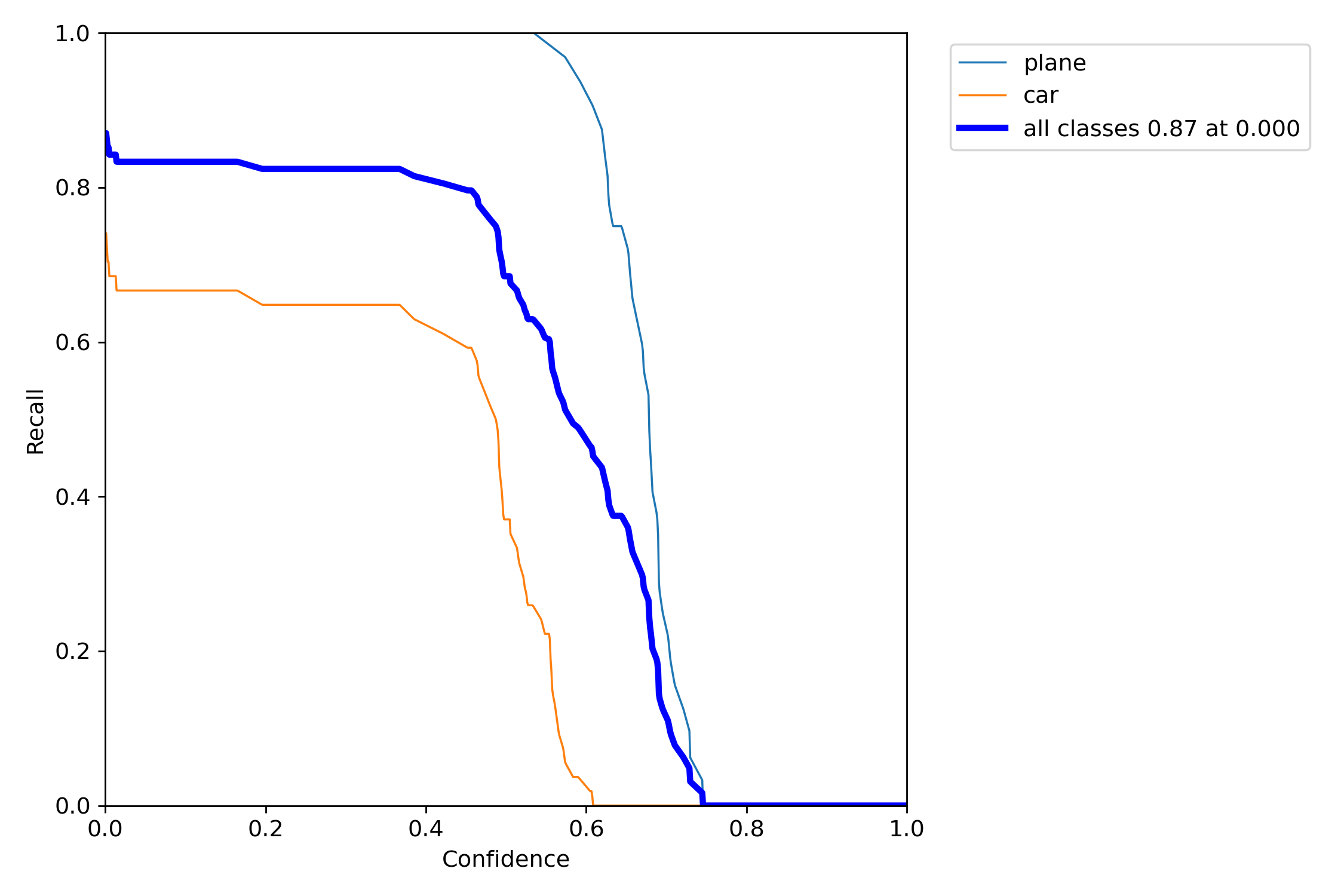
    4.3. Recall Curve

    4.4. Precision-Recall Curve
    4.5. F1 Curve

Section V. Rotate-Tutorial 2: Transform COCO Dataset to Rotate Labels Using Segmentation

Transform COCO Dataset to Rotate Labels by Following Rotate-Tutorial 2

Transformed Exemplar Figure

Section VI. References

Comments
  • IndexError: index 6 is out of bounds for dimension 1 with size 6I

    IndexError: index 6 is out of bounds for dimension 1 with size 6I

    I have modified my label into the format (class, cx, cy, w, h, cos, sin),and I sucessfully train UCAS-AOD you provided, but I meet this problem when I train my own dataset. my label is as follows: 0 1244.5523 399.0501 86.4318 225.7462 0.3616157183568731 0.9323272345251117 image

    Traceback (most recent call last): File "rotate_train.py", line 553, in train(hyp, opt, device, tb_writer, rotate=opt.rotate) File "rotate_train.py", line 103, in train model = Model(opt.cfg, ch=3, nc=nc, anchors=hyp.get('anchors')).to(device) # create File "/home/cdzk/LanXin/R-yolov5/rotate-yolov5/models/yolo.py", line 341, in init super(Rotate_Model, self).init(cfg, ch, nc, anchors) File "/home/cdzk/LanXin/R-yolov5/rotate-yolov5/models/yolo.py", line 110, in init self._initialize_biases() # only run once File "/home/cdzk/LanXin/R-yolov5/rotate-yolov5/models/yolo.py", line 366, in _initialize_biases b.data[:, 6] += math.log(8 / (640 / s) ** 2) # obj (8 objects per 640 image) IndexError: index 6 is out of bounds for dimension 1 with size 6

    image

    could you know what can I do to revise this ? Thank you for your help!

    opened by AllieLan 3
  • polygon_nms_kernel use exclusive nested for loop?

    polygon_nms_kernel use exclusive nested for loop?

    Hello, First I want to say Thank you for the effort. I have my own dataset and I labeled it as you mentioned, I trained it on a CPU I haven't tried using GPU yet. In the training set it finished the first epoch without any issue but when it started to calculate the mAP it got lost in the polygon_nms_kernel in general.py specific on the while loop at the 934. line In some way I ended up having x_.shape like (16939,10) and inside the loop, there is a polygon_box_iou that contains polygon_inter_union_cpu which is itself a 16939 lens. So my dummy question is, Is it normal to have that much of an exclusive computation 16939*16939 = 286M iteration. just to calculate the mAP and do nms?

    opened by muhammedakyuzlu 2
  • Inference not working

    Inference not working

    Hey @XinzeLee, Tutorial-1 colab does not detect bounding boxes.

    Steps to reproduce:

    1. !git clone https://github.com/XinzeLee/RotateObjectDetection
    2. %cd /content/RotateObjectDetection/rotate-yolov5
    3. !pip install -r requirements.txt
    4. %cd /content/RotateObjectDetection/rotate-yolov5/utils/iou_cuda
    5. !python setup.py install
    6. %cd /content/RotateObjectDetection/rotate-yolov5
    7. Below code
    from IPython.display import Image
    
    !python rotate_detect.py --weights rotate-yolov5s-ucas.pt --img 1024 --conf 0.75 \
        --source data/images/UCAS-AOD --iou-thres 0.4 --hide-labels
    # Image(filename='runs/detect/exp/1070.png', width=1024)
    
    1. Check out images under runs/detect/exp
    opened by satpalsr 1
  • Allowing full rotation [-180, 180]

    Allowing full rotation [-180, 180]

    Thank you for sharing your work. I've been trying to solve a rotated object detection problem, but in my case I want to predict full rotation or θ [-180, 180] degrees. For example, it matters if the object is pointing up or down.

    Would allowing the cos output to have values from [-1,1] (tanh activation in both model and loss) achieve this? Do you have any suggestion on this? I am looking forward to your input!

    opened by gzamps 0
  • I encountered 'Expected all tensors to be on the same device, but found at least two devices, cuda:0 and cpu!' when I train my own data

    I encountered 'Expected all tensors to be on the same device, but found at least two devices, cuda:0 and cpu!' when I train my own data

    Traceback (most recent call last): File "rotate_train.py", line 553, in train(hyp, opt, device, tb_writer, rotate=opt.rotate) File "rotate_train.py", line 314, in train loss, loss_items = compute_loss(pred, targets.to(device)) # loss scaled by batch_size File "/root/yolo/RotateObjectDetection-main/rotate-yolov5/utils/loss.py", line 269, in call iou = rotate_bbox_iou(pbox, tbox[i], CIoU=True, device=device) # iou(prediction, target) File "/root/yolo/RotateObjectDetection-main/rotate-yolov5/utils/general.py", line 1072, in rotate_bbox_iou return polygon_bbox_iou(boxes1_xyxyxyxy, boxes2_xyxyxyxy, GIoU, DIoU, CIoU, eps, device) # IoU File "/root/yolo/RotateObjectDetection-main/rotate-yolov5/utils/general.py", line 907, in polygon_bbox_iou alpha = v / (v - iou + (1 + eps)) RuntimeError: Expected all tensors to be on the same device, but found at least two devices, cuda:0 and cpu!

    opened by Zivid99 1
  • cuda extension build on Windows fails

    cuda extension build on Windows fails

    I get a ton of errors running the iou_cuda setup script. I have visual studio 2019, and cuda 11.2. Did anyone have success compiling this on windows?

    Just the last part of the errors include:

    C:\Program Files\NVIDIA GPU Computing Toolkit\CUDA\v11.2\include\sm_32_intrinsics.hpp(123): error: asm operand type size(8) does not match type/size implied by constraint 'r'

    C:\Program Files\NVIDIA GPU Computing Toolkit\CUDA\v11.2\include\sm_32_intrinsics.hpp(124): error: asm operand type size(8) does not match type/size implied by constraint 'r'

    Error limit reached. 100 errors detected in the compilation of "/RotateObjectDetection-main/rotate-yolov5/utils/iou_cuda/inter_union_cuda.cu". Compilation terminated.

    opened by sequoiagrove 1
  •     raise EnvironmentError('CUDA_HOME environment variable is not set. ' OSError: CUDA_HOME environment variable is not set. Please set it to your CUDA install root.

    raise EnvironmentError('CUDA_HOME environment variable is not set. ' OSError: CUDA_HOME environment variable is not set. Please set it to your CUDA install root.

    when I run setup.py, I encounter this problem Traceback (most recent call last): File "setup.py", line 20, in <module> '-gencode=arch=compute_75,code=sm_75', '-gencode=arch=compute_80,code=sm_80', File "D:\anaconda_location\envs\zivid_py37\lib\site-packages\torch\utils\cpp_extension.py", line 800, in CUDAExtension library_dirs += library_paths(cuda=True) File "D:\anaconda_location\envs\zivid_py37\lib\site-packages\torch\utils\cpp_extension.py", line 899, in library_paths paths.append(_join_cuda_home(lib_dir)) File "D:\anaconda_location\envs\zivid_py37\lib\site-packages\torch\utils\cpp_extension.py", line 1827, in _join_cuda_home raise EnvironmentError('CUDA_HOME environment variable is not set. ' OSError: CUDA_HOME environment variable is not set. Please set it to your CUDA install root.

    By the way, I build my project in win10, no GPU, only with cuda 11.2.162 driver and my torch vision is 1.7.1+cu101 in anaconda.

    opened by Zivid99 0
  • Same no of training labels predicted

    Same no of training labels predicted

    Hey @XinzeLee, I followed Rotate-tutorial 1 colab to train the model for 100 epochs but I observe the same low number of labels predicted at each epoch: image

    I have also tried it for my custom dataset & a similar problem persists. What are your thoughts on it? image

    opened by satpalsr 0
  •  CUDA error: no kernel image is available at polygon_b_inter_union_cuda

    CUDA error: no kernel image is available at polygon_b_inter_union_cuda

    Hi, thanks for you great work. I managed to train my custom dataset,, but the inclusion of the function 'polygon_b_inter_union_cuda' is problematic. The error thrown is: File "/usr/local/etc/rotate-yolov5/utils/general.py", line 890, in polygon_bbox_iou union += eps RuntimeError: CUDA error: no kernel image is available for execution on the device CUDA is installed and available. If I use the CPU-version 'polygon_b_inter_union_cpu' everything works flawlessly, but the training is very slow. Do you know what the problem might be? I use python 3.7.10, torch 1.10.0, cuda 11.3 on ubuntu 18.04

    opened by UeFrog 0
Releases(v1.0)
Owner
xinzelee
xinzelee
Blender Add-on that sets a Material's Base Color to one of Pantone's Colors of the Year

Blender PCOY (Pantone Color of the Year) MCMC (Mid-Century Modern Colors) HG71 (House & Garden Colors 1971) Blender Add-ons That Assign a Custom Color

Don Schnitzius 15 Nov 20, 2022
Adversarial Framework for (non-) Parametric Image Stylisation Mosaics

Fully Adversarial Mosaics (FAMOS) Pytorch implementation of the paper "Copy the Old or Paint Anew? An Adversarial Framework for (non-) Parametric Imag

Zalando Research 120 Dec 24, 2022
Auxiliary data to the CHIIR paper Searching to Learn with Instructional Scaffolding

Searching to Learn with Instructional Scaffolding This is the data and analysis code for the paper "Searching to Learn with Instructional Scaffolding"

Arthur Câmara 2 Mar 02, 2022
A simple program for training and testing vit

Vit This is a simple program for training and testing vit. Key requirements: torch, torchvision and timm. Dataset I put 5 categories of the cub classi

xiezhenyu 2 Oct 11, 2022
Language-Agnostic Website Embedding and Classification

Homepage2Vec Language-Agnostic Website Embedding and Classification based on Curlie labels https://arxiv.org/pdf/2201.03677.pdf Homepage2Vec is a pre-

25 Dec 27, 2022
An implementation of EWC with PyTorch

EWC.pytorch An implementation of Elastic Weight Consolidation (EWC), proposed in James Kirkpatrick et al. Overcoming catastrophic forgetting in neural

Ryuichiro Hataya 166 Dec 22, 2022
PyTorch implementations for our SIGGRAPH 2021 paper: Editable Free-viewpoint Video Using a Layered Neural Representation.

st-nerf We provide PyTorch implementations for our paper: Editable Free-viewpoint Video Using a Layered Neural Representation SIGGRAPH 2021 Jiakai Zha

Diplodocus 258 Jan 02, 2023
MDMM - Learning multi-domain multi-modality I2I translation

Multi-Domain Multi-Modality I2I translation Pytorch implementation of multi-modality I2I translation for multi-domains. The project is an extension to

Hsin-Ying Lee 107 Nov 04, 2022
BasicVSR++: Improving Video Super-Resolution with Enhanced Propagation and Alignment

BasicVSR++: Improving Video Super-Resolution with Enhanced Propagation and Alignment

Holy Wu 35 Jan 01, 2023
Multi-Stage Episodic Control for Strategic Exploration in Text Games

XTX: eXploit - Then - eXplore Requirements First clone this repo using git clone https://github.com/princeton-nlp/XTX.git Please create two conda envi

Princeton Natural Language Processing 9 May 24, 2022
PyGCL: A PyTorch Library for Graph Contrastive Learning

PyGCL is a PyTorch-based open-source Graph Contrastive Learning (GCL) library, which features modularized GCL components from published papers, standa

PyGCL 588 Dec 31, 2022
Understanding and Improving Encoder Layer Fusion in Sequence-to-Sequence Learning (ICLR 2021)

Understanding and Improving Encoder Layer Fusion in Sequence-to-Sequence Learning (ICLR 2021) Citation Please cite as: @inproceedings{liu2020understan

Sunbow Liu 22 Nov 25, 2022
The official repo for CVPR2021——ViPNAS: Efficient Video Pose Estimation via Neural Architecture Search.

ViPNAS: Efficient Video Pose Estimation via Neural Architecture Search [paper] Introduction This is the official implementation of ViPNAS: Efficient V

Lumin 42 Sep 26, 2022
SpeechNAS Better Trade off between Latency and Accuracy for Large Scale Speaker Verification

SpeechNAS Better Trade off between Latency and Accuracy for Large Scale Speaker Verification

Wentao Zhu 24 May 20, 2022
Neural Architecture Search Powered by Swarm Intelligence 🐜

Neural Architecture Search Powered by Swarm Intelligence 🐜 DeepSwarm DeepSwarm is an open-source library which uses Ant Colony Optimization to tackle

288 Oct 28, 2022
Deep Sea Treasure Environment for Multi-Objective Optimization Research

DeepSeaTreasure Environment Installation In order to get started with this environment, you can install it using the following command: python3 -m pip

imec IDLab 6 Nov 14, 2022
This MVP data web app uses the Streamlit framework and Facebook's Prophet forecasting package to generate a dynamic forecast from your own data.

📈 Automated Time Series Forecasting Background: This MVP data web app uses the Streamlit framework and Facebook's Prophet forecasting package to gene

Zach Renwick 42 Jan 04, 2023
Implementation of the algorithm shown in the article "Modelo de Predicción de Éxito de Canciones Basado en Descriptores de Audio"

Success Predictor Implementation of the algorithm shown in the article "Modelo de Predicción de Éxito de Canciones Basado en Descriptores de Audio". B

Rodrigo Nazar Meier 4 Mar 17, 2022
Keras like implementation of Deep Learning architectures from scratch using numpy.

Mini-Keras Keras like implementation of Deep Learning architectures from scratch using numpy. How to contribute? The project contains implementations

MANU S PILLAI 5 Oct 10, 2021
Taichi Course Homework Template

太极图形课S1-标题部分 这个作业未来或将是你的开源项目,标题的内容可以来自作业中的核心关键词,让读者一眼看出你所完成的工作/做出的好玩demo 如果暂时未想好,起名时可以参考“太极图形课S1-xxx作业” 如下是作业(项目)展开说明的方法,可以帮大家理清思路,并且也对读者非常友好,请小伙伴们多多参

TaichiCourse 30 Nov 19, 2022