xkeysnail
xkeysnail is yet another keyboard remapping tool for X environment written in Python. It's like xmodmap but allows more flexible remappings.
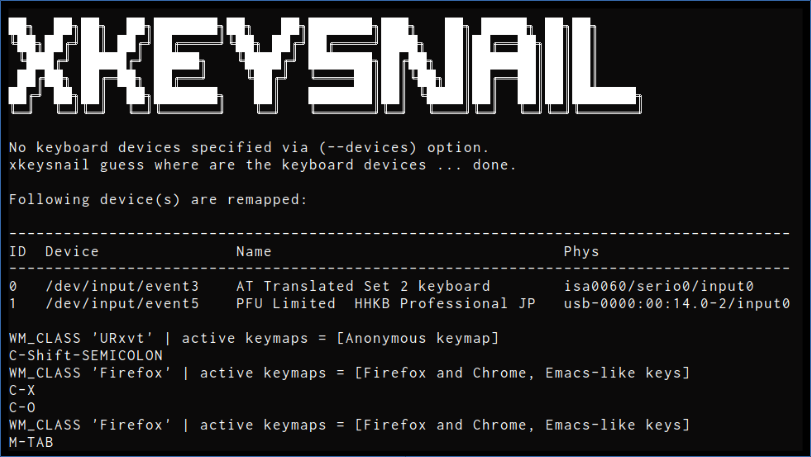
- Pros
- Has high-level and flexible remapping mechanisms, such as
- per-application keybindings can be defined
- multiple stroke keybindings can be defined such as
Ctrl+x Ctrl+ctoCtrl+q - not only key remapping but arbitrary commands defined by Python can be bound to a key
- Runs in low-level layer (
evdevanduinput), making remapping work in almost all the places
- Has high-level and flexible remapping mechanisms, such as
- Cons
- Runs in root-mode (requires
sudo)
- Runs in root-mode (requires
The key remapping mechanism of xkeysnail is based on pykeymacs (https://github.com/DreaminginCodeZH/pykeymacs).
Installation
Requires root privilege and Python 3.
Ubuntu
sudo apt install python3-pip
sudo pip3 install xkeysnail

# If you plan to compile from source
sudo apt install python3-dev
Fedora
sudo dnf install python3-pip
sudo pip3 install xkeysnail
# Add your user to input group if you don't want to run xkeysnail
# with sudo (log out and log in again to apply group change)
sudo usermod -a -G input $USER

# If you plan to compile from source
sudo dnf install python3-devel
Manjaro/Arch
# Some distros will need to compile evdev components
# and may fail to do so if gcc is not installed.
sudo pacman -Syy
sudo pacman -S gcc
Solus
# Some distros will need to compile evdev components
# and may fail to do so if gcc is not installed.
sudo eopkg install gcc
sudo eopkg install -c system.devel
From source
git clone --depth 1 https://github.com/mooz/xkeysnail.git
cd xkeysnail
sudo pip3 install --upgrade .
Usage
sudo xkeysnail config.py
When you encounter the errors like Xlib.error.DisplayConnectionError: Can't connect to display ":0.0": b'No protocol specified\n' , try
xhost +SI:localuser:root
sudo xkeysnail config.py
If you want to specify keyboard devices, use --devices option:
sudo xkeysnail config.py --devices /dev/input/event3 'Topre Corporation HHKB Professional'
If you have hot-plugging keyboards, use --watch option.
If you want to suppress output of key events, use -q / --quiet option especially when running as a daemon.
How to prepare config.py?
(If you just need Emacs-like keybindings, consider to use example/config.py, which contains Emacs-like keybindings).
Configuration file is a Python script that consists of several keymaps defined by define_keymap(condition, mappings, name)
define_keymap(condition, mappings, name)
Defines a keymap consists of mappings, which is activated when the condition is satisfied.
Argument condition specifies the condition of activating the mappings on an application and takes one of the following forms:
- Regular expression (e.g.,
re.compile("YYY"))- Activates the
mappingsif the patternYYYmatches theWM_CLASSof the application. - Case Insensitivity matching against
WM_CLASSviare.IGNORECASE(e.g.re.compile('Gnome-terminal', re.IGNORECASE))
- Activates the
lambda wm_class: some_condition(wm_class)- Activates the
mappingsif theWM_CLASSof the application satisfies the condition specified by thelambdafunction. - Case Insensitivity matching via
casefold()orlambda wm_class: wm_class.casefold()(see example below to see how to compare to a list of names)
- Activates the
None: Refers to no condition.None-specified keymap will be a global keymap and is always enabled.
Argument mappings is a dictionary in the form of {key: command, key2: command2, ...} where key and command take following forms:
key: Key to override specified byK("YYY")- For the syntax of key specification, please refer to the key specification section.
command: one of the followingsK("YYY"): Dispatch custom key to the application.[command1, command2, ...]: Execute commands sequentially.{ ... }: Sub-keymap. Used to define multiple stroke keybindings. See multiple stroke keys for details.pass_through_key: Pass throughkeyto the application. Useful to override the global mappings behavior on certain applications.escape_next_key: Escape next key.- Arbitrary function: The function is executed and the returned value is used as a command.
- Can be used to invoke UNIX commands.
Argument name specifies the keymap name. This is an optional argument.
Key Specification
Key specification in a keymap is in a form of K("(
where
is one of the followings
CorCtrl-> Control keyMorAlt-> Alt keyShift-> Shift keySuperorWin-> Super/Windows key
You can specify left/right modifiers by adding any one of prefixes L/R.
And
is a key whose name is defined in key.py.
Here is a list of key specification examples:
K("C-M-j"):Ctrl+Alt+jK("Ctrl-m"):Ctrl+mK("Win-o"):Super/Windows+oK("M-Shift-comma"):Alt+Shift+comma(=Alt+>)
Multiple stroke keys
When you needs multiple stroke keys, define nested keymap. For example, the following example remaps C-x C-c to C-q.
define_keymap(None, {
    K("C-x"): {
      K("C-c"): K("C-q"),
      K("C-f"): K("C-q"),
    }
})
Checking an application's WM_CLASS with xprop
To check WM_CLASS of the application you want to have custom keymap, use xprop command:
xprop WM_CLASS
and then click the application. xprop tells WM_CLASS of the application as follows.
WM_CLASS(STRING) = "Navigator", "Firefox"
Use the second value (in this case Firefox) as the WM_CLASS value in your config.py.
Example config.py
See example/config.py.
Here is an excerpt of example/config.py.
from xkeysnail.transform import *

define_keymap(re.compile("Firefox|Google-chrome"), {
    # Ctrl+Alt+j/k to switch next/previous tab
    K("C-M-j"): K("C-TAB"),
    K("C-M-k"): K("C-Shift-TAB"),
}, "Firefox and Chrome")

define_keymap(re.compile("Zeal"), {
    # Ctrl+s to focus search area
    K("C-s"): K("C-k"),
}, "Zeal")

define_keymap(lambda wm_class: wm_class not in ("Emacs", "URxvt"), {
    # Cancel
    K("C-g"): [K("esc"), set_mark(False)],
    # Escape
    K("C-q"): escape_next_key,
    # C-x YYY
    K("C-x"): {
        # C-x h (select all)
        K("h"): [K("C-home"), K("C-a"), set_mark(True)],
        # C-x C-f (open)
        K("C-f"): K("C-o"),
        # C-x C-s (save)
        K("C-s"): K("C-s"),
        # C-x k (kill tab)
        K("k"): K("C-f4"),
        # C-x C-c (exit)
        K("C-c"): K("M-f4"),
        # cancel
        K("C-g"): pass_through_key,
        # C-x u (undo)
        K("u"): [K("C-z"), set_mark(False)],
    }
}, "Emacs-like keys")
Example of Case Insensitivity Matching
terminals = ["gnome-terminal","konsole","io.elementary.terminal","sakura"]
terminals = [term.casefold() for term in terminals]
termStr = "|".join(str(x) for x in terminals)

# [Conditional modmap] Change modifier keys in certain applications
define_conditional_modmap(lambda wm_class: wm_class.casefold() not in terminals,{
    # Default Mac/Win
    Key.LEFT_ALT: Key.RIGHT_CTRL,   # WinMac
    Key.LEFT_META: Key.LEFT_ALT,    # WinMac
    Key.LEFT_CTRL: Key.LEFT_META,   # WinMac
    Key.RIGHT_ALT: Key.RIGHT_CTRL,  # WinMac
    Key.RIGHT_META: Key.RIGHT_ALT,  # WinMac
    Key.RIGHT_CTRL: Key.RIGHT_META, # WinMac
})

# [Conditional modmap] Change modifier keys in certain applications
define_conditional_modmap(re.compile(termStr, re.IGNORECASE), {

    # Default Mac/Win
    Key.LEFT_ALT: Key.RIGHT_CTRL,   # WinMac
    Key.LEFT_META: Key.LEFT_ALT,    # WinMac
    Key.LEFT_CTRL: Key.LEFT_CTRL,   # WinMac
    Key.RIGHT_ALT: Key.RIGHT_CTRL,  # WinMac
    Key.RIGHT_META: Key.RIGHT_ALT,  # WinMac
    Key.RIGHT_CTRL: Key.LEFT_CTRL,  # WinMac
})
FAQ
How do I fix Firefox capturing Alt before xkeysnail?
In the Firefox location bar, go to about:config, search for ui.key.menuAccessKeyFocuses, and set the Value to false.
License
xkeysnail is distributed under GPL.
xkeysnail
Copyright (C) 2018 Masafumi Oyamada
This program is free software: you can redistribute it and/or modify
it under the terms of the GNU General Public License as published by
the Free Software Foundation, either version 3 of the License, or
(at your option) any later version.
This program is distributed in the hope that it will be useful,
but WITHOUT ANY WARRANTY; without even the implied warranty of
MERCHANTABILITY or FITNESS FOR A PARTICULAR PURPOSE. See the
GNU General Public License for more details.
You should have received a copy of the GNU General Public License
along with this program. If not, see
xkeysnail is based on pykeymacs (https://github.com/DreaminginCodeZH/pykeymacs), which is distributed under GPL.
pykeymacs
Copyright (C) 2015 Zhang Hai
This program is free software: you can redistribute it and/or modify
it under the terms of the GNU General Public License as published by
the Free Software Foundation, either version 3 of the License, or
(at your option) any later version.
This program is distributed in the hope that it will be useful,
but WITHOUT ANY WARRANTY; without even the implied warranty of
MERCHANTABILITY or FITNESS FOR A PARTICULAR PURPOSE. See the
GNU General Public License for more details.
You should have received a copy of the GNU General Public License
along with this program. If not, see

 191 Dec 22, 2022
 3 Feb 22, 2022
 2 Feb 12, 2022
 1 Nov 11, 2021
 15 Dec 22, 2022
 2 Mar 23, 2022
 2 Jun 01, 2022
 18 Jan 23, 2022
 36 Dec 20, 2022
 206 Dec 31, 2022
 16 Mar 24, 2022
 1 Feb 12, 2022
 73 Jan 01, 2023
 5k Jan 05, 2023
 2.8k Jan 03, 2023
 38 Dec 31, 2022
 12 Nov 18, 2022
 8 Feb 24, 2022
 19 Nov 18, 2022
 3 Dec 22, 2021