POC for detecting the Log4Shell (Log4J RCE) vulnerability

Overview

Interactsh

An OOB interaction gathering server and client library

FeaturesUsageInteractsh ClientInteractsh ServerInteractsh IntegrationJoin Discord


Interactsh is an Open-Source Solution for Out of band Data Extraction, A tool designed to detect bugs that cause external interactions, For example - Blind SQLi, Blind CMDi, SSRF, etc.

Features

  • DNS/HTTP/HTTPS/SMTP Interaction support
  • NTLM/SMB Listener support (self-hosted)
  • Wildcard Interaction support (self-hosted)
  • CLI / Web / Burp / ZAP / Docker client support
  • AES encryption with zero logging
  • SELF Hosted Interactsh server support
  • Automatic ACME based Wildcard TLS w/ Auto Renewal
  • DNS Entries for Cloud Metadata service

Interactsh Client

Interactsh CLI Client

Interactsh Cli client requires go1.17+ to install successfully. Run the following command to get the repo -

go install -v github.com/projectdiscovery/interactsh/cmd/[email protected]

Running Interactsh CLI Client

This will generate a unique payload that can be used for OOB testing with minimal interaction information in the ouput.

interactsh-client

    _       __                       __       __  
   (_)___  / /____  _________ ______/ /______/ /_ 
  / / __ \/ __/ _ \/ ___/ __ '/ ___/ __/ ___/ __ \
 / / / / / /_/  __/ /  / /_/ / /__/ /_(__  ) / / /
/_/_/ /_/\__/\___/_/   \__,_/\___/\__/____/_/ /_/ v0.0.5

        projectdiscovery.io

[INF] Listing 1 payload for OOB Testing
[INF] c23b2la0kl1krjcrdj10cndmnioyyyyyn.interact.sh

[c23b2la0kl1krjcrdj10cndmnioyyyyyn] Received DNS interaction (A) from 172.253.226.100 at 2021-26-26 12:26
[c23b2la0kl1krjcrdj10cndmnioyyyyyn] Received DNS interaction (AAAA) from 32.3.34.129 at 2021-26-26 12:26
[c23b2la0kl1krjcrdj10cndmnioyyyyyn] Received HTTP interaction from 43.22.22.50 at 2021-26-26 12:26
[c23b2la0kl1krjcrdj10cndmnioyyyyyn] Received DNS interaction (MX) from 43.3.192.3 at 2021-26-26 12:26
[c23b2la0kl1krjcrdj10cndmnioyyyyyn] Received DNS interaction (TXT) from 74.32.183.135 at 2021-26-26 12:26
[c23b2la0kl1krjcrdj10cndmnioyyyyyn] Received SMTP interaction from 32.85.166.50 at 2021-26-26 12:26

Running the Interactsh client in verbose mode (v) to see the whole request and response, along with an output file to analyze afterwards.

interactsh-client -v -o interactsh-logs.txt

    _       __                       __       __  
   (_)___  / /____  _________ ______/ /______/ /_ 
  / / __ \/ __/ _ \/ ___/ __ '/ ___/ __/ ___/ __ \
 / / / / / /_/  __/ /  / /_/ / /__/ /_(__  ) / / /
/_/_/ /_/\__/\___/_/   \__,_/\___/\__/____/_/ /_/ v0.0.5

    projectdiscovery.io

[INF] Listing 1 payload for OOB Testing
[INF] c58bduhe008dovpvhvugcfemp9yyyyyyn.interact.sh

[c58bduhe008dovpvhvugcfemp9yyyyyyn] Received HTTP interaction from 103.22.142.211 at 2021-09-26 18:08:07
------------
HTTP Request
------------

GET /favicon.ico HTTP/2.0
Host: c58bduhe008dovpvhvugcfemp9yyyyyyn.interact.sh
Accept: image/avif,image/webp,image/apng,image/svg+xml,image/*,*/*;q=0.8
Accept-Encoding: gzip, deflate, br
Accept-Language: en-IN,en;q=0.9
Cookie: _ga=GA1.2.440163205.1619796009; _iub_cs-77854424=%7B%22timestamp%22%3A%222021-04-30T15%3A23%3A23.192Z%22%2C%22version%22%3A%221.30.2%22%2C%22consent%22%3Atrue%2C%22id%22%3A77854424%7D
Referer: https://c58bduhe008dovpvhvugcfemp9yyyyyyn.interact.sh/
Sec-Ch-Ua: "Google Chrome";v="93", " Not;A Brand";v="99", "Chromium";v="93"
Sec-Ch-Ua-Mobile: ?0
Sec-Ch-Ua-Platform: "macOS"
Sec-Fetch-Dest: image
Sec-Fetch-Mode: no-cors
Sec-Fetch-Site: same-origin
User-Agent: Mozilla/5.0 (Macintosh; Intel Mac OS X 10_15_7) AppleWebKit/537.36 (KHTML, like Gecko) Chrome/93.0.4577.82 Safari/537.36


-------------
HTTP Response
-------------

HTTP/1.1 200 OK
Connection: close
Content-Type: text/html; charset=utf-8
Server: interact.sh

<html><head></head><body>nyyyyyy9pmefcguvhvpvod800ehudb85c</body></html>

Using the server flag, Interactsh client can be configured to connect with a self-hosted interactsh server.

interactsh-client -server hackwithautomation.com

Using the token flag, Interactsh client can connect to a self-hosted interactsh server that is protected with authentication.

interactsh-client -server hackwithautomation.com -token XXX

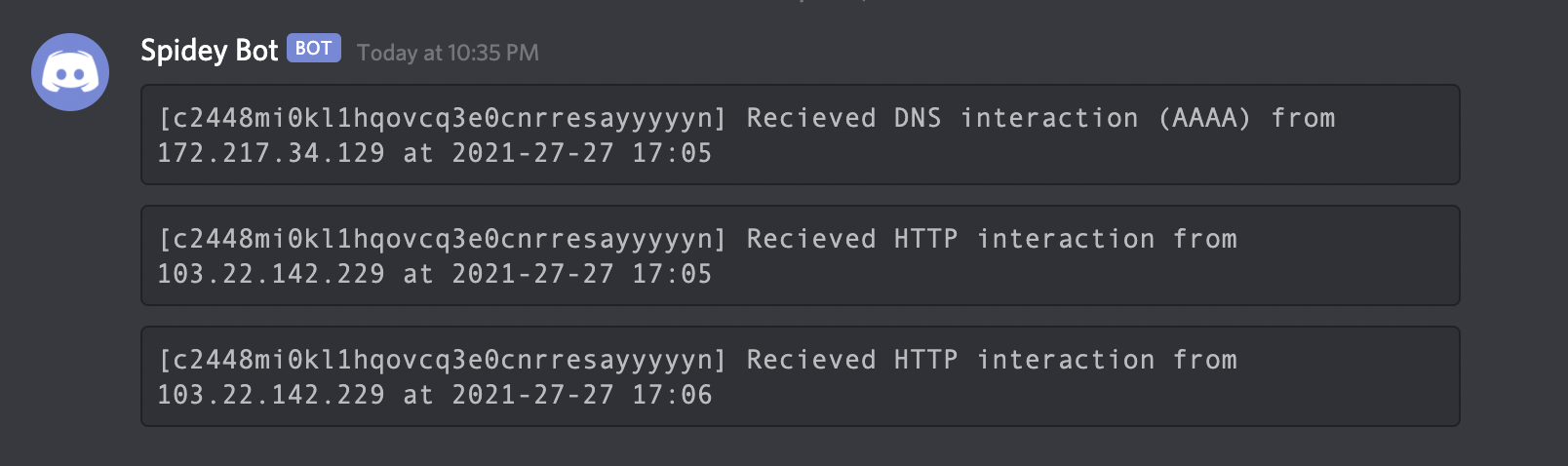
If you are away from your terminal, you may use notify to send a real-time interaction notification to any supported platform.

interactsh-client | notify
image

Usage

interactsh-client -h

This will display help for the tool. Here are all the switches it supports.

Flag Description Example
n Interactsh payload count to generate (default 1) interactsh-client -n 2
poll-interval Interaction poll interval in seconds (default 5) interactsh-client -poll-interval 1
server Interactsh server to use interactsh-client -server https://domain.com
dns-only Display only DNS interaction in CLI output interactsh-client -dns-only
http-only Display only HTTP interaction in CLI output interactsh-client -http-only
smtp-only Display only SMTP interaction in CLI output interactsh-client -smtp-only
json Write output in JSONL(ines) format interactsh-client -json
token Authentication token to connect interactsh server interactsh-client -token XXX
persist Enables persistent interactsh sessions interactsh-client -persist
o Output file to write interaction interactsh-client -o logs.txt
v Show verbose interaction interactsh-client -v

Interactsh Web Client

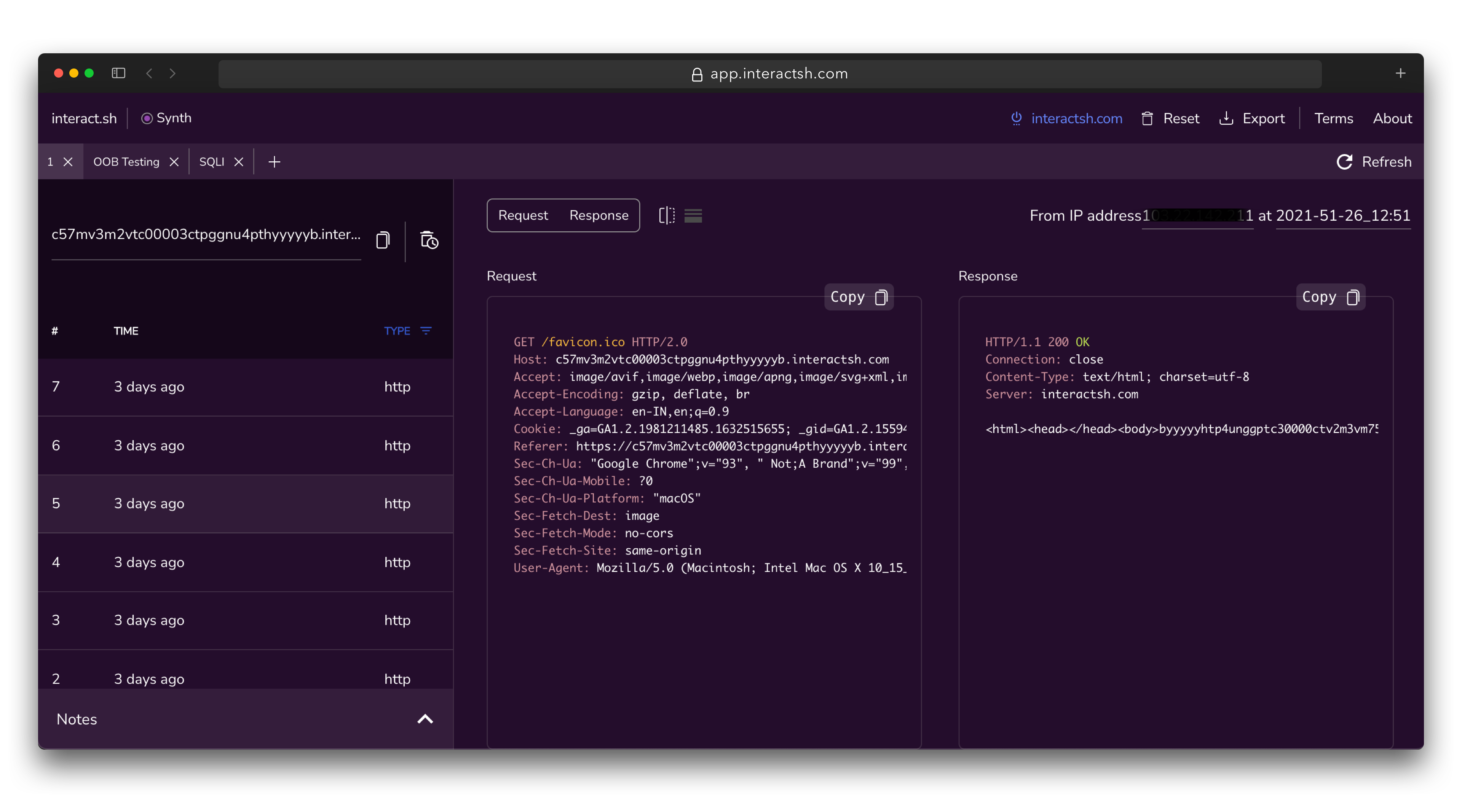
Interactsh-web is a free and open-source web client that displays Interactsh interactions in a well-managed dashboard in your browser. It uses the browser's local storage to store and display all incoming interactions. By default, the web client is configured to use - interachsh.com, a cloud-hosted interactsh server, and supports other self-hosted public/authencaited interactsh servers as well.

A hosted instance of interactsh-web client is available at https://app.interactsh.com
interactsh-web

Interactsh Docker Client

A Docker image is also provided with interactsh client that is ready to run and can be used in the following way:

docker run projectdiscovery/interactsh-client:latest

    _       __                       __       __  
   (_)___  / /____  _________ ______/ /______/ /_ 
  / / __ \/ __/ _ \/ ___/ __ '/ ___/ __/ ___/ __ \
 / / / / / /_/  __/ /  / /_/ / /__/ /_(__  ) / / /
/_/_/ /_/\__/\___/_/   \__,_/\___/\__/____/_/ /_/ v0.0.5

        projectdiscovery.io

[INF] Listing 1 payload for OOB Testing
[INF] c59e3crp82ke7bcnedq0cfjqdpeyyyyyn.interact.sh

Burp Suite Extension

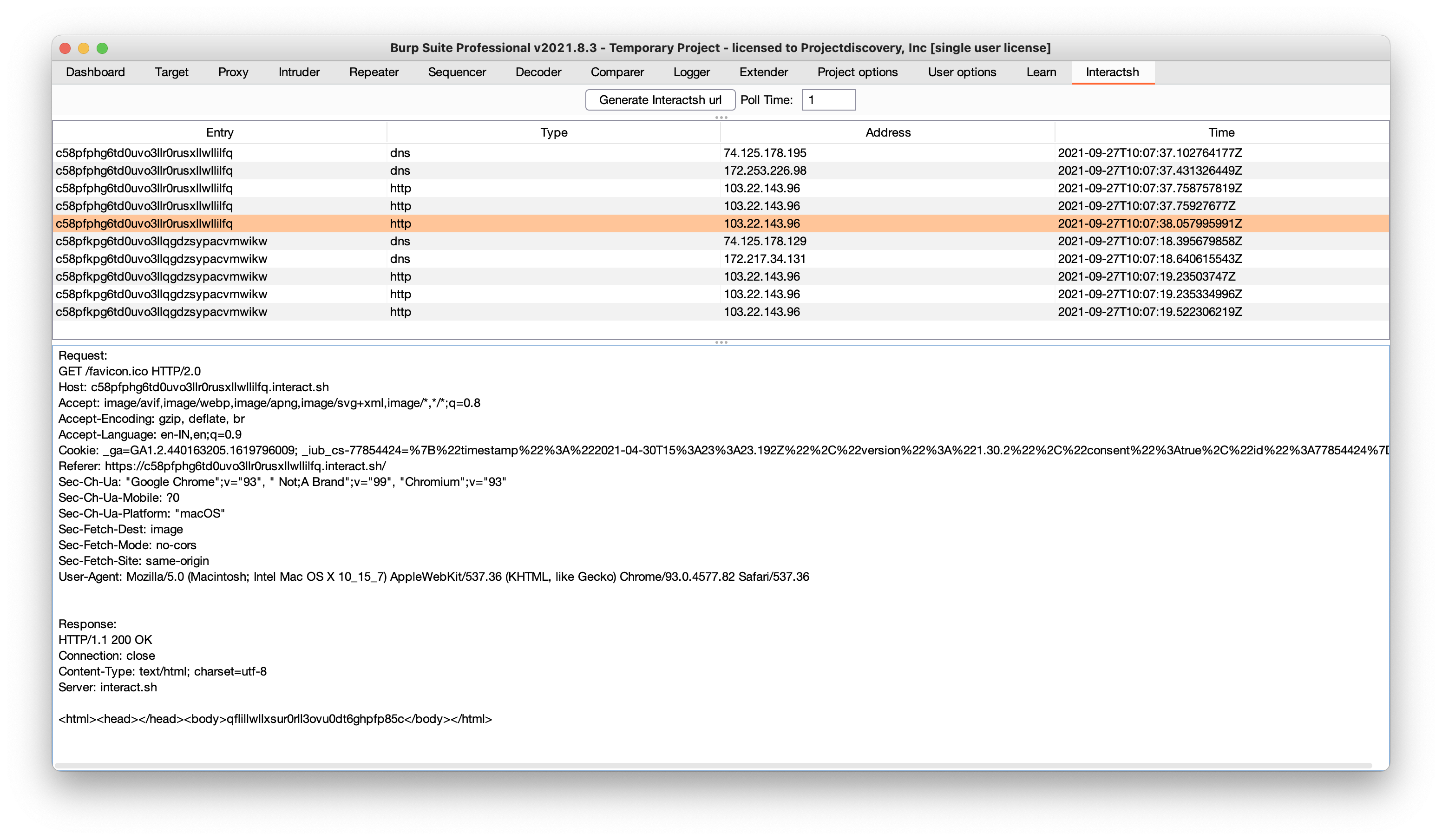
interactsh-collaborator is Burp Suite extension developed and maintained by @wdahlenb

  • Download latest JAR file from releases page.
  • Open Burp Suite → Extender → Add → Java → Select JAR file → Next
  • New tab named Interactsh will be appeared upon successful installation.
  • See the interactsh-collaborator project for more info.
burp

OWASP ZAP Add-On

Interactsh can be used with OWASP ZAP via the OAST add-on for ZAP. With ZAP's scripting capabilities, you can create powerful out-of-band scan rules that leverage Interactsh's features. A standalone script template has been provided as an example (it is added automatically when you install the add-on).

  • Install the OAST add-on from the ZAP Marketplace.
  • Go to Tools → Options → OAST and select Interactsh.
  • Configure the options for the client and click on "New Payload" to generate a new payload.
  • OOB interactions will appear in the OAST Tab and you can click on any of them to view the full request and response.
  • See the OAST add-on documentation for more info.
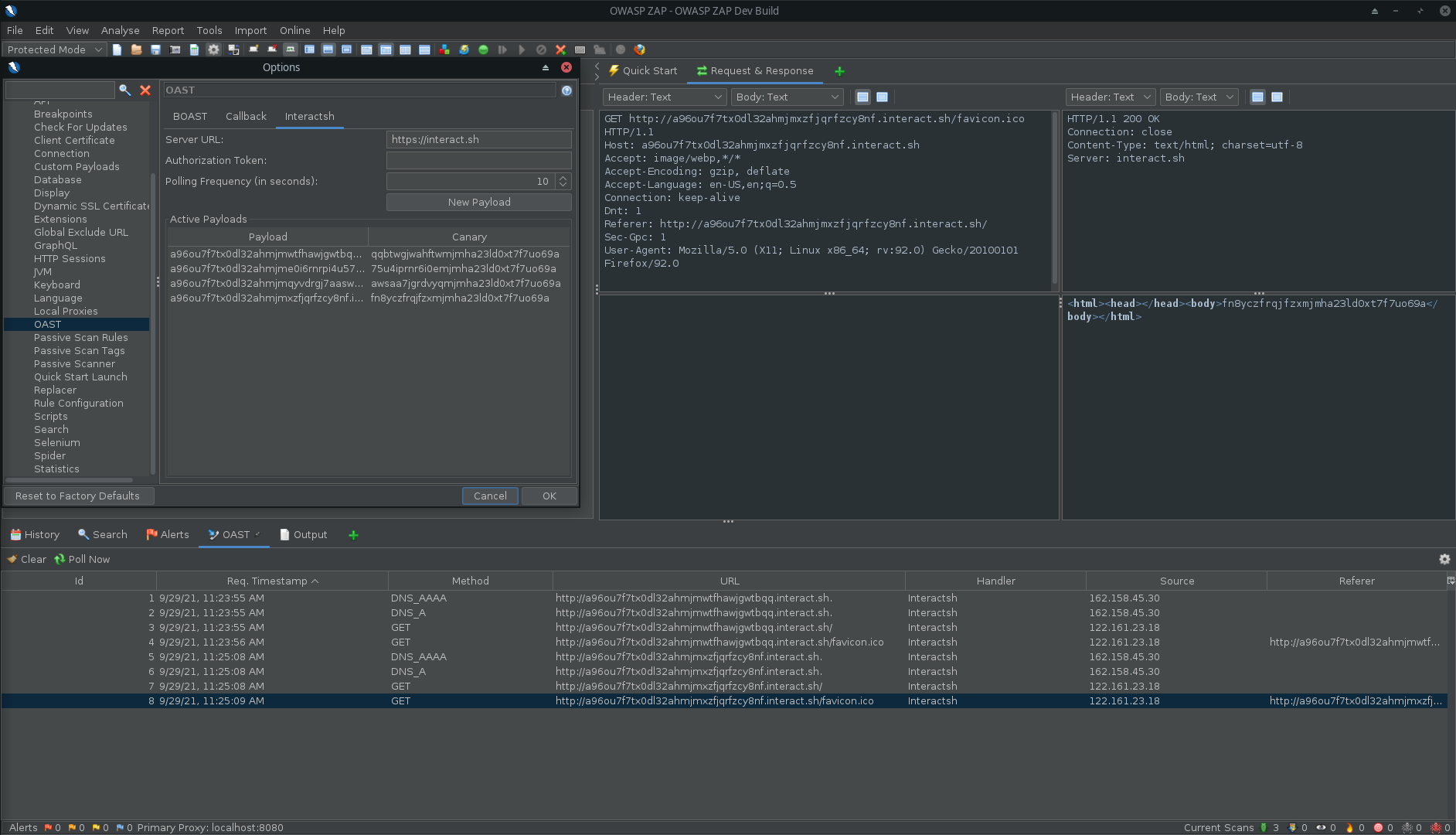
zap


Interactsh Server

Interactsh server runs multiple services and captures all the incoming requests. To host an instance of interactsh-server, you are required to have the follow requirements:

  1. Domain name with custom host names and nameservers.
  2. Basic VPS running 24/7 in the background.

We are using GoDaddy for domain name and DigitalOcean droplet for the server, a basic $5 droplet should be sufficient to run self-hosted Interactsh server. If you are not using GoDaddy, follow your registrar's process for creating / updating DNS entries.

Configuring Interactsh domain
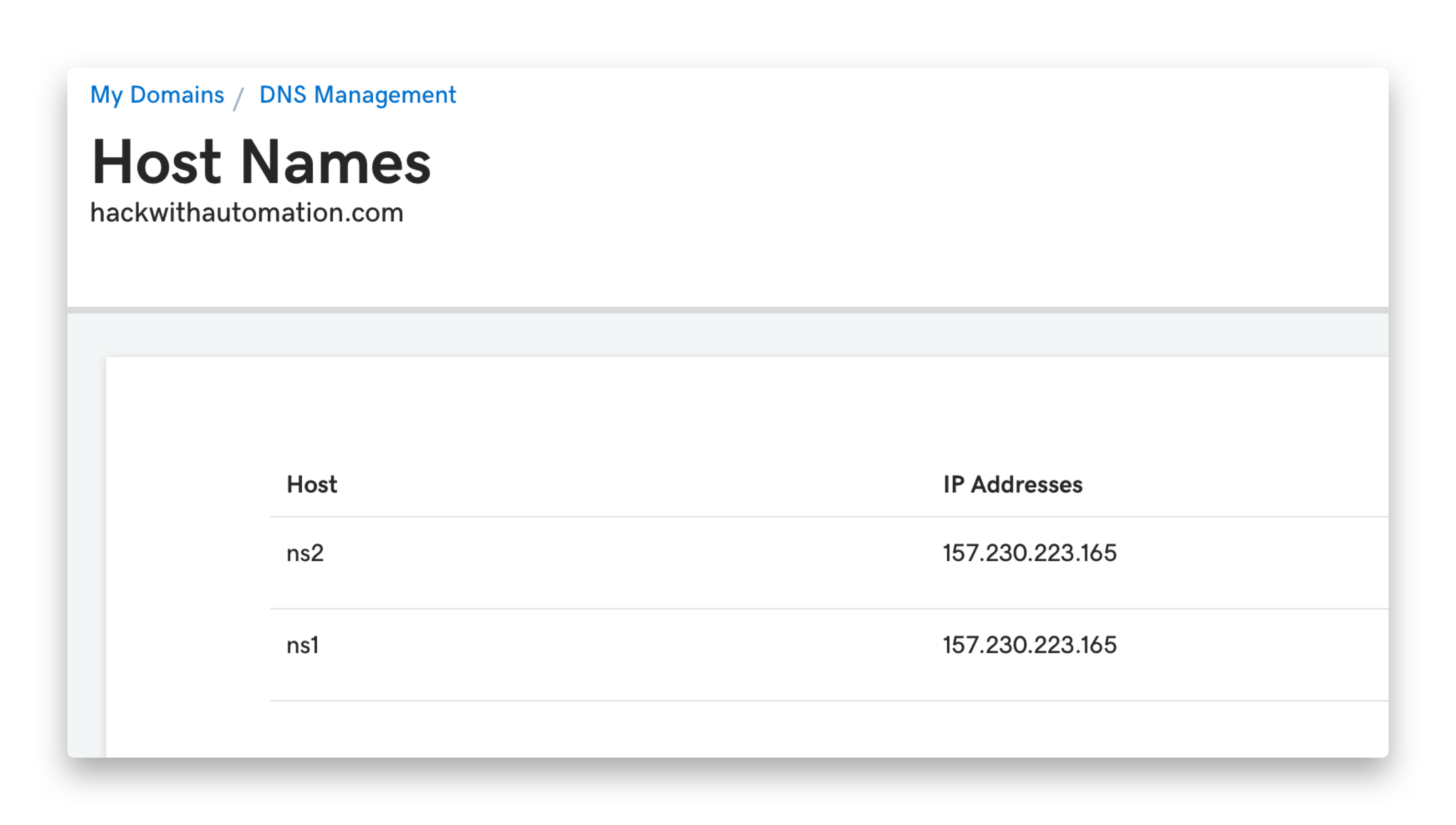
  • Navigate to https://dcc.godaddy.com/manage/{{domain}}/dns
  • Advanced Features → Host names → Add → Submit ns1, ns2 with VPS IP as value
gdd-hostname
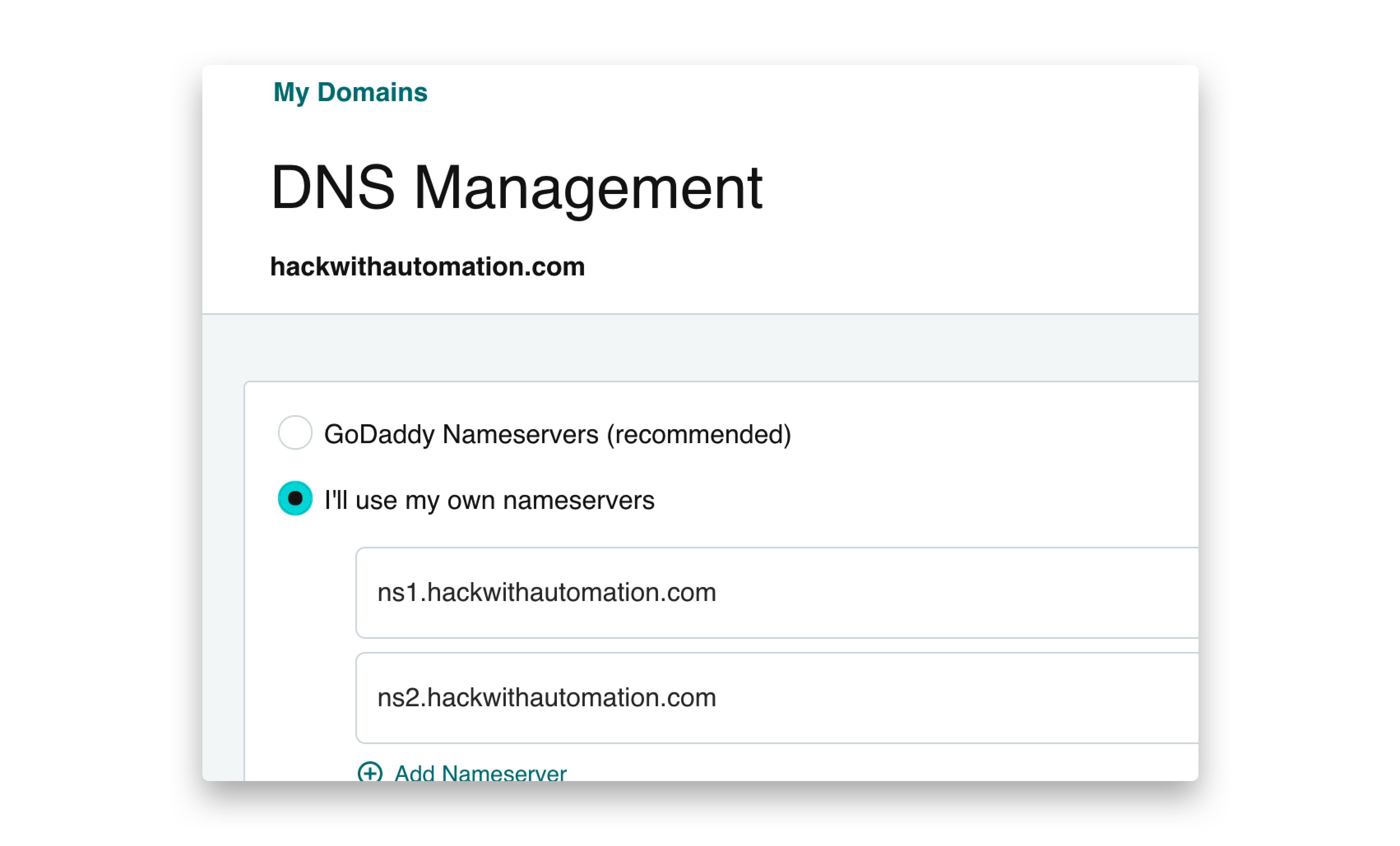
  • Navigate to https://dns.godaddy.com/{{domain}}/nameservers
  • I'll use my own nameservers → Submit ns1.{{domain}}, ns2.{{domain}}
gdd-ns

Configuring Interactsh server

Install interactsh-server on your remote VPS

go install -v github.com/projectdiscovery/interactsh/cmd/[email protected]

Considering domain name setup is completed, run the below command to run interactsh server

interactsh-server -domain domain.com

Alternatively, you can utilize ready to run docker image of interactsh-server on your remote machine with

docker run projectdiscovery/interactsh-server:latest -domain domain.com

Following is an example of a successful installation and operation of a self-hosted server:

interactsh-server

A number of needed flags are configured automatically to run interactsh server with default settings. For example, the hostmaster flag with a valid email address such as [email protected] and the ip and listen-ip flags with the public IP address of the VPS.

A hosted instance of interactsh-server which is used as default with interactsh-client is available at https://interact.sh

Usage

interactsh-server -h

This will display help for the tool. Here are all the switches it supports.

Flag Description Example
auth Enable authentication to server using random generated token interactsh-server -auth
token Enable authentication to server using given token interactsh-server -token MY_TOKEN
domain Domain to use for interactsh server interactsh-server -domain domain.com
eviction Number of days to persist interactions for (default 30) interactsh-server -eviction 30
hostmaster Hostmaster email to use for interactsh server interactsh-server -hostmaster [email protected]
ip Public IP Address to use for interactsh server interactsh-server -ip XX.XX.XX.XX
listen-ip Public IP Address to listen on interactsh-server -listen-ip XX.XX.XX.XX
root-tld Enable wildcard/global interaction for *.domain.com interactsh-server -root-tld
origin-url Origin URL to send in ACAO Header interactsh-server -origin-url https://domain.com
responder Start a responder agent - docker must be installed interactsh-server -responder
smb Start a smb agent - impacket and python 3 must be installed interactsh-server -smb
debug Run interactsh in debug mode interactsh-server -debug

There are more useful capabilities supported by Interactsh server that are not enabled by default and are intended to be used only by self-hosted servers. These feature are not available with hosted server at https://interact.sh

root-tld flag enables wildcard (*.domain.com) interaction support with your self-hosted server and includes implicit authentication protection via the auth flag if the token flag is omitted.

interactsh-server -domain domain.com -root-tld

2021/09/28 12:18:24 Client Token: 4c17895a460123ea439abbad64e0e02c2c7be660464d75299f76e1a972ac4e56
2021/09/28 12:18:24 TLS certificates are not expiring, continue!
2021/09/28 12:18:24 Listening on DNS, SMTP and HTTP ports

Interactsh Integration

Nuclei - OOB Scan

Nuclei vulnerability scanner can also utilize Interactsh for automated payload generation and detection of Out of band based security vulnerabilities.

See Nuclei + Interactsh Integration blog and guide document for more info.

Cloud Metadata

Interactsh server supports DNS records for cloud metadata services, which is useful for testing SSRF-related vulnerabilities.

Currently supported metadata services:

Example:

aws.{interactsh-server} points to 169.254.169.254

aws.interact.sh points to 169.254.169.254

alibaba.{interactsh-server} points to 100.100.100.200

alibaba.interact.sh points to 100.100.100.200


Acknowledgement

Interactsh is inspired from Burp Collaborator.

License

Interactsh is distributed under MIT License and made with 🖤 by the projectdiscovery team.

Comments
  • Errors in TXT propagation during SSL certificate update/installation

    Errors in TXT propagation during SSL certificate update/installation

    The certificate update randomly fails due to delays/issues in the TXT record propagation containing the challenge:

    # ./interactsh-server -domain abcd.efg -ip xxx.xxx.xxx.xxx -listen-ip xxx.xxx.xxx.xxx
    2021/12/15 14:24:28 Creating new order for domains: [*.abcd.efg abcd.efg]
    2021/12/15 14:24:28 Order created: https://acme-v02.api.letsencrypt.org/acme/order/123456789/123456789
    2021/12/15 14:24:28 Fetching authorization: https://acme-v02.api.letsencrypt.org/acme/authz-v3/123456789
    2021/12/15 14:24:28 Fetched authorization: abcd.efg
    2021/12/15 14:28:28 Updating challenge for authorization abcd.efg: https://acme-v02.api.letsencrypt.org/acme/chall-v3/123456789/123456789
    2021/12/15 14:28:59 An error occurred while applying for an certificate, error: could not generate new certs: error updating authorization abcd.efg challenge: acme: error code 400 "urn:ietf:params:acme:error:dns": During secondary validation: DNS problem: query timed out looking up TXT for _abcd.efg
    2021/12/15 14:28:59 Could not generate certs for auto TLS, https will be disabled
    2021/12/15 14:28:59 Listening on DNS, SMTP and HTTP ports
    
    
    $ dig abcd.efg txt # from another box
    
    ; <<>> DiG 9.16.1-Ubuntu <<>> hackwithautomation.com txt
    ;; global options: +cmd
    ;; Got answer:
    ;; ->>HEADER<<- opcode: QUERY, status: NOERROR, id: 15605
    ;; flags: qr rd ra; QUERY: 1, ANSWER: 1, AUTHORITY: 0, ADDITIONAL: 1
    
    ;; OPT PSEUDOSECTION:
    ; EDNS: version: 0, flags:; udp: 65494
    ;; QUESTION SECTION:
    ;abcd.efg.		IN	TXT
    
    ;; ANSWER SECTION:
    abcd.efg.	0	IN	TXT	""
    
    ;; Query time: 8 msec
    ;; SERVER: 127.0.0.53#53(127.0.0.53)
    ;; WHEN: Wed Dec 15 13:32:01 UTC 2021
    ;; MSG SIZE  rcvd: 107
    
    Priority: High Status: Completed Type: Bug 
    opened by Mzack9999 15
  • Can't connect to my custom interactsh server

    Can't connect to my custom interactsh server

    Hi, Following the instructions I set up my own Interactsh server, however after starting it, I can't connect to it with the interactsh client.

    Server running : interactsh

    Attempt to connect with the client : interact2

    curl

    And I think my DNS configuration is good because if I run a custom DNS that I wrote in Ruby, it responds well to queries dns

    Regards

    Type: Bug 
    opened by JoshuaMart 11
  • Connection Refused connecting to private server

    Connection Refused connecting to private server

    Version: 0.0.7 Go version: 1.17.5 linux/amd64 Hello guys, the issue I'm having is trying to connect the client to my server. I execute the command: interactsh-client -server https://example.com

    The server returns:

    [FTL] Could not create client: could not make register request: POST https://example.com/register giving up after 6 attempts: Post "https://example.com/register": dial tcp server_ip
    :443: connect: connection refused
    

    I also tried http://example.com with the same response. And I also tried the web client with custom server pointing to example.com with no success.

    My server is running on an Oracle VM. My domain in registered on Namecheap. I configured it with custom nameservers (ns1 and ns2 both pointing to server_ip, which is the VM's IP). I am running BIND9 on it to act as nameserver. If I enable nginx on my VM I can access it using http://example.com. If I run nslookup ubuntu.com example.com from my Windows PC I get the correct response. I start my server with this command: interactsh-server -domain example.com

    The response I get leads me to believe it is running correctly:

    2021/12/26 21:06:20 Creating new order for domains: [*.example.com example.com]
    2021/12/26 21:06:21 Order created: https://acme-v02.api.letsencrypt.org/acme/orde                                                                                       r/337280xxx/5038xxxxxxx
    2021/12/26 21:06:21 Fetching authorization: https://acme-v02.api.letsencrypt.org/                                                                                       acme/authz-v3/6226815xxxx
    2021/12/26 21:06:21 Fetched authorization: example.com
    2021/12/26 21:06:31 Updating challenge for authorization example.com: https://acme-v02.api.letsencrypt.org/acme/chall-v3/6226815xxxx/Wnqorg
    2021/12/26 21:06:33 Listening on DNS, SMTP and HTTP ports
    

    I tried shutting down my firewall to see if it was interfering in some way with the command sudo iptables -F. I also made sure ports 53, 80 and 443 were open for TCP packets on the VM configuration.

    Even so, I am getting connection refused.

    Type: Question 
    opened by bluesm866 9
  • Not able to run Interachsh -server on Digital Ocean Droplet.

    Not able to run Interachsh -server on Digital Ocean Droplet.

    Hi team,

    I have created a DO Debain Droplet and installed a Floating IP added the configuration as said under the self hosted instance guide. Can anyone please help?

    Screenshot_2021-08-13_10-41-25

    opened by Shri1610 9
  • Adding ldap support

    Adding ldap support

    Example of ldap interaction:

    $ ldapsearch -LLL -H ldap://127.0.0.1:10389 -d 5 -o ldif-wrap=no -b "OU=testgroup,OU=Group,dc=example,dc=com" -D "test" -w "test" '(CN=testgroup)' cn
    

    interactsh-server:

    $ sudo go run . -ldap -debug -listen-ip 127.0.0.1 -ip 127.0.0.1
    2021/12/13 12:25:48 Client Token: xxxx
    2021/12/13 12:25:49 Listening on ports: DNS, SMTP, HTTP, LDAP
    [DBG] LDAP Interaction: 
    {"protocol":"ldap","unique-id":"","full-id":"","raw-request":"Listening on 127.0.0.1:10389\n","remote-address":"","timestamp":"2021-12-13T12:25:49.528108+01:00"}
    [DBG] Registered correlationID xxx for key
    [DBG] LDAP Interaction: 
    {"protocol":"ldap","unique-id":"","full-id":"","raw-request":"Connection client [1] from 127.0.0.1:60991 accepted","remote-address":"","timestamp":"2021-12-13T12:26:02.724619+01:00"}
    [DBG] LDAP Interaction: 
    {"protocol":"ldap","unique-id":"","full-id":"","raw-request":"\u003c\u003c\u003c 1 - BindRequest - hex=\u0026{303c0201016037020103042b7569643d7365617263682d757365722c6f753d50656f706c652c64633d6578616d706c652c64633d636f6d80057465737461}","remote-address":"","timestamp":"2021-12-13T12:26:02.725405+01:00"}
    [DBG] LDAP Interaction: 
    {"protocol":"ldap","unique-id":"","full-id":"","raw-request":"\u003e\u003e\u003e 1 - LDAPResult - hex=302f020101302a0a0135040004234f7065726174696f6e206e6f7420696d706c656d656e74656420627920736572766572","remote-address":"","timestamp":"2021-12-13T12:26:02.725526+01:00"}
    
    Status: Completed Type: Enhancement 
    opened by Mzack9999 9
  • Not able to run the interactsh-server

    Not able to run the interactsh-server

    When I run the command interactsh-server -domain mydomain.com -hostmaster [email protected] -ip [VPS IP]. The following output is given without any errors:

    2021/05/01 08:45:17 Creating new order for domains: [*.mydomain.com mydomain.com]
    2021/05/01 08:45:17 Order created: https://acme-v02.api.letsencrypt.org/acme/order/121967319/9409571122
    2021/05/01 08:45:17 Fetching authorization: https://acme-v02.api.letsencrypt.org/acme/authz-v3/12762297545
    2021/05/01 08:45:17 Fetched authorization: mydomain.com
    2021/05/01 08:45:27 Updating challenge for authorization mydomain.com: https://acme-v02.api.letsencrypt.org/acme/chall-v3/12762297545/FkqiUg
    

    But the server is not giving A records when queried. I already had a letsencrypt cert but even after I deleted the cert nothing changed the same output is given

    opened by HritikHS 7
  • Not able to run the interactsh-server

    Not able to run the interactsh-server

    We are trying to setup interactsh-server. But we are hitting this below error. We have already tried to setup this on ubuntu. Since Debian is recommended, we were trying there. But there also we are hitting the same issue.

    -03:/tmp/root# ./interactsh-server -d interactshserver.prancer.cloud
    
        _       __                       __       __
       (_)___  / /____  _________ ______/ /______/ /_
      / / __ \/ __/ _ \/ ___/ __ '/ ___/ __/ ___/ __ \
     / / / / / /_/  __/ /  / /_/ / /__/ /_(__  ) / / /
    /_/_/ /_/\__/\___/_/   \__,_/\___/\__/____/_/ /_/ 1.0.6
    
                    projectdiscovery.io
    
    [INF] Public IP: 137.135.78.15
    [INF] Outbound IP: 10.0.0.4
    [INF] Requesting SSL Certificate for:  [*.interactshserver.prancer.cloud, interactshserver.prancer.cloud]
    [ERR] An error occurred while applying for a certificate, error: [*.interactshserver.prancer.cloud] Obtain: [*.interactshserver.prancer.cloud] solving challenges: waiting for solver certmagic.solverWrapper to be ready: timed out waiting for record to fully propagate; verify DNS provider configuration is correct - last error: <nil> (order=https://acme-v02.api.letsencrypt.org/acme/order/658683696/112438748756) (ca=https://acme-v02.api.letsencrypt.org/directory)
    [ERR] Could not generate certs for auto TLS, https will be disabled
    [INF] Listening with the following services:
    [LDAP] Listening on TCP 10.0.0.4:389
    [HTTPS] Listening on TCP 10.0.0.4:443
    [DNS] Listening on TCP 10.0.0.4:53
    [SMTPS] Listening on TCP 10.0.0.4:587
    [DNS] Listening on UDP 10.0.0.4:53
    [HTTP] Listening on TCP 10.0.0.4:80
    [SMTP] Listening on TCP 10.0.0.4:25
    [ERR] Could not serve http on tls: open : no such file or directory
    
    Priority: Medium Status: Completed Type: Bug Investigation 
    opened by raghumannn 6
  • Improve default socket listening behaviour

    Improve default socket listening behaviour

    This commit fixes three issues:

    • Previously if a "listen IP" wasn't specified the public IP looked up from a "what is my IP" API was used. In many cases cloud VMs do not have their "public" IP bound to an interface (such as Amazon EC2), causing startup to fail:

      $ ./interactsh-server -domain example.com
      [FTL] Could not listen for udp DNS on 203.0.113.42:53 (listen udp 203.0.113.42:53: bind: cannot assign requested address)
      

      This has been changed to bind to an appropriate wildcard address, which should work in almost all cases.

    • The default wildcard listen address has been changed to :<port number>, which will cause the socket to pick a suitable wildcard address depending on whether the machine is dual stack or IPv4-only. This further supports upcoming work to add IPv6 support.

    • IPv6 literals may now be passed to "-listen-ip" without needing to wrap them in [].

    opened by fincham 6
  • Nuclei spams AAAA requests to the Interact server

    Nuclei spams AAAA requests to the Interact server

    Hi, I'm using Nuclei, interact and notify to spot OOB requests, however the webhook is spamming me with this

    image

    Could a IP filter argument be added so they're not passed through into STDOUT?

    Type: Question 
    opened by 0x0luke 6
  • [Feature] Burp suite extension for interactsh client

    [Feature] Burp suite extension for interactsh client

    Maybe it is not very necessary, but if it would be something interesting, a client for burpsuite (community), it is necessary to take into account that it would be an extra maintenance, no wonder they reject the idea. but still I comment

    Status: Completed Type: Enhancement 
    opened by vay3t 6
  • Allow use of base domain (or custom sub-domain) for self-hosted servers

    Allow use of base domain (or custom sub-domain) for self-hosted servers

    Hello and thank you for this awesome tool, it will surely come in handy during our testing.

    The current behavior of interactsh is to create a randomized subdomain like c282n3l3djgbti5v595gcnenzdoyyyyyn.domain.tld, which is fine and all, however, we have a pretty nice 4 x 2 domain and we feel that smaller payloads are the best, so could you allow the use of the base domain and/or customized sub-domains for self-hosted servers in addition to the randomized subdomains?

    Edited to ask for customized sub-domains option as well. 👍🏻

    Status: Completed Type: Enhancement 
    opened by geeknik 6
  • chore(deps): bump goreleaser/goreleaser-action from 3 to 4

    chore(deps): bump goreleaser/goreleaser-action from 3 to 4

    Bumps goreleaser/goreleaser-action from 3 to 4.

    Release notes

    Sourced from goreleaser/goreleaser-action's releases.

    v4.0.0

    What's Changed

    Full Changelog: https://github.com/goreleaser/goreleaser-action/compare/v3...v4.0.0

    v3.2.0

    What's Changed

    • chore: remove workaround for setOutput by @​crazy-max (#374)
    • chore(deps): bump @​actions/core from 1.9.1 to 1.10.0 (#372)
    • chore(deps): bump yargs from 17.5.1 to 17.6.0 (#373)

    Full Changelog: https://github.com/goreleaser/goreleaser-action/compare/v3.1.0...v3.2.0

    v3.1.0

    What's Changed

    • fix: dist resolution from config file by @​crazy-max (#369)
    • ci: fix workflow by @​crazy-max (#357)
    • docs: bump actions to latest major by @​crazy-max (#356)
    • chore(deps): bump crazy-max/ghaction-import-gpg from 4 to 5 (#360)
    • chore(deps): bump ghaction-import-gpg to v5 (#359)
    • chore(deps): bump @​actions/core from 1.6.0 to 1.8.2 (#358)
    • chore(deps): bump @​actions/core from 1.8.2 to 1.9.1 (#367)

    Full Changelog: https://github.com/goreleaser/goreleaser-action/compare/v3.0.0...v3.1.0

    Commits
    • 8f67e59 chore: regenerate
    • 78df308 chore(deps): bump minimatch from 3.0.4 to 3.1.2 (#383)
    • 66134d9 Merge remote-tracking branch 'origin/master' into flarco/master
    • 3c08cfd chore(deps): bump yargs from 17.6.0 to 17.6.2
    • 5dc579b docs: add example when using workdir along with upload-artifact (#366)
    • 3b7d1ba feat!: remove auto-snapshot on dirty tag (#382)
    • 23e0ed5 fix: do not override GORELEASER_CURRENT_TAG (#370)
    • 1315dab update build
    • b60ea88 improve install
    • 4d25ab4 Update goreleaser.ts
    • See full diff in compare view

    Dependabot compatibility score

    Dependabot will resolve any conflicts with this PR as long as you don't alter it yourself. You can also trigger a rebase manually by commenting @dependabot rebase.


    Dependabot commands and options

    You can trigger Dependabot actions by commenting on this PR:

    • @dependabot rebase will rebase this PR
    • @dependabot recreate will recreate this PR, overwriting any edits that have been made to it
    • @dependabot merge will merge this PR after your CI passes on it
    • @dependabot squash and merge will squash and merge this PR after your CI passes on it
    • @dependabot cancel merge will cancel a previously requested merge and block automerging
    • @dependabot reopen will reopen this PR if it is closed
    • @dependabot close will close this PR and stop Dependabot recreating it. You can achieve the same result by closing it manually
    • @dependabot ignore this major version will close this PR and stop Dependabot creating any more for this major version (unless you reopen the PR or upgrade to it yourself)
    • @dependabot ignore this minor version will close this PR and stop Dependabot creating any more for this minor version (unless you reopen the PR or upgrade to it yourself)
    • @dependabot ignore this dependency will close this PR and stop Dependabot creating any more for this dependency (unless you reopen the PR or upgrade to it yourself)
    Type: Maintenance 
    opened by dependabot[bot] 0
  • Support for infinite eviction on self-hosted interactsh-server

    Support for infinite eviction on self-hosted interactsh-server

    Please describe your feature request:

    README.md for interactsh-server says:

    -e, -eviction int       number of days to persist interaction data in memory (default 30)
    

    There should be a way to specify an infinite eviction (i.e. disable the purging of sessions and interaction data)

    Describe the use case of this feature:

    Someone with a self-hosted interactsh-server may want to do very long-running polling of a session. For example:

    • Day 0 - create an interactsh session and do a very long poll against it using interactsh-client, e.g. piped to notify
    • Day 1 - use the session to generate canary hostnames. Use those hostnames e.g. in a blind time-delayed SSRF or blind XSS scenario
    • Day 100 - have the hostname be accessed by a victim, receive notification of this event

    With the default eviction of 30 days, my understanding is that the long-running interactsh-client started on day 0 will silently stop receiving events after 30 days. The interactsh-client will stay connected and will keep polling, will not get any errors, but will not receive events.

    Alternative solution:

    A user of interactsh-server can do -e 999999 to get an essentially infinite eviction time :) but this is not very clean

    Risks

    There might be an accidental or malicious DoS risk to an interactsh-server that is configured to never evict sessions

    See also

    Discussion re: this issue at https://discord.com/channels/695645237418131507/837760016822829147/1050207078393856020

    Type: Enhancement 
    opened by justinsteven 1
  • please support multiple public ip ipAddress #417 2022-12-07

    please support multiple public ip ipAddress #417 2022-12-07

    support multiple public ip ipAddress #417 Now, based on the development of interactsh, it already supports the analysis of multiple Internet ip

    $ dig A www.sina.com.cn
    
    ;; ANSWER SECTION:
    www.sina.com.cn.	28	IN	CNAME	spool.grid.sinaedge.com.
    spool.grid.sinaedge.com. 45	IN	CNAME	ww1.sinaimg.cn.w.alikunlun.com.
    ww1.sinaimg.cn.w.alikunlun.com.	28 IN	A	36.170.92.241
    ww1.sinaimg.cn.w.alikunlun.com.	28 IN	A	36.170.19.242
    ww1.sinaimg.cn.w.alikunlun.com.	28 IN	A	183.223.15.219
    ww1.sinaimg.cn.w.alikunlun.com.	28 IN	A	183.223.15.223
    ww1.sinaimg.cn.w.alikunlun.com.	28 IN	A	183.223.15.221
    ww1.sinaimg.cn.w.alikunlun.com.	28 IN	A	183.223.15.218
    ww1.sinaimg.cn.w.alikunlun.com.	28 IN	A	183.223.15.222
    ww1.sinaimg.cn.w.alikunlun.com.	28 IN	A	183.223.15.225
    ww1.sinaimg.cn.w.alikunlun.com.	28 IN	A	36.170.19.238
    ww1.sinaimg.cn.w.alikunlun.com.	28 IN	A	36.170.19.244
    ww1.sinaimg.cn.w.alikunlun.com.	28 IN	A	36.170.19.243
    ww1.sinaimg.cn.w.alikunlun.com.	28 IN	A	36.170.19.240
    ww1.sinaimg.cn.w.alikunlun.com.	28 IN	A	36.170.19.241
    ww1.sinaimg.cn.w.alikunlun.com.	28 IN	A	36.170.92.236
    ww1.sinaimg.cn.w.alikunlun.com.	28 IN	A	36.170.92.240
    ww1.sinaimg.cn.w.alikunlun.com.	28 IN	A	36.170.92.237
    
    opened by hktalent 0
  • No SMTP interaction received if local part of email contains @ symbol

    No SMTP interaction received if local part of email contains @ symbol

    SMTP server does not record interaction if email contains @ symbol in local part of email, e.g., "[email protected]"@example.com.

    Interactsh version: 1.0.7

    Current Behavior:

    After sending email to "[email protected]"@ce3pf0s9952p8p7a93ggm3pm3um4hxpe3.oast.pro

    {"protocol":"dns","unique-id":"ce3pf0s9952p8p7a93ggm3pm3um4hxpe3",
    "full-id":"ce3pf0s9952p8p7a93ggm3pm3um4hxpe3","q-type":"MX",...}
    

    Expected Behavior:

    Expect to also receive SMTP interaction.

    Steps To Reproduce:

    Example: steps to reproduce the behavior:

    1. Run 'interactsh ...'
    2. Send email to "[email protected]"@[interactsh-domain]
    3. Observe DNS interaction but no SMTP interaction
    Status: Completed Type: Bug 
    opened by hjalti 0
  • panic: certificate worker: runtime error: invalid memory address or nil pointer dereference

    panic: certificate worker: runtime error: invalid memory address or nil pointer dereference

    Interactsh version:

    main / dev

    Current Behavior:

    2022/11/24 09:10:38 panic: certificate worker: runtime error: invalid memory address or nil pointer dereference
    goroutine 121 [running]:
    github.com/caddyserver/certmagic.(*jobManager).worker.func1()
            /root/go/pkg/mod/github.com/caddyserver/[email protected]/async.go:58 +0x65
    panic({0xb05b20, 0x159a890})
            /snap/go/9991/src/runtime/panic.go:838 +0x207
    github.com/caddyserver/certmagic.(*Config).renewCert.func2({0x11add98, 0xc0006942d0})
            /root/go/pkg/mod/github.com/caddyserver/[email protected]/config.go:821 +0xc14
    github.com/caddyserver/certmagic.doWithRetry({0x11add28, 0xc0001a4048}, 0x0, 0xc0008d3b60)
            /root/go/pkg/mod/github.com/caddyserver/[email protected]/async.go:106 +0x1cb
    github.com/caddyserver/certmagic.(*Config).renewCert(0xc0001ce370, {0x11add28, 0xc0001a4048}, {0xc0000361e2, 0xb}, 0x0, 0x0)
            /root/go/pkg/mod/github.com/caddyserver/[email protected]/config.go:860 +0x58b
    github.com/caddyserver/certmagic.(*Config).RenewCertAsync(...)
            /root/go/pkg/mod/github.com/caddyserver/[email protected]/config.go:690
    github.com/caddyserver/certmagic.(*Config).manageOne.func2()
            /root/go/pkg/mod/github.com/caddyserver/[email protected]/config.go:394 +0x20c
    github.com/caddyserver/certmagic.(*jobManager).worker(0x159dba0)
            /root/go/pkg/mod/github.com/caddyserver/[email protected]/async.go:73 +0x112
    created by github.com/caddyserver/certmagic.(*jobManager).Submit
            /root/go/pkg/mod/github.com/caddyserver/[email protected]/async.go:50 +0x28a
    2022/11/24 09:10:40 panic: certificate worker: runtime error: invalid memory address or nil pointer dereference
    goroutine 82 [running]:
    github.com/caddyserver/certmagic.(*jobManager).worker.func1()
            /root/go/pkg/mod/github.com/caddyserver/[email protected]/async.go:58 +0x65
    panic({0xb05b20, 0x159a890})
            /snap/go/9991/src/runtime/panic.go:838 +0x207
    github.com/caddyserver/certmagic.(*Config).renewCert.func2({0x11add98, 0xc000598630})
            /root/go/pkg/mod/github.com/caddyserver/[email protected]/config.go:821 +0xc14
    github.com/caddyserver/certmagic.doWithRetry({0x11add28, 0xc0001a4048}, 0x0, 0xc00082bb60)
            /root/go/pkg/mod/github.com/caddyserver/[email protected]/async.go:106 +0x1cb
    github.com/caddyserver/certmagic.(*Config).renewCert(0xc0001ce370, {0x11add28, 0xc0001a4048}, {0xc0000361e0, 0xd}, 0x0, 0x0)
            /root/go/pkg/mod/github.com/caddyserver/[email protected]/config.go:860 +0x58b
    github.com/caddyserver/certmagic.(*Config).RenewCertAsync(...)
            /root/go/pkg/mod/github.com/caddyserver/[email protected]/config.go:690
    github.com/caddyserver/certmagic.(*Config).manageOne.func2()
            /root/go/pkg/mod/github.com/caddyserver/[email protected]/config.go:394 +0x20c
    github.com/caddyserver/certmagic.(*jobManager).worker(0x159dba0)
            /root/go/pkg/mod/github.com/caddyserver/[email protected]/async.go:73 +0x112
    created by github.com/caddyserver/certmagic.(*jobManager).Submit
            /root/go/pkg/mod/github.com/caddyserver/certmagi[email protected]/async.go:50 +0x28a
    2022/11/24 09:10:42 [ERROR] Keeping lock file fresh: open /root/.local/share/certmagic/locks/issue_cert_wildcard_.interact.sh.lock: too many open files - terminating lock maintenance (lockfile: /root/.local/share/certmagic/locks/issue_cert_wildcard_.interact.sh.lock)
    2022/11/24 09:10:42 [ERROR] Keeping lock file fresh: open /root/.local/share/certmagic/locks/issue_cert_interact.sh.lock: too many open files - terminating lock maintenance (lockfile: /root/.local/share/certmagic/locks/issue_cert_interact.sh.lock)
    

    Expected Behavior:

    no panic

    Priority: Medium Status: Abandoned Type: Bug 
    opened by ehsandeep 1
Releases(v1.0.7)
Owner
ProjectDiscovery
Security Through Intelligent Automation
ProjectDiscovery
一款Web在线自动免杀工具

一款利用加载器以及Python反序列化绕过AV的在线免杀工具 因为打包方式的局限性,不能跨平台,若要生成exe格式的只能在Windows下运行本项目 打包速度有点慢,提交后稍等一会 开发环境及运行 前端使用Bootstrap框架,后端使用Django框架 。

yhy 172 Nov 28, 2022
Web3 Pancakeswap Sniper & honeypot detector Take Profit/StopLose bot written in python3, For ANDROID WIN MAC & LINUX

🏆 Pancakeswap BSC Sniper Bot web3 with honeypot detector (ANDROID WINDOWS MAC LINUX) 🥇 ⭐️ ⭐️ ⭐️ First SNIPER BOT for ANDROID & WINDOWS with honeypot

Mayank 12 Jan 07, 2023
Transparent proxy server that works as a poor man's VPN. Forwards over ssh. Doesn't require admin. Works with Linux and MacOS. Supports DNS tunneling.

sshuttle: where transparent proxy meets VPN meets ssh As far as I know, sshuttle is the only program that solves the following common case: Your clien

9.4k Jan 04, 2023
Coerce authentication from Windows hosts via MS-FSRVP (Requires FS-VSS-AGENT service running on host)

VSSTrigger Coerce authentication from Windows hosts via MS-FSRVP (Requires FS-VS

Filip Dragovic 6 Jul 24, 2022
A gui application used for network reconnaissance while pentesting

netrecon A gui application used for network reconnaissance while pentesting

Krisna Pranav 4 Sep 03, 2022
Yet another web fuzzer

yafuzz Yet another web fuzzer Usage This script can run in two modes of operation. Supplying a wordlist -W argument will initiate a multithreaded fuzz

FooBallZ 5 Feb 02, 2022
Python & JavaScript Obfuscator made in Python 3.

Python Code Obfuscator A script that converts code into full on random numerical expressions. Simple Scripts: Python Mode... Input: Function that deco

rzx. 1 Dec 29, 2021
A burp-suite plugin that extract all parameter names from in-scope requests

ParamsExtractor A burp-suite plugin that extract all parameters name from in-scope requests. You can run the plugin while you are working on the targe

29 Nov 09, 2022
Yara Based Detection Engine for web browsers

Yobi Yara Based Detection for web browsers System Requirements Yobi requires python3 and and right now supports only firefox and other Gecko-based bro

imp0rtp3 44 Nov 20, 2022
Exploiting CVE-2021-44228 in VMWare Horizon for remote code execution and more.

Log4jHorizon Exploiting CVE-2021-44228 in VMWare Horizon for remote code execution and more. BLOG COMING SOON Code and README.md this time around are

96 Dec 14, 2022
domato but as a website

ROFL-FUZZER Ths is Domato, a DOM Fuzzer from Google, but hosted as an website It generates a instance of a newtab on the template given by the user ,

Swapnadeep Som 18 Nov 22, 2021
ADExplorerSnapshot.py is an AD Explorer snapshot ingestor for BloodHound.

ADExplorerSnapshot.py ADExplorerSnapshot.py is an AD Explorer snapshot ingestor for BloodHound. AD Explorer allows you to connect to a DC and browse L

576 Dec 23, 2022
Python implementation for PrintNightmare (CVE-2021-1675 / CVE-2021-34527) using standard Impacket.

PrintNightmare Python implementation for PrintNightmare (CVE-2021-1675 / CVE-2021-34527) using standard Impacket. Installtion $ pip3 install impacket

Oliver Lyak 140 Dec 27, 2022
Log4Shell RCE Exploit - fully independent exploit does not require any 3rd party binaries.

Log4Shell RCE Exploit fully independent exploit does not require any 3rd party binaries. The exploit spraying the payload to all possible logged HTTP

258 Jan 02, 2023
This repository uses a mixture of numbers, alphabets, and other symbols found on the computer keyboard

This repository uses a mixture of numbers, alphabets, and other symbols found on the computer keyboard to form a 16-character password which is unpredictable and cannot easily be memorised.

Mohammad Shaad Shaikh 1 Nov 23, 2021
Ducky Script is the payload language of Hak5 gear.

Ducky Script is the payload language of Hak5 gear. Since its introduction with the USB Rubber Ducky in 2010, Ducky Script has grown in capability while maintaining simplicity. Aided by Bash for logic

Abir Abedin Khan 6 Oct 07, 2022
PreviewGram is for users that wants get a more private experience with the Telegram's Channel.

PreviewGram is for users that wants get a more private experience with the Telegram's Channel.

1 Sep 25, 2022
compact and speedy hash cracker for md5, sha1, and sha256 hashes

hash-cracker hash cracker is a multi-functional and compact...hash cracking tool...that supports dictionary attacks against three kinds of hashes: md5

Abdullah Ansari 3 Feb 22, 2022
Visius Heimdall is a tool that checks for risks on your cloud infrastructure

Heimdall Cloud Checker 🇧🇷 About Visius is a Brazilian cybersecurity startup that follows the signs of the crimson thunder ;) 🎸 ! As we value open s

visius 48 Jun 20, 2022
The Modern Hash Identification System

🔗 Don't know what type of hash it is? Name That Hash will name that hash type! 🤖 Identify MD5, SHA256 and 3000+ other hashes ☄ Comes with a neat web app 🔥

1.2k Dec 28, 2022