Style transfer, deep learning, feature transform

Overview

License CC BY-NC-SA 4.0 Python 2.7 Python 3.5

FastPhotoStyle

License

Copyright (C) 2018 NVIDIA Corporation. All rights reserved. Licensed under the CC BY-NC-SA 4.0 license (https://creativecommons.org/licenses/by-nc-sa/4.0/legalcode).
What's new

Date News
2018-07-25 Migrate to pytorch 0.4.0. For pytorch 0.3.0 user, check out FastPhotoStyle for pytorch 0.3.0.
Add a tutorial showing 3 ways of using the FastPhotoStyle algorithm.
2018-07-10 Our paper is accepted by the ECCV 2018 conference!!!

About

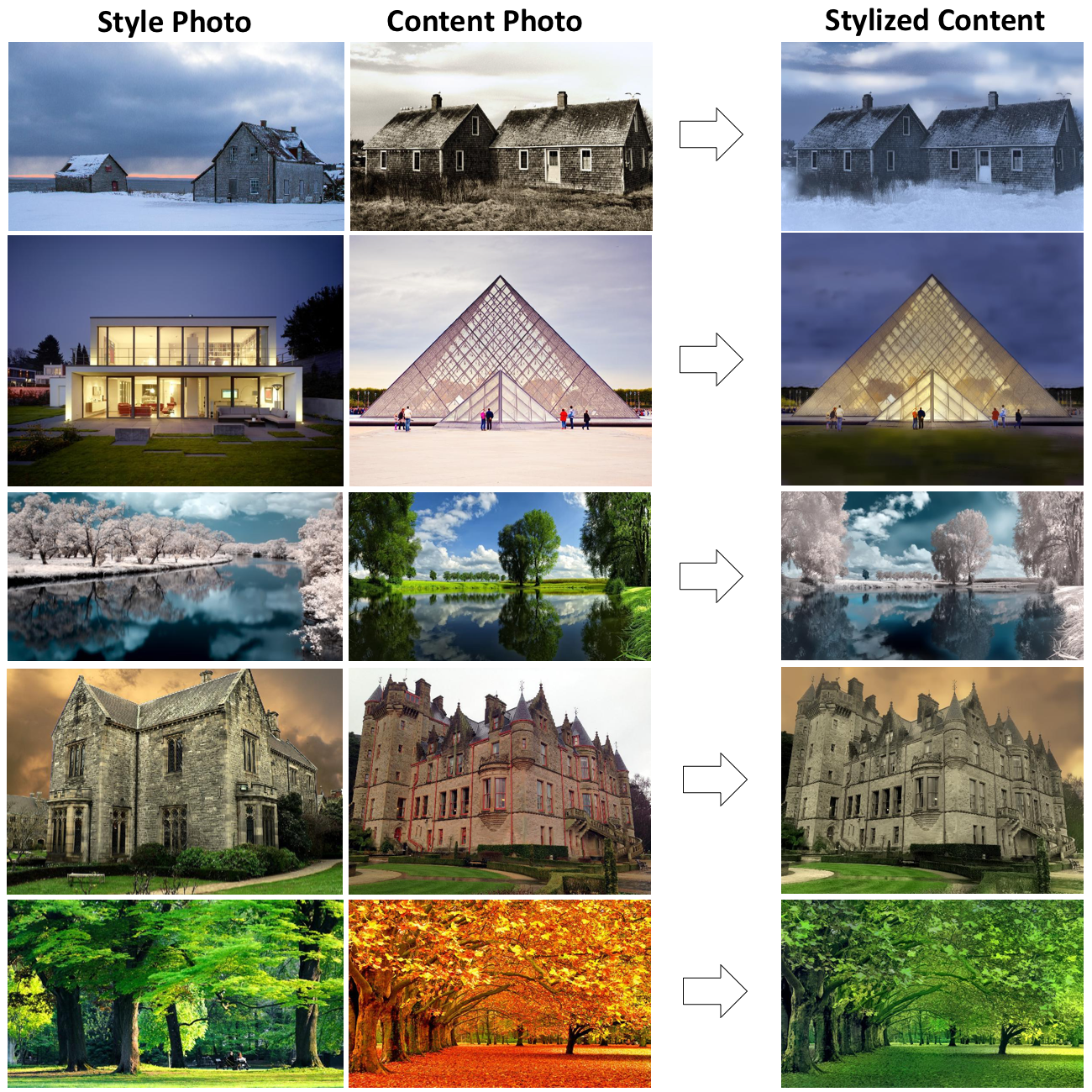
Given a content photo and a style photo, the code can transfer the style of the style photo to the content photo. The details of the algorithm behind the code is documented in our arxiv paper. Please cite the paper if this code repository is used in your publications.

A Closed-form Solution to Photorealistic Image Stylization
Yijun Li (UC Merced), Ming-Yu Liu (NVIDIA), Xueting Li (UC Merced), Ming-Hsuan Yang (NVIDIA, UC Merced), Jan Kautz (NVIDIA)
European Conference on Computer Vision (ECCV), 2018

Tutorial

Please check out the tutorial.

Comments
  • RuntimeError

    RuntimeError

    I am receiving this error: RuntimeError: the number of sizes provided must be greater or equal to the number of dimensions in the tensor at /opt/conda/conda-bld/pytorch_1501972792122/work/pytorch-0.1.12/torch/lib/THC/generic/THCTensor.c:299

    opened by matthewarthur 16
  • Running FastPhotoStyle on MacOS

    Running FastPhotoStyle on MacOS

    Hi I'm a bit new to Python and have trouble understanding the messages I get when running "converter.py" in Terminal:

    usage: cp [-R [-H | -L | -P]] [-fi | -n] [-apvXc] source_file target_file cp [-R [-H | -L | -P]] [-fi | -n] [-apvXc] source_file ... target_directory

    What am I supposed to do next? These don't seem to be standard Python asks and I couldn't find a user guide on how to use this script. Forgive me if I'm missing something obvious

    opened by fabulousrice 10
  • Failed with UMFPACK_ERROR_out_of_memory

    Failed with UMFPACK_ERROR_out_of_memory

    Thanks for the great code. When I run the algorithm with my own high-resolution images (655 * 1280), I find that when using scipy.sparse.linalg.spsolve with scikit-umfpack as solver, it requires too much memory (larger than 128GB). After some investigations, I found the problem might be OS dependent. However, I actually followed the instructions: my OS is Ubuntu 16.04, also the same CUDA and python version.

    I wonder if anyone struggles at the same issue with me, and if there is any other solver. Thanks.

    opened by ycjing 8
  • ValueError: total size of new array must be unchanged

    ValueError: total size of new array must be unchanged

    What am I doing wrong? The simple demo with global style works, but trying with label maps I get an error.

    Picture of the images and the visualized label maps: fps

    I run this command:

    python demo.py \
    --content_image_path images/custom2/content1.png \
    --content_seg_path images/custom2/content1.label/label.png \
    --style_image_path images/custom2/style1.png \
    --style_seg_path images/custom2/style1.label/label.png \
    --output_image_path results/example2.png
    

    Output and error:

    Elapsed time in stylization: 0.417996
    Traceback (most recent call last):
      File "demo.py", line 43, in <module>
        cuda=args.cuda,
      File "/home/ubuntu/.fast-photo-style/process_stylization.py", line 62, in stylization
        stylized_img = p_wct.transform(cont_img, styl_img, cont_seg, styl_seg)
      File "/home/ubuntu/.fast-photo-style/photo_wct.py", line 35, in transform
        csF4 = self.__feature_wct(cF4, sF4, cont_seg, styl_seg)
      File "/home/ubuntu/.fast-photo-style/photo_wct.py", line 88, in __feature_wct
        cont_mask = np.where(t_cont_seg.reshape(t_cont_seg.shape[0] * t_cont_seg.shape[1]) == l)
    ValueError: total size of new array must be unchanged
    
    opened by Instagit 8
  • RuntimeError: cuda runtime error (2) : out of memory

    RuntimeError: cuda runtime error (2) : out of memory

    THCudaCheck FAIL file=/opt/conda/conda-bld/pytorch_1501969512886/work/pytorch-0.1.12/torch/lib/THC/generic/THCStorage.cu line=66 error=2 : out of memory Traceback (most recent call last): File "demo.py", line 68, in stylized_img = p_wct.transform(cont_img, styl_img, cont_seg, styl_seg) File "/home/boss/FastPhotoStyle-master/photo_wct.py", line 36, in transform sF4,sF3,sF2,sF1 = self.e4.forward_multiple(styl_img) File "/home/boss/FastPhotoStyle-master/models.py", line 393, in forward_multiple out1 = self.conv3(out1) File "/home/boss/anaconda2/envs/NVIDIA/lib/python3.5/site-packages/torch/nn/modules/module.py", line 206, in call result = self.forward(*input, **kwargs) File "/home/boss/anaconda2/envs/NVIDIA/lib/python3.5/site-packages/torch/nn/modules/conv.py", line 237, in forward self.padding, self.dilation, self.groups) File "/home/boss/anaconda2/envs/NVIDIA/lib/python3.5/site-packages/torch/nn/functional.py", line 40, in conv2d return f(input, weight, bias) RuntimeError: cuda runtime error (2) : out of memory at /opt/conda/conda-bld/pytorch_1501969512886/work/pytorch-0.1.12/torch/lib/THC/generic/THCStorage.cu:66

    opened by z1412247644 8
  • Much Slower Than the Reported Time

    Much Slower Than the Reported Time

    Hi, I tested your code by running demo.sh with a K40m GPU, but my CUDA version is 8.0 (not 9.1). The total time is about 145s, more than 10 times slower than the reported time in the paper (11.39s for 1K image size). Besides a better GPU (Titan XP), I wonder whether the new CUDA is the key for the high performance. Thanks.

    opened by onlywuyiwuyi 5
  • OSError: [WinError 126] The specified module could not be found

    OSError: [WinError 126] The specified module could not be found

    Hi, I am running FastPhotoStyle code on Windows 10 and using Python 3.7, CUDA 10.0 and cuda 9.1. Although I made the change that was suggested to upgrade the version of Python from string to Byte, I am still getting the same error. Can you please suggest a fix for this issue.

    Resize image: (803,538)->(803,538) Resize image: (960,540)->(960,540) Elapsed time in stylization: 2.325060 Elapsed time in propagation: 83.987388 Elapsed time in post processing: 0.015629 Traceback (most recent call last): File "demo.py", line 47, in no_post=args.no_post File "D:\TrainImages\FastPhotoStyle-master\process_stylization.py", line 135, in stylization out_img = smooth_filter(out_img, cont_pilimg, f_radius=15, f_edge=1e-1) File "D:\TrainImages\FastPhotoStyle-master\smooth_filter.py", line 402, in smooth_filter best_ = smooth_local_affine(output_, input_, 1e-7, 3, H, W, f_radius, f_edge) File "D:\TrainImages\FastPhotoStyle-master\smooth_filter.py", line 333, in smooth_local_affine program = Program(src.encode('utf-8'), 'best_local_affine_kernel.cu'.encode('utf-8')) File "C:\Users\SD\Anaconda3\lib\site-packages\pynvrtc\compiler.py", line 49, in init self._interface = NVRTCInterface(lib_name) File "C:\Users\SD\Anaconda3\lib\site-packages\pynvrtc\interface.py", line 87, in init self._load_nvrtc_lib(lib_path) File "C:\Users\SD\Anaconda3\lib\site-packages\pynvrtc\interface.py", line 109, in _load_nvrtc_lib self.lib = cdll.LoadLibrary(name) File "C:\Users\SD\Anaconda3\lib\ctypes_init.py", line 434, in LoadLibrary return self.dlltype(name) File "C:\Users\SD\Anaconda3\lib\ctypes_init.py", line 356, in init self._handle = _dlopen(self._name, mode) OSError: [WinError 126] The specified module could not be found

    opened by Sunsmiles2 4
  • change image load from 3ch to 1ch

    change image load from 3ch to 1ch

    This addresses issue #55. One expects a 1 channel mask (resize based only on height and width) but you force this to become a 3 channel mask upon loading (mode="RGB"). Now we correctly get a 1 channel 8 bit mask.

    opened by dhpollack 4
  • Can't install cupy

    Can't install cupy

    Command:

    pip install cupy
    

    Result:

    ERROR: Complete output from command python setup.py egg_info:
        ERROR: Options: {'package_name': 'cupy', 'long_description': None, 'wheel_libs': [], 'wheel_includes': [], 'no_rpath': False, 'profile': False, 'linetrace': False, 'annotate': False, 'no_cuda': False}
        
        -------- Configuring Module: cuda --------
        Microsoft Visual C++ 14.0 is required. Get it with "Microsoft Visual C++ Build Tools": https://visualstudio.microsoft.com/downloads/
        
        ************************************************************
        * CuPy Configuration Summary                               *
        ************************************************************
        
        Build Environment:
          Include directories: ['C:\\Program Files\\NVIDIA GPU Computing Toolkit\\CUDA\\v10.0\\include', 'C:\\Program Files\\NVIDIA Corporation\\NvToolsExt\\include']
          Library directories: ['C:\\Program Files\\NVIDIA GPU Computing Toolkit\\CUDA\\v10.0\\bin', 'C:\\Program Files\\NVIDIA GPU Computing Toolkit\\CUDA\\v10.0\\lib\\x64', 'C:\\Program Files\\NVIDIA Corporation\\NvToolsExt\\lib\\x64']
          nvcc command       : ['C:\\Program Files\\NVIDIA GPU Computing Toolkit\\CUDA\\v10.0\\bin/nvcc.exe']
        
        Environment Variables:
          CFLAGS          : (none)
          LDFLAGS         : (none)
          LIBRARY_PATH    : (none)
          CUDA_PATH       : C:\Program Files\NVIDIA GPU Computing Toolkit\CUDA\v10.0
          NVTOOLSEXT_PATH : C:\Program Files\NVIDIA Corporation\NvToolsExt\
          NVCC            : (none)
        
        Modules:
          cuda      : No
            -> Include files not found: ['cublas_v2.h', 'cuda.h', 'cuda_profiler_api.h', 'cuda_runtime.h', 'cufft.h', 'curand.h', 'cusparse.h', 'nvrtc.h']
            -> Check your CFLAGS environment variable.
        
        ERROR: CUDA could not be found on your system.
        Please refer to the Installation Guide for details:
        https://docs-cupy.chainer.org/en/stable/install.html
        
        ************************************************************
        
        Traceback (most recent call last):
          File "<string>", line 1, in <module>
          File "C:\Users\FLAMES~1\AppData\Local\Temp\pip-install-ghow8_pv\cupy\setup.py", line 120, in <module>
            ext_modules = cupy_setup_build.get_ext_modules()
          File "C:\Users\FLAMES~1\AppData\Local\Temp\pip-install-ghow8_pv\cupy\cupy_setup_build.py", line 632, in get_ext_modules
            extensions = make_extensions(arg_options, compiler, use_cython)
          File "C:\Users\FLAMES~1\AppData\Local\Temp\pip-install-ghow8_pv\cupy\cupy_setup_build.py", line 387, in make_extensions
            raise Exception('Your CUDA environment is invalid. '
        Exception: Your CUDA environment is invalid. Please check above error log.
        ----------------------------------------
    ERROR: Command "python setup.py egg_info" failed with error code 1 in C:\Users\FLAMES~1\AppData\Local\Temp\pip-install-ghow8_pv\cupy\
    
    opened by f1am3d 3
  • Smoothing twice

    Smoothing twice

    Within the paper, I can only see smoothing mentioned once. However in the implementation smoothing is performed twice in photo_smooth.py and smooth_filter.py.

    Am I misunderstanding the paper/implementation regarding the second smoothing technique, or is this an addition made? If so, can you explain why this was added?

    opened by wesleyw72 3
  • Torch models to pytorch models, bug fix, CPU support, etc

    Torch models to pytorch models, bug fix, CPU support, etc

    This PR:

    • Convert torch models to pytorch models (listed in TODOs in the origin code) and converter.py shows how it was done. The pytorch model leaves in the submodule PhotoWCTModels which makes it easier to download from a server as https://github.com/NVIDIA/FastPhotoStyle/issues/15 suggested.

    • The models are refactored into less and clear classes. The layers are named according to the origin paper.

    • Fix a bug in Propagator. It fails to process images with alpha channels because it does not open them with RGB mode.

    • CPU support for PhotoWCT. PhotoWCT can work in CPU mode without using .cuda(). This could make it ~10x slower (not too slow yet) but more friendly for those without GPUs or GPUs with less memory as https://github.com/NVIDIA/FastPhotoStyle/issues/17

    I'm sorry that some codes in photo_wct.py are changed by the (PEP8) code formatter, so not too much of them are actually modified.

    Current code are tested. They can work well as before.

    opened by suquark 3
  • no module named segmentation.dataset

    no module named segmentation.dataset

    Hello, thanks for your great work I face not found the dataset when run with demo_example3.sh. Could you guide me where to found this seg.dataset folder. https://github.com/CSAILVision/semantic-segmentation-pytorch looks dont have this folder .

    Thanks!

    image

    opened by juneleung 0
  • Removed a literal comparison pitfall from the code

    Removed a literal comparison pitfall from the code

    The problem The code was comparing booleans using the operator '==', where in Python the indicated is to use the operator 'is', otherwise we would fall into a literal comparison pitfall. This pitfall was detected using Pylint and generated the following message error code and message: Pylint code: C0121

    Comparison 'styl_seg.size == False' should be 'styl_seg.size is False' if checking for the singleton value False, or 'not styl_seg.size' if testing for falsiness

    Solution Removed the '==' operator and changed it to 'is'

    opened by NaelsonDouglas 0
  • Docker build fails

    Docker build fails

    Hi! The docker image fails to build. We get this issue during step 12:

    Step 12/16 : RUN conda install -y -c anaconda pip ---> Running in 15c22eca2c92 Collecting package metadata (repodata.json): ...working... done Solving environment: ...working... The environment is inconsistent, please check the package plan carefully The following packages are causing the inconsistency:

    • https://repo.continuum.io/pkgs/main/linux-64/conda-verify-2.0.0-py36h98955d8_0.tar.bz2/linux-64::conda-verify==2.0.0=py36h98955d8_0
    • https://repo.continuum.io/pkgs/main/linux-64/dask-core-0.15.3-py36h10e6167_0.tar.bz2/linux-64::dask-core==0.15.3=py36h10e6167_0
    • https://repo.continuum.io/pkgs/main/linux-64/cython-0.26.1-py36h21c49d0_0.tar.bz2/linux-64::cython==0.26.1=py36h21c49d0_0
    • https://repo.continuum.io/pkgs/main/linux-64/dask-0.15.3-py36hdc2c8aa_0.tar.bz2/linux-64::dask==0.15.3=py36hdc2c8aa_0
    • https://repo.continuum.io/pkgs/main/linux-64/snowballstemmer-1.2.1-py36h6febd40_0.tar.bz2/linux-64::snowballstemmer==1.2.1=py36h6febd40_0
    • https://repo.continuum.io/pkgs/main/linux-64/greenlet-0.4.12-py36h2d503a6_0.tar.bz2/linux-64::greenlet==0.4.12=py36h2d503a6_0
    • https://repo.continuum.io/pkgs/main/linux-64/ipython_genutils-0.2.0-py36hb52b0d5_0.tar.bz2/linux-64::ipython_genutils==0.2.0=py36hb52b0d5_0
    • https://repo.continuum.io/pkgs/main/linux-64/cryptography-2.0.3-py36ha225213_1.tar.bz2/linux-64::cryptography==2.0.3=py36ha225213_1
    • https://repo.continuum.io/pkgs/main/linux-64/xlrd-1.1.0-py36h1db9f0c_1.tar.bz2/linux-64::xlrd==1.1.0=py36h1db9f0c_1
    • https://repo.continuum.io/pkgs/main/linux-64/pep8-1.7.0-py36h26ade29_0.tar.bz2/linux-64::pep8==1.7.0=py36h26ade29_0
    • https://repo.continuum.io/pkgs/main/linux-64/astroid-1.5.3-py36hbdb9df2_0.tar.bz2/linux-64::astroid==1.5.3=py36hbdb9df2_0
    • https://repo.continuum.io/pkgs/main/linux-64/contextlib2-0.5.5-py36h6c84a62_0.tar.bz2/linux-64::contextlib2==0.5.5=py36h6c84a62_0
    • https://repo.continuum.io/pkgs/main/linux-64/patsy-0.4.1-py36ha3be15e_0.tar.bz2/linux-64::patsy==0.4.1=py36ha3be15e_0
    • https://repo.continuum.io/pkgs/main/linux-64/h5py-2.7.0-py36he81ebca_1.tar.bz2/linux-64::h5py==2.7.0=py36he81ebca_1
    • https://repo.continuum.io/pkgs/main/linux-64/html5lib-0.999999999-py36h2cfc398_0.tar.bz2/linux-64::html5lib==0.999999999=py36h2cfc398_0
    • https://repo.continuum.io/pkgs/main/linux-64/astropy-2.0.2-py36ha51211e_4.tar.bz2/linux-64::astropy==2.0.2=py36ha51211e_4
    • https://repo.continuum.io/pkgs/main/linux-64/lazy-object-proxy-1.3.1-py36h10fcdad_0.tar.bz2/linux-64::lazy-object-proxy==1.3.1=py36h10fcdad_0
    • https://repo.continuum.io/pkgs/main/linux-64/jupyter_client-5.1.0-py36h614e9ea_0.tar.bz2/linux-64::jupyter_client==5.1.0=py36h614e9ea_0
    • https://repo.continuum.io/pkgs/main/linux-64/filelock-2.0.12-py36hacfa1f5_0.tar.bz2/linux-64::filelock==2.0.12=py36hacfa1f5_0
    • https://repo.continuum.io/pkgs/main/linux-64/qtawesome-0.4.4-py36h609ed8c_0.tar.bz2/linux-64::qtawesome==0.4.4=py36h609ed8c_0
    • https://repo.continuum.io/pkgs/main/linux-64/mpmath-0.19-py36h8cc018b_2.tar.bz2/linux-64::mpmath==0.19=py36h8cc018b_2
    • https://repo.continuum.io/pkgs/main/linux-64/bkcharts-0.2-py36h735825a_0.tar.bz2/linux-64::bkcharts==0.2=py36h735825a_0
    • https://repo.continuum.io/pkgs/main/linux-64/certifi-2017.7.27.1-py36h8b7b77e_0.tar.bz2/linux-64::certifi==2017.7.27.1=py36h8b7b77e_0
    • https://repo.continuum.io/pkgs/main/linux-64/ipywidgets-7.0.0-py36h7b55c3a_0.tar.bz2/linux-64::ipywidgets==7.0.0=py36h7b55c3a_0
    • https://repo.continuum.io/pkgs/main/linux-64/click-6.7-py36h5253387_0.tar.bz2/linux-64::click==6.7=py36h5253387_0
    • https://repo.continuum.io/pkgs/main/linux-64/docutils-0.14-py36hb0f60f5_0.tar.bz2/linux-64::docutils==0.14=py36hb0f60f5_0
    • https://repo.continuum.io/pkgs/main/linux-64/tblib-1.3.2-py36h34cf8b6_0.tar.bz2/linux-64::tblib==1.3.2=py36h34cf8b6_0
    • https://repo.continuum.io/pkgs/main/linux-64/singledispatch-3.4.0.3-py36h7a266c3_0.tar.bz2/linux-64::singledispatch==3.4.0.3=py36h7a266c3_0
    • https://repo.continuum.io/pkgs/main/linux-64/asn1crypto-0.22.0-py36h265ca7c_1.tar.bz2/linux-64::asn1crypto==0.22.0=py36h265ca7c_1
    • https://repo.continuum.io/pkgs/main/linux-64/jedi-0.10.2-py36h552def0_0.tar.bz2/linux-64::jedi==0.10.2=py36h552def0_0
    • https://repo.continuum.io/pkgs/main/linux-64/distributed-1.19.1-py36h25f3894_0.tar.bz2/linux-64::distributed==1.19.1=py36h25f3894_0
    • https://repo.continuum.io/pkgs/main/linux-64/pycparser-2.18-py36hf9f622e_1.tar.bz2/linux-64::pycparser==2.18=py36hf9f622e_1
    • https://repo.continuum.io/pkgs/main/linux-64/pyodbc-4.0.17-py36h999153c_0.tar.bz2/linux-64::pyodbc==4.0.17=py36h999153c_0
    • https://repo.continuum.io/pkgs/main/linux-64/qt-5.6.2-h974d657_12.tar.bz2/linux-64::qt==5.6.2=h974d657_12
    • https://repo.continuum.io/pkgs/main/linux-64/openssl-1.0.2l-h077ae2c_5.tar.bz2/linux-64::openssl==1.0.2l=h077ae2c_5
    • https://repo.continuum.io/pkgs/main/linux-64/beautifulsoup4-4.6.0-py36h49b8c8c_1.tar.bz2/linux-64::beautifulsoup4==4.6.0=py36h49b8c8c_1
    • https://repo.continuum.io/pkgs/main/linux-64/llvmlite-0.20.0-py36_0.tar.bz2/linux-64::llvmlite==0.20.0=py36_0
    • https://repo.continuum.io/pkgs/main/linux-64/scikit-image-0.13.0-py36had3c07a_1.tar.bz2/linux-64::scikit-image==0.13.0=py36had3c07a_1
    • https://repo.continuum.io/pkgs/main/linux-64/ipykernel-4.6.1-py36hbf841aa_0.tar.bz2/linux-64::ipykernel==4.6.1=py36hbf841aa_0
    • https://repo.continuum.io/pkgs/main/linux-64/nltk-3.2.4-py36h1a0979f_0.tar.bz2/linux-64::nltk==3.2.4=py36h1a0979f_0
    • https://repo.continuum.io/pkgs/main/linux-64/jupyterlab_launcher-0.4.0-py36h4d8058d_0.tar.bz2/linux-64::jupyterlab_launcher==0.4.0=py36h4d8058d_0
    • https://repo.continuum.io/pkgs/main/linux-64/mistune-0.7.4-py36hbab8784_0.tar.bz2/linux-64::mistune==0.7.4=py36hbab8784_0
    • https://repo.continuum.io/pkgs/main/linux-64/_ipyw_jlab_nb_ext_conf-0.1.0-py36he11e457_0.tar.bz2/linux-64::_ipyw_jlab_nb_ext_conf==0.1.0=py36he11e457_0
    • https://repo.continuum.io/pkgs/main/linux-64/wheel-0.29.0-py36he7f4e38_1.tar.bz2/linux-64::wheel==0.29.0=py36he7f4e38_1
    • https://repo.continuum.io/pkgs/main/linux-64/bitarray-0.8.1-py36h5834eb8_0.tar.bz2/linux-64::bitarray==0.8.1=py36h5834eb8_0
    • https://repo.continuum.io/pkgs/main/linux-64/ipython-6.1.0-py36hc72a948_1.tar.bz2/linux-64::ipython==6.1.0=py36hc72a948_1
    • https://repo.continuum.io/pkgs/main/linux-64/pywavelets-0.5.2-py36he602eb0_0.tar.bz2/linux-64::pywavelets==0.5.2=py36he602eb0_0
    • https://repo.continuum.io/pkgs/main/linux-64/six-1.11.0-py36h372c433_1.tar.bz2/linux-64::six==1.11.0=py36h372c433_1
    • https://repo.continuum.io/pkgs/main/linux-64/bottleneck-1.2.1-py36haac1ea0_0.tar.bz2/linux-64::bottleneck==1.2.1=py36haac1ea0_0
    • https://repo.continuum.io/pkgs/main/linux-64/isort-4.2.15-py36had401c0_0.tar.bz2/linux-64::isort==4.2.15=py36had401c0_0
    • https://repo.continuum.io/pkgs/main/linux-64/gmpy2-2.0.8-py36h55090d7_1.tar.bz2/linux-64::gmpy2==2.0.8=py36h55090d7_1
    • https://repo.continuum.io/pkgs/main/linux-64/markupsafe-1.0-py36hd9260cd_1.tar.bz2/linux-64::markupsafe==1.0=py36hd9260cd_1
    • https://repo.continuum.io/pkgs/main/linux-64/get_terminal_size-1.0.0-haa9412d_0.tar.bz2/linux-64::get_terminal_size==1.0.0=haa9412d_0
    • https://repo.continuum.io/pkgs/main/linux-64/sympy-1.1.1-py36hc6d1c1c_0.tar.bz2/linux-64::sympy==1.1.1=py36hc6d1c1c_0
    • https://repo.continuum.io/pkgs/main/linux-64/odo-0.5.1-py36h90ed295_0.tar.bz2/linux-64::odo==0.5.1=py36h90ed295_0
    • https://repo.continuum.io/pkgs/main/linux-64/msgpack-python-0.4.8-py36hec4c5d1_0.tar.bz2/linux-64::msgpack-python==0.4.8=py36hec4c5d1_0
    • https://repo.continuum.io/pkgs/main/linux-64/olefile-0.44-py36h79f9f78_0.tar.bz2/linux-64::olefile==0.44=py36h79f9f78_0
    • https://repo.continuum.io/pkgs/main/linux-64/tornado-4.5.2-py36h1283b2a_0.tar.bz2/linux-64::tornado==4.5.2=py36h1283b2a_0
    • https://repo.continuum.io/pkgs/main/linux-64/sortedcollections-0.5.3-py36h3c761f9_0.tar.bz2/linux-64::sortedcollections==0.5.3=py36h3c761f9_0
    • https://repo.continuum.io/pkgs/main/linux-64/flask-cors-3.0.3-py36h2d857d3_0.tar.bz2/linux-64::flask-cors==3.0.3=py36h2d857d3_0
    • https://repo.continuum.io/pkgs/main/linux-64/pysocks-1.6.7-py36hd97a5b1_1.tar.bz2/linux-64::pysocks==1.6.7=py36hd97a5b1_1
    • https://repo.continuum.io/pkgs/main/linux-64/sphinxcontrib-1.0-py36h6d0f590_1.tar.bz2/linux-64::sphinxcontrib==1.0=py36h6d0f590_1
    • https://repo.continuum.io/pkgs/main/linux-64/pkginfo-1.4.1-py36h215d178_1.tar.bz2/linux-64::pkginfo==1.4.1=py36h215d178_1
    • https://repo.continuum.io/pkgs/main/linux-64/sphinx-1.6.3-py36he5f0bdb_0.tar.bz2/linux-64::sphinx==1.6.3=py36he5f0bdb_0
    • https://repo.continuum.io/pkgs/main/linux-64/mccabe-0.6.1-py36h5ad9710_1.tar.bz2/linux-64::mccabe==0.6.1=py36h5ad9710_1
    • https://repo.continuum.io/pkgs/main/linux-64/simplegeneric-0.8.1-py36h2cb9092_0.tar.bz2/linux-64::simplegeneric==0.8.1=py36h2cb9092_0
    • https://repo.continuum.io/pkgs/main/linux-64/itsdangerous-0.24-py36h93cc618_1.tar.bz2/linux-64::itsdangerous==0.24=py36h93cc618_1
    • https://repo.continuum.io/pkgs/main/linux-64/xlsxwriter-1.0.2-py36h3de1aca_0.tar.bz2/linux-64::xlsxwriter==1.0.2=py36h3de1aca_0
    • https://repo.continuum.io/pkgs/main/linux-64/pandas-0.20.3-py36h842e28d_2.tar.bz2/linux-64::pandas==0.20.3=py36h842e28d_2
    • https://repo.continuum.io/pkgs/main/linux-64/requests-2.18.4-py36he2e5f8d_1.tar.bz2/linux-64::requests==2.18.4=py36he2e5f8d_1
    • https://repo.continuum.io/pkgs/main/linux-64/pytest-3.2.1-py36h11ad3bb_1.tar.bz2/linux-64::pytest==3.2.1=py36h11ad3bb_1
    • https://repo.continuum.io/pkgs/main/linux-64/werkzeug-0.12.2-py36hc703753_0.tar.bz2/linux-64::werkzeug==0.12.2=py36hc703753_0
    • https://repo.continuum.io/pkgs/main/linux-64/jupyter_core-4.3.0-py36h357a921_0.tar.bz2/linux-64::jupyter_core==4.3.0=py36h357a921_0
    • https://repo.continuum.io/pkgs/main/linux-64/pixman-0.34.0-h83dc358_2.tar.bz2/linux-64::pixman==0.34.0=h83dc358_2
    • https://repo.continuum.io/pkgs/main/linux-64/qtconsole-4.3.1-py36h8f73b5b_0.tar.bz2/linux-64::qtconsole==4.3.1=py36h8f73b5b_0
    • https://repo.continuum.io/pkgs/main/linux-64/datashape-0.5.4-py36h3ad6b5c_0.tar.bz2/linux-64::datashape==0.5.4=py36h3ad6b5c_0
    • https://repo.continuum.io/pkgs/main/linux-64/nbconvert-5.3.1-py36hb41ffb7_0.tar.bz2/linux-64::nbconvert==5.3.1=py36hb41ffb7_0
    • https://repo.continuum.io/pkgs/main/linux-64/sqlalchemy-1.1.13-py36hfb5efd7_0.tar.bz2/linux-64::sqlalchemy==1.1.13=py36hfb5efd7_0
    • https://repo.continuum.io/pkgs/main/linux-64/pylint-1.7.4-py36hb9d4533_0.tar.bz2/linux-64::pylint==1.7.4=py36hb9d4533_0
    • https://repo.continuum.io/pkgs/main/linux-64/bokeh-0.12.10-py36hbb0e44a_0.tar.bz2/linux-64::bokeh==0.12.10=py36hbb0e44a_0
    • https://repo.continuum.io/pkgs/main/linux-64/imageio-2.2.0-py36he555465_0.tar.bz2/linux-64::imageio==2.2.0=py36he555465_0
    • https://repo.continuum.io/pkgs/main/linux-64/chardet-3.0.4-py36h0f667ec_1.tar.bz2/linux-64::chardet==3.0.4=py36h0f667ec_1
    • https://repo.continuum.io/pkgs/main/linux-64/spyder-3.2.4-py36hbe6152b_0.tar.bz2/linux-64::spyder==3.2.4=py36hbe6152b_0
    • https://repo.continuum.io/pkgs/main/linux-64/testpath-0.3.1-py36h8cadb63_0.tar.bz2/linux-64::testpath==0.3.1=py36h8cadb63_0
    • https://repo.continuum.io/pkgs/main/linux-64/flask-0.12.2-py36hb24657c_0.tar.bz2/linux-64::flask==0.12.2=py36hb24657c_0
    • https://repo.continuum.io/pkgs/main/linux-64/jdcal-1.3-py36h4c697fb_0.tar.bz2/linux-64::jdcal==1.3=py36h4c697fb_0
    • https://repo.continuum.io/pkgs/main/linux-64/anaconda-client-1.6.5-py36h19c0dcd_0.tar.bz2/linux-64::anaconda-client==1.6.5=py36h19c0dcd_0
    • https://repo.continuum.io/pkgs/main/linux-64/pandocfilters-1.4.2-py36ha6701b7_1.tar.bz2/linux-64::pandocfilters==1.4.2=py36ha6701b7_1
    • https://repo.continuum.io/pkgs/main/linux-64/pygments-2.2.0-py36h0d3125c_0.tar.bz2/linux-64::pygments==2.2.0=py36h0d3125c_0
    • https://repo.continuum.io/pkgs/main/linux-64/webencodings-0.5.1-py36h800622e_1.tar.bz2/linux-64::webencodings==0.5.1=py36h800622e_1
    • https://repo.continuum.io/pkgs/main/linux-64/qtpy-1.3.1-py36h3691cc8_0.tar.bz2/linux-64::qtpy==1.3.1=py36h3691cc8_0
    • https://repo.continuum.io/pkgs/main/linux-64/pexpect-4.2.1-py36h3b9d41b_0.tar.bz2/linux-64::pexpect==4.2.1=py36h3b9d41b_0
    • https://repo.continuum.io/pkgs/main/linux-64/pyyaml-3.12-py36hafb9ca4_1.tar.bz2/linux-64::pyyaml==3.12=py36hafb9ca4_1
    • https://repo.continuum.io/pkgs/main/linux-64/python-3.6.3-hc9025b9_1.tar.bz2/linux-64::python==3.6.3=hc9025b9_1
    • https://repo.continuum.io/pkgs/main/linux-64/terminado-0.6-py36ha25a19f_0.tar.bz2/linux-64::terminado==0.6=py36ha25a19f_0
    • https://repo.continuum.io/pkgs/main/linux-64/jupyter-1.0.0-py36h9896ce5_0.tar.bz2/linux-64::jupyter==1.0.0=py36h9896ce5_0
    • https://repo.continuum.io/pkgs/main/linux-64/et_xmlfile-1.0.1-py36hd6bccc3_0.tar.bz2/linux-64::et_xmlfile==1.0.1=py36hd6bccc3_0
    • https://repo.continuum.io/pkgs/main/linux-64/notebook-5.0.0-py36h0b20546_2.tar.bz2/linux-64::notebook==5.0.0=py36h0b20546_2
    • https://repo.continuum.io/pkgs/main/linux-64/ptyprocess-0.5.2-py36h69acd42_0.tar.bz2/linux-64::ptyprocess==0.5.2=py36h69acd42_0
    • https://repo.continuum.io/pkgs/main/linux-64/pytz-2017.2-py36hc2ccc2a_1.tar.bz2/linux-64::pytz==2017.2=py36hc2ccc2a_1
    • https://repo.continuum.io/pkgs/main/linux-64/cycler-0.10.0-py36h93f1223_0.tar.bz2/linux-64::cycler==0.10.0=py36h93f1223_0
    • https://repo.continuum.io/pkgs/main/linux-64/sphinxcontrib-websupport-1.0.1-py36hb5cb234_1.tar.bz2/linux-64::sphinxcontrib-websupport==1.0.1=py36hb5cb234_1
    • https://repo.continuum.io/pkgs/main/linux-64/pyqt-5.6.0-py36h0386399_5.tar.bz2/linux-64::pyqt==5.6.0=py36h0386399_5
    • https://repo.continuum.io/pkgs/main/linux-64/cloudpickle-0.4.0-py36h30f8c20_0.tar.bz2/linux-64::cloudpickle==0.4.0=py36h30f8c20_0
    • https://repo.continuum.io/pkgs/main/linux-64/pyflakes-1.6.0-py36h7bd6a15_0.tar.bz2/linux-64::pyflakes==1.6.0=py36h7bd6a15_0
    • https://repo.continuum.io/pkgs/main/linux-64/numpydoc-0.7.0-py36h18f165f_0.tar.bz2/linux-64::numpydoc==0.7.0=py36h18f165f_0
    • https://repo.continuum.io/pkgs/main/linux-64/pickleshare-0.7.4-py36h63277f8_0.tar.bz2/linux-64::pickleshare==0.7.4=py36h63277f8_0
    • https://repo.continuum.io/pkgs/main/linux-64/wcwidth-0.1.7-py36hdf4376a_0.tar.bz2/linux-64::wcwidth==0.1.7=py36hdf4376a_0
    • https://repo.continuum.io/pkgs/main/linux-64/sip-4.18.1-py36h51ed4ed_2.tar.bz2/linux-64::sip==4.18.1=py36h51ed4ed_2
    • https://repo.continuum.io/pkgs/main/linux-64/navigator-updater-0.1.0-py36h14770f7_0.tar.bz2/linux-64::navigator-updater==0.1.0=py36h14770f7_0
    • https://repo.continuum.io/pkgs/main/linux-64/babel-2.5.0-py36h7d14adf_0.tar.bz2/linux-64::babel==2.5.0=py36h7d14adf_0
    • https://repo.continuum.io/pkgs/main/linux-64/nbformat-4.4.0-py36h31c9010_0.tar.bz2/linux-64::nbformat==4.4.0=py36h31c9010_0
    • https://repo.continuum.io/pkgs/main/linux-64/zict-0.1.3-py36h3a3bf81_0.tar.bz2/linux-64::zict==0.1.3=py36h3a3bf81_0
    • https://repo.continuum.io/pkgs/main/linux-64/statsmodels-0.8.0-py36h8533d0b_0.tar.bz2/linux-64::statsmodels==0.8.0=py36h8533d0b_0
    • https://repo.continuum.io/pkgs/main/linux-64/pycurl-7.43.0-py36h5e72054_3.tar.bz2/linux-64::pycurl==7.43.0=py36h5e72054_3
    • https://repo.continuum.io/pkgs/main/linux-64/seaborn-0.8.0-py36h197244f_0.tar.bz2/linux-64::seaborn==0.8.0=py36h197244f_0
    • https://repo.continuum.io/pkgs/main/linux-64/pillow-4.2.1-py36h9119f52_0.tar.bz2/linux-64::pillow==4.2.1=py36h9119f52_0
    • https://repo.continuum.io/pkgs/main/linux-64/pycrypto-2.6.1-py36h6998063_1.tar.bz2/linux-64::pycrypto==2.6.1=py36h6998063_1
    • https://repo.continuum.io/pkgs/main/linux-64/mkl-service-1.1.2-py36h17a0993_4.tar.bz2/linux-64::mkl-service==1.1.2=py36h17a0993_4
    • https://repo.continuum.io/pkgs/main/linux-64/jupyterlab-0.27.0-py36h86377d0_2.tar.bz2/linux-64::jupyterlab==0.27.0=py36h86377d0_2
    • https://repo.continuum.io/pkgs/main/linux-64/conda-build-3.0.27-py36h940a66d_0.tar.bz2/linux-64::conda-build==3.0.27=py36h940a66d_0
    • https://repo.continuum.io/pkgs/main/linux-64/jupyter_console-5.2.0-py36he59e554_1.tar.bz2/linux-64::jupyter_console==5.2.0=py36he59e554_1
    • https://repo.continuum.io/pkgs/main/linux-64/numexpr-2.6.2-py36hdd3393f_1.tar.bz2/linux-64::numexpr==2.6.2=py36hdd3393f_1
    • https://repo.continuum.io/pkgs/main/linux-64/nose-1.3.7-py36hcdf7029_2.tar.bz2/linux-64::nose==1.3.7=py36hcdf7029_2
    • https://repo.continuum.io/pkgs/main/linux-64/wrapt-1.10.11-py36h28b7045_0.tar.bz2/linux-64::wrapt==1.10.11=py36h28b7045_0
    • https://repo.continuum.io/pkgs/main/linux-64/xlwt-1.3.0-py36h7b00a1f_0.tar.bz2/linux-64::xlwt==1.3.0=py36h7b00a1f_0
    • https://repo.continuum.io/pkgs/main/linux-64/jinja2-2.9.6-py36h489bce4_1.tar.bz2/linux-64::jinja2==2.9.6=py36h489bce4_1
    • https://repo.continuum.io/pkgs/main/linux-64/decorator-4.1.2-py36hd076ac8_0.tar.bz2/linux-64::decorator==4.1.2=py36hd076ac8_0
    • https://repo.continuum.io/pkgs/main/linux-64/packaging-16.8-py36ha668100_1.tar.bz2/linux-64::packaging==16.8=py36ha668100_1
    • https://repo.continuum.io/pkgs/main/linux-64/harfbuzz-1.5.0-h2545bd6_0.tar.bz2/linux-64::harfbuzz==1.5.0=h2545bd6_0
    • https://repo.continuum.io/pkgs/main/linux-64/scipy-0.19.1-py36h9976243_3.tar.bz2/linux-64::scipy==0.19.1=py36h9976243_3
    • https://repo.continuum.io/pkgs/main/linux-64/numpy-1.13.3-py36ha12f23b_0.tar.bz2/linux-64::numpy==1.13.3=py36ha12f23b_0
    • https://repo.continuum.io/pkgs/main/linux-64/typing-3.6.2-py36h7da032a_0.tar.bz2/linux-64::typing==3.6.2=py36h7da032a_0
    • https://repo.continuum.io/pkgs/main/linux-64/pango-1.40.11-h8191d47_0.tar.bz2/linux-64::pango==1.40.11=h8191d47_0
    • https://repo.continuum.io/pkgs/main/linux-64/entrypoints-0.2.3-py36h1aec115_2.tar.bz2/linux-64::entrypoints==0.2.3=py36h1aec115_2
    • https://repo.continuum.io/pkgs/main/linux-64/ruamel_yaml-0.11.14-py36ha2fb22d_2.tar.bz2/linux-64::ruamel_yaml==0.11.14=py36ha2fb22d_2
    • https://repo.continuum.io/pkgs/main/linux-64/pytables-3.4.2-py36h3b5282a_2.tar.bz2/linux-64::pytables==3.4.2=py36h3b5282a_2
    • https://repo.continuum.io/pkgs/main/linux-64/pyzmq-16.0.2-py36h3b0cf96_2.tar.bz2/linux-64::pyzmq==16.0.2=py36h3b0cf96_2
    • https://repo.continuum.io/pkgs/main/linux-64/locket-0.2.0-py36h787c0ad_1.tar.bz2/linux-64::locket==0.2.0=py36h787c0ad_1
    • https://repo.continuum.io/pkgs/main/linux-64/toolz-0.8.2-py36h81f2dff_0.tar.bz2/linux-64::toolz==0.8.2=py36h81f2dff_0
    • https://repo.continuum.io/pkgs/main/linux-64/anaconda-navigator-1.6.9-py36h11ddaaa_0.tar.bz2/linux-64::anaconda-navigator==1.6.9=py36h11ddaaa_0
    • https://repo.continuum.io/pkgs/main/linux-64/heapdict-1.0.0-py36h79797d7_0.tar.bz2/linux-64::heapdict==1.0.0=py36h79797d7_0
    • https://repo.continuum.io/pkgs/main/linux-64/setuptools-36.5.0-py36he42e2e1_0.tar.bz2/linux-64::setuptools==36.5.0=py36he42e2e1_0
    • https://repo.continuum.io/pkgs/main/linux-64/scikit-learn-0.19.1-py36h7aa7ec6_0.tar.bz2/linux-64::scikit-learn==0.19.1=py36h7aa7ec6_0
    • https://repo.continuum.io/pkgs/main/linux-64/curl-7.55.1-hcb0b314_2.tar.bz2/linux-64::curl==7.55.1=hcb0b314_2
    • https://repo.continuum.io/pkgs/main/linux-64/multipledispatch-0.4.9-py36h41da3fb_0.tar.bz2/linux-64::multipledispatch==0.4.9=py36h41da3fb_0
    • https://repo.continuum.io/pkgs/main/linux-64/lxml-4.1.0-py36h5b66e50_0.tar.bz2/linux-64::lxml==4.1.0=py36h5b66e50_0
    • https://repo.continuum.io/pkgs/main/linux-64/bleach-2.0.0-py36h688b259_0.tar.bz2/linux-64::bleach==2.0.0=py36h688b259_0
    • https://repo.continuum.io/pkgs/main/linux-64/clyent-1.2.2-py36h7e57e65_1.tar.bz2/linux-64::clyent==1.2.2=py36h7e57e65_1
    • https://repo.continuum.io/pkgs/main/linux-64/glob2-0.5-py36h2c1b292_1.tar.bz2/linux-64::glob2==0.5=py36h2c1b292_1
    • https://repo.continuum.io/pkgs/main/linux-64/boto-2.48.0-py36h6e4cd66_1.tar.bz2/linux-64::boto==2.48.0=py36h6e4cd66_1
    • https://repo.continuum.io/pkgs/main/linux-64/cairo-1.14.10-haa5651f_5.tar.bz2/linux-64::cairo==1.14.10=haa5651f_5
    • https://repo.continuum.io/pkgs/main/linux-64/py-1.4.34-py36h0712aa3_1.tar.bz2/linux-64::py==1.4.34=py36h0712aa3_1
    • https://repo.continuum.io/pkgs/main/linux-64/pip-9.0.1-py36h8ec8b28_3.tar.bz2/linux-64::pip==9.0.1=py36h8ec8b28_3
    • https://repo.continuum.io/pkgs/main/linux-64/fastcache-1.0.2-py36h5b0c431_0.tar.bz2/linux-64::fastcache==1.0.2=py36h5b0c431_0
    • https://repo.continuum.io/pkgs/main/linux-64/gevent-1.2.2-py36h2fe25dc_0.tar.bz2/linux-64::gevent==1.2.2=py36h2fe25dc_0
    • https://repo.continuum.io/pkgs/main/linux-64/imagesize-0.7.1-py36h52d8127_0.tar.bz2/linux-64::imagesize==0.7.1=py36h52d8127_0
    • https://repo.continuum.io/pkgs/main/linux-64/openpyxl-2.4.8-py36h41dd2a8_1.tar.bz2/linux-64::openpyxl==2.4.8=py36h41dd2a8_1
    • https://repo.continuum.io/pkgs/main/linux-64/networkx-2.0-py36h7e96fb8_0.tar.bz2/linux-64::networkx==2.0=py36h7e96fb8_0
    • https://repo.continuum.io/pkgs/main/linux-64/pathlib2-2.3.0-py36h49efa8e_0.tar.bz2/linux-64::pathlib2==2.3.0=py36h49efa8e_0
    • https://repo.continuum.io/pkgs/main/linux-64/blaze-0.11.3-py36h4e06776_0.tar.bz2/linux-64::blaze==0.11.3=py36h4e06776_0
    • https://repo.continuum.io/pkgs/main/linux-64/libxcb-1.12-h84ff03f_3.tar.bz2/linux-64::libxcb==1.12=h84ff03f_3
    • https://repo.continuum.io/pkgs/main/linux-64/alabaster-0.7.10-py36h306e16b_0.tar.bz2/linux-64::alabaster==0.7.10=py36h306e16b_0
    • https://repo.continuum.io/pkgs/main/linux-64/matplotlib-2.1.0-py36hba5de38_0.tar.bz2/linux-64::matplotlib==2.1.0=py36hba5de38_0
    • https://repo.continuum.io/pkgs/main/linux-64/pycodestyle-2.3.1-py36hf609f19_0.tar.bz2/linux-64::pycodestyle==2.3.1=py36hf609f19_0
    • https://repo.continuum.io/pkgs/main/linux-64/prompt_toolkit-1.0.15-py36h17d85b1_0.tar.bz2/linux-64::prompt_toolkit==1.0.15=py36h17d85b1_0
    • https://repo.continuum.io/pkgs/main/linux-64/numba-0.35.0-np113py36_10.tar.bz2/linux-64::numba==0.35.0=np113py36_10
    • https://repo.continuum.io/pkgs/main/linux-64/anaconda-5.0.1-py36hd30a520_1.tar.bz2/linux-64::anaconda==5.0.1=py36hd30a520_1
    • https://repo.continuum.io/pkgs/main/linux-64/widgetsnbextension-3.0.2-py36hd01bb71_1.tar.bz2/linux-64::widgetsnbextension==3.0.2=py36hd01bb71_1
    • https://repo.continuum.io/pkgs/main/linux-64/unicodecsv-0.14.1-py36ha668878_0.tar.bz2/linux-64::unicodecsv==0.14.1=py36ha668878_0
    • https://repo.continuum.io/pkgs/main/linux-64/pyparsing-2.2.0-py36hee85983_1.tar.bz2/linux-64::pyparsing==2.2.0=py36hee85983_1
    • https://repo.continuum.io/pkgs/main/linux-64/cffi-1.10.0-py36had8d393_1.tar.bz2/linux-64::cffi==1.10.0=py36had8d393_1
    • https://repo.continuum.io/pkgs/main/linux-64/pyopenssl-17.2.0-py36h5cc804b_0.tar.bz2/linux-64::pyopenssl==17.2.0=py36h5cc804b_0
    • https://repo.continuum.io/pkgs/main/linux-64/rope-0.10.5-py36h1f8c17e_0.tar.bz2/linux-64::rope==0.10.5=py36h1f8c17e_0
    • https://repo.continuum.io/pkgs/main/linux-64/cytoolz-0.8.2-py36h708bfd4_0.tar.bz2/linux-64::cytoolz==0.8.2=py36h708bfd4_0
    • https://repo.continuum.io/pkgs/main/linux-64/backports-1.0-py36hfa02d7e_1.tar.bz2/linux-64::backports==1.0=py36hfa02d7e_1
    • https://repo.continuum.io/pkgs/main/linux-64/urllib3-1.22-py36hbe7ace6_0.tar.bz2/linux-64::urllib3==1.22=py36hbe7ace6_0
    • https://repo.continuum.io/pkgs/main/linux-64/python-dateutil-2.6.1-py36h88d3b88_1.tar.bz2/linux-64::python-dateutil==2.6.1=py36h88d3b88_1
    • https://repo.continuum.io/pkgs/main/linux-64/sortedcontainers-1.5.7-py36hdf89491_0.tar.bz2/linux-64::sortedcontainers==1.5.7=py36hdf89491_0
    • https://repo.continuum.io/pkgs/main/linux-64/ply-3.10-py36hed35086_0.tar.bz2/linux-64::ply==3.10=py36hed35086_0
    • https://repo.continuum.io/pkgs/main/linux-64/psutil-5.4.0-py36h84c53db_0.tar.bz2/linux-64::psutil==5.4.0=py36h84c53db_0
    • https://repo.continuum.io/pkgs/main/linux-64/jsonschema-2.6.0-py36h006f8b5_0.tar.bz2/linux-64::jsonschema==2.6.0=py36h006f8b5_0
    • https://repo.continuum.io/pkgs/main/linux-64/path.py-10.3.1-py36he0c6f6d_0.tar.bz2/linux-64::path.py==10.3.1=py36he0c6f6d_0
    • https://repo.continuum.io/pkgs/main/linux-64/traitlets-4.3.2-py36h674d592_0.tar.bz2/linux-64::traitlets==4.3.2=py36h674d592_0
    • https://repo.continuum.io/pkgs/main/linux-64/anaconda-project-0.8.0-py36h29abdf5_0.tar.bz2/linux-64::anaconda-project==0.8.0=py36h29abdf5_0
    • https://repo.continuum.io/pkgs/main/linux-64/partd-0.3.8-py36h36fd896_0.tar.bz2/linux-64::partd==0.3.8=py36h36fd896_0
    • https://repo.continuum.io/pkgs/main/linux-64/backports.shutil_get_terminal_size-1.0.0-py36hfea85ff_2.tar.bz2/linux-64::backports.shutil_get_terminal_size==1.0.0=py36hfea85ff_2
    • https://repo.continuum.io/pkgs/main/linux-64/idna-2.6-py36h82fb2a8_1.tar.bz2/linux-64::idna==2.6=py36h82fb2a8_1
    • https://repo.continuum.io/pkgs/main/linux-64/colorama-0.3.9-py36h489cec4_0.tar.bz2/linux-64::colorama==0.3.9=py36h489cec4_0
    • https://repo.continuum.io/pkgs/main/linux-64/linux-64::ninja==1.8.2=py36h6bb024c_1
    • https://repo.continuum.io/pkgs/main/linux-64/linux-64::pycosat==0.6.3=py36h27cfd23_0
    • pytorch/noarch::torchvision==0.2.1=py_2
    • https://repo.continuum.io/pkgs/main/linux-64/linux-64::conda-package-handling==1.7.2=py36h03888b9_0
    • https://repo.continuum.io/pkgs/main/linux-64/linux-64::conda==4.9.2=py36h06a4308_0
    • pytorch/linux-64::pytorch==0.4.1=py36_py35_py27__9.0.176_7.1.2_2
    • https://repo.continuum.io/pkgs/main/noarch/noarch::tqdm==4.59.0=pyhd3eb1b0_1
    opened by Mazuzel 1
  • SVD fails in __wct_core when cont_feat or styl_feat are [x,1] dimensional matrix

    SVD fails in __wct_core when cont_feat or styl_feat are [x,1] dimensional matrix

    Unless I'm doing something wrong, there is a corner case inside def __wct_core, when one of the matrices is basically a vector. When calculating: contentConv = torch.mm(cont_feat, cont_feat.t()).div(cFSize[1] - 1) + iden

    cFSize[1] is 1 so there is a division by 0=> and we get a matrix full of NAN which is causing the SVD to fail.

    For now, as a w/a inside def __feature_wct I've changed the condtion if cont_mask[0].size <= 0 or styl_mask[0].size <= 0: continue

    to

    if cont_mask[0].size <= 1 or styl_mask[0].size <= 1: continue

    to ignore labels that causing this issue.

    Any idea why it happens and what is the best approach to fix it?

    opened by dkreinov 1
  • Update to the latest torch

    Update to the latest torch

    Note that demo_example3.sh depends on CSAIL Semantic Segmentation repo, which itself depends on later pytorch version. This example might break -- I added a warning in there.

    opened by z-a-f 2
Releases(f33e07f)
Owner
NVIDIA Corporation
NVIDIA Corporation
Place holder for HOPE: a human-centric and task-oriented MT evaluation framework using professional post-editing

HOPE: A Task-Oriented and Human-Centric Evaluation Framework Using Professional Post-Editing Towards More Effective MT Evaluation Place holder for dat

Lifeng Han 1 Apr 25, 2022
Attendance Monitoring with Face Recognition using Python

Attendance Monitoring with Face Recognition using Python A python GUI integrated attendance system using face recognition to take attendance. In this

Vaibhav Rajput 2 Jun 21, 2022
SPRING is a seq2seq model for Text-to-AMR and AMR-to-Text (AAAI2021).

SPRING This is the repo for SPRING (Symmetric ParsIng aNd Generation), a novel approach to semantic parsing and generation, presented at AAAI 2021. Wi

Sapienza NLP group 98 Dec 21, 2022
PyTorch implementation of Octave Convolution with pre-trained Oct-ResNet and Oct-MobileNet models

octconv.pytorch PyTorch implementation of Octave Convolution in Drop an Octave: Reducing Spatial Redundancy in Convolutional Neural Networks with Octa

Duo Li 273 Dec 18, 2022
Human head pose estimation using Keras over TensorFlow.

RealHePoNet: a robust single-stage ConvNet for head pose estimation in the wild.

Rafael Berral Soler 71 Jan 05, 2023
Sarus implementation of classical ML models. The models are implemented using the Keras API of tensorflow 2. Vizualization are implemented and can be seen in tensorboard.

Sarus published models Sarus implementation of classical ML models. The models are implemented using the Keras API of tensorflow 2. Vizualization are

Sarus Technologies 39 Aug 19, 2022
A minimal implementation of face-detection models using flask, gunicorn, nginx, docker, and docker-compose

Face-Detection-flask-gunicorn-nginx-docker This is a simple implementation of dockerized face-detection restful-API implemented with flask, Nginx, and

Pooya-Mohammadi 30 Dec 17, 2022
Differentiable scientific computing library

xitorch: differentiable scientific computing library xitorch is a PyTorch-based library of differentiable functions and functionals that can be widely

98 Dec 26, 2022
Testing the Facial Emotion Recognition (FER) algorithm on animations

PegHeads-Tutorial-3 Testing the Facial Emotion Recognition (FER) algorithm on animations

PegHeads Inc 2 Jan 03, 2022
The pytorch implementation of the paper "text-guided neural image inpainting" at MM'2020

TDANet: Text-Guided Neural Image Inpainting, MM'2020 (Oral) MM | ArXiv This repository implements the paper "Text-Guided Neural Image Inpainting" by L

LisaiZhang 75 Dec 22, 2022
A fast poisson image editing implementation that can utilize multi-core CPU or GPU to handle a high-resolution image input.

Poisson Image Editing - A Parallel Implementation Jiayi Weng (jiayiwen), Zixu Chen (zixuc) Poisson Image Editing is a technique that can fuse two imag

Jiayi Weng 110 Dec 27, 2022
Artificial Neural network regression model to predict the energy output in a combined cycle power plant.

Energy_Output_Predictor Artificial Neural network regression model to predict the energy output in a combined cycle power plant. Abstract Energy outpu

1 Feb 11, 2022
Weakly Supervised End-to-End Learning (NeurIPS 2021)

WeaSEL: Weakly Supervised End-to-end Learning This is a PyTorch-Lightning-based framework, based on our End-to-End Weak Supervision paper (NeurIPS 202

Auton Lab, Carnegie Mellon University 131 Jan 06, 2023
Generate pixel-style avatars with python.

face2pixel Generate pixel-style avatars with python. Run: Clone the project: git clone https://github.com/theodorecooper/face2pixel install requiremen

Theodore Cooper 2 May 11, 2022
LexGLUE: A Benchmark Dataset for Legal Language Understanding in English

LexGLUE: A Benchmark Dataset for Legal Language Understanding in English ⚖️ 🏆 🧑‍🎓 👩‍⚖️ Dataset Summary Inspired by the recent widespread use of th

95 Dec 08, 2022
Unified Instance and Knowledge Alignment Pretraining for Aspect-based Sentiment Analysis

Unified Instance and Knowledge Alignment Pretraining for Aspect-based Sentiment Analysis Requirements python 3.7 pytorch-gpu 1.7 numpy 1.19.4 pytorch_

12 Oct 29, 2022
This repository is an implementation of paper : Improving the Training of Graph Neural Networks with Consistency Regularization

CRGNN Paper : Improving the Training of Graph Neural Networks with Consistency Regularization Environments Implementing environment: GeForce RTX™ 3090

THUDM 28 Dec 09, 2022
EsViT: Efficient self-supervised Vision Transformers

Efficient Self-Supervised Vision Transformers (EsViT) PyTorch implementation for EsViT, built with two techniques: A multi-stage Transformer architect

Microsoft 352 Dec 25, 2022
BOVText: A Large-Scale, Multidimensional Multilingual Dataset for Video Text Spotting

BOVText: A Large-Scale, Bilingual Open World Dataset for Video Text Spotting Updated on December 10, 2021 (Release all dataset(2021 videos)) Updated o

weijiawu 47 Dec 26, 2022
MARS: Learning Modality-Agnostic Representation for Scalable Cross-media Retrieva

Introduction This is the source code of our TCSVT 2021 paper "MARS: Learning Modality-Agnostic Representation for Scalable Cross-media Retrieval". Ple

7 Aug 24, 2022