
Voicefixer aims at the restoration of human speech regardless how serious its degraded.

Related tags

Audiovoicefixer
Overview

Open In Colab PyPI version

VoiceFixer

Voicefixer aims at the restoration of human speech regardless how serious its degraded. It can handle noise, reveberation, low resolution (2kHz~44.1kHz) and clipping (0.1-1.0 threshold) effect within one model.
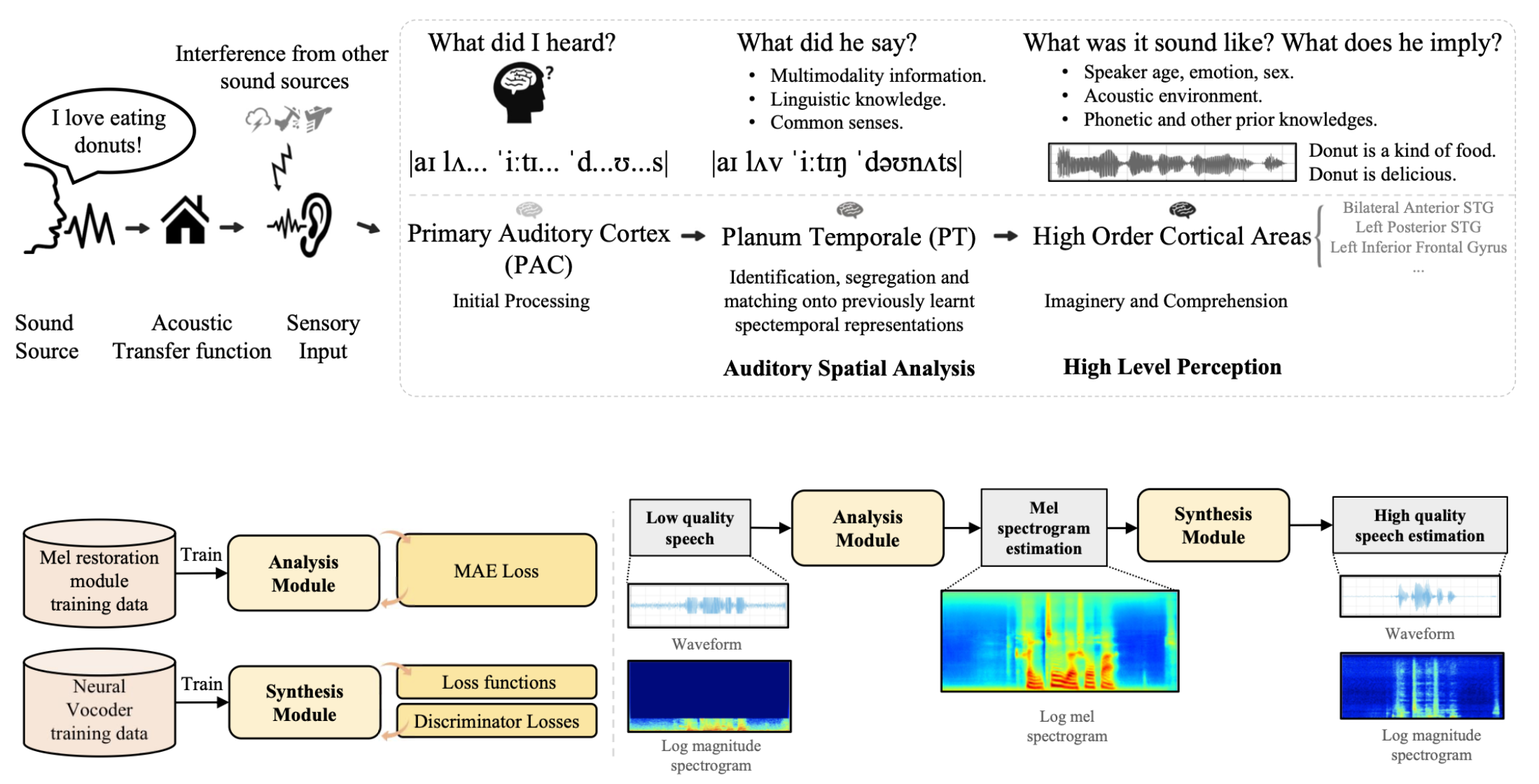
46dAq1.png

Demo

Please visit demo page to view what voicefixer can do.

Usage

from voicefixer import VoiceFixer
voicefixer = VoiceFixer()
voicefixer.restore(input="", # input wav file path
                   output="", # output wav file path
                   cuda=False, # whether to use gpu acceleration
                   mode = 0) # You can try out mode 0, 1 to find out the best result

from voicefixer import Vocoder
# Universal Speaker Independent Vocoder
vocoder = Vocoder(sample_rate=44100) # only support 44100 sample rate
vocoder.oracle(fpath="", # input wav file path
               out_path="") # output wav file path
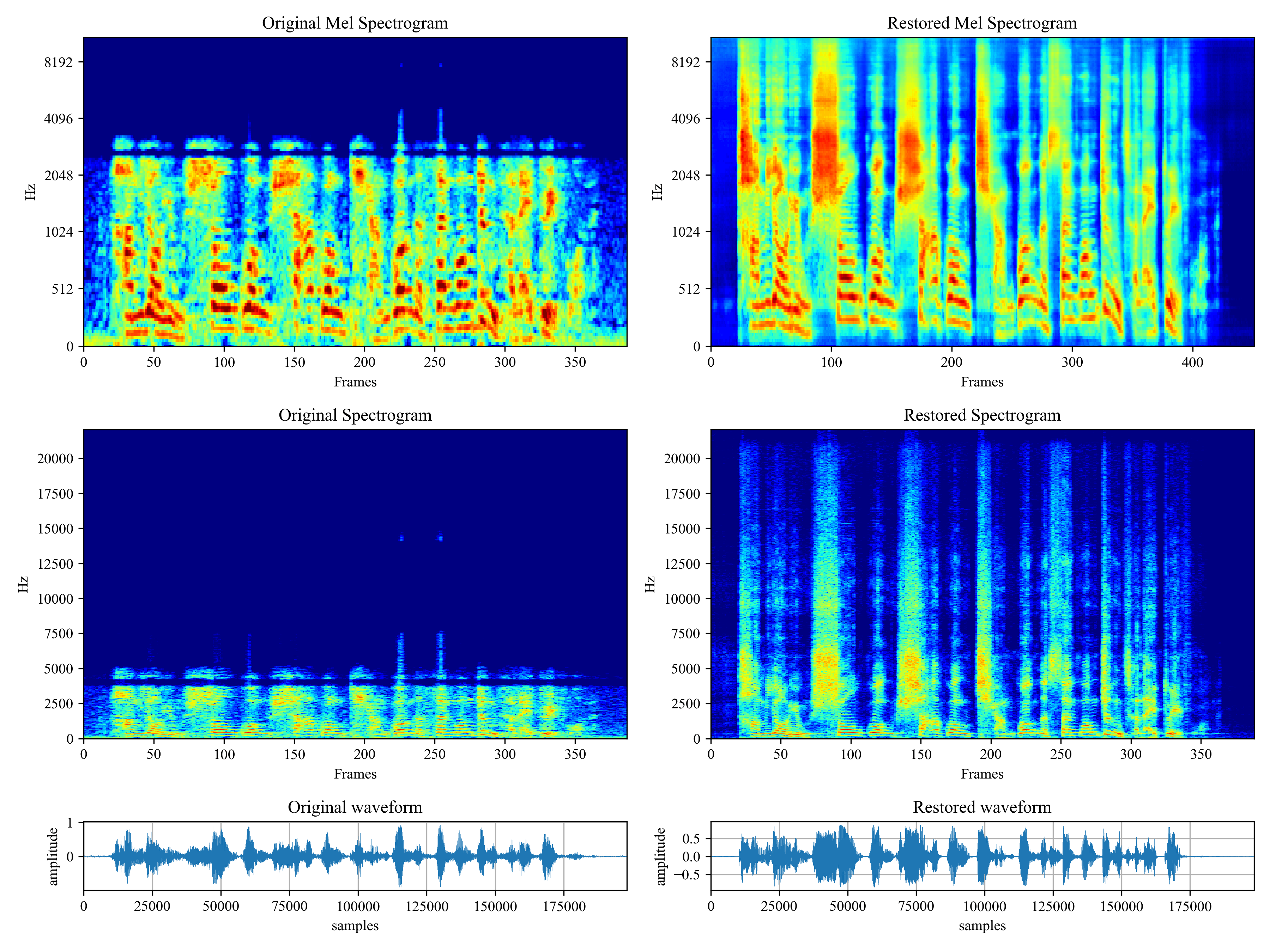
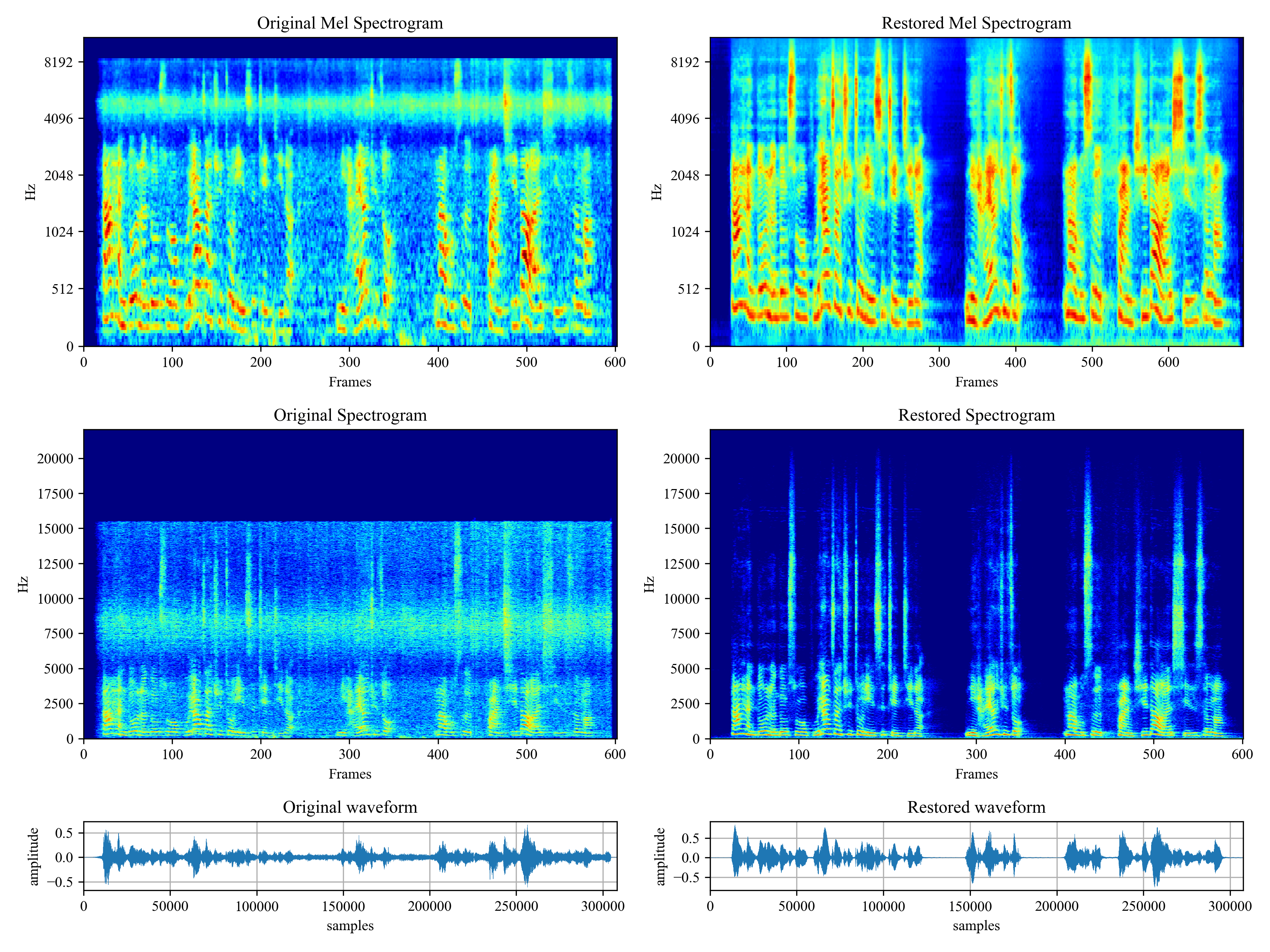
46dnPO.png 46dMxH.png

Related Material

Comments
  • Issue with defining Module

    Issue with defining Module

    I'm trying to make a Google Colab with the code of this one, but it somehow returned this error: NameError: name 'VoiceFixer' is not defined. I even actually defined VoiceFixer using one of the definitions from line 9 of base.py. So I changed the definition with line 93 of model.py, still got the same error. Do you know any fixes? If yes, reply.

    opened by YTR76 9
  • Inconsistency in the generator architecture

    Inconsistency in the generator architecture

    Thanks for releasing the code publicly. I have a small confusion in the implementation of the generator mentioned here. As per Fig.3(a) in the paper, a mask is predicted from the input noisy audio which is then multiplied with the input to get the clean audio, but in the implementation, it seems the after the masking operation it is further passed through a unet. The loss is also calculated for both the outputs. Can you please clarify the inconsistency? Thanks in advance.

    opened by krantiparida 5
  • Add command line script

    Add command line script

    This update adds a script for processing files directly from the command line. You can test locally by switching to the command-line branch, navigating to the repo folder, and running pip3 install -e . You should be able to run the command voicefixer from any directory.

    opened by chrisbaume 4
  • Possibility of running on Windows?

    Possibility of running on Windows?

    Hello, I stumbled on this repo and found it really interesting. The demos in particular impressed me. I have some old/bad quality speech recordings I'd like to try and enhance, but I'm having trouble running any of the code.

    I am running Windows 10 home, Python 3.9.12 at the moment. No GPU present right now, so that may be a problem? I understand that the code is not well tested on Windows yet. Nevertheless, I am completely ignorant when it comes to getting these sorts of things to run; without clear steps to follow, I am lost.

    If there are legitimate issues running on Windows, I'd like to do my part in making them known, but I'm taking a shot in the dark here. I still hope I can be helpful though!

    I assume that the intended workflow for testing is to read an audio file eg. wav, aiff, raw PCM data etc. and process it, creating a new output file? But please correct me if I'm wrong.

    I followed instructions in readme.md to try and use the Streamlit app. Specifically, I ran these commands: pip install voicefixer==0.0.17 git clone https://github.com/haoheliu/voicefixer.git cd voicefixer pip install streamlit streamlit run test/streamlit.py At this point a Windows firewall dialog comes up and I click allow. Throughout this process, no errors seem to show up. But the models do not appear to download (no terminal updates, and I let it sit for about a day with no changes). Streamlit page remains blank. The last thing I see in terminal is: "  You can now view your Streamlit app in your browser.   Local URL: http://localhost:8501   Network URL: http://10.0.0.37:8501" That local URL is the one shown in the address bar.

    So yeah I'm quite lost. What do you advise? Thanks in advance!

    opened by musicalman 4
  • How to test the model for a single task?

    How to test the model for a single task?

    I ran the test/reference.py to test my distorted speech, and the result was GSR. How to test the model for a single task, such as audio super-resolution only? In addition, what is the delay of voicefixer?

    opened by litong123 4
  • Add streamlit inference demo page

    Add streamlit inference demo page

    image Hi!

    I'm very impressed with your research result, and also I want to test my samples as easily as possible.

    So, I made a simple web-based demo using streamlit.

    opened by AppleHolic 3
  • some questions

    some questions

    Hi, thanks for your great work.
    After reading your paper, I have a question here.

    1. Why use the two-stage algorithm? is it to facilitate more types of speech restoration?
    2. Since there is no information about the speed of the model in the paper, what is the training and inference speed of the model?
    opened by LqNoob 2
  • Can the pretrained model suppot these waveform where target sound is far-field?

    Can the pretrained model suppot these waveform where target sound is far-field?

    I tried to use the test script for restoring my audio, but I obtained worse performance. I suspect the model only supports target sound from close field.

    opened by NewEricWang 2
  • where to find the model(*.pth) to test the effect with my own input wav?

    where to find the model(*.pth) to test the effect with my own input wav?

    hi, i just want to test the powerfull effect of voicefixer, with my own distored wav. so i followed your instruction under Python Examples, but when run python3 test/test.py failed. the error information is as follows~~~~~~~~~ Initializing VoiceFixer... Traceback (most recent call last): File "test/test.py", line 39, in voicefixer = VoiceFixer() File "/root/anaconda3.8/lib/python3.8/site-packages/voicefixer/base.py", line 12, in init self._model = voicefixer_fe(channels=2, sample_rate=44100) File "/root/anaconda3.8/lib/python3.8/site-packages/voicefixer/restorer/model.py", line 140, in init self.vocoder = Vocoder(sample_rate=44100) File "/root/anaconda3.8/lib/python3.8/site-packages/voicefixer/vocoder/base.py", line 14, in init self._load_pretrain(Config.ckpt) File "/root/anaconda3.8/lib/python3.8/site-packages/voicefixer/vocoder/base.py", line 19, in _load_pretrain checkpoint = load_checkpoint(pth, torch.device("cpu")) File "/root/anaconda3.8/lib/python3.8/site-packages/voicefixer/vocoder/model/util.py", line 92, in load_checkpoint checkpoint = torch.load(checkpoint_path, map_location=device) File "/root/anaconda3.8/lib/python3.8/site-packages/torch/serialization.py", line 600, in load with _open_zipfile_reader(opened_file) as opened_zipfile: File "/root/anaconda3.8/lib/python3.8/site-packages/torch/serialization.py", line 242, in init super(_open_zipfile_reader, self).init(torch._C.PyTorchFileReader(name_or_buffer)) RuntimeError: PytorchStreamReader failed reading zip archive: failed finding central directory It seems that the pretrained model file can not be find. i manually searched the *.pth files but not find, so seeking your help. Thank you!

    opened by yihe1003 2
  • Unable to test, error in state_dict

    Unable to test, error in state_dict

    Hello,

    I am trying to test the code on a wav file. But I receive the following message:

    RuntimeError: Error(s) in loading state_dict for VoiceFixer: Missing key(s) in state_dict: "f_helper.istft.ola_window". Unexpected key(s) in state_dict: "f_helper.istft.reverse.weight", "f_helper.istft.overlap_add.weight".

    Which seemed to be caused by the following line in the code: self._model = self._model.load_from_checkpoint(os.path.join(os.path.expanduser('~'), ".cache/voicefixer/analysis_module/checkpoints/epoch=15_trimed_bn.ckpt"))

    Do you have an idea on how to resolve this issue?

    opened by yalharbi 2
  • Some problems and questions.

    Some problems and questions.

    Hello! I installed your neural network and ran it in Desktop App mode, but I don't see the "Turn on GPU" switch here. This is the first question. Second question: How do I use the models from the demo page? GSR_UNet, VF_Unet, Oracle?

    Thanks in advance for the answer!

    opened by Aspector1 1
  • Artifacts on 's' sounds

    Artifacts on 's' sounds

    Hello! Awesome project, and I totally understand that this isn't your main focus anymore, but I just love the results this gives over almost everything else I've tried for speech restoration.

    However, I'm getting some interesting 's' sounds being dropped occasionally, and was wondering if there was perhaps a way of avoiding that, that you knew of?

    UnvoiceFixed Voicefixed

    Any ideas would be great, thanks!

    opened by JakeCasey 0
  • Lots of noises are added to the unspoken parts and overall quality is not worse - files provides

    Lots of noises are added to the unspoken parts and overall quality is not worse - files provides

    My audio is from my lecture video : https://www.youtube.com/watch?v=2zY1dQDGl3o

    I want to improve overall quality to make it easier to understand

    Here my raw audio : https://drive.google.com/file/d/1gGxH1J3Z_I8NNjqBvbrVB5MA0gh4qCD7/view?usp=share_link

    mode 0 output : https://drive.google.com/file/d/1MRFQecxx9Ikevnsyk9Ivx6Ofr_dqdwFi/view?usp=share_link

    mode 1 output : https://drive.google.com/file/d/1sva-o7Py6beEIWbcA4f0LS1-ikGmvlUC/view?usp=share_link

    mode 2 output : https://drive.google.com/file/d/1sva-o7Py6beEIWbcA4f0LS1-ikGmvlUC/view?usp=share_link

    for example open 1.00.40 and you will see noise

    also improvement is not very good if i am not talking a lot during that part of video

    check out usually the late parts of the sound files and you will see it is actually worse in mode 1 and mode 2

    for example check 1.02.40 mode 1 and see noise and bad sound quality

    for example check 1.32.55 mode 2 and see bad quality and noise glitches

    I don't know maybe you can test and experiment with my speech to improve model even further.

    thank you very much keep up the good work

    opened by FurkanGozukara 2
  • Voice fixer 8000hz to 16000hz how to upsample wav to 16000 hz using voice fixer

    Voice fixer 8000hz to 16000hz how to upsample wav to 16000 hz using voice fixer

    every time when i try telephonic wav(8khz) to rise it to 44khz it removes clarity of audio.... how to give custom upsample rate and there Are 2 people voices in my wav file but when i upsample with voice fixer ,the output wav has only one person voice

    opened by PHVK1611 1
  • How to use my own trained model from voicefixer_main?

    How to use my own trained model from voicefixer_main?

    Hello.

    I am having issue when running your code for inference with the trained model from voicefixer_main, not the pretrained model. Is it possible to use the trained model for test.py?

    I tried to replaced the vf.ckpt with my trined model ~ at the original directory, but it did not work it produced the following error:

    CleanShot 2022-11-04 at 16 34 01@2x

    It seems like the pretrained model voicefixer and the trained model from voicefixer_main are different each other in terms of model's size. the pretrained model is about 489.3 MB the one from voice_fixer main is about 1.3 GB

    opened by utahboy3502 1
  • Padding error with certain input lengths

    Padding error with certain input lengths

    Hello everyone, first of all nice work on the library! Very cool stuff and good out-of-the-box results.

    I've run into a bug though (or at least it looks a lot like one). Certain input lengths trigger padding errors, probably due to how the split-and-concat strategy for larger inputs work in restore_inmem:

    import voicefixer
    import numpy as np
    
    model = voicefixer.VoiceFixer()
    model.restore_inmem(np.random.random(44100*30 + 1))
    
    >>>
    RuntimeError: Argument #4: Padding size should be less than the corresponding input dimension, but got: padding (1024, 1024) at dimension 2 of input [1, 1, 2]
    

    I have a rough idea on how to patch it, so let me know if you'd like a PR.

    Thanks,

    opened by amiasato 1
Releases(v0.0.12)
Anki vector Music ❤ is the best and only Telegram VC player with playlists, Multi Playback, Channel play and more

Anki Vector Music 🎵 A bot that can play music on Telegram Group and Channel Voice Chats Available on telegram as @Anki Vector Music Features 🔥 Thumb

Damantha Jasinghe 12 Nov 12, 2022
Pyroomacoustics is a package for audio signal processing for indoor applications. It was developed as a fast prototyping platform for beamforming algorithms in indoor scenarios.

Summary Pyroomacoustics is a software package aimed at the rapid development and testing of audio array processing algorithms. The content of the pack

Audiovisual Communications Laboratory 1k Jan 09, 2023
pyo is a Python module written in C to help digital signal processing script creation.

pyo is a Python module written in C to help digital signal processing script creation.

Olivier Bélanger 1.1k Jan 01, 2023
MelGAN test on audio decoding

Official repository for the paper MelGAN: Generative Adversarial Networks for Conditional Waveform Synthesis The original work URL: https://github.com

Jurio 1 Apr 29, 2022
GNU Radio – the Free and Open Software Radio Ecosystem

GNU Radio is a free & open-source software development toolkit that provides signal processing blocks to implement software radios. It can be used wit

GNU Radio 4.1k Jan 06, 2023
SomaFM Plugin for Kodi

SomaFM XBMC Plugin This description is a bit outdated. You can simply install this addon by browsing the official repositories from within Kodi. Insta

7 Jan 21, 2022
FPGA based USB 2.0 high speed audio interface featuring multiple optical ADAT inputs and outputs

ADAT USB Audio Interface FPGA based USB 2.0 High Speed audio interface featuring multiple optical ADAT inputs and outputs Status / current limitations

Hans Baier 78 Dec 31, 2022
Open-Source bot to play songs in your Telegram's Group Voice Chat. Powered by @Akki_ThePro

VcPlayer Telegram Voice-Chat Bot [PyTGCalls] ⇝ Requirements ⇜ Account requirements A Telegram account to use as the music bot, You cannot use regular

Akki ThePro 2 Dec 25, 2021
An audio-solving python funcaptcha solving module

funcapsolver funcapsolver is a funcaptcha audio-solving module, which allows captchas to be interacted with and solved with the use of google's speech

Acier 8 Nov 21, 2022
Audio processor to map oracle notes in the VoG raid in Destiny 2 to call outs.

vog_oracles Audio processor to map oracle notes in the VoG raid in Destiny 2 to call outs. Huge thanks to mzucker on GitHub for the note detection cod

19 Sep 29, 2022
In this project we can see how we can generate automatic music using character RNN.

Automatic Music Genaration Table of Contents Project Description Approach towards the problem Limitations Libraries Used Summary Applications Referenc

Pronay Ghosh 2 May 27, 2022
Python CD-DA ripper preferring accuracy over speed

Whipper Whipper is a Python 3 (3.6+) CD-DA ripper based on the morituri project (CDDA ripper for *nix systems aiming for accuracy over speed). It star

671 Jan 04, 2023
Gateware for the Terasic/Arrow DECA board, to become a USB2 high speed audio interface

DECA USB Audio Interface DECA based USB 2.0 High Speed audio interface Status / current limitations enumerates as class compliant audio device on Linu

Hans Baier 16 Mar 21, 2022
Frescobaldi LilyPond Editor

README for Frescobaldi Homepage: http://www.frescobaldi.org/ Main author: Wilbert Berendsen Frescobaldi is a LilyPond sheet music text editor. It aims

Frescobaldi 600 Dec 29, 2022
Use android as mic/speaker for ubuntu

Pulse Audio Control Panel Platforms Requirements sudo apt install ffmpeg pactl (already installed) Download Download the AppImage from release page ch

19 Dec 01, 2022
Mopidy is an extensible music server written in Python

Mopidy Mopidy is an extensible music server written in Python. Mopidy plays music from local disk, Spotify, SoundCloud, Google Play Music, and more. Y

Mopidy 7.6k Jan 05, 2023
Delta TTA(Text To Audio) SoftWare

Text-To-Audio-Windows Delta TTA(Text To Audio) SoftWare Info You Can Use It For Convert Your Text To Audio File You Just Write Your Text And Your End

Delta Inc. 2 Dec 14, 2021
Music Streaming Platform based on full implementation of DBSM

Symphony Music Streaming Platform based on full implementation of DBSM List of Commands Insert User (INSERT) Function to implement input in USER Get a

Parth Maradia 1 Nov 12, 2021
Full LAKH MIDI dataset converted to MuseNet MIDI output format (9 instruments + drums)

LAKH MuseNet MIDI Dataset Full LAKH MIDI dataset converted to MuseNet MIDI output format (9 instruments + drums) Bonus: Choir on Channel 10 Please CC

Alex 6 Nov 20, 2022
Speech Algorithms Collections

Speech Algorithms Collections

Ryuk 498 Jan 06, 2023