Command-line tool for looking up colors and palettes.

Overview

Colorpedia

Colorpedia is a command-line tool for looking up colors, shades and palettes.

Supported color models: HEX, RGB, HSL, HSV, CMYK.
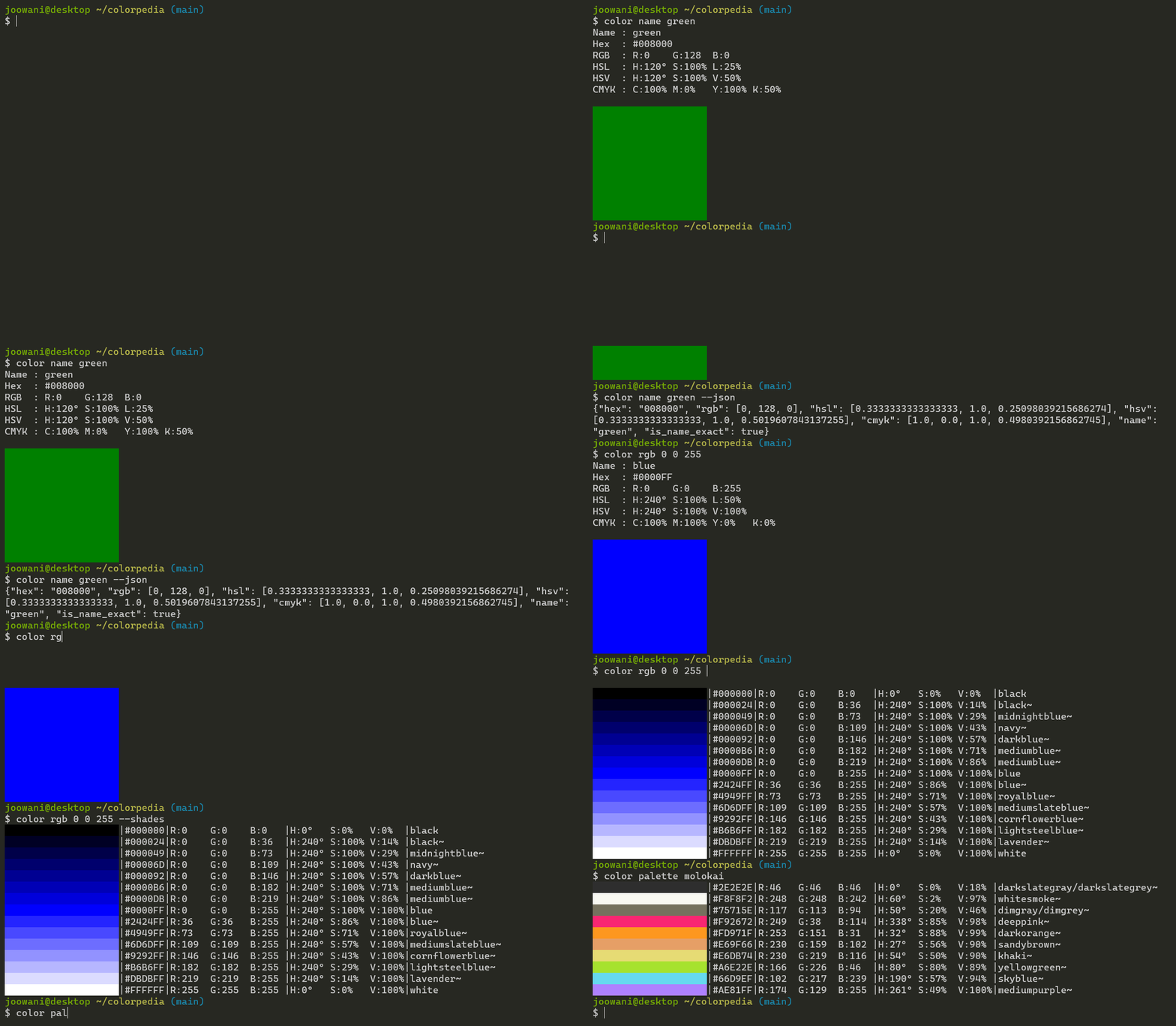
Demo GIF Build CodeQL Codecov PyPI version GitHub license Python version

Requirements

  • Modern terminal with true color and utf-8 support (e.g. Windows Terminal, PowerShell, iTerm2, Terminator)
  • Python 3.6+

Installation

Install via pip:

pip install colorpedia

For conda users:

conda install colorpedia -c conda-forge

You can then use the color command:

color --help

If you have a name collision on Windows, use colorpedia instead:

colorpedia --help

Usage

Look up colors using various color models:

color name green            # CSS3 color name
color hex FFFFFF            # hex code without the hash (#) prefix
color rgb 255 255 255       # RGB (Red Green Blue)
color hsl 360 100 100       # HSL (Hue Saturation Lightness)
color hsv 360 100 100       # HSV (Hue Saturation Brightness)
color cmyk 100 100 100 100  # CMYK (Cyan Magenta Yellow Black)

Use --shades to display shades of a color:

color name green --shades    # Display 15 colors by default
color hex FFFFFF --shades=5  # Display 5 shades

Look up color palettes:

color palette molokai
color palette facebook
color palette zenburn

Control the output with global flags:

color name yellow --all      # Display all details
color name yellow --json     # Display in JSON format
color name yellow --units    # Display unit symbols
color name yellow --nojson   # Do not display in JSON
color name yellow --nounits  # Do not display unit symbols

Combine with other command-line tools like jq:

color palette molokai | cut -d'|' -f 2,3,4
color name blue --range --json | jq .[0].name

Use --help to display more information on each subcommand:

color name --help
color rgb --help
color palette --help

Tab Completion

For Bash, add the following line in ~/.bashrc or ~/.bash_profile:

source <(color -- --completion)

For Zsh, add the following lines in ~/.zshrc:

autoload -U +X compinit && compinit
autoload -U +X bashcompinit && bashcompinit

source <(color -- --completion | sed "s/:/: /g")

Replace color with colorpedia if you are using the latter.

Configuration

Initialize the configuration file to customize CLI behavior:

color config init

The command above creates ~/.config/colorpedia/config.json with default settings:

{
  // Always display in JSON format. Use with --nojson global flag.
  "always_output_json": false,
  
  // Suffix for approximate color names (e.g. "green~").
  "approx_name_suffix": "~",
  
  // Default number of shades displayed when --shades is used without a count.
  "default_shades_count": 15,
  
  // Display degrees angle (°) symbol. Use with --nounits global flag.
  "display_degree_symbol": false,
  
  // Display percentage (%) symbol. Use with --nounits global flag.
  "display_percent_symbol": false,
  
  // Height of the color box displayed in single-color (get) view.
  "get_view_color_height": 10,
  
  // Width of the color box displayed in single-color (get) view.
  "get_view_color_width": 20,
  
  // Keys displayed in single-color (get) view.
  "get_view_keys": ["name", "hex", "rgb", "color", "hsl", "hsv", "cmyk"],
  
  // Keys displayed in JSON view.
  "json_keys": ["name", "is_name_exact", "hex", "rgb", "hsl", "hsv", "cmyk"],
  
  // Width of the color box displayed in multi-color (list) view.
  "list_view_color_width": 20,
  
  // Keys displayed in multi-color (list) view.
  "list_view_keys": ["name", "hex", "rgb", "color", "hsl", "hsv", "cmyk"],
  
  // Always uppercase hex codes if set to true, lowercase if set to false.
  "uppercase_hex_codes": true
}

Display or edit the configuration file:

color config show  # Display configuration
color config edit  # Edit configuration via a text editor

Technical Notes

  • Names of "unknown" colors are approximated using minimum RGB delta:
    delta = (R1 - R2) ^ 2 + (G1 - G2) ^ 2 + (B1 - B2) ^ 2
    
    If there is are ties, all names are included in the output.
  • Percentage values use 0 - 100 scale by default, 0 - 1 scale in JSON.
  • Degree angles use 0 - 360 scale by default, 0 - 1 scale in JSON.
  • Percent and degree unit symbols are omitted in JSON.
  • If HSV/HSL/CMYK values do not map exactly to an RGB triplet, they are rounded to the nearest one.
You might also like...
A lightweight Python module and command-line tool for generating NATO APP-6(D) compliant military symbols from both ID codes and natural language names

Python military symbols This is a lightweight Python module, including a command-line script, to generate NATO APP-6(D) compliant military symbol icon

Python command line tool and python engine to label table fields and fields in data files.

Python command line tool and python engine to label table fields and fields in data files. It could help to find meaningful data in your tables and data files or to find Personal identifable information (PII).

A command line tool to hide and reveal information inside images (works for both PNGs and JPGs)

Imgrerite A command line tool to hide and reveal information inside images (works for both PNGs and JPGs) Dependencies Python 3 Git Most of the Linux

gget is a free and open-source command-line tool and Python package that enables efficient querying of genomic databases.

gget is a free and open-source command-line tool and Python package that enables efficient querying of genomic databases. gget consists of a collection of separate but interoperable modules, each designed to facilitate one type of database querying in a single line of code.

Simple command line tool for text to image generation using OpenAI's CLIP and Siren (Implicit neural representation network)

Simple command line tool for text to image generation using OpenAI's CLIP and Siren (Implicit neural representation network)

Free and Open-Source Command Line tool for Text Replacement

Sniplet Free and Open Source Text Replacement Tool Description: Sniplet is a work in progress CLI tool which can do text replacement globally in Linux

A command line tool to remove background from video and image

A command line tool to remove background from video and image, brought to you by BackgroundRemover.app which is an app made by nadermx powered by this tool

A command line tool (and Python library) for archiving Twitter JSON

A command line tool (and Python library) for archiving Twitter JSON

Command line tool to keep track of your favorite playlists on YouTube and many other places.

Command line tool to keep track of your favorite playlists on YouTube and many other places.

Comments
  • Bad hex code when using 212121

    Bad hex code when using 212121

    Cool tool! Thank you so much for sharing it!

    Entity | Version --- | --- colorpedia | 1.1.0 Python | 3.9.1

    When I run

    % color hex 212121
    Bad hex code (expecting a string matching ^(?:[0-9a-fA-F]{3}){1,2}$)
    

    #212121 seems to be a valid hex code.

    opened by paw-lu 9
  • [Feature Suggestion] Commands to manipulate user-defined palettes

    [Feature Suggestion] Commands to manipulate user-defined palettes

    To add a new palette,

    colorpedia palette create <name> <path_to_json_file>

    If there is already one, ask the user if want to overwrite or not.

    To delete a palette,

    colorpedia palette remove <name>

    enhancement 
    opened by dinhanhx 3
  • Colorpedia

    Colorpedia

    just installed colorpedia using pip... I cant seem to run this .. I am getting the following error message

    Traceback (most recent call last): File "/Users/user/anaconda3/bin/color", line 5, in from colorpedia.cli import entry_point File "/Users/user/anaconda3/lib/python3.6/site-packages/colorpedia/init.py", line 1, in from colorpedia.color import Color File "/Users/user/anaconda3/lib/python3.6/site-packages/colorpedia/color.py", line 1, in from dataclasses import dataclass ModuleNotFoundError: No module named 'dataclasses'

    Please help

    opened by coderchai 2
Releases(1.2.3)
CLI tool to fix linked references for dates.

Fix Logseq dates This is a CLI tool to fix the date references following a change in date format since the current version (0.4.4) of Logseq does not

Isaac Dadzie 5 May 18, 2022
🌌 A Python script to generate blog banners from command line.

Auto Blog Banner Generator A Python script to generate blog banners. This script is used at RavSam. The following image is an example of the blog bann

RavSam 10 Sep 20, 2022
Freaky fast fuzzy Denite/CtrlP matcher for vim/neovim

Freaky fast fuzzy Denite/CtrlP matcher for vim/neovim This is a matcher plugin for denite.nvim and CtrlP.

Raghu 113 Sep 29, 2022
A command line utility for tracking a stock market portfolio. Primarily featuring high resolution braille graphs.

A command line stock market / portfolio tracker originally insipred by Ericm's Stonks program, featuring unicode for incredibly high detailed graphs even in a terminal.

Conrad Selig 51 Nov 29, 2022
A CLI/Shell supporting OpenRobot API and more!

A CLI/Shell supporting JeyyAPI, OpenRobot API and RePI API.

OpenRobot Packages 1 Jan 06, 2022
The easiest way to create beautiful CLI for your programs.

The Yandere is a program written in Python3, allowing you to create your own beautiful CLI tool.

Billy 31 Dec 20, 2022
QueraToCSV is a simple python CLI project to convert the Quera results file into CSV files.

Quera is an Iranian Learning management system (LMS) that has an online judge for programming languages. Some Iranian universities use it to automate the evaluation of programming assignments.

Amirmahdi Namjoo 16 Nov 11, 2022
Code for the Open Data Day 2022 publicbodies.org Nepal data scraping activities.

Open Data Day Publicbodies.org Nepal We've gathered on Saturday, 5th March 2022 with Open Knowledge Nepal in order to try and automate the collection

Augusto Herrmann 2 Mar 12, 2022
Jupyter notebook client in neovim

🪐 Jupyter-Nvim Read jupyter notebooks in neovim Note: The plugin is still in alpha stage 👾 Usage Just open any *.ipynb file and voila! ✨ Contributin

Ahmed Khalf 85 Dec 29, 2022
A simple terminal-based localhost chat application written in python

Chat House A simple terminal-based localhost chat application written in python How to Use? Clone the repo git clone https://github.com/heksadecimal/c

Heks 10 Nov 09, 2021
Python script to tabulate data formats like json, csv, html, etc

pyT PyT is a a command line tool and as well a library for visualising various data formats like: JSON HTML Table CSV XML, etc. Features Print table o

Mobolaji Abdulsalam 1 Dec 30, 2021
cli simple python script to interact with iphone afc api based on python library( tidevice )

afcclient cli simple python script to interact with iphone afc api based on python library( tidevice ) installation pip3 install -U tidevice cp afccli

fyst_14 2 Jul 15, 2022
xonsh is a Python-powered, cross-platform, Unix-gazing shell

xonsh is a Python-powered, cross-platform, Unix-gazing shell language and command prompt.

xonsh 6.7k Dec 31, 2022
Objexplore is an interactive Python object explorer for the terminal.

Objexplore is an interactive Python object explorer for the terminal. Use it while debugging, or exploring a new library, or whatever! 9D1FAC73-B2A5-4

kylepollina 249 Dec 23, 2022
A simple Python CLI tool that draws routes/paths on a given map.

Map Router A simple Python CLI tool that draws routes/paths on a given map. Index Installation Usage Docs Why? License Support Installation Coming soo

Pedro Morim 1 Nov 07, 2021
Wordle-cli - Command-line clone of Josh Wardle's WORDLE

Command-line clone of Josh Wardle's WORDLE, inspired by Paul Battley's Ruby vers

Klipspringer 32 Jan 03, 2023
Ralph is a command-line tool to fetch, extract, convert and push your tracking logs from various storage backends to your LRS or any other compatible storage or database backend.

Ralph is a command-line tool to fetch, extract, convert and push your tracking logs (aka learning events) from various storage backends to your

France Université Numérique 18 Jan 05, 2023
Simple Python Library to display text with color in Python Terminal

pyTextColor v1.0 Introduction pyTextColor is a simple Python Library to display colorful outputs in Terminal, etc. Note: Your Terminal or any software

Siddhesh Chavan 1 Jan 23, 2022
Cthulhu is a simple python CLI application that streams torrents directly from 1337x.

Cthulhu is a simple python CLI application that facilitates the streaming of torrents directly from 1337x. It uses webtorrent to stream video

Raiyan 27 Dec 27, 2022
dcargs is a tool for generating portable, reusable, and strongly typed CLI interfaces from dataclass definitions.

dcargs is a tool for generating portable, reusable, and strongly typed CLI interfaces from dataclass definitions.

Brent Yi 119 Jan 09, 2023

