🔎 Monitor deep learning model training and hardware usage from your mobile phone 📱

Overview

Monitor deep learning model training and hardware usage from mobile.

PyPI - Python Version PyPI Status Docs Twitter

🔥 Features

  • Monitor running experiments from mobile phone (or laptop) View Run
  • Monitor hardware usage on any computer with a single command
  • Integrate with just 2 lines of code (see examples below)
  • Keeps track of experiments including infomation like git commit, configurations and hyper-parameters
  • Keep Tensorboard logs organized
  • Save and load checkpoints
  • API for custom visualizations Open In Colab Open In Colab
  • Pretty logs of training progress
  • Change hyper-parameters while the model is training
  • Open source! we also have a small hosted server for the mobile web app

Installation

You can install this package using PIP.

pip install labml

PyTorch example

Open In Colab Kaggle

from labml import tracker, experiment

with experiment.record(name='sample', exp_conf=conf):
    for i in range(50):
        loss, accuracy = train()
        tracker.save(i, {'loss': loss, 'accuracy': accuracy})

PyTorch Lightning example

Open In Colab Kaggle

from labml import experiment
from labml.utils.lightening import LabMLLighteningLogger

trainer = pl.Trainer(gpus=1, max_epochs=5, progress_bar_refresh_rate=20, logger=LabMLLighteningLogger())

with experiment.record(name='sample', exp_conf=conf, disable_screen=True):
        trainer.fit(model, data_loader)

TensorFlow 2.X Keras example

Open In Colab Kaggle

from labml import experiment
from labml.utils.keras import LabMLKerasCallback

with experiment.record(name='sample', exp_conf=conf):
    for i in range(50):
        model.fit(x_train, y_train, epochs=conf['epochs'], validation_data=(x_test, y_test),
                  callbacks=[LabMLKerasCallback()], verbose=None)

📚 Documentation

Guides

🖥 Screenshots

Formatted training loop output
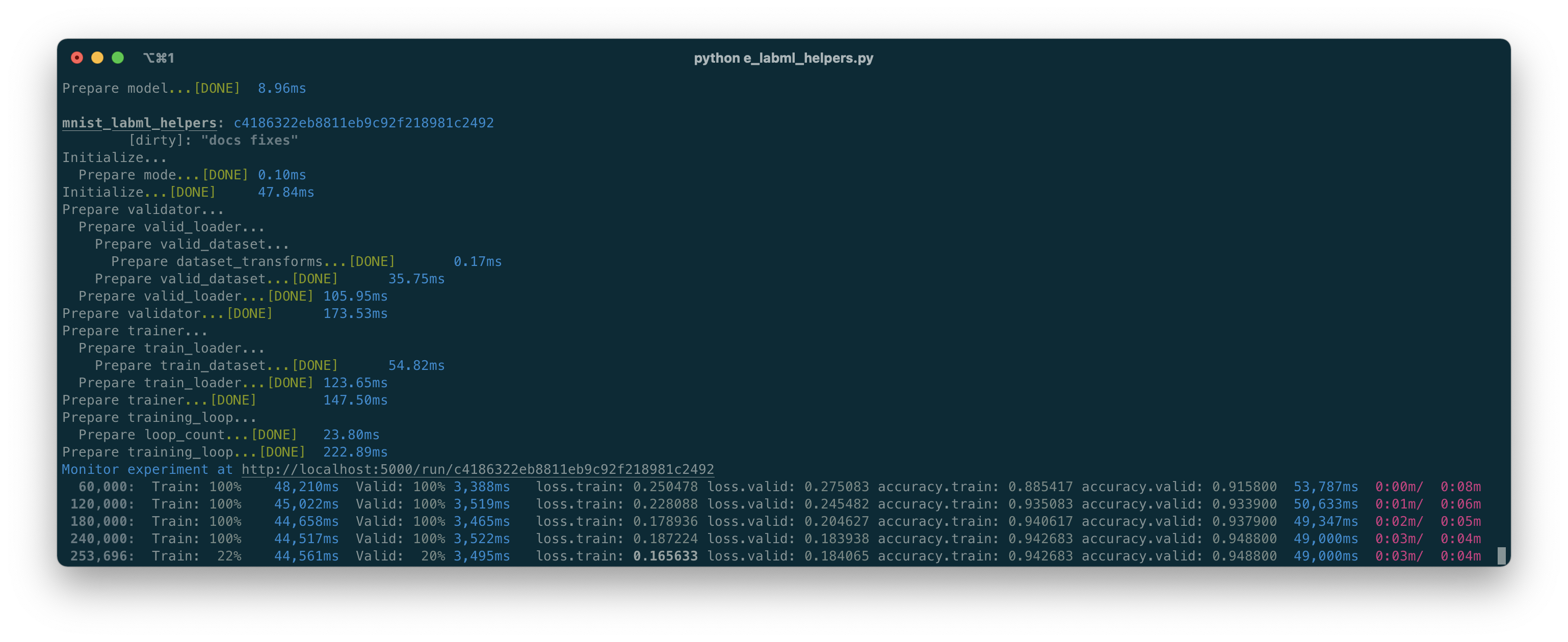
Sample Logs

Custom visualizations based on Tensorboard logs
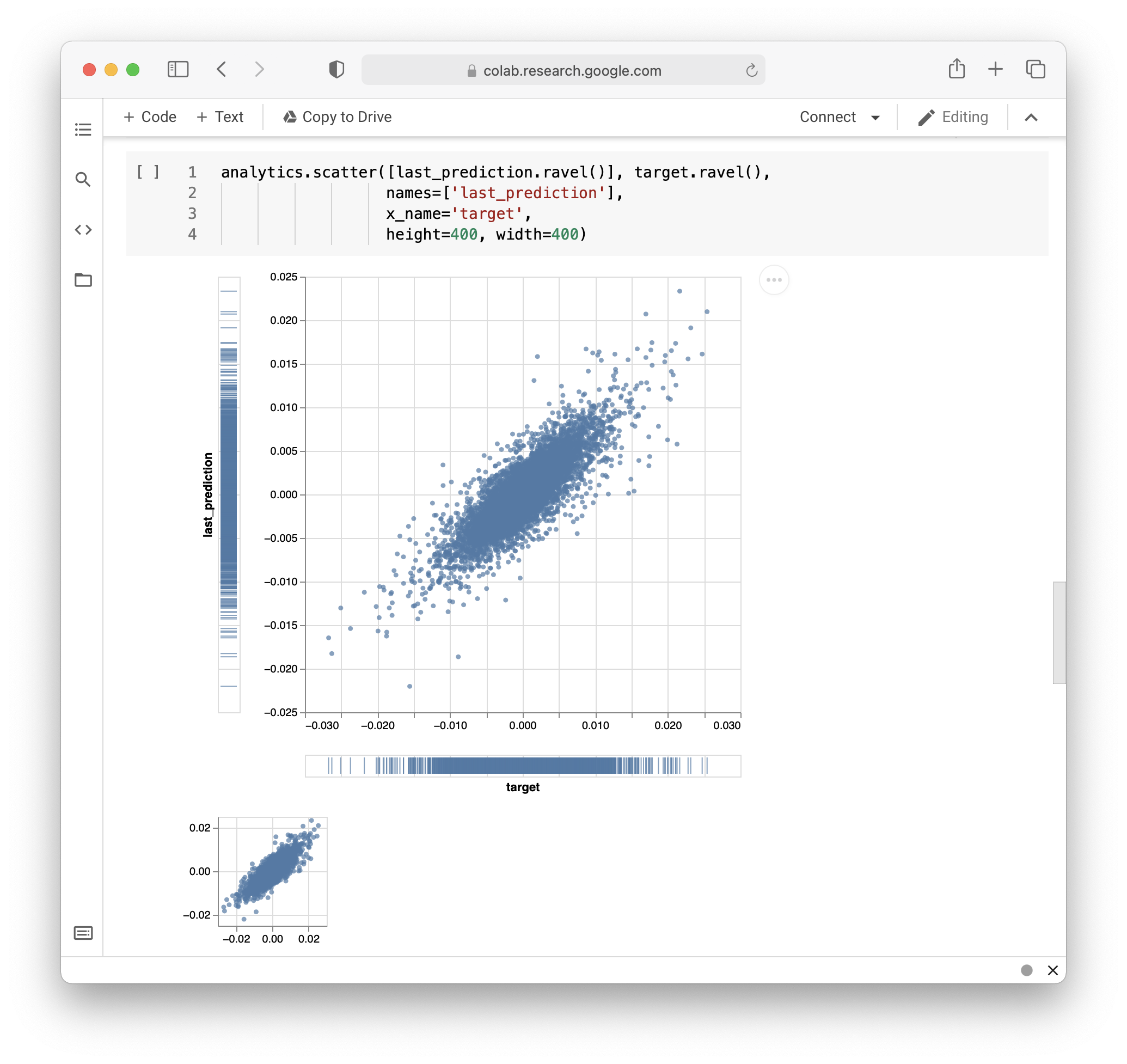
Analytics

Tools

Hosting your own experiments server

# Install the package
pip install labml-app

# Start the server

labml app-server

Training models on cloud

# Install the package
pip install labml_remote

# Initialize the project
labml_remote init

# Add cloud server(s) to .remote/configs.yaml

# Prepare the remote server(s)
labml_remote prepare

# Start a PyTorch distributed training job
labml_remote helper-torch-launch --cmd 'train.py' --nproc-per-node 2 --env GLOO_SOCKET_IFNAME enp1s0

Monitoring hardware usage

# Install packages and dependencies
pip install labml psutil py3nvml

# Start monitoring
labml monitor

Other Guides

Setting up a local Ubuntu workstation for deep learning

Setting up a local cloud computer for deep learning

Citing

If you use LabML for academic research, please cite the library using the following BibTeX entry.

@misc{labml,
 author = {Varuna Jayasiri, Nipun Wijerathne},
 title = {labml.ai: A library to organize machine learning experiments},
 year = {2020},
 url = {https://labml.ai/},
}
Comments
  • Labml is stuck

    Labml is stuck

    I can't do anything with labml, even if it is as simple as executing: image

    It is stuck forever, and I literally downloaded and executed your notebook https://colab.research.google.com/github/lab-ml/labml/blob/master/guides/monitor.ipynb

    and it gets stuck at the sixth cell: tracker.set_queue('loss.train', 20, True)

    image

    What should I do please?

    bug help wanted 
    opened by shetsecure 11
  • Remove git commits/branches check

    Remove git commits/branches check

    Hello there!

    First of all thanks for your library, used it in my recent open source project!

    Now, I want to share my criticism.

    I have another project, but there we decided to set remotes' names of our repo different from default: bars and upstream, there is no origin as you can see.

    So I had this error:

    .labml.yml:

    check_repo_dirty: false
    experiments_path: '.labml'
    web_api: 'secret'
    

    Error:

    Traceback (most recent call last):
      File "/media/sviperm/9740514d-d8c8-4f3e-afee-16ce6923340c3/sviperm/Documents/Aurora/Aurora.ContextualMistakes/src/train.py", line 395, in <module>
        train()
      File "/media/sviperm/9740514d-d8c8-4f3e-afee-16ce6923340c3/sviperm/Documents/Aurora/Aurora.ContextualMistakes/src/train.py", line 354, in train
        with experiment.record(name=MODEL_SAVE_NAME, exp_conf=args.__dict__) if args.labml else ExitStack():
      File "/media/sviperm/9740514d-d8c8-4f3e-afee-16ce6923340c3/sviperm/Documents/Aurora/Aurora.ContextualMistakes/venv/lib/python3.9/site-packages/labml/experiment.py", line 388, in rec
    ord
        create(name=name,
      File "/media/sviperm/9740514d-d8c8-4f3e-afee-16ce6923340c3/sviperm/Documents/Aurora/Aurora.ContextualMistakes/venv/lib/python3.9/site-packages/labml/experiment.py", line 86, in crea
    te
        _create_experiment(uuid=uuid,
      File "/media/sviperm/9740514d-d8c8-4f3e-afee-16ce6923340c3/sviperm/Documents/Aurora/Aurora.ContextualMistakes/venv/lib/python3.9/site-packages/labml/internal/experiment/__init__.py"
    , line 511, in create_experiment
        _internal = Experiment(uuid=uuid,
      File "/media/sviperm/9740514d-d8c8-4f3e-afee-16ce6923340c3/sviperm/Documents/Aurora/Aurora.ContextualMistakes/venv/lib/python3.9/site-packages/labml/internal/experiment/__init__.py"
    , line 225, in __init__
        self.run.repo_remotes = list(repo.remote().urls)
      File "/media/sviperm/9740514d-d8c8-4f3e-afee-16ce6923340c3/sviperm/Documents/Aurora/Aurora.ContextualMistakes/venv/lib/python3.9/site-packages/git/remote.py", line 553, in urls
        raise ex
      File "/media/sviperm/9740514d-d8c8-4f3e-afee-16ce6923340c3/sviperm/Documents/Aurora/Aurora.ContextualMistakes/venv/lib/python3.9/site-packages/git/remote.py", line 529, in urls
        remote_details = self.repo.git.remote("get-url", "--all", self.name)
      File "/media/sviperm/9740514d-d8c8-4f3e-afee-16ce6923340c3/sviperm/Documents/Aurora/Aurora.ContextualMistakes/venv/lib/python3.9/site-packages/git/cmd.py", line 545, in <lambda>
        return lambda *args, **kwargs: self._call_process(name, *args, **kwargs)
      File "/media/sviperm/9740514d-d8c8-4f3e-afee-16ce6923340c3/sviperm/Documents/Aurora/Aurora.ContextualMistakes/venv/lib/python3.9/site-packages/git/cmd.py", line 1011, in _call_process
        return self.execute(call, **exec_kwargs)
      File "/media/sviperm/9740514d-d8c8-4f3e-afee-16ce6923340c3/sviperm/Documents/Aurora/Aurora.ContextualMistakes/venv/lib/python3.9/site-packages/git/cmd.py", line 828, in execute
        raise GitCommandError(command, status, stderr_value, stdout_value)
    git.exc.GitCommandError: Cmd('git') failed due to: exit code(128)
      cmdline: git remote get-url --all origin
      stderr: 'fatal: No such remote 'origin''
    

    So my question №1 is: why labml check git branches/remote/commits? What is the idea behind this logic? I think that library for training monitoring for ML project doesn't need to do that. If developer / data scientist want to track git and prevent training because of uncommited changes, he/she can write this logic by his own.

    Question №2: if i set check_repo_dirty: false why labml still checking repo? And what is the default value of the parameter?

    2 possible suggestions:

    1. Put condition before try in labml/internal/experiment/__init__.py to prevent all this git code :
      if self.check_repo_dirty:
          try:
              repo = git.Repo(lab_singleton().path)
      
              self.run.repo_remotes = list(repo.remote().urls)
              self.run.commit = repo.head.commit.hexsha
              self.run.commit_message = repo.head.commit.message.strip()
              self.run.is_dirty = repo.is_dirty()
              self.run.diff = repo.git.diff()
          except git.InvalidGitRepositoryError:
              if not is_colab() and not is_kaggle():
                  labml_notice(["Not a valid git repository: ",
                                (str(lab_singleton().path), Text.value)])
              self.run.commit = 'unknown'
              self.run.commit_message = ''
              self.run.is_dirty = True
              self.run.diff = ''
      
    2. Or completely remove all this git tracking code or make it deprecated.

    Thanks!

    bug 
    opened by sviperm 6
  • Checkpointing optimizers

    Checkpointing optimizers

    Hi, I am working with your framework. First of all, great job. It really saved me from the usual research mess :) I have some questions about the checkpointing. I've seen that each layer is saved in a .npy format. However, this does not work for other objects that are based on state_dict, for example optimizers. For long trainings they should be saved with the model, since we don't want to retrain the whole model from scratch. I've looked into your checkpointing strategy here. Do you see any significant problem if instead saving all layers in .npy files we directly save the state_dict?

    opened by fabvio 5
  • Network error in comparison section

    Network error in comparison section

    Issue: when runs were added to comparison section then were deleted, there is network error + 404 error

    image image

    Run in app.labml.ai

    How to reproduce: create 2 runs, add one to another to compare, then delete run which was added

    Tested in incognito-mode tab, so this is no cache/cookies problem

    bug 
    opened by sviperm 4
  • 500 Error Issue

    500 Error Issue

    Hi,

    I see this error "Oops! Something went wrong 500 Seems like we are having issues right now".

    I'm also unable to run the app locally. Please advise.

    labml app-server gives me: labml: error: argument command: invalid choice: 'app-server' (choose from 'dashboard', 'capture', 'launch', 'monitor', 'service', 'service-run')

    opened by Ananya-Joshi 3
  • Added tensorboard image logging

    Added tensorboard image logging

    Hi. I've seen that the Artifact class is used to print outputs during training time. I usually keep track of outputs during training. I added support in tensorboard for image artifact logging.

    What I did is checking the is_print value is true while the print_all method is called. This is to avoid unnecessary outputs. Then, in the tensorboard writer, I iterate over Image artifacts and write them using tf.summary.image. The method should be extensible seamlessly to other artifact types.

    I assume that artifacts are flushed once they are printed or overlapped, so this won't create memory issues during training. Am I wrong?

    opened by fabvio 3
  • 502 - Bad Gateway

    502 - Bad Gateway

    Hi, since yesterday, I constantly receive the message '502 Bad Gateway' every time I launch an labml experiment, both from jupyter notebook and from Colab. Here an example:

    Schermata da 2021-10-11 21-10-26

    Moreover, I get this error from https://app.labml.ai/runs : Schermata da 2021-10-11 21-04-28

    Is there a problem with your app?

    Thanks in advantage.

    opened by EMalagoli92 2
  • tensorflow import?

    tensorflow import?

    I don't think the tensorflow import in the experiments.pytorch file is necessary - you can write to tensorboard without tensorflow.

    Indeed, some of your usages are actually deprecated.

    opened by MiroFurtado 2
  • UnicodeEncodeError: 'gbk' codec can't encode character

    UnicodeEncodeError: 'gbk' codec can't encode character

    Hello, first of all thank you for your open source, I'm trying to learn to use this module recently. But today I got the following error when running the model, it seems like there are some errors when I follow the GIt commit? What should I do to fix it ?

    image

    opened by CHENHUI-X 1
  • Some private runs visible on homepage before login or refresh

    Some private runs visible on homepage before login or refresh

    The current app.labml.ai homepage somehow displays some private runs that are not supposed to be visible to public when visiting the website first time, even without login. It only asked for login after one refresh or revisit.

    opened by adrien1018 1
  • Feature request: Allow setting listen address on command line & infer URL from request

    Feature request: Allow setting listen address on command line & infer URL from request

    Currently the app is fixed to listen on 0.0.0.0:5005. It would be great if the bind address & port can be set from command line (e.g. labml app-server --bind-address=127.0.0.1 --port=5678).

    Also, the webpage will always try to fetch data from localhost:5005, making it inconvenient to connect to the server from a non-local machine. The host URL should be inferred from the request instead of being hardcoded.

    enhancement app 
    opened by adrien1018 1
  • Bump setuptools from 62.3.3 to 65.5.1 in /app/server

    Bump setuptools from 62.3.3 to 65.5.1 in /app/server

    Bumps setuptools from 62.3.3 to 65.5.1.

    Release notes

    Sourced from setuptools's releases.

    v65.5.1

    No release notes provided.

    v65.5.0

    No release notes provided.

    v65.4.1

    No release notes provided.

    v65.4.0

    No release notes provided.

    v65.3.0

    No release notes provided.

    v65.2.0

    No release notes provided.

    v65.1.1

    No release notes provided.

    v65.1.0

    No release notes provided.

    v65.0.2

    No release notes provided.

    v65.0.1

    No release notes provided.

    v65.0.0

    No release notes provided.

    v64.0.3

    No release notes provided.

    v64.0.2

    No release notes provided.

    v64.0.1

    No release notes provided.

    v64.0.0

    No release notes provided.

    v63.4.3

    No release notes provided.

    v63.4.2

    No release notes provided.

    ... (truncated)

    Changelog

    Sourced from setuptools's changelog.

    v65.5.1

    Misc ^^^^

    • #3638: Drop a test dependency on the mock package, always use :external+python:py:mod:unittest.mock -- by :user:hroncok
    • #3659: Fixed REDoS vector in package_index.

    v65.5.0

    Changes ^^^^^^^

    • #3624: Fixed editable install for multi-module/no-package src-layout projects.
    • #3626: Minor refactorings to support distutils using stdlib logging module.

    Documentation changes ^^^^^^^^^^^^^^^^^^^^^

    • #3419: Updated the example version numbers to be compliant with PEP-440 on the "Specifying Your Project’s Version" page of the user guide.

    Misc ^^^^

    • #3569: Improved information about conflicting entries in the current working directory and editable install (in documentation and as an informational warning).
    • #3576: Updated version of validate_pyproject.

    v65.4.1

    Misc ^^^^

    v65.4.0

    Changes ^^^^^^^

    v65.3.0

    ... (truncated)

    Commits

    Dependabot compatibility score

    Dependabot will resolve any conflicts with this PR as long as you don't alter it yourself. You can also trigger a rebase manually by commenting @dependabot rebase.


    Dependabot commands and options

    You can trigger Dependabot actions by commenting on this PR:

    • @dependabot rebase will rebase this PR
    • @dependabot recreate will recreate this PR, overwriting any edits that have been made to it
    • @dependabot merge will merge this PR after your CI passes on it
    • @dependabot squash and merge will squash and merge this PR after your CI passes on it
    • @dependabot cancel merge will cancel a previously requested merge and block automerging
    • @dependabot reopen will reopen this PR if it is closed
    • @dependabot close will close this PR and stop Dependabot recreating it. You can achieve the same result by closing it manually
    • @dependabot ignore this major version will close this PR and stop Dependabot creating any more for this major version (unless you reopen the PR or upgrade to it yourself)
    • @dependabot ignore this minor version will close this PR and stop Dependabot creating any more for this minor version (unless you reopen the PR or upgrade to it yourself)
    • @dependabot ignore this dependency will close this PR and stop Dependabot creating any more for this dependency (unless you reopen the PR or upgrade to it yourself)
    • @dependabot use these labels will set the current labels as the default for future PRs for this repo and language
    • @dependabot use these reviewers will set the current reviewers as the default for future PRs for this repo and language
    • @dependabot use these assignees will set the current assignees as the default for future PRs for this repo and language
    • @dependabot use this milestone will set the current milestone as the default for future PRs for this repo and language

    You can disable automated security fix PRs for this repo from the Security Alerts page.

    dependencies python 
    opened by dependabot[bot] 0
  • Bump certifi from 2022.5.18.1 to 2022.12.7 in /app/server

    Bump certifi from 2022.5.18.1 to 2022.12.7 in /app/server

    Bumps certifi from 2022.5.18.1 to 2022.12.7.

    Commits

    Dependabot compatibility score

    Dependabot will resolve any conflicts with this PR as long as you don't alter it yourself. You can also trigger a rebase manually by commenting @dependabot rebase.


    Dependabot commands and options

    You can trigger Dependabot actions by commenting on this PR:

    • @dependabot rebase will rebase this PR
    • @dependabot recreate will recreate this PR, overwriting any edits that have been made to it
    • @dependabot merge will merge this PR after your CI passes on it
    • @dependabot squash and merge will squash and merge this PR after your CI passes on it
    • @dependabot cancel merge will cancel a previously requested merge and block automerging
    • @dependabot reopen will reopen this PR if it is closed
    • @dependabot close will close this PR and stop Dependabot recreating it. You can achieve the same result by closing it manually
    • @dependabot ignore this major version will close this PR and stop Dependabot creating any more for this major version (unless you reopen the PR or upgrade to it yourself)
    • @dependabot ignore this minor version will close this PR and stop Dependabot creating any more for this minor version (unless you reopen the PR or upgrade to it yourself)
    • @dependabot ignore this dependency will close this PR and stop Dependabot creating any more for this dependency (unless you reopen the PR or upgrade to it yourself)
    • @dependabot use these labels will set the current labels as the default for future PRs for this repo and language
    • @dependabot use these reviewers will set the current reviewers as the default for future PRs for this repo and language
    • @dependabot use these assignees will set the current assignees as the default for future PRs for this repo and language
    • @dependabot use this milestone will set the current milestone as the default for future PRs for this repo and language

    You can disable automated security fix PRs for this repo from the Security Alerts page.

    dependencies python 
    opened by dependabot[bot] 0
  • Tracker bug: UnicodeEncodeError: 'charmap' codec can't encode characters

    Tracker bug: UnicodeEncodeError: 'charmap' codec can't encode characters

    After I stopped the training with tracker and start it again, I see the following error from experiment.record(name=args.experiment_name)

    Traceback (most recent call last):
      File "model_combined.py", line 282, in <module>
        with experiment.record(name=args.experiment_name):
      File "C:\Users\miles\anaconda3\envs\idio\lib\site-packages\labml\experiment.py", line 439, in record
        return start()
      File "C:\Users\miles\anaconda3\envs\idio\lib\site-packages\labml\experiment.py", line 278, in start
        return _experiment_singleton().start(run_uuid=_load_run_uuid, checkpoint=_load_checkpoint)
      File "C:\Users\miles\anaconda3\envs\idio\lib\site-packages\labml\internal\experiment\__init__.py", line 463, in start
        self.run.save_info()
      File "C:\Users\miles\anaconda3\envs\idio\lib\site-packages\labml\internal\experiment\experiment_run.py", line 249, in save_info
        f.write(self.diff)
      File "C:\Users\me\anaconda3\envs\idio\lib\encodings\cp1252.py", line 19, in encode
        return codecs.charmap_encode(input,self.errors,encoding_table)[0]
    UnicodeEncodeError: 'charmap' codec can't encode characters in position 2827-2831: character maps to <undefined>
    
    opened by MeNicefellow 0
  • Hardware Naming In Monitor

    Hardware Naming In Monitor

    I'm trying to monitor multiple machines' usages. Their names in the dashbord are always My Computer. It seems there is no option in configs.yaml for naming a machine.

    opened by MeNicefellow 1
  • Bump d3-color and d3 in /app/ui

    Bump d3-color and d3 in /app/ui

    Bumps d3-color to 3.1.0 and updates ancestor dependency d3. These dependencies need to be updated together.

    Updates d3-color from 1.4.1 to 3.1.0

    Release notes

    Sourced from d3-color's releases.

    v3.1.0

    v3.0.1

    • Make build reproducible.

    v3.0.0

    • Adopt type: module.

    This package now requires Node.js 12 or higher. For more, please read Sindre Sorhus’s FAQ.

    v2.0.0

    This release adopts ES2015 language features such as for-of and drops support for older browsers, including IE. If you need to support pre-ES2015 environments, you should stick with d3-color 1.x or use a transpiler.

    Commits

    Updates d3 from 5.16.0 to 7.6.1

    Release notes

    Sourced from d3's releases.

    v7.6.1

    v7.6.0

    v7.5.0

    v7.4.5

    v7.4.4

    • Fix incorrect behavior of d3.bisector when given an asymmetric comparator.

    v7.4.3

    v7.4.2

    • Fix off-by-one bin assignment due to rounding error in d3.bin.

    v7.4.1

    • Significantly improve the performance of d3.bin.
    • Fix the implementation of d3.thresholdScott.
    • d3.pack and d3.packEnclose are now fully deterministic.
    • d3.pack and d3.packEnclose now handle certain floating point errors better.

    v7.4.0

    v7.3.0

    v7.2.1

    • Fix stratify.path when the top-level directory is only a single character.

    ... (truncated)

    Commits

    Dependabot will resolve any conflicts with this PR as long as you don't alter it yourself. You can also trigger a rebase manually by commenting @dependabot rebase.


    Dependabot commands and options

    You can trigger Dependabot actions by commenting on this PR:

    • @dependabot rebase will rebase this PR
    • @dependabot recreate will recreate this PR, overwriting any edits that have been made to it
    • @dependabot merge will merge this PR after your CI passes on it
    • @dependabot squash and merge will squash and merge this PR after your CI passes on it
    • @dependabot cancel merge will cancel a previously requested merge and block automerging
    • @dependabot reopen will reopen this PR if it is closed
    • @dependabot close will close this PR and stop Dependabot recreating it. You can achieve the same result by closing it manually
    • @dependabot ignore this major version will close this PR and stop Dependabot creating any more for this major version (unless you reopen the PR or upgrade to it yourself)
    • @dependabot ignore this minor version will close this PR and stop Dependabot creating any more for this minor version (unless you reopen the PR or upgrade to it yourself)
    • @dependabot ignore this dependency will close this PR and stop Dependabot creating any more for this dependency (unless you reopen the PR or upgrade to it yourself)
    • @dependabot use these labels will set the current labels as the default for future PRs for this repo and language
    • @dependabot use these reviewers will set the current reviewers as the default for future PRs for this repo and language
    • @dependabot use these assignees will set the current assignees as the default for future PRs for this repo and language
    • @dependabot use this milestone will set the current milestone as the default for future PRs for this repo and language

    You can disable automated security fix PRs for this repo from the Security Alerts page.

    dependencies javascript 
    opened by dependabot[bot] 0
Releases(v0.4.132)
Owner
labml.ai
Tools to help deep learning researchers
labml.ai
PCGNN - Procedural Content Generation with NEAT and Novelty

PCGNN - Procedural Content Generation with NEAT and Novelty Generation Approach — Metrics — Paper — Poster — Examples PCGNN - Procedural Content Gener

Michael Beukman 8 Dec 10, 2022
ToFFi - Toolbox for Frequency-based Fingerprinting of Brain Signals

ToFFi Toolbox This repository contains "before peer review" version of the software related to the preprint of the publication ToFFi - Toolbox for Fre

4 Aug 31, 2022
This repository contains the code for the CVPR 2021 paper "GIRAFFE: Representing Scenes as Compositional Generative Neural Feature Fields"

GIRAFFE: Representing Scenes as Compositional Generative Neural Feature Fields Project Page | Paper | Supplementary | Video | Slides | Blog | Talk If

1.1k Dec 30, 2022
这是一个利用facenet和retinaface实现人脸识别的库,可以进行在线的人脸识别。

Facenet+Retinaface:人脸识别模型在Keras当中的实现 目录 注意事项 Attention 所需环境 Environment 文件下载 Download 预测步骤 How2predict 参考资料 Reference 注意事项 该库中包含了两个网络,分别是retinaface和fa

Bubbliiiing 31 Nov 15, 2022
This repo implements several applications of the proposed generalized Bures-Wasserstein (GBW) geometry on symmetric positive definite matrices.

GBW This repo implements several applications of the proposed generalized Bures-Wasserstein (GBW) geometry on symmetric positive definite matrices. Ap

Andi Han 0 Oct 22, 2021
GuideDog is an AI/ML-based mobile app designed to assist the lives of the visually impaired, 100% voice-controlled

Guidedog Authors: Kyuhee Jo, Steven Gunarso, Jacky Wang, Raghav Sharma GuideDog is an AI/ML-based mobile app designed to assist the lives of the visua

Kyuhee Jo 5 Nov 24, 2021
RP-GAN: Stable GAN Training with Random Projections

RP-GAN: Stable GAN Training with Random Projections This repository contains a reference implementation of the algorithm described in the paper: Behna

Ayan Chakrabarti 20 Sep 18, 2021
A PyTorch Implementation of PGL-SUM from "Combining Global and Local Attention with Positional Encoding for Video Summarization", Proc. IEEE ISM 2021

PGL-SUM: Combining Global and Local Attention with Positional Encoding for Video Summarization PyTorch Implementation of PGL-SUM From "PGL-SUM: Combin

Evlampios Apostolidis 35 Dec 22, 2022
IOT: Instance-wise Layer Reordering for Transformer Structures

Introduction This repository contains the code for Instance-wise Ordered Transformer (IOT), which is introduced in the ICLR2021 paper IOT: Instance-wi

IOT 19 Nov 15, 2022
Neural Surface Maps

Neural Surface Maps Official implementation of Neural Surface Maps - Luca Morreale, Noam Aigerman, Vladimir Kim, Niloy J. Mitra [Paper] [Project Page]

Luca Morreale 49 Dec 13, 2022
Convert human motion from video to .bvh

video_to_bvh Convert human motion from video to .bvh with Google Colab Usage 1. Open video_to_bvh.ipynb in Google Colab Go to https://colab.research.g

Dene 306 Dec 10, 2022
CondenseNet: Light weighted CNN for mobile devices

CondenseNets This repository contains the code (in PyTorch) for "CondenseNet: An Efficient DenseNet using Learned Group Convolutions" paper by Gao Hua

Shichen Liu 690 Nov 30, 2022
A modular PyTorch library for optical flow estimation using neural networks

A modular PyTorch library for optical flow estimation using neural networks

neu-vig 113 Dec 20, 2022
Deep Learning Theory

Deep Learning Theory 整理了一些深度学习的理论相关内容,持续更新。 Overview Recent advances in deep learning theory 总结了目前深度学习理论研究的六个方向的一些结果,概述型,没做深入探讨(2021)。 1.1 complexity

fq 103 Jan 04, 2023
This repository accompanies our paper “Do Prompt-Based Models Really Understand the Meaning of Their Prompts?”

This repository accompanies our paper “Do Prompt-Based Models Really Understand the Meaning of Their Prompts?” Usage To replicate our results in Secti

Albert Webson 64 Dec 11, 2022
Self-Supervised Monocular DepthEstimation with Internal Feature Fusion(arXiv), BMVC2021

DIFFNet This repo is for Self-Supervised Monocular DepthEstimation with Internal Feature Fusion(arXiv), BMVC2021 A new backbone for self-supervised de

Hang 94 Dec 25, 2022
PHOTONAI is a high level python API for designing and optimizing machine learning pipelines.

PHOTONAI is a high level python API for designing and optimizing machine learning pipelines. We've created a system in which you can easily select and

Medical Machine Learning Lab - University of Münster 57 Nov 12, 2022
EPSANet:An Efficient Pyramid Split Attention Block on Convolutional Neural Network

EPSANet:An Efficient Pyramid Split Attention Block on Convolutional Neural Network This repo contains the official Pytorch implementaion code and conf

Hu Zhang 175 Jan 07, 2023
robomimic: A Modular Framework for Robot Learning from Demonstration

robomimic [Homepage]   [Documentation]   [Study Paper]   [Study Website]   [ARISE Initiative] Latest Updates [08/09/2021] v0.1.0: Initial code and pap

ARISE Initiative 178 Jan 05, 2023
Türkiye Canlı Mobese Görüntülerinde Profesyonel Nesne Takip Sistemi

Türkiye Mobese Görüntü Takip Türkiye Mobese görüntülerinde OPENCV ve Yolo ile takip sistemi Multiple Object Tracking System in Turkish Mobese with OPE

15 Dec 22, 2022

