Awesome Streamlit 


The fastest way to build Awesome Tools and Apps! Powered by Python!
The purpose of this project is to share knowledge on how Awesome Streamlit is and can become. Pull requests are very welcome!
Streamlit has just been announced (Oct 2019) but I see the potential of becoming the Iphone of Data Science Apps. And maybe it can even become the Iphone of Technical Writing, Code, Micro Apps and Python.
This project provides
- A curated list of Awesome Streamlit resources. See below.
- An awesome Streamlit application with a gallery of Awesome Streamlit Apps.
- Feel free to add your awesome app to the gallery via a Pull request. It's easy (see below).
- A vision on how awesome Streamlit is and can become.
- A best practices example and starter template of an awesome, multipage app with an automated CI/ CD pipeline, deployed to the cloud and running in a Docker container.
Visit the app at awesome-streamlit.org!
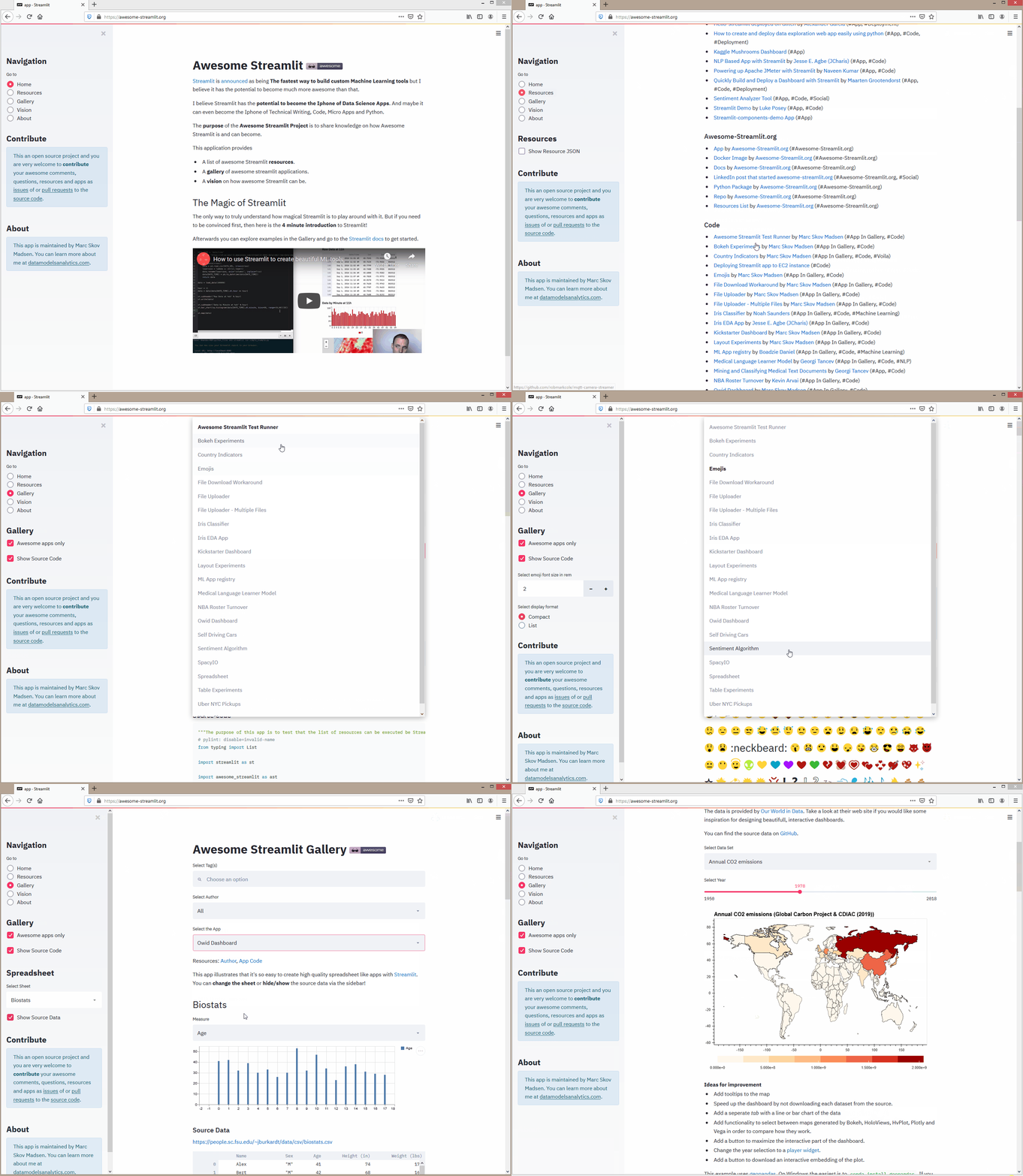
The Magic of Streamlit
The only way to truly understand how magical Streamlit is to play around with it. But if you need to be convinced first, then here is the 4 minute introduction to Streamlit!
Afterwards you can go to the Streamlit docs to get started. You might also visit Awesome Streamlit docs.

Awesome Resources
A curated list of awesome streamlit resources. Inspired by awesome-python and awesome-pandas.
Alternative
- Bokeh (#Alternative)
- Jupyter Voila (#Alternative)
- Panel (#Alternative)
- Plotly Dash (#Alternative)
App
- Hello-streamlit deployed on Glitch by Alexander Garcia (#App, #Deployment)
- How to create and deploy data exploration web app easily using python (#App, #Code, #Deployment)
- Kaggle Mushrooms Dashboard (#App)
- NLP Based App with Streamlit by Jesse E. Agbe (JCharis) (#App, #Code)
- Powering up Apache JMeter with Streamlit by Naveen Kumar (#App, #Code)
- Quickly Build and Deploy a Dashboard with Streamlit by Maarten Grootendorst (#App, #Code, #Deployment)
- Sentiment Analyzer Tool (#App, #Code, #Social)
- Streamlit Demo by Luke Posey (#App, #Code)
- Streamlit-components-demo App (#App)
- Deploying web apps with Streamlit, Docker, and AWS by Collin Prather (#App, #Code)
Article
Awesome-Streamlit.org
- App by Awesome-Streamlit.org (#Awesome-Streamlit.org)
- Docker Image by Awesome-Streamlit.org (#Awesome-Streamlit.org)
- Docs by Awesome-Streamlit.org (#Awesome-Streamlit.org)
- LinkedIn post that started awesome-streamlit.org (#Awesome-Streamlit.org, #Social)
- Python Package by Awesome-Streamlit.org (#Awesome-Streamlit.org)
- Repo by Awesome-Streamlit.org (#Awesome-Streamlit.org)
- Resources List by Awesome-Streamlit.org (#Awesome-Streamlit.org)
Code
- Awesome Streamlit Test Runner by Marc Skov Madsen (#App In Gallery, #Code)
- Bokeh Experiments by Marc Skov Madsen (#App In Gallery, #Code)
- Country Indicators by Marc Skov Madsen (#App In Gallery, #Code, #Voila)
- Deploying Streamlit app to EC2 instance (#Code)
- Emojis by Marc Skov Madsen (#App In Gallery, #Code)
- File Download Workaround by Marc Skov Madsen (#App In Gallery, #Code)
- File Uploader by Marc Skov Madsen (#App In Gallery, #Code)
- File Uploader - Multiple Files by Marc Skov Madsen (#App In Gallery, #Code)
- Image Classifier by Marc Skov Madsen (#App In Gallery, #Code)
- Iris Classifier by Noah Saunders (#App In Gallery, #Code, #Machine Learning)
- Iris EDA App by Jesse E. Agbe (JCharis) (#App In Gallery, #Code)
- Kickstarter Dashboard by Marc Skov Madsen (#App In Gallery, #Code)
- Layout Experiments by Marc Skov Madsen (#App In Gallery, #Code)
- ML App registry by Boadzie Daniel (#App In Gallery, #Code, #Machine Learning)
- Medical Language Learner Model by Georgi Tancev (#App In Gallery, #Code, #NLP)
- Mining and Classifying Medical Text Documents by Georgi Tancev (#App, #Code)
- NBA Roster Turnover by Kevin Arvai (#App In Gallery, #Code)
- Owid Dashboard by Marc Skov Madsen (#App In Gallery, #Code)
- Self Driving Cars by Streamlit (#App In Gallery, #Code)
- Sentiment Algorithm by Paras Patidar (#App In Gallery, #Code, #Machine Learning)
- SpacyIO by Ines Montani (#App In Gallery, #Code, #NLP)
- Spreadsheet by Marc Skov Madsen (#App In Gallery, #Code)
- Streamlit-components-demo Code (#Code)
- Table Experiments by Marc Skov Madsen (#App In Gallery, #Code)
- Uber Data Explorer App (#Code)
- Uber NYC Pickups by Streamlit (#App In Gallery, #Code)
- Yahoo Finance by Paduel (#App In Gallery, #Code, #Finance)
Guide
- Host Streamlit on Heroku with Nginx basic authentication by Alexandre Domingues (#Code, #Guide)
Sister Sites
- Awesome-Panel.Org by Marc Skov Madsen (#Sister Sites)
Social
- LinkedIn #streamlit (#Social)
- Twitter #streamlit (#Social)
Streamlit.io
- Streamlit Community (#Streamlit.io)
- Streamlit Docs (#Streamlit.io)
- Streamlit launches article in TechCrunch (#Streamlit.io)
- Streamlit.io (#Streamlit.io)
- The announcing blog (#Streamlit.io)
- The announcing community post (#Streamlit.io)
Technical
Tutorial
- A step by step guide to running streamlit pytorch and bert on a cheap aws instance (#Article, #Deployment, #Tutorial)
- Building a ui for your latest ai by Luke Posey (#Article, #Tutorial)
- Building an Iris EDA App with Streamlit and Python by Jesse E. Agbe (JCharis) (#Tutorial, #Video)
- Full-Stack AI: Building a UI for Your Latest AI Project in No Time at All (#Article, #Image Recognition, #Tutorial)
- How To Deploy Streamlit Apps (Using Heroku) (#Deployment, #Tutorial, #Video)
- How to build your machine learning app in 3 simple steps (#Article, #Deployment, #Tutorial)
- How to create and deploy data exploration web app easily using python (#Article, #Deployment, #Tutorial)
- How to write web apps using simple python for data scientists (#Article, #Tutorial)
- Mining and Classifying Medical Text Documents by Georgi Tancev (#Article, #Deployment, #NLP, #Tutorial)
- Streamlit Python Tutorial (Crash Course) by Jesse E. Agbe (JCharis) (#Tutorial, #Video
Governance
This repo is maintained by me :-)
I'm Marc, Skov, Madsen, PhD, CFA®, Lead Data Scientist Developer at Ørsted
You can learn more about me at datamodelsanalytics.com

I try my best to govern and maintain this project in the spirit of the Zen of Python.
But i'm not an experienced open source maintainer so helpfull suggestions are appreciated.
Thanks
Contribute
GitHub Issues and Pull requests are very welcome!
If you believe Awesome Streamlit is awesome and would like to join as a Core Developer feel free to reach out via datamodelsanalytics.com
How to contribute awesome links
The best way to contribute an awesome link is via a Pull request.
In the pull request you should
- describe why your contribution is awesome and should be included.
- add your resource the list of RESOURCES in the package/awesome_streamlit/database/resources.py file.
Thanks.
How to contribute awesome apps
The best way to contribute an awesome app is via a Pull request.
In the pull request you should
- describe why your contribution is awesome and should be included.
- create a new folder
gallery/<your_app_name>and app filegallery/<your_app_name>/<your_app_name.py>. - Add your app code conforming to the template
"""
## APP NAME

DESCRIPTION

Author: [YOUR NAME](https://URL_TO_YOU))\n
Source: [Github](https://github.com/URL_TO_CODE)
"""
import streamlit as st

# Your imports goes below

def main():
    st.title("APP NAME")
    st.markdown("DESCRIPTION")

    # Your code goes below

if __name__ == "__main__":
    main()
- Please note magic in sub pages does not work. So don't use magic.
- add the
your_app_nameto the- list of APPS_IN_GALLERY in the package\awesome_streamlit\database\apps_in_gallery.py.
- update the requirements_base.txt file. Please specify the required versions.
- Run the automated tests using
invoke test.alland fix all errors from your app - Run the full app via
streamlit run app.pyand manually test your contribution.
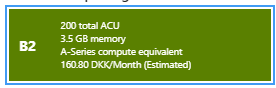
Please note that your app should not require high compute power as we are running on one of the cheapest tiers available on Azure.
Feel free to reach out if you have comments, questions or need help.
Thanks.
How to contribute to the Streamlit Community
Please sign up to and participate in the community at discuss.streamlit.io
How to contribute to the Streamlit Package
Please contribute to improving the Streamlit package at GitHub/streamlit/streamlit
How to contribute to Streamlit.io
Streamlit.io is in the position of trying to balance building an awesome, succesfull business and providing an awesome product to the open source community.
If you are in a Team please consider signing up for the beta of
How to sponsor the Awesome Streamlit project
If you would like to sponsor my time or the infrastructure the platform is running on, feel free to reach out via datamodelsanalytics.com.
You can also appreciate the work I have already done if you

Thanks
Marc
LICENSE
Attribution-ShareAlike 4.0 International
Getting Started with the Awesome Streamlit Repository
Prerequisites
- An Operating System like Windows, OsX or Linux
- A working Python installation.
- We recommend using 64bit Python 3.7.4.
- a Shell
- an Editor
- The Git cli
Installation
Clone the repo
git clone https://github.com/MarcSkovMadsen/awesome-streamlit.git
cd into the project root folder
cd awesome-streamlit
Create virtual environment
via python
Then you should create a virtual environment named .venv
python -m venv .venv
and activate the environment.
On Linux, OsX or in a Windows Git Bash terminal it's
source .venv/Scripts/activate
or alternatively
source .venv/bin/activate
In a Windows terminal it's
.venv/Scripts/activate.bat
or via anaconda
Create virtual environment named awesome-streamlit
conda create -n awesome-streamlit python=3.7.4
and activate environment.
activate awesome-streamlit
If you are on windows you need to install some things required by GeoPandas by following these instructions.
Then you should install the local requirements
pip install -r requirements_local.txt
Finally you need to install some spacy dependencies
python -m spacy download en_core_web_sm
python -m spacy download en_core_web_md
python -m spacy download de_core_news_sm
Build and run the Application Locally
streamlit run app.py
or as a Docker container via
invoke docker.build --rebuild
invoke docker.run-server
Run the Application using the image on Dockerhub
If you don't wan't to clone the repo and build the docker container you can just use docker run to run the image from Dockerhub
To run bash interactively
docker run -it -p 80:80 --entrypoint "/bin/bash" marcskovmadsen/awesome-streamlit:latest
To run the streamlit interactively on port 80
docker run -it -p 80:80 --entrypoint "streamlit" marcskovmadsen/awesome-streamlit:latest run app.py
Code quality and Tests
We use
- isort for sorting import statements
- autoflake to remove unused imports and unused variables
- black the opinionated code formatter
- pylint for static analysis
- mypy for static type checking
- pytest for unit to functional tests
to ensure a high quality of our code and application.
You can run all tests using
invoke test.all
Streamlit Tests
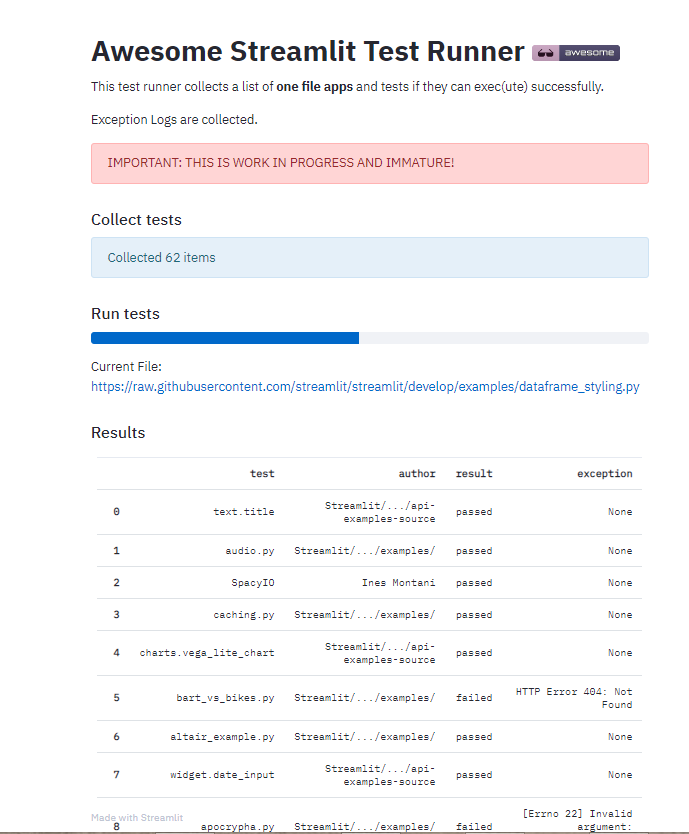
I've created a first version of an awesome streamlit test runner. You run it via
streamlit run test_runner_app.py
or in Docker
docker run -it -p 80:80 --entrypoint "streamlit" marcskovmadsen/awesome-streamlit:latest run test_runner_app.py
Workflow
We use the power of Invoke to semi-automate the local workflow. You can see the list of available commands using
$ invoke --list
Available tasks:

  docker.build                            Build Docker image
  docker.push                             Push the Docker container
  docker.run                              Run the Docker container interactively.
  docker.run-server                       Run the Docker container interactively
  docker.system-prune                     The docker system prune command will free up space
  test.all (test.pre-commit, test.test)   Runs isort, autoflake, black, pylint, mypy and pytest
  test.autoflake                          Runs autoflake to remove unused imports on all .py files recursively
  test.bandit                             Runs Bandit the security linter from PyCQA.
  test.black                              Runs black (autoformatter) on all .py files recursively
  test.isort                              Runs isort (import sorter) on all .py files recursively
  test.mypy                               Runs mypy (static type checker) on all .py files recursively
  test.pylint                             Runs pylint (linter) on all .py files recursively to identify coding errors
  test.pytest                             Runs pytest to identify failing tests
Configuration
You can configure the app in the config.py file.
Please note that Streamlit has its own config files in the ~/.streamlit folder.
CI/ CD and Hosting
The application is
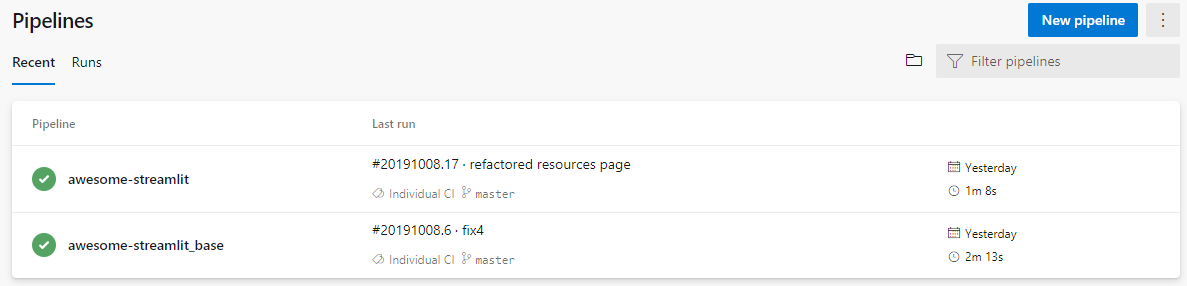
- build as a Docker image and tested via Azure Pipelines builds
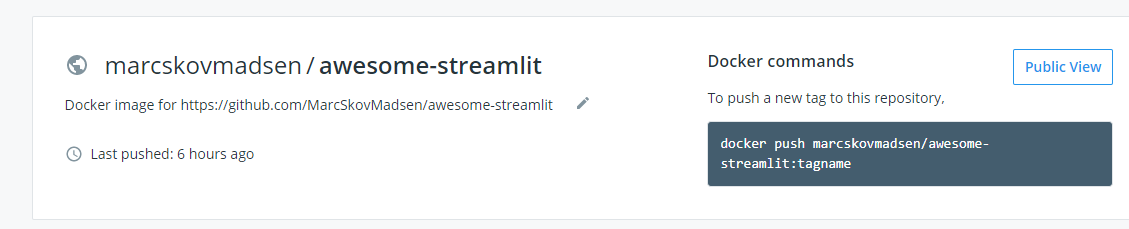
- pushed to the Dockerhub repository marcskovmadsen/awesome-streamlit.
- released via Azure Pipelines
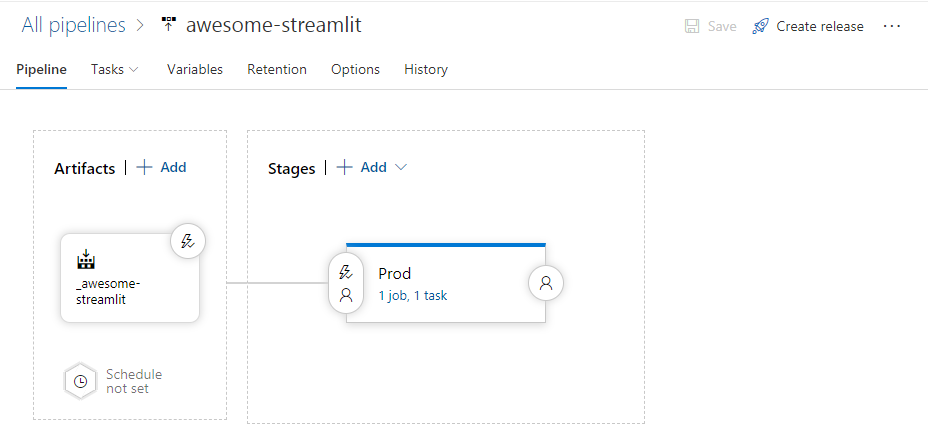
- to a web app for containers service on Azure on the cheapest non-free pricing tier
The Awesome-Streamlit Package
You can build the package using
cd package
python setup.py sdist bdist_wheel
If you wan't to publish the package to PyPi you should first
update the version number in the setup.py file. The format is YYYYmmdd.version. For example 20191014.2
Then you run
twine upload dist/awesome-streamlit-YYYYmmdd.version.tar.gz -u <the-pypi-username> -p <the-pypi-password>
For more info see the package README.md
Project Layout
The basic layout of a application is as simple as
.
└── app.py
As our application grows we would refactor our app.py file into multiple folders and files.
- assets here we keep our css and images assets.
- models - Defines the layout of our data in the form of
- Classes: Name, attribute names, types
- DataFrame Schemas: column and index names, dtypes
- SQLAlchemy Tables: columns names, types
- pages - Defines the different pages of the Streamlit app
- services - Organizes and shares business logic, models, data and functions with different pages of the Streamlit App.
- Database interactions: Select, Insert, Update, Delete
- REST API interactions, get, post, put, delete
- Pandas transformations
and end up with a project structure like
.
├── app.py
└── src
    └── assets
    |    └── css
    |    |   ├── app.css
    |    |   ├── component1.css
    |    |   ├── component2.css
    |    |   ├── page1.css
    |    |   └── page2.css
    |    └── images
    |    |   ├── image1.png
    |    |   └── image2.png
    ├── core
    |   └── services
    |       ├── service1.py
    |       └── service2.py
    └── pages
    |   └── pages
    |       ├── page1.py
    |       └── page2.py
    └── shared
        └── models
        |   ├── model1.py
        |   └── model2.py
        └── components
            ├── component1.py
            └── component2.py
Further refactoring is guided by by this blog post and the Angular Style Guide.
We place our tests in a test folder in the root folder organized with folders similar to the app folder and file names with a test_ prefix.
.
└── test
    ├── test_app.py
    ├── core
    |   └── services
    |       ├── test_service1.py
    |       └── test_service2.py
    └── pages
    |   └── pages
    |       ├── page1
    |       |   └── test_page1.py
    |       └── page2
    └── shared
        └── models
        |   ├── test_model1.py
        |   └── test_model2.py
        └── components
            ├── test_component1.py
            └── test_component2.py

 2 Nov 12, 2022
 325 Dec 28, 2022
 727 Dec 26, 2022
 2 May 12, 2022
 106 Jan 05, 2023
 0 Jan 05, 2022
 1 Jan 10, 2022
 2.3k Dec 22, 2022
 1.4k Dec 31, 2022
 6.7k Jan 09, 2023
 186 Dec 30, 2022
 35 Dec 23, 2022
 71 Oct 28, 2022
 75 Dec 27, 2022
 10 Oct 06, 2022
 1 Jan 22, 2022
 1.9k Dec 26, 2022
 48 Jan 06, 2023
 166 Dec 29, 2022
 3 Jun 08, 2022