Rosetta is a Django application that eases the translation process of your Django projects

Overview

Rosetta

https://travis-ci.org/mbi/django-rosetta.svg?branch=develop https://img.shields.io/pypi/v/django-rosetta https://img.shields.io/pypi/l/django-rosetta

Rosetta is a Django application that facilitates the translation process of your Django projects.

Because it doesn't export any models, Rosetta doesn't create any tables in your project's database. Rosetta can be installed and uninstalled by simply adding and removing a single entry in your project's INSTALLED_APPS and a single line in your main urls.py file.

Note: as of version 0.9.0, django-rosetta requires Django 1.11 or later, as of version 0.9.6, django-rosetta requires Django 2.2 or later

Features

  • Reads and writes your project's gettext catalogs (po and mo files)
  • Installed and uninstalled in under a minute
  • Uses Django's admin interface CSS

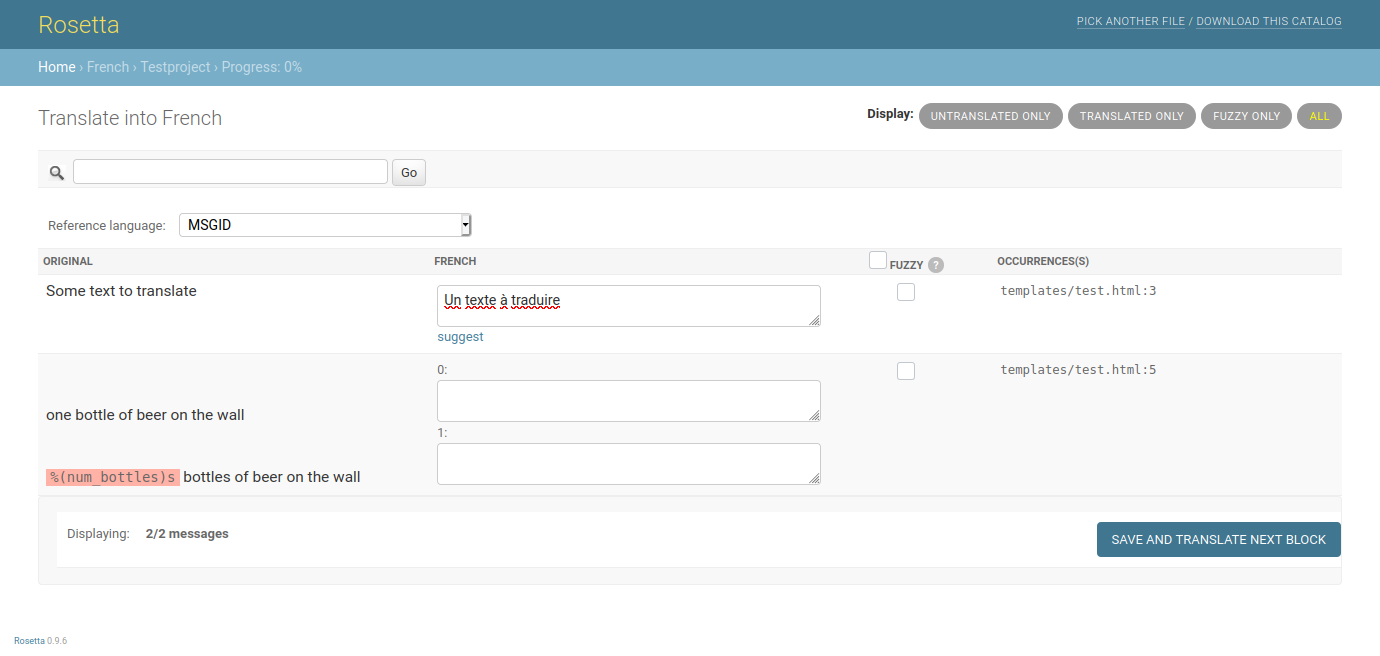
https://user-images.githubusercontent.com/131808/104168653-ac277e00-53fe-11eb-975e-8d46551fac59.png

Documentation

Please refer to the online documentation to install Rosetta and get started.

Comments
  • Can't click language files from /rosetta/ in non chrome browser on osx.

    Can't click language files from /rosetta/ in non chrome browser on osx.

    On the main listing page for the language files I can' click on a file to go to the next page. It just reloads the current page over and over again, I can make it go by repeatedly and rapidly clicking the link.

    Chrome doesn't appear to have this issue but firefox and safari both do on OSX 10.8.

    THe link appears to go to http://<my_domain>.com/rosetta/select/fr/0/ however clicking it just reloads /rosetta/.

    Have I included URLs improperly somewhere?

    opened by ulchm 29
  • One test failure on OpenSUSE

    One test failure on OpenSUSE

    • Which version of Django are you using?: 1.11.28 and 2.2.12
    • Which version of django-rosetta are you using?: 0.9.3
    • Have you looked trough recent issues and checked this isn't a duplicate? Yes
    [   43s] ======================================================================
    [   43s] FAIL: test_47_azure_ajax_translation (rosetta.tests.tests.RosettaTestCase)
    [   43s] ----------------------------------------------------------------------
    [   43s] Traceback (most recent call last):
    [   43s]   File "/usr/lib/python2.7/site-packages/vcr/cassette.py", line 106, in __call__
    [   43s]     return type(self)(self.cls, args_getter)._execute_function(function, args, kwargs)
    [   43s]   File "/usr/lib/python2.7/site-packages/vcr/cassette.py", line 120, in _execute_function
    [   43s]     return self._handle_function(fn=handle_function)
    [   43s]   File "/usr/lib/python2.7/site-packages/vcr/cassette.py", line 144, in _handle_function
    [   43s]     return fn(cassette)
    [   43s]   File "/usr/lib/python2.7/site-packages/vcr/cassette.py", line 113, in handle_function
    [   43s]     return function(*args, **kwargs)
    [   43s]   File "/home/abuild/rpmbuild/BUILD/django-rosetta-0.9.3/rosetta/tests/tests.py", line 965, in test_47_azure_ajax_translation
    [   43s]     self.assertContains(r, '"Salut tout le monde"')
    [   43s]   File "/usr/lib/python2.7/site-packages/django/test/testcases.py", line 393, in assertContains
    [   43s]     self.assertTrue(real_count != 0, msg_prefix + "Couldn't find %s in response" % text_repr)
    [   43s] AssertionError: Couldn't find '"Salut tout le monde"' in response
    
    opened by jayvdb 18
  • Django 1.7 - exception when using AppConfig

    Django 1.7 - exception when using AppConfig

    Currently rosetta loops through applications in INSTALLED_APPS and try to get locale directory for each app. Django 1.7. applications refactor allows to add AppConfig class instead of module. This makes rosetta raise exception:

      File ".../rosetta/poutil.py", line 83, in find_pos
        apppath = os.path.normpath(os.path.abspath(os.path.join(os.path.dirname(app.__file__), 'locale')))
    AttributeError: type object 'MYAPPCONFIG' has no attribute '__file__'
    

    Workaround for this is to add this AppConfig to ROSETTA_EXCLUDED_APPLICATIONS.

    opened by bmihelac 17
  • Reference language selector

    Reference language selector

    A couple of months ago, we added a reference language selector in django-rosetta and it's been sitting in our private fork of it since then. We thought you might like it, so we've cleaned it up and pushed it here.

    The feature adds a Reference language selector to the translation interface. This way, instead of having only the option to show the msgid to translate, you can also have the translated version (if you already have other translations) of the msgid. That's useful if you have translators that don't speak your base language.

    opened by hsoft 13
  • Cannot import name 'get_version' from 'rosetta'

    Cannot import name 'get_version' from 'rosetta'

    • Which version of Django are you using?: 2.1.2
    • Which version of django-rosetta are you using?: 0.9.0

    When I run django I get this error message

      File "C:\Users\georg\AppData\Local\Programs\Python\Python37\lib\site-packages\rosetta\urls.py", line 8, in <module>
        from . import views
      File "C:\Users\georg\AppData\Local\Programs\Python\Python37\lib\site-packages\rosetta\views.py", line 32, in <module>
        from rosetta import get_version as get_rosetta_version
    ImportError: cannot import name 'get_version' from 'rosetta'
    
    opened by calenwu 12
  • Save redirect not working and occasionally failing to save

    Save redirect not working and occasionally failing to save

    The initial problem I have is that the "save and translate next block" doesn't navigate forward to the next block, it simply saves the translations on the current page and redisplays it.

    After hitting save, it is possible to move forward manually using the numbered page links which is what I've asked my translator to do.

    However the bigger problem is that after repeating the above for several pages, on the ~6th page of translations the save button redirects back to the Language selection page and the most recent set of translations are lost. Previously saved pages are retained.

    Seems likely to be an issue with session/caching but I have no idea where to start....

    Django 1.4 and Rosetta 0.6.8.

    I experience the issue under two server configurations:

    • nginx in front of Gunicorn
    • 'runserver' (daemonised under screen)

    Configuration:

    ROSETTA_STORAGE_CLASS = 'rosetta.storage.CacheRosettaStorage' SESSION_COOKIE_SECURE = False CACHES = { 'default': { 'BACKEND': 'django.core.cache.backends.locmem.LocMemCache', 'LOCATION': 'dwight-dev', } }

    opened by dwightgunning 11
  • Layout bug in Firefox 10+

    Layout bug in Firefox 10+

    In Firefox version 10+ the translation table with all the message files is shifted to the right - as far as the end of the search form above. Please ad an overflow:hidden to #toolbar in rosetta.css to fix it:

    toolbar { height:20px;overflow: hidden}

    Or place a
    below the toolbar

    tag.

    Thanks for the great app!!

    opened by SimonSteinberger 10
  • Django 1.9 removed get_cache from django.core.cache

    Django 1.9 removed get_cache from django.core.cache

    Rosetta 0.7.8, Django 1.9. Using memcached backend. Error:

    rosetta/poutil.py
    from django.core.cache import get_cache
    ImportError: cannot import name 'get_cache'
    

    Django 1.9 release notes: django.core.cache.get_cache is removed

    opened by grumpa 9
  • Explicit URL structure

    Explicit URL structure

    I was wondering why the system works with session'ed attributes like current language and filter.

    I'm pretty sure there is some reason behind that, but I would personally prefer a more explicit URL structure where you edit /rosetta/fr/?filter=fuzzy. This would allow deep-linking, allow for editing (or simply browsing) multiple languages in separate tabs (and not separate browsers as is now required) and just make it more transparent (and thus more pythonic).

    Would there be an interest in (me working on) changing this?

    opened by barklund 9
  • Although locales are found, I can't open them.

    Although locales are found, I can't open them.

    Hi,

    I have installed rosetta, I am using django 1.4.5. At first I could not open the rosetta panel because /rosetta/ url redirected me to /accounts/login/ (although my admin user had already been logged in through the admin panel, and I am using /login/ instead of /accounts/login/ to authenticate).

    So, I had to add ROSETTA_REQUIRES_AUTH = False in my settings.py file. After this, rosetta panel opened. However I only see something like this.

    https://dl.dropboxusercontent.com/u/2423935/ros.JPG

    and whenever I click on 'conf' it doesn't do anything.

    What am I doing wrong?

    Any ideas what should I do?

    PS: I have added my admin user to the translators group, too (although it is not necessary) and admin user is always logged in.

    opened by xpanta 9
  • A PR to make compilation of mo file optional?

    A PR to make compilation of mo file optional?

    As far I can tell, when a page of translations is saved in Rosetta the mo file is automatically compiled.

    If it's automatically complied then, even if rosetta_settings.[U]WSGI_AUTO_RELOAD is False, a restart of the application outside of Rosetta will result in the translation going live, e.g. a restart as part of the application deployment process.

    I have a use case where it'd be preferable for the mo file to not be automatically compiled: Translations need to go live in bulk as part of a scheduled 'translation deployment', but not inadvertently made live piecemeal as a result of day-to-day code deployments (which restart the application).

    Is there interest in a PR that adds an Rosetta setting to make compilation optional? If so, I'll make it.

    The setting would be called something like rosetta_settings.AUTO_COMPILE and default to True for backwards compatibility.

    With this setting in place I think all that'd be needed is to use it in an if-block around this code which does the compilation and, optionally, auto reloading:

    https://github.com/mbi/django-rosetta/blob/develop/rosetta/views.py#L164-L186

    (do point out if there's anything I missed, I haven't looked in detail yet).

    opened by nealtodd 8
  • Missing Azure Location setting

    Missing Azure Location setting

    • Which version of Django are you using?: 3.2
    • Which version of django-rosetta are you using?: 0.9.8
    • Have you looked trough recent issues and checked this isn't a duplicate? yes

    Setting AZURE_CLIENT_SECRET is not enough. Gives the following error:

    Microsoft Translation API error: Error code 401000, The request is not authorized because credentials are missing or invalid.

    Adding the missing location to API request header solves this issue.

    image
    opened by JPolonia 0
  • Why split `DJANGO_SETTINGS_MODULE` in function find_pos()?

    Why split `DJANGO_SETTINGS_MODULE` in function find_pos()?

    • Which version of Django are you using?: 3.2
    • Which version of django-rosetta are you using?: latest
    • Have you looked trough recent issues and checked this isn't a duplicate? Y

    This is the original code in poutil.py, and when my structure of settings is settings/*, errors will be like TypeError: expected str, bytes or os.PathLike object, not NoneType, since "settings.*".split('.') happended and settings here is a directory, which no __file__ was included.

    # rosetta/poutil.py
    def find_pos(lang, project_apps=True, django_apps=False, third_party_apps=False):
        # project/locale
        if settings.SETTINGS_MODULE:
            parts = settings.SETTINGS_MODULE.split('.')
        else:
            # if settings.SETTINGS_MODULE is None, we are probably in "test" mode
            # and override_settings() was used
            # see: https://code.djangoproject.com/ticket/25911
            parts = os.environ.get(ENVIRONMENT_VARIABLE).split('.')
        project = __import__(parts[0], {}, {}, [])
        # TODO: update below
        project = __import__("settings.dev")
    

    So what should I do if my settings structure is settings/*?

    opened by Dongbox 1
  • Configurable version control service integration

    Configurable version control service integration

    • Which version of Django are you using?: 2.2
    • Which version of django-rosetta are you using?: 0.9.5
    • Have you looked trough recent issues and checked this isn't a duplicate? Yes

    Feature: Link to source file

    The "Occurrence(s)" column in the Web UI lists file names and the line numbers of where the text was extracted from. It should be easy to configure an external service URL and generate a link to display the text location in the file under version control.

    If the reference content (see definition) is directly a valid URL (e.g. when I edit the PO file and add a #. https://foo.bar.com line to an item) that URL should be turned into a clickable link either.

    Related

    See https://code.djangoproject.com/ticket/32356 for a related Django feature request.

    opened by bittner 5
  • Rosetta and TMs (translation memory)

    Rosetta and TMs (translation memory)

    Hi there!

    We're using Rosetta 0.9.4 on Django 2.2.17, and all is good. Apart from skepticism of professional translators, of course. The main theme is, "The tool doesn't provide a TM, hence we can't use it."

    I need some help to understand this topic better.

    Note that my wife is a professional translator and project manager in the translation industry, so I am informed largely about the concepts of "traditional translation" of documents (e.g. SDL Trados, Across, OmegaT) but also about the approach emerged from the software development industry (e.g. Transifex, Crowdin), which I have hands-on experience with.

    Where is Rosetta's TM?

    From my understanding, Rosetta is more or less a nice front-end to manipulate .po files, extracted by Python's gettext module integrated in Django. There are no models, yet still Rosetta does "automatic translation", which is visible by fuzzy matches (which I assume is also a feature coming from gettext again, really).

    So in essence, the .po files themselves are that TM already. There is no additional or separate component, but as the entire "document" is identical to all (successful) translations that have been done in the past, there is not even a need for a separate TM. It's all read into "Rosetta's memory" in its entirety. There is no disadvantage of having "no TM", given we only deal with our domain specific vocabulary.

    Is this view correct?

    External TMs?

    A related question, after having clarified whether Rosetta has a TM or no, is there a way to

    • download Rosetta's TM and/or
    • attach (or upload) an external TM

    to add, say, more flexibility to the translation process?

    opened by bittner 6
  • Documentation not clear on when the cache setting comes into play for parsed PO files.

    Documentation not clear on when the cache setting comes into play for parsed PO files.

    • Which version of Django are you using?: 2.2
    • Which version of django-rosetta are you using?: 0.9.3

    The document fails to mention an important fact that if the underlying po files are writable then even if a cache is configured and rosetta cache storage points to that (for e.g., using ROSETTA_STORAGE_CLASS = 'rosetta.storage.CacheRosettaStorage') - still this cache will not be used. Only when the file is not writable this setting comes into picture.

    Also this is clear from the views.py of Rosetta

    @cached_property
        def po_file(self):
            """Return the parsed .po file that is currently being translated/viewed.
    
     if self.po_file_is_writable:
                # If we can write changes to file, then we pull it up fresh with
                # each request.
    
    .........................................
    ..........................................
    
            else:
                storage = get_storage(self.request)
                po_file = storage.get(self.po_file_cache_key, None)
    
    opened by shailendra333 0
  • Locale path in AWS S3

    Locale path in AWS S3

    • Which version of Django are you using?: django 1.5
    • Which version of django-rosetta are you using?: 0.7.2
    • Have you looked trough recent issues and checked this isn't a duplicate?Not duplicate

    Currently rosetta scans the locale paths specify it in settings.py and loads into admin UI. Once the translation added and click to save button will store it in the same path of the corresponding locale. Is there any way we can change this to store it remote server or AWS S3 location.

    In docker container based environment, during auto-scaling the translator instance can be redeployed so the saved changes in .po files cane be lost. To overcome this, prefer to store the files in AWS S3 location.

    Is this approach is possible to achieve?

    PR welcome 🙏 
    opened by sajithygag 14
Releases(v0.7.11)
  • v0.7.11(Mar 30, 2016)

    • Make MO file compilation optional (PR #166, Issue #155, thanks @nealtodd)
    • Fix an invalid page get parameter by falling back to page 1 (PR #165, thanks @nealtodd)
    • Adds reference language selector (PR #60, thanks @hsoft)
    Source code(tar.gz)
    Source code(zip)
Owner
Marco Bonetti
Back-end person at @cruncher.
Marco Bonetti
React.JS - Django Application Template

OTS React.JS - DJango Web Application (UNTESTED) This repository servers as a template for creating React.JS - Django Web Applications. Note that the

Darryl See Wei Shen 5 Aug 19, 2022
Projeto onde podes inserir notícias, ver todas as notícias guardas e filtrar por tag. A base de dados usada é o mongoDB.

djangoProject Projeto onde podes inserir notícias, ver todas as notícias guardas e filtrar por tag. A base de dados usada é o mongoDB. packages utiliz

Sofia Rocha 1 Feb 22, 2022
Django-Docker - Django Installation Guide on Docker

Guía de instalación del Framework Django en Docker Introducción: Con esta guía p

Victor manuel torres 3 Dec 02, 2022
An app that allows you to add recipes from the dashboard made using DJango, JQuery, JScript and HTMl.

An app that allows you to add recipes from the dashboard. Then visitors filter based on different categories also each ingredient has a unique page with their related recipes.

Pablo Sagredo 1 Jan 31, 2022
webfest Django project @innovaccer

inno-doctor webfest Django project @innovaccer setup guide create new directory for project clone the repo with url into the directory make sure pytho

Rohit sahu 6 Oct 28, 2022
The new Python SDK for Sentry.io

Bad software is everywhere, and we're tired of it. Sentry is on a mission to help developers write better software faster, so we can get back to enjoy

Sentry 1.4k Jan 05, 2023
Python CSS/Javascript minifier

Squeezeit - Python CSS and Javascript minifier Copyright (C) 2011 Sam Rudge This program is free software: you can redistribute it and/or modify it un

Smudge 152 Apr 03, 2022
Neighbourhood - A python-django web app to help the residence of a given neighborhood know their surrounding better

Neighbourhood A python-django web app to help the residence of a given neighborh

Levy Omolo 4 Aug 25, 2022
Exemplo de biblioteca com Django

Bookstore Exemplo de biblioteca feito com Django. Este projeto foi feito com: Python 3.9.7 Django 3.2.8 Django Rest Framework 3.12.4 Bootstrap 4.0 Vue

Regis Santos 1 Oct 28, 2021
A Student/ School management application built using Django and Python.

Student Management An awesome student management app built using Django.! Explore the docs » View Demo · Report Bug · Request Feature Table of Content

Nishant Sethi 1 Feb 10, 2022
Easy thumbnails for Django

Easy Thumbnails A powerful, yet easy to implement thumbnailing application for Django 1.11+ Below is a quick summary of usage. For more comprehensive

Chris Beaven 1.3k Dec 30, 2022
A Django web application that allows you to be in the loop about everything happening in your neighborhood.

A Django web application that allows you to be in the loop about everything happening in your neighborhood. From contact information of different handyman to meeting announcements or even alerts.

Kennedy Ngugi Mwaura 3 Dec 11, 2022
A slick ORM cache with automatic granular event-driven invalidation.

Cacheops A slick app that supports automatic or manual queryset caching and automatic granular event-driven invalidation. It uses redis as backend for

Alexander Schepanovski 1.7k Jan 03, 2023
Simple alternative to Doodle polls and scheduling (Python 3, Django 3, JavaScript)

What is jawanndenn? jawanndenn is a simple web application to schedule meetings and run polls, a libre alternative to Doodle. It is using the followin

Sebastian Pipping 169 Jan 06, 2023
A music recommendation REST API which makes a machine learning algorithm work with the Django REST Framework

music-recommender-rest-api A music recommendation REST API which makes a machine learning algorithm work with the Django REST Framework How it works T

The Reaper 1 Sep 28, 2021
🌟 A social media made with Django and Python and Bulma. 🎉

Vitary A simple social media made with Django Installation 🛠️ Get the source code 💻 git clone https://github.com/foxy4096/Vitary.git Go the the dir

Aditya Priyadarshi 15 Aug 30, 2022
Source files for a free pyRevit toolbar.

pyRoovit (WIP) What is this? PyRoovit is/will be a toolbar for the use with pyRevit built by Gavin Crump (aka Aussie BIM Guru). Having used and taught

Gavin Crump 11 Nov 10, 2022
Django CRUD REST API Generator

Django CRUD REST API Generator This is a simple tool that generates a Django REST API with the given models. Specs: Authentication, DRF generic views,

Mehmet Alp Sümer 57 Nov 24, 2022
Simple application TodoList django with ReactJS

Django & React Django We basically follow the Django REST framework quickstart guide here. Create backend folder with a virtual Python environment: mk

Flavien HUGS 2 Aug 07, 2022
Simple XML-RPC and JSON-RPC server for modern Django

django-modern-rpc Build an XML-RPC and/or JSON-RPC server as part of your Django project. Major Django and Python versions are supported Main features

Antoine Lorence 82 Dec 04, 2022