AI-powered literature discovery and review engine for medical/scientific papers

Overview

AI-powered literature discovery and review engine for medical/scientific papers


Version GitHub Release Date GitHub issues GitHub last commit Build Status Coverage Status


demo

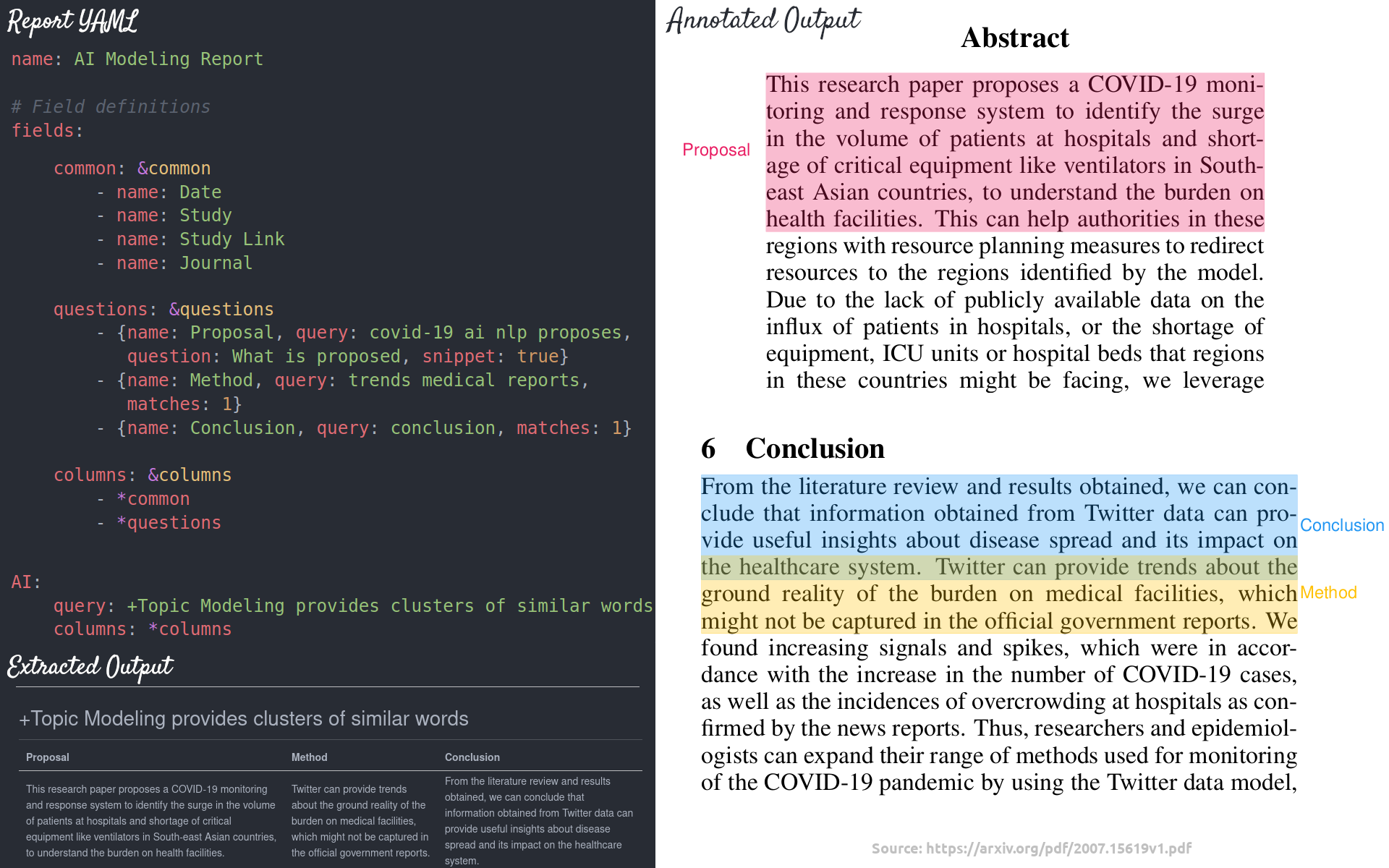
paperai is an AI-powered literature discovery and review engine for medical/scientific papers. paperai helps automate tedious literature reviews allowing researchers to focus on their core work. Queries are run to filter papers with specified criteria. Reports powered by extractive question-answering are run to identify answers to key questions within sets of medical/scientific papers.

paperai was used to analyze the COVID-19 Open Research Dataset (CORD-19), winning multiple awards in the CORD-19 Kaggle challenge.

paperai and/or NeuML has been recognized in the following articles:

Installation

The easiest way to install is via pip and PyPI

pip install paperai

You can also install paperai directly from GitHub. Using a Python Virtual Environment is recommended.

pip install git+https://github.com/neuml/paperai

Python 3.6+ is supported

See this link to help resolve environment-specific install issues.

Docker

A Dockerfile with commands to install paperai, all dependencies and scripts is available in this repository.

Clone this git repository and run the following to build and run the Docker image.

docker build -t paperai -f docker/Dockerfile .
docker run --name paperai --rm -it paperai

This will bring up a paperai command shell. Standard Docker commands can be used to copy files over or commands can be run directly in the shell to retrieve input content. All scripts in the following examples are available in this environment.

paperetl's Dockerfile can be combined with this Dockerfile to have a single image that can index and query content. The files from the paperetl project scripts directory needs to be placed in paperai's scripts directory. The paperetl Dockerfile also needs to be copied over (it's referenced as paperetl.Dockerfile here).

docker build -t base -f docker/Dockerfile .
docker build -t paperai --build-arg BASE_IMAGE=base -f docker/paperetl.Dockerfile .
docker run --name paperai --rm -it paperai

Examples

The following notebooks and applications demonstrate the capabilities provided by paperai.

Notebooks

Notebook Description
CORD-19 Analysis with Sentence Embeddings Builds paperai-based submissions for the CORD-19 Challenge
CORD-19 Report Builder Template for building new reports

Applications

Application Description
Search Search a paperai index. Set query parameters, execute searches and display results.

Building a model

paperai indexes databases previously built with paperetl. paperai currently supports querying SQLite databases.

The following sections show how to build an index for a SQLite articles database.

This example assumes the database and model path is cord19/models. Substitute as appropriate.

  1. Download CORD-19 fastText vectors

    scripts/getvectors.sh cord19/vectors

    A full vector model build can optionally be run with the following command.

    python -m paperai.vectors cord19/models

    CORD-19 fastText vectors are also available on Kaggle.

  2. Build embeddings index

    python -m paperai.index cord19/models cord19/vectors/cord19-300d.magnitude

The paperai.index process takes two optional arguments, the model path and the vector file path. The default model location is ~/.cord19 if no parameters are passed in.

Building a report file

Reports support generating output in multiple formats. An example report call:

python -m paperai.report tasks/risks.yml 50 md cord19/models

The following report formats are supported:

  • Markdown (Default) - Renders a Markdown report. Columns and answers are extracted from articles with the results stored in a Markdown file.
  • CSV - Renders a CSV report. Columns and answers are extracted from articles with the results stored in a CSV file.
  • Annotation - Columns and answers are extracted from articles with the results annotated over the original PDF files. Requires passing in a path with the original PDF files.

In the example above, a file named tasks/risk_factors.md will be created. Example report configuration files can be found here.

Running queries

The fastest way to run queries is to start a paperai shell

paperai cord19/models

A prompt will come up. Queries can be typed directly into the console.

Tech Overview

The tech stack is built on Python and creates a sentence embeddings index with FastText + BM25. Background on this method can be found in this Medium article.

The model is a combination of a sentence embeddings index and a SQLite database with the articles. Each article is parsed into sentences and stored in SQLite along with the article metadata. FastText vectors are built over the full corpus. The sentence embeddings index only uses tagged articles, which helps produce the most relevant results.

Multiple entry points exist to interact with the model.

  • paperai.report - Builds a markdown report for a series of queries. For each query, the best articles are shown, top matches from those articles and a highlights section which shows the most relevant sections from the embeddings search for the query.
  • paperai.query - Runs a single query from the terminal
  • paperai.shell - Allows running multiple queries from the terminal
Comments
  • Vector model file not found (cord19-300d.magnitude)

    Vector model file not found (cord19-300d.magnitude)

    • issue moved from wrong project to here -

    Hi,

    I get the following error when running python -m paperai.index

    raise IOError(ENOENT, "Vector model file not found", path) FileNotFoundError: [Errno 2] Vector model file not found: 'C:\Users\x\.cord19\vectors\cord19-300d.magnitude'

    PS. I am quite new to all this; so, apologies if the mistake is on my end.

    When trying to download cord19-300d.magnitude from https://www.kaggle.com/davidmezzetti/cord19-fasttext-vectors#cord19-300d.magnitude, I get the error: "Too many requests"

    opened by fomar1994 30
  • Installation issues

    Installation issues

    The system would report issue with "UnicodeDecodeError: 'gbk' codec can't decode byte 0x82 in position 12007: illegal multibyte sequence" when I execute this command "pip install paperai". I wonder if WINDOWS SYSTEM cannot decompress tar.gz-type packages. 微信图片_20201215222928

    opened by albertY-C 16
  • I'm not sure to have followed correctly the procedure for running paperai with pre-trained vectors

    I'm not sure to have followed correctly the procedure for running paperai with pre-trained vectors

    After successfully installing paperai in Linux (Ubuntu 20.04.1 LTS), I tried to run it by using the pre-trained vectors option to build the model, as follows:

    (1) I downloaded the vectors from https://www.kaggle.com/davidmezzetti/cord19-fasttext-vectors#cord19-300d.magnitude (2) My Downloads folder in my computer ended up with a Zip file containing the vectors. (3) I created a directory ~/.cord19/vectors/ and moved the downloaded Zip file into this directory (see yellow folder in the figure below). (4) I extracted the Zip file, which resulted in the grey folder shown below, which contained the file cord19-300d.magnitude (5) I moved the cord19-300d.magnitude file outside of the grey folder and thus into the ~/.cord19/vectors/ directory (see figure below)

    Screenshot from 2020-08-06 22-07-59

    (6) I excuted the following command to build the embeddings index with the above pre-trained vectors:

    python -m paperai.index

    Upon performing the above I got the following error message (see below)

    ppai1 9 ErrorLaptopRun

    Am I getting this error because the above steps are not the correct ones? If so, what would be the correct steps? Otherwise, what other things should I try to eliminate the issue?

    opened by DavidRivasPhD 10
  • Windows install issue

    Windows install issue

    It was reported that paperai can't be installed in a Windows environment due to the following error:

    ValueError: path 'src/python/' cannot end with '/'

    bug 
    opened by davidmezzetti 5
  • Added pdf output build option

    Added pdf output build option

    Modified export.py to create a pdf output option This is done by the new method in export, streampdf

    This edit done for educational purposes as a participant in York University's software design course

    Thank you for your time

    opened by will0710 3
  • Processing custom sqlite file

    Processing custom sqlite file

    I want to create an index and vector file over a Custom sqlite articles database. I have created a articles.sqlite database on medical papers, using paperetl. But I did not find any instruction as to how to process it . Can you please give instructions on this ?

    opened by choudharya3 3
  • risk-factors.yml issues

    risk-factors.yml issues

    when i run command "python -m paperai.report tasks/risk-factors.yml 50 md cord19/models ", i can't find file risk-factors.yml, and i can't understand argument "50"

    opened by Zhip-S 2
  • Integration: DeepSource

    Integration: DeepSource

    I ran DeepSource analysis on my fork of this repository and found some code quality issues. Have a look at the issues caught in this repository by DeepSource here.

    DeepSource is a code review automation tool that detects code quality issues and helps you to automatically fix some of them. You can use DeepSource to track test coverage, Detect problems in Dockerfiles, etc. in addition to detecting issues in code.

    The PR #24 fixed some of the issues caught by DeepSource.

    All the features of the DeepSource are mentioned here. I'd suggest you integrate DeepSource since it is free for Open Source projects forever.

    Integrating DeepSource to continuously analyze your repository:

    • Install DeepSource on your repository here.
    • Create .deepsource.toml configuration specific to this repo or use the configuration mentioned below which I used to run the analysis on the fork of this repo.
    • Activate analysis here.
    version = 1
    
    test_patterns = ["/test/python/*.py"]
    
    [[analyzers]]
    name = "python"
    enabled = true
    
      [analyzers.meta]
      runtime_version = "3.x.x"
    
    opened by withshubh 2
  • RuntimeError: CUDA error: out of memory (NVidia V100, 32 GB DDRAM)

    RuntimeError: CUDA error: out of memory (NVidia V100, 32 GB DDRAM)

    What are the minimum memory requirements for the PaperAI? When running on Nvidia V100, 32 GB DDRAM I got: RuntimeError: CUDA error: out of memory. GPU memory seems to be completely free.

    Is there a way how to run it from GPU, or can I run it exclusively on TPUs?

    from txtai.embeddings import Embeddings
    import torch
    
    torch.cuda.empty_cache()
    
    # MEMORY
    id = 1
    t = torch.cuda.get_device_properties(id).total_memory
    c = torch.cuda.memory_cached(id)
    a = torch.cuda.memory_allocated(id)
    f = c-a  # free inside cache
    
    print("TOTAL", t / 1024/1024/1024," GB")
    print("ALLOCATED", a)
    
    # Create embeddings model, backed by sentence-transformers & transformers
    embeddings = Embeddings({"method": "transformers", "path": "sentence-transformers/bert-base-nli-mean-tokens"})
    
    import numpy as np
    
    sections = ["US tops 5 million confirmed virus cases",
                "Canada's last fully intact ice shelf has suddenly collapsed, forming a Manhattan-sized iceberg",
                "Beijing mobilises invasion craft along coast as Taiwan tensions escalate",
                "The National Park Service warns against sacrificing slower friends in a bear attack",
                "Maine man wins $1M from $25 lottery ticket",
                "Make huge profits without work, earn up to $100,000 a day"]
    
    
    query = "health"
    uid = np.argmax(embeddings.similarity(query, sections))
    print("%-20s %s" % (query, sections[uid]))
    

    TOTAL 31.74853515625 GB ALLOCATED 0 Traceback (most recent call last): File "pokus2.py", line 32, in uid = np.argmax(embeddings.similarity(query, sections)) File "/home/user/.local/lib/python3.8/site-packages/txtai/embeddings.py", line 228, in similarity query = self.transform((None, query, None)).reshape(1, -1) File "/home/user/.local/lib/python3.8/site-packages/txtai/embeddings.py", line 179, in transform embedding = self.model.transform(document) File "/home/user/.local/lib/python3.8/site-packages/txtai/vectors.py", line 264, in transform return self.model.encode([" ".join(document[1])], show_progress_bar=False)[0]

    opened by burgetrm 2
  • Wrong annotation places

    Wrong annotation places

    Need fix to correctly annotate the pdf text from query text that has the different pages, columns, or others placing positions in the pdf. In the screenshots, the annotator trying to annotate text that in the different positions only by per page consideration rather than all placing positions consideration. That method made the annotator annotate text that should not be annotated because the annotator only found the text in its current scope only. Also, the annotation that covers texts that should not be annotated leads to confusing annotation indicators too.

    Columns problem:

    • Query Screenshot_20
    • Annotations Screenshot_16

    Pages problem:

    • Query Screenshot_19
    • Annotations Screenshot_17 Screenshot_18
    opened by muazhari 1
  • sqlite3.OperationalError: no such table: sections

    sqlite3.OperationalError: no such table: sections

    when I command in a docker: python -m paperai.vectors cord19/models, the output srror is "sqlite3.OperationalError: no such table: sections"

    opened by wspspring 1
  • paperai for beginners

    paperai for beginners

    First and foremost, thank you for offering such a great library. Nonetheless I was wondering if possible can you provide a simple guideline on using such a awesome library for new research project like from loading pdf files to querying the topics. I went through the examples but could not grasp the overall idea. I believe a small effort of yours would be really help for beginners like me to use this library in research work.

    opened by satishchaudhary382 1
Releases(v2.0.0)
  • v2.0.0(Mar 12, 2022)

    This release adds the following enhancements and bug fixes:

    • Allow setting report options within task yml files (#42)
    • Allow running reports against full databases (#43)
    • Batch extractor queries (#44)
    • Remove study design columns (#46)
    • Add option to specify extraction column context (#47)
    • Add report reference column (#48)
    • Add report column format parameter (#49)
    • Add pre-commit checks (#50)
    • Add check to report sections query to ensure text has tokens (#51)
    • Remove default home directory cord19 path defaults (#52)
    • Require Python 3.7+ (#54)
    • Update txtai to 4.3.1 (#56)
    Source code(tar.gz)
    Source code(zip)
  • v1.10.0(Sep 10, 2021)

  • v1.9.0(Aug 18, 2021)

  • v1.8.0(Apr 23, 2021)

    This release adds the following enhancements and bug fixes:

    • Add ability to read index yml (#18)
    • Switch from mdv to mdv3 to support Python 3.9 (#21)
    • Add enhanced API for paperai (#30)
    • Add configurable query threshold, (#31)
    • Support query negation (#32)
    • Add search application (#33)
    Source code(tar.gz)
    Source code(zip)
  • v1.7.0(Feb 24, 2021)

  • v1.6.0(Jan 13, 2021)

  • v1.5.0(Dec 11, 2020)

  • v1.4.0(Nov 6, 2020)

    This release adds the following enhancements and bug fixes:

    • Allow specifying vector output file (#10, #11, #13)
    • Build test suite (#12)
    • Add additional column parameters (#14)
    • Allow indexing partial datasources (#15)
    • Add GitHub actions build script (#16)
    Source code(tar.gz)
    Source code(zip)
  • v1.3.0(Aug 18, 2020)

  • v1.2.1(Aug 12, 2020)

  • v1.2.0(Aug 11, 2020)

    Release addresses the following:

    • Allow customized the QA model used for QA extraction (#5)
    • Migrated embeddings index logic to txtai project (#7)
    Source code(tar.gz)
    Source code(zip)
  • v1.1.0(Aug 5, 2020)

    Release addresses the following:

    • Add wildcard report queries (#1) - Add ability to run report against entire database. This is only practical for smaller datasets.
    • Fix Windows install issues (#2)
    • Embeddings index memory improvements (#3) - Various improvements to limit memory usage when building an embeddings index
    • Support must clauses for custom query columns (#4) - Add same logic already present in general queries to require a term to be present when deriving report query columns
    Source code(tar.gz)
    Source code(zip)
  • v1.0.0(Jul 21, 2020)

Owner
NeuML
Applying machine learning to solve everyday problems
NeuML
Training code of Spatial Time Memory Network. Semi-supervised video object segmentation.

Training-code-of-STM This repository fully reproduces Space-Time Memory Networks Performance on Davis17 val set&Weights backbone training stage traini

haochen wang 128 Dec 11, 2022
Japanese synonym library

chikkarpy chikkarpyはchikkarのPython版です。 chikkarpy is a Python version of chikkar. chikkarpy は Sudachi 同義語辞書を利用し、SudachiPyの出力に同義語展開を追加するために開発されたライブラリです。

Works Applications 48 Dec 14, 2022
PyTorch Implementation of "Bridging Pre-trained Language Models and Hand-crafted Features for Unsupervised POS Tagging" (Findings of ACL 2022)

Feature_CRF_AE Feature_CRF_AE provides a implementation of Bridging Pre-trained Language Models and Hand-crafted Features for Unsupervised POS Tagging

Jacob Zhou 6 Apr 29, 2022
Natural Language Processing library built with AllenNLP 🌲🌱

Custom Natural Language Processing with big and small models 🌲🌱

Recognai 65 Sep 13, 2022
RIDE automatically creates the package and boilerplate OOP Python node scripts as per your needs

RIDE: ROS IDE RIDE automatically creates the package and boilerplate OOP Python code for nodes as per your needs (RIDE is not an IDE, but even ROS isn

Jash Mota 20 Jul 14, 2022
Flaxformer: transformer architectures in JAX/Flax

Flaxformer: transformer architectures in JAX/Flax Flaxformer is a transformer library for primarily NLP and multimodal research at Google. It is used

Google 114 Dec 29, 2022
Large-scale Self-supervised Pre-training Across Tasks, Languages, and Modalities

Hiring We are hiring at all levels (including FTE researchers and interns)! If you are interested in working with us on NLP and large-scale pre-traine

Microsoft 7.8k Jan 09, 2023
Implementation of Memorizing Transformers (ICLR 2022), attention net augmented with indexing and retrieval of memories using approximate nearest neighbors, in Pytorch

Memorizing Transformers - Pytorch Implementation of Memorizing Transformers (ICLR 2022), attention net augmented with indexing and retrieval of memori

Phil Wang 364 Jan 06, 2023
Perform sentiment analysis and keyword extraction on Craigslist listings

craiglist-helper synopsis Perform sentiment analysis and keyword extraction on Craigslist listings Background I love Craigslist. I've found most of my

Mark Musil 1 Nov 08, 2021
NLP tool to extract emotional phrase from tweets 🤩

Emotional phrase extractor Extract phrase in the given text that is used to express the sentiment. Capturing sentiment in language is important in the

Shahul ES 38 Oct 17, 2022
An easy-to-use Python module that helps you to extract the BERT embeddings for a large text dataset (Bengali/English) efficiently.

An easy-to-use Python module that helps you to extract the BERT embeddings for a large text dataset (Bengali/English) efficiently.

Khalid Saifullah 37 Sep 05, 2022
NLPShala , the best IDE for all Natural language processing tasks.

The revolutionary IDE for all NLP (Natural language processing) stuffs on the internet.

Abhi 3 Aug 08, 2021
2021语言与智能技术竞赛:机器阅读理解任务

LICS2021 MRC 1. 项目&任务介绍 本项目基于官方给定的baseline(DuReader-Checklist-BASELINE)进行二次改造,对整个代码框架做了简单的重构,对核心网络结构添加了注释,解耦了数据读取的模块,并添加了阈值确认的功能,一些小的细节也做了改进。 本次任务为202

roar 29 Dec 05, 2022
Creating a chess engine using GPT-3

GPT3Chess Creating a chess engine using GPT-3 Code for my article : https://towardsdatascience.com/gpt-3-play-chess-d123a96096a9 My game (white) vs GP

19 Dec 17, 2022
Implementation of Natural Language Code Search in the project CodeBERT: A Pre-Trained Model for Programming and Natural Languages.

CodeBERT-Implementation In this repo we have replicated the paper CodeBERT: A Pre-Trained Model for Programming and Natural Languages. We are interest

Tanuj Sur 4 Jul 01, 2022
中文无监督SimCSE Pytorch实现

A PyTorch implementation of unsupervised SimCSE SimCSE: Simple Contrastive Learning of Sentence Embeddings 1. 用法 无监督训练 python train_unsup.py ./data/ne

99 Dec 23, 2022
Phomber is infomation grathering tool that reverse search phone numbers and get their details, written in python3.

A Infomation Grathering tool that reverse search phone numbers and get their details ! What is phomber? Phomber is one of the best tools available fo

S41R4J 121 Dec 27, 2022
This repository describes our reproducible framework for assessing self-supervised representation learning from speech

LeBenchmark: a reproducible framework for assessing SSL from speech Self-Supervised Learning (SSL) using huge unlabeled data has been successfully exp

49 Aug 24, 2022
Code for "Finetuning Pretrained Transformers into Variational Autoencoders"

transformers-into-vaes Code for Finetuning Pretrained Transformers into Variational Autoencoders (our submission to NLP Insights Workshop 2021). Gathe

Seongmin Park 22 Nov 26, 2022
A PyTorch-based model pruning toolkit for pre-trained language models

English | 中文说明 TextPruner是一个为预训练语言模型设计的模型裁剪工具包,通过轻量、快速的裁剪方法对模型进行结构化剪枝,从而实现压缩模型体积、提升模型速度。 其他相关资源: 知识蒸馏工具TextBrewer:https://github.com/airaria/TextBrewe

Ziqing Yang 231 Jan 08, 2023