Blender addon that simplifies access to useful operators and adds missing functionality

Overview

image

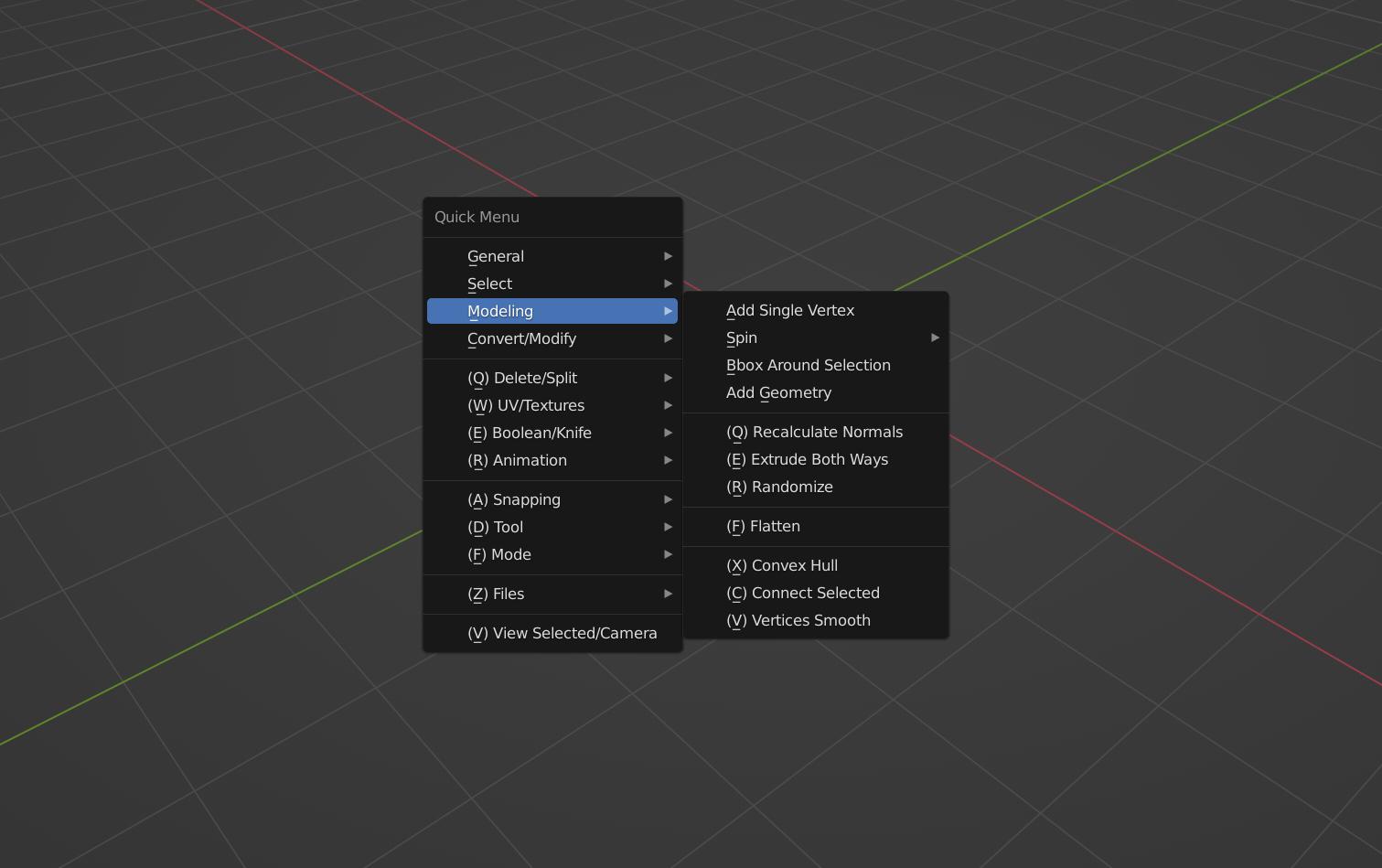
Quick Menu is a Blender addon that simplifies common tasks

Compatible with Blender 3.x.x

Install through Edit -> Preferences -> Addons -> Install... -> Select quick_menu.py.

Press D to open the menu.

Every operator is described in the manual.

Join our DISCORD for discussion.

The addon was initially made only with personal use in mind and therefore is not customizable. However, it adds some new operators that some people may find useful. It also simplifies access to some operators and settings. Blender is already very hotkey-friendly, but:

  1. Some useful operators are hard to reach, some take several mouse clicks. Some things you can't even fix with editing the keymap (snapping options for example). Quick Menu is optimized for accelerator keys, meaning all of the operators are accessible with just your left hand. All of them follow the pattern d + {key near d} + {key near d} . I took into consideration how easy it is to press them as well, combinations that are used frequently have some rolling finger motion in them.

  2. Blender doesn't really offer anything that would automate repeating tasks, like macros or whatever. Some of the operators do multiple things at once if it makes sense. Which effectively adds new functionality to Blender.

  3. Blender's defaults don't always make sense for my workflow, and a lot of the operators could be context-dependent. A lot of operators address this by calling existing Blender operators with proper settings. For example, I believe that "Shade Smooth", "Origin To (whatever)", operators that add modifiers and booleans should work regardless of what mode you're in. I believe that Separate/Join should be one button. The same is true for Region To Loop/Loop To Region, Add Mirror/Apply Mirror, etc. I believe that some operators (like mirror) should take into consideration your camera orientation when initially setting the axis. The list goes on. The addon is very opinionated.

This addon is the result of over a year of brainstorming on the effectiveness of modeling/texturing workflow and testing tools on small projects. I'm trying to keep it lightweight. If something seems missing from it, there's a high chance that the reason for it is that Blender already has built-in tools that allow to do it easily, or the use-case for it is very rare.

This addon is designed to be as unintrusive and minimalistic as possible. All of the operators are in just one menu. There's no UI other than that, which makes it easy to use. It also only takes one hotkey. It can be changed in the addon's preferences, but I recommend D.

This addon is a single-file addon for now, and it will probably stay that way because it simplifies development (reloading addons consisting of multiple files is not as straightforward as just pressing Alt+R, Alt+P in Blender's text editor).

Some tools

Here are some examples of tools that Quick Menu has. Keep in mind that this is not a complete list of operators, but rather a small showcase of what kind of things the addon is capable of. Only some modeling tools are listed, but the addon also has some operators for UVs, textures, export, etc. Check out the manual for the complete list.

Convert To Curve d41

Allows to create tubes out of selected edges with either round or square cross-section. Can be used without leaving edit mode. Usage: d+4+1

curve.mp4

Add geometry d34

Creates a circle or a square aligned to the selected face. Usage: d+3+5. Press shift to make a square

addgeometry.mp4

Loop/Region d23

Like some other Quick Menu operators (for example Separate/Join) it unifies multiple existing Blender operators into one. So instead of having to remember two separate hotkeys for Select Loop Inner Region and Select Boundary Loop, you can now just press d+2+3, and the addon will decide what to do depending on what mode you're in

loopregion.mp4

Bbox around selection d33

Creates a bounding box around selected elements in edit mode. Can also create a bounding plane/line, depending on the selection. Usage: d+3+3

bbox.mp4

Booleans de1, de2, de3

Context-dependent boolean, works in both object and edit mode. This operator will pre-scale selection by a small margin before applying boolean to avoid problems with coplanar faces. Works well with Blender's existing Add Cube tool (dd1). Usage: d+e+1 for union, d+e+2 for difference, d+e+3 for intersection

boolean.mp4

Connect d3c

Connects selected isolated islands with an edge. Will make a face if more than 2 islands are selected. Usage: d+3+c

connect.mp4

Flatten d3f

A faster way to flatten compared to s+{axis}+0+enter. This operator is view-dependent. Usage: d+3+f

flatten.mp4

Randomize d3r

Randomize operator that works in both object and edit mode (on separate islands). Usage: d+3+r

randomize.mp4

Spin d32

Effectively presets for the existing spin operator. Usage: d+3+2

spin.mp4

Plane Intersect Island deq

A view-dependent operator that cuts an island with a plane that goes through the center of the active element and is oriented towards the viewport camera (Snapped to 90 degrees by default). Convenient for cutting through complex meshes with ngons. Usage: d+e+q

planeintersectisland.mp4

Projection Intersect der

Projects selected elements to unselected. Just like the previous one, this operator is view-dependent. Flattens selection before projecting. Usage: d+e+r

projectionintersect.mp4

Knife Intersect dee

Similar to Blender's Intersect (Knife) (Ctrl+F+K), but removes the original geometry. Usage: d+e+e

knifeintersect.mp4
Comments
  • Array count issue

    Array count issue

    Issue: addon for arrays work incorrect. When you press counts more, it adds new array modifier with more counts in addition to previous one. When you press less counts, it add new array modifier with less counts in addition to previous one. 1 - 2 - 3 - 4 - 3 - 2 - 1 - 1, and in total: 7 array modifiers.

    Version: Blender 3.3.0 LTS (Steam version)

    How to recreate:

    1. In EDIT mode select mesh or part.
    2. To see the bug: open modifiers property menu.
    3. D-4-A to set array.
    4. in pop-up menu (same as F9) set count 2 or more by pressing arrows. 4.1) I check init.py, and there count number is 3 by default but in blender it is 1 (so, maybe, v3.3.0 is the reason)
    5. pressing opposite arrows to decrease numbers.

    Result: new array modifier is adding to modifiers' stack and affect on mesh.

    https://user-images.githubusercontent.com/60898828/189495750-d34d7c14-9e1e-4511-b61e-933a20b9dbeb.mp4

    opened by DesLandysh 0
  • I'm getting an error on create curves feature

    I'm getting an error on create curves feature

    When I try to create a curve I get an error.

    Python: Traceback (most recent call last): File "/Users/user/Library/Application Support/Blender/3.1/scripts/addons/quickmenu-main/init.py", line 789, in invoke return self.execute(context) File "/Users/user/Library/Application Support/Blender/3.1/scripts/addons/quickmenu-main/init.py", line 810, in execute self.resolution = max(1, (calculate_number_of_vertices_by_radius(self.depth, subsurf) / 2 - 3)) File "/Applications/Blender.app/Contents/Resources/3.1/scripts/modules/bpy_types.py", line 778, in setattr return setattr(properties, attr, value) TypeError: bpy_struct: item.attr = val: QM_OT_convert.resolution expected an int type, not float

    location: :-1

    opened by Nestlium 0
  • D-3-4 scale down (mouse to the left) throws error

    D-3-4 scale down (mouse to the left) throws error

    Blender 3.0.1

    Error: Python: Traceback (most recent call last):
      File "D:\Blender Assets\addons\quickmenu-main\__init__.py", line 645, in modal
        return modal_run(self, context, event, True)
      File "D:\Blender Assets\addons\quickmenu-main\__init__.py", line 184, in modal_run
        if hasattr(operator, 'on_modal_run'): operator.on_modal_run(context, event)
      File "D:\Blender Assets\addons\quickmenu-main\__init__.py", line 624, in on_modal_run
        self.execute(context)
      File "D:\Blender Assets\addons\quickmenu-main\__init__.py", line 661, in execute
        self.add_geometry()
      File "D:\Blender Assets\addons\quickmenu-main\__init__.py", line 656, in add_geometry
        self.vertices = calculate_number_of_vertices_by_radius(self.radius)
      File "D:\Blender Assets\addons\quickmenu-main\__init__.py", line 104, in calculate_number_of_vertices_by_radius
        return max(6, grid_snap(2, math.log(1 + 0.03 + 0.4 * radius) * RADIUS_TO_VERTICES))
    ValueError: math domain error
    
    opened by iperson 0
  • Error handling

    Error handling

    Having trouble reproducing this one. I think it was D-4-3, but could not repeat.

    location: <unknown location>:-1
    Error: Python: Traceback (most recent call last):
      File "D:\Blender Assets\addons\quickmenu-main\__init__.py", line 881, in execute
        execute_in_mode('OBJECT', fn)
      File "D:\Blender Assets\addons\quickmenu-main\__init__.py", line 92, in execute_in_mode
        result = callback()
      File "D:\Blender Assets\addons\quickmenu-main\__init__.py", line 880, in fn
        bpy.ops.object.convert(target='MESH')
      File "C:\Program Files\Blender Foundation\Blender 3.0\3.0\scripts\modules\bpy\ops.py", line 132, in __call__
        ret = _op_call(self.idname_py(), None, kw)
    RuntimeError: Operator bpy.ops.object.convert.poll() failed, context is incorrect
    
    opened by iperson 0
  • Addon does not show up after install

    Addon does not show up after install

    I'm on an M1 Max Mac running the Blender 3.1 beta on MacOS Monterrey. I downloaded the latest version and Installed it as per the documentation. The addon does not show up after restarting blender, nor in the Addon list in the preferences.

    I've tried selecting a cube, pressing D 4 5 ( and other combinations ) but no menu shows up.

    opened by SkelegonDK 3
Releases(v2.4.3)
Owner
passivestar
passivestar
Solve various integral equations using numerical methods in Python

Solve Volterra and Fredholm integral equations This Python package estimates Volterra and Fredholm integral equations using known techniques. Installa

Matthew Wildrick Thomas 18 Nov 28, 2022
The little-endian version of MessagePack

MessagePackEL This is the little-endian version of MessagePack, except the endianness is different, the rest is exactly the same as MessagePack. C lib

dukelec 9 May 13, 2022
Home Assistant integration for spanish electrical data providers (e.g., datadis)

homeassistant-edata Esta integración para Home Assistant te permite seguir de un vistazo tus consumos y máximas potencias alcanzadas. Para ello, se ap

VMG 163 Jan 05, 2023
FBChecker Account using python , package requests and web old facebook

fbcek FBChecker Account using python , package requests and web old facebook using python 3.x apt upgrade -y apt update -y pkg install bash -y pkg ins

XnuxersXploitXen 5 Dec 24, 2022
Scripts used in the RayStation medical radiation dosimetry treatment planning system

Med Phys Scripts These are scripts that I, the medical physics assistant at Cookeville Regional Medical Center, wrote for use in our radiation therapy

Kaley White 2 Oct 19, 2022
Blender Add-on to Add Metal Materials to Your Scene

Blender QMM (Quick Metal Materials) Blender Addon to Add Metal Materials to Your Scene Installation Download the latest ZIP from Releases. Usage This

Don Schnitzius 27 Dec 26, 2022
A person does not exist image bot

A person does not exist image bot

Fayas Noushad 3 Dec 12, 2021
Architectural Patterns implementation by using notification handler module prototype

This repository covers singleton, indirection, factory, adaptor, mediator patterns in python language by using university hypothetical notification module prototype. The code is just for demonstratin

Muhammad Umair 2 Jan 08, 2022
An esoteric programming language that supports concurrency, regex, and web requests.

The Hofstadter Esoteric Programming Language Hofstadter's Law: It always takes longer than you expect, even when you take into account Hofstadter's La

Austin Henley 19 Dec 27, 2022
A command-line utility that creates projects from cookiecutters (project templates), e.g. Python package projects, VueJS projects.

Cookiecutter A command-line utility that creates projects from cookiecutters (project templates), e.g. creating a Python package project from a Python

18.6k Jan 02, 2023
🤖️ Plugin for Sentry which allows sending notification via DingTalk robot.

Sentry DingTalk Sentry 集成钉钉机器人通知 Requirments sentry = 21.5.1 特性 发送异常通知到钉钉 支持钉钉机器人webhook设置关键字 配置环境变量 DINGTALK_WEBHOOK: Optional(string) DINGTALK_CUST

1 Nov 04, 2021
Stop ask your soraka to ult you, just ult yourself

Lollo's auto-ultimate script Are you tired of your low elo friend who can't ult you with soraka when you ask for it? Use Useless Support and just ult

9 Oct 20, 2022
A collection of tips for using MISP.

MISP Tip of the Week A collection of tips for using MISP. Published via BelgoMISP (todo) and this repository. Available in MD and JSON. Do you want to

Koen Van Impe 52 Jan 07, 2023
gwcheck is a tool to check .gnu.warning.* sections in ELF object files and display their content.

gwcheck Description gwcheck is a tool to check .gnu.warning.* sections in ELF object files and display their content. For an introduction to .gnu.warn

Frederic Cambus 11 Oct 28, 2022
✨ Udemy Coupon Finder For Discord. Supports Turkish & English Language.

Udemy Course Finder Bot | Udemy Kupon Bulucu Botu This bot finds new udemy coupons and sends to the channel. Before Setup You must have python = 3.6

Penguen 4 May 04, 2022
Hopefully the the next-generation backend server of bgm.tv

Hopefully the the next-generation backend server of bgm.tv

Bangumi 475 Jan 01, 2023
A tool converting rpk (记乎) to apkg (Anki Package)

RpkConverter This tool is used to convert rpk file to Anki apkg. 如果遇到任何问题,请发起issue,并描述情况。如果转换rpk出现问题,请将文件发到邮箱 ssqyang [AT] outlook.com,我会debug并修复问题。 下

9 Nov 01, 2021
A service to display a quick summary of a project on GitHub.

A service to display a quick summary of a project on GitHub. Usage 📖 Paste the code below with details filled in as specified below into your Readme.

Rohit V 8 Dec 06, 2022
A web application which you can search, buy or sell shares with current prices which provided by IEX.

CS50 - Stock Exchange A web application which you can search, buy or sell shares with current prices which provided by IEX. Table of Contents Setup St

1 May 28, 2022
Social reading and reviewing, decentralized with ActivityPub

BookWyrm Social reading and reviewing, decentralized with ActivityPub Contents Joining BookWyrm Contributing About BookWyrm What it is and isn't The r

BookWyrm 1.4k Jan 08, 2023