Prompt-learning is the latest paradigm to adapt pre-trained language models (PLMs) to downstream NLP tasks

Overview

An Open-Source Framework for Prompt-learning.


OverviewInstallationHow To UseDocs

Overview

Prompt-learning is the latest paradigm to adapt pre-trained language models (PLMs) to downstream NLP tasks, which modifies the input text with a textual template and directly uses PLMs to conduct pre-trained tasks. This library provides a standard, flexible and extensible framework to deploy the prompt-learning pipeline. OpenPrompt supports loading PLMs directly from huggingface transformers. In the future, we will also support PLMs implemented by other libraries.
What Can You Do via OpenPrompt?

demo

  • Use the implementations of current prompt-learning approaches.* We have implemented various of prompting methods, including templating, verbalizing and optimization strategies under a unified standard. You can easily call and understand these methods.
  • Design your own prompt-learning work. With the extensibility of OpenPrompt, you can quickly practice your prompt-learning ideas.

Installation

Using Git

Clone the repository from github:

git clone https://github.com/thunlp/OpenPrompt.git
cd OpenPrompt
pip install -r requirements.txt
python setup.py install

Modify the code

python setup.py develop

Use OpenPrompt

Base Concepts

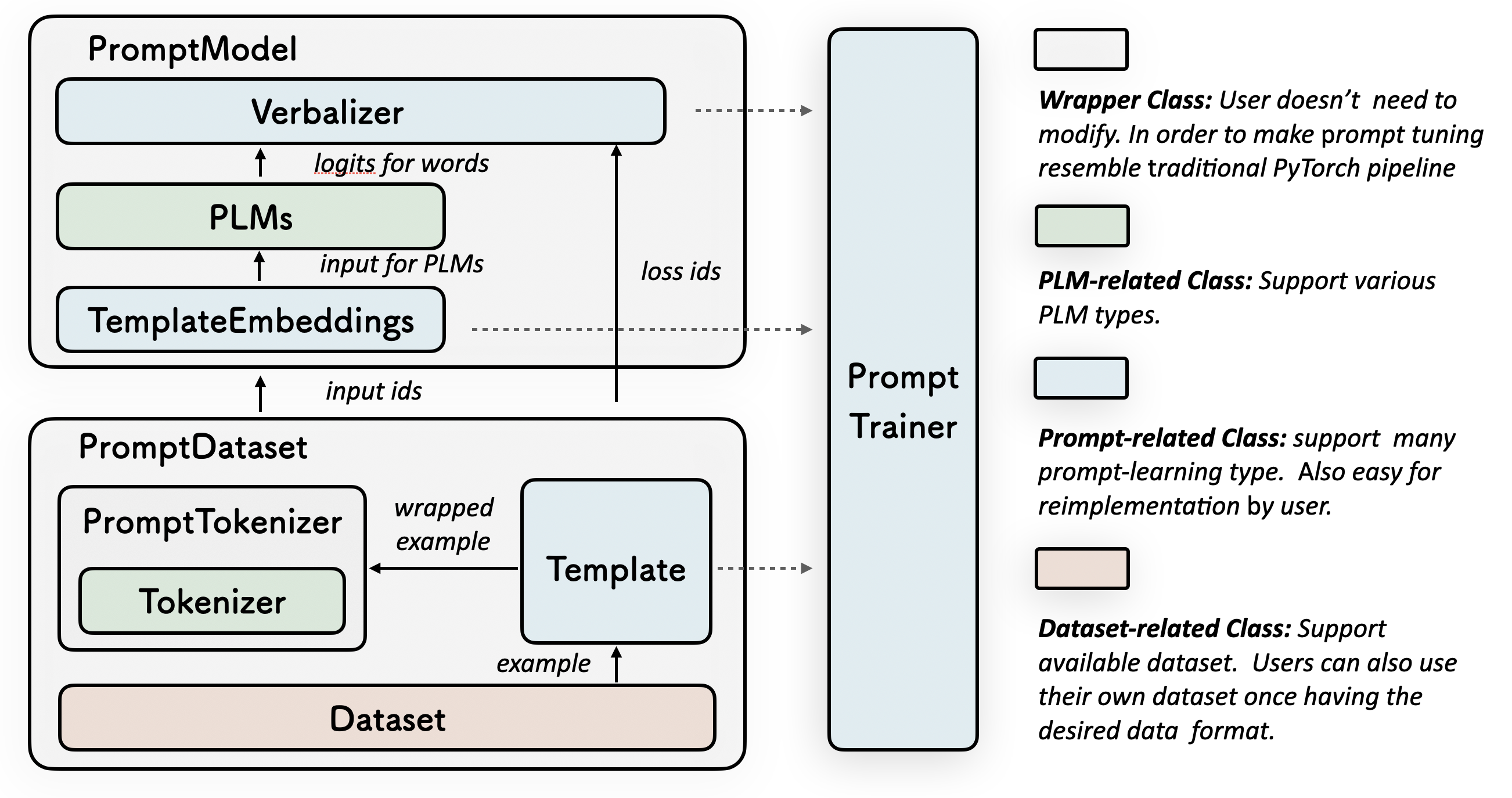
A Prompt class contains a (or multiple) Template and a (or multiple) Verbalizer, where the Template class is defined to wrap the original input with templates, and the Verbalizer class is to construct a projection between labels and target words in the current vocabulary.

A PromptModel class combines the Template, Verbalizer and PLM, practically participating in training and inference.

Introduction by a Simple Example

With the modularity and flexibility of OpenPrompt, you can easily develop a prompt-learning pipeline.

Step 1: Define a task

The first step is to determine the current NLP task, think about what’s your data looks like and what do you want from the data! That is, the essence of this step is to determine the classses and the InputExample of the task. For simplicity, we use Sentiment Analysis as an example. tutorial_task.

from openprompt.data_utils import InputExample
classes = [ # There are two classes in Sentiment Analysis, one for negative and one for positive
    "negative",
    "positive"
]
dataset = [ # For simplicity, there's only two examples
    # text_a is the input text of the data, some other datasets may have multiple input sentences in one example.
    InputExample(
        guid = 0,
        text_a = "Albert Einstein was one of the greatest intellects of his time.",
    ),
    InputExample(
        guid = 1,
        text_a = "The film was badly made.",
    ),
]

Step 2: Define a Pre-trained Language Models (PLMs) as backbone.

Choose a PLM to support your task. Different models have different attributes, we encourge you to use OpenPrompt to explore the potential of various PLMs. OpenPrompt is compatible with models on huggingface.

from openprompt.plms import get_model_class
model_class = get_model_class(plm_type = "bert")
model_path = "bert-base-cased"
bertConfig = model_class.config.from_pretrained(model_path)
bertTokenizer = model_class.tokenizer.from_pretrained(model_path)
bertModel = model_class.model.from_pretrained(model_path)

Step 3: Define a Template.

Template is a modifier of the original input text, which is also one of the most important modules in prompt-learning. 

", "It", "was", " "], tokenizer = bertTokenizer, ) ">
from openprompt.prompts import ManualTemplate
promptTemplate = ManualTemplate(
    text = ["
     
      "
     , "It", "was", "
     
      "
     ],
    tokenizer = bertTokenizer,
)

Step 4: Define a Verbalizer

Verbalizer is another important (but not neccessary) in prompt-learning,which projects the original labels (we have defined them as classes, remember?) to a set of label words. Here is an example that we project the negative class to the word bad, and project the positive class to the words good, wonderful, great.

from openprompt.prompts import ManualVerbalizer
promptVerbalizer = ManualVerbalizer(
    classes = classes,
    label_words = {
        "negative": ["bad"],
        "positive": ["good", "wonderful", "great"],
    },
    tokenizer = bertTokenizer,
)

Step 5: Combine them into a PromptModel

Given the task, now we have a PLM, a Template and a Verbalizer, we combine them into a PromptModel. Note that although the example naively combine the three modules, you can actually define some complicated interactions among them.

from openprompt import PromptForClassification
promptModel = PromptForClassification(
    template = promptTemplate,
    model = bertModel,
    verbalizer = promptVerbalizer,
)

Please refer to our documentation for more details.

Datasets

We provide a series of download scripts in the dataset/ folder, feel free to use them to download benchmarks.

Citation

We are working on the technical report...

Contributors

We thank all the contributors to this project, more contributors are welcome!

Ning Ding, Shengding Hu, Weilin Zhao.

Comments
  • An error occurred while using the latest version (1.0.0)

    An error occurred while using the latest version (1.0.0)

    When I use ptr_template in the latest version.The following error occurred. TypeError: __init__() got an unexpected keyword argument 'placeholder_mapping' Version 0.1.1 does not have this problem.

    opened by blacker521 8
  • Failed to run the demo in `tutorial`

    Failed to run the demo in `tutorial`

    command: python tutorial/1.1_mixed_template.py

    output:

      File "tutorial/1.1_mixed_template.py", line 94, in <module>
        logits = prompt_model(inputs)
      File "/home/h/anaconda3/envs/openprompt/lib/python3.8/site-packages/torch/nn/modules/module.py", line 1051, in _call_impl
        return forward_call(*input, **kwargs)
      File "/home/h/work/OpenPrompt/openprompt/pipeline_base.py", line 241, in forward
        outputs = self.verbalizer.gather_outputs(outputs)
    TypeError: gather_outputs() takes 1 positional argument but 2 were given
    
    opened by huchinlp 7
  • no attribute 'tokenize_one_example'

    no attribute 'tokenize_one_example'

    Hi,

    thank you for your amazing work to ease the users of prompt learning.

    I tried to implement the LMBFF tutorial and happened to meet this error:

    Traceback (most recent call last):
      File "run_lmbff.py", line 116, in <module>
        dataloader = PromptDataLoader(dataset['train'], template, template_generate_tokenizer, template_tokenizer_wrapper, batch_size=len(dataset['train']), decoder_max_length=128) # register all data at once
      File "/home/oryza/playground/OpenPrompt/openprompt/pipeline_base.py", line 101, in __init__
        self.tokenize()
      File "/home/oryza/playground/OpenPrompt/openprompt/pipeline_base.py", line 137, in tokenize
        inputfeatures = InputFeatures(**self.tokenizer_wrapper.tokenize_one_example(wrapped_example, self.teacher_forcing), **wrapped_example[1]).to_tensor()
    AttributeError: 'T5Tokenizer' object has no attribute 'tokenize_one_example'
    

    This is my pip list:

    Package            Version   Editable project location
    ------------------ --------- ---------------------------------
    aiohttp            3.8.1
    aiosignal          1.2.0
    async-timeout      4.0.2
    asynctest          0.13.0
    attrs              21.4.0
    certifi            2021.10.8
    charset-normalizer 2.0.12
    click              8.1.2
    datasets           2.0.0
    dill               0.3.4
    filelock           3.6.0
    frozenlist         1.3.0
    fsspec             2022.3.0
    huggingface-hub    0.5.1
    idna               3.3
    importlib-metadata 4.11.3
    joblib             1.1.0
    multidict          6.0.2
    multiprocess       0.70.12.2
    nltk               3.7
    numpy              1.21.5
    openprompt         1.0.0     /home/oryza/playground/OpenPrompt
    packaging          21.3
    pandas             1.3.5
    pip                22.0.4
    protobuf           3.20.0
    pyarrow            7.0.0
    pyparsing          3.0.8
    python-dateutil    2.8.2
    pytz               2022.1
    PyYAML             6.0
    regex              2022.3.15
    requests           2.27.1
    responses          0.18.0
    rouge              1.0.0
    sacremoses         0.0.49
    scikit-learn       1.0.2
    scipy              1.7.3
    sentencepiece      0.1.96
    setuptools         41.2.0
    six                1.16.0
    sklearn            0.0
    tensorboardX       2.5
    threadpoolctl      3.1.0
    tokenizers         0.10.3
    torch              1.11.0
    tqdm               4.64.0
    transformers       4.10.0
    typing_extensions  4.1.1
    urllib3            1.26.9
    xxhash             3.0.0
    yacs               0.1.8
    yarl               1.7.2
    zipp               3.8.0
    

    Do you have any idea about the error? I read in another thread about installing SentencePiece to solve this problem but my sentencepiece is already there.

    Thank you in advance!

    Best, Oryza

    opened by khairunnisaor 6
  • 使用 InputExample() 构建中文数据集,汉字读入为Unicode编码

    使用 InputExample() 构建中文数据集,汉字读入为Unicode编码

    Code

    dataset = {}
    dataset["train"] = []
    for index,data in train_dataset.iterrows():
        input_example = InputExample(text_a = data["text"], label=data["class"], guid=data["id"])
        dataset["train"].append(input_example)
    print(dataset["train"][10])
    

    output

    {
      "guid": 13,
      "label": 2,
      "meta": {},
      "text_a": "\u522b\u6025\u3002\u8bf4\u4e0d\u51c6\u7684\u3002\u7b2c\u4e00\u6b21\u8fc7\u7684\u65f6\u5019\u4e5f\u5ba1\u6838\u4e86\u5341\u51e0\u5929\u3002\u4e0d\u8fc7\u6700\u540e\u5168\u989d\u5ea6\u901a\u8fc7\u3002\u5229\u606f\u9ad8\u5c31\u6ca1\u7528",
      "text_b": "",
      "tgt_text": null
    }
    
    opened by terence1023 6
  • bug:TypeError: _forward_unimplemented() got an unexpected keyword argument 'output_hidden_states'

    bug:TypeError: _forward_unimplemented() got an unexpected keyword argument 'output_hidden_states'

    File "/workspace/knowledgegraphcommon/business/text_classification/prompt/text_classification_prompt.py", line 185, in train logits = self.prompt_model(inputs) File "/root/miniconda3/lib/python3.9/site-packages/torch/nn/modules/module.py", line 1051, in _call_impl return forward_call(*input, **kwargs) File "/workspace/OpenPrompt/openprompt/pipeline_base.py", line 263, in forward outputs = self.prompt_model(batch) File "/root/miniconda3/lib/python3.9/site-packages/torch/nn/modules/module.py", line 1051, in _call_impl return forward_call(*input, **kwargs) File "/workspace/OpenPrompt/openprompt/pipeline_base.py", line 185, in forward outputs = self.plm(**input_batch, output_hidden_states=True) File "/root/miniconda3/lib/python3.9/site-packages/torch/nn/modules/module.py", line 1051, in _call_impl return forward_call(*input, **kwargs) TypeError: _forward_unimplemented() got an unexpected keyword argument 'output_hidden_states'

    opened by franztao 5
  • Use 2.1_conditional_generation.py , after fine-tuning, it only generates the same char.  Why ?

    Use 2.1_conditional_generation.py , after fine-tuning, it only generates the same char. Why ?

    use 2.1_conditional_generation.py in datasets/CondGen/webnlg_2017/

    generated txt: ''''''''''''''''''''''''''''''''''''''''''''''''''''''''''''''''''''''''''''''''''''''''''''''''''''''''''''''''

    opened by 353xiong 4
  • How to handle label words in Chinese?

    How to handle label words in Chinese?

    Label words may be tokenized into multiple tokens. In Chinese, label words are likely be tokenized into characters. So, how to handle label words that consist of more than one characters?

    opened by NLPpupil 4
  • Question about updating the repository

    Question about updating the repository

    How do you keep this repository up to date? Do I need to clone the entire library every time and update it again as follows:

    git clone https://github.com/thunlp/OpenPrompt.git
    cd OpenPrompt
    pip install -r requirements.txt
    python setup.py install
    
    opened by probe2 4
  • TypeError: __init__() missing 1 required positional argument: 'tokenizer_wrapper_class'

    TypeError: __init__() missing 1 required positional argument: 'tokenizer_wrapper_class'

    When going through the tutorial

    In step 6, raised the errors below:

    data_loader = PromptDataLoader( ... dataset = dataset, ... tokenizer = bertTokenizer, ... template = promptTemplate, ... ) Traceback (most recent call last): File "", line 1, in TypeError: init() missing 1 required positional argument: 'tokenizer_wrapper_class'

    opened by dongxiaohuang 4
  • 初始模型为bert,roberta时的特殊注意事项?

    初始模型为bert,roberta时的特殊注意事项?

    作者好,我使用t5,gpt2作为初始模型进行训练,验证集指标稳步上升没有问题,但是使用bert,roberta,electra的时候就出现问题,验证集指标一直是0.5203649397197784,想请教下,这是什么原因导致的? example: input_example = InputExample(text_a=line['text_pair'], text_b=line['text'], label=int(line['label']), guid=i)

    初始化模型: plm, tokenizer, model_config, WrapperClass = load_plm("bert", "bert-base-chinese")

    模板: template_text = '{"placeholder":"text_a"}{"placeholder":"text_b"}的情感倾向是{"mask"}.'

    verbalizer: myverbalizer = ManualVerbalizer(tokenizer, num_classes=2, label_words=[["负"], ["正"]])

    训练详情详情: Epoch 1, average loss: 3.3326262831687927 Epoch 1, average loss: 0.7787383239444913 Epoch 1, average loss: 0.7572225447236699 Epoch 1, average loss: 0.738348940730161 Epoch 1, average loss: 0.7296206120358232 Epoch 1, average loss: 0.7233000741192647 Epoch 1, average loss: 0.7194478078047589 Epoch 1, average loss: 0.7165702087618587 Epoch 1, average loss: 0.7136984900552019 Epoch 1, average loss: 0.7121389577100447 Epoch 1, average loss: 0.7103113287874931 Epoch 1, average loss: 0.7093091916511776 Epoch 1, average loss: 0.7082642679232515 Epoch 1, average loss: 0.7077864898547248 Epoch 1, average loss: 0.7074250399318126 Epoch 1, average loss: 0.7070826163498072 Epoch 1, average loss: 0.7063648934145984 Epoch 1, average loss: 0.7059904860616641 Epoch 1, average loss: 0.70552960885168 Epoch 1, average loss: 0.7050825911213101 Epoch 1, average loss: 0.7048186851440073 0.5203649397197784 Epoch 2, average loss: 0.6653246581554413 Epoch 2, average loss: 0.7000961779363898 Epoch 2, average loss: 0.6992864966194495 Epoch 2, average loss: 0.697152165840576 Epoch 2, average loss: 0.6964660410873108 Epoch 2, average loss: 0.6976269556980793 Epoch 2, average loss: 0.6974568861339253 Epoch 2, average loss: 0.6972834053179063 Epoch 2, average loss: 0.6972271847809284 Epoch 2, average loss: 0.6969758515266203 Epoch 2, average loss: 0.6968832315801383 Epoch 2, average loss: 0.6966261330479784 Epoch 2, average loss: 0.6964328451033501 Epoch 2, average loss: 0.6963928808987537 Epoch 2, average loss: 0.6964452584858793 Epoch 2, average loss: 0.6963973140276998 Epoch 2, average loss: 0.696516385802325 Epoch 2, average loss: 0.6964337500765108 Epoch 2, average loss: 0.6963930293084604 Epoch 2, average loss: 0.6962399163065522 Epoch 2, average loss: 0.7043500146401878 0.5203649397197784

    opened by qdchenxiaoyan 3
  • How to accelerate the downloading of pytorch_model.bin?

    How to accelerate the downloading of pytorch_model.bin?

    image hello, when I try to run the example in the readme, I found the download speed is too slow. I use miniconda with python3.8 and cuda11.1. Are there any ways to speed up the download?
    opened by FelliYang 3
  • Question about the test score in tutorial/3.1_lmbff.py

    Question about the test score in tutorial/3.1_lmbff.py

    Hello, I ran this tutorial code implementing lmbff and the final test score was 0.5091743119266054.

    This performance is too low, so I checked the evaluation score during training and the prediction results. In fact, the model scored 0.5 in each epoch, and the final prediction was all 0. Exactly, 0.509 equals to the score predicting majority as reported in the paper of lmbff.

    I did not check in more detail, but apparently there is something wrong with the training of the model here.

    opened by ZekaiShao25 0
  • 意图分类任务,label是中文,怎么定义label words

    意图分类任务,label是中文,怎么定义label words

    根据文档https://thunlp.github.io/OpenPrompt/notes/verbalizer.html, label_words里面定义的都是一个token。当处理中文文本分类任务时,label是多个字,应该怎么定义呢?

    mytemplate = ManualTemplate(tokenizer=tokenizer, text="""{"meta":"raw"}的意图是{"mask"}""") 比如 意图是 "天气"、"音乐"、"电影"。

    opened by lonelydancer 1
  • PromptForClassification shouldn't change plm

    PromptForClassification shouldn't change plm

    Hey! When I use freeze_plm in PromptForClassification with freeze_plm=True and then freeze_plm=False, the PLM would still behave as though it is frozen. This does not seem like an expected behavior in this case. i.e:

    plm, tokenizer, model_config, WrapperClass = load_plm("roberta", "roberta-base")
    prompt_model = PromptForClassification(plm=plm, template=promptTemplate, verbalizer=promptVerbalizer, 
                                           freeze_plm=True)
    prompt_model = PromptForClassification(plm=plm, template=promptTemplate, verbalizer=promptVerbalizer, 
                                           freeze_plm=False) 
    # do training.. behaves as though PLM frozen, 
    # e.g. outputs "RuntimeError: element 0 of tensors does not require grad and does not have a grad_fn"
    
    opened by guyd1995 0
  • Question about 2.1 conditional generation

    Question about 2.1 conditional generation

    When I run this code, I get the following error: PermissionError: [Errno 13] Permission denied: '../../Generated_sentence_webnlg_gpt2_False.txt'. After I gave the entire folder all permissions, I still didn't solve the problem

    opened by ZHUANG-jt 0
  • Save and re-load a trained prompt model

    Save and re-load a trained prompt model

    Currently, I am saving the model using the following: torch.save(prompt_model.state_dict(), PATH)

    How can we load this back to test performance on other data? Pytorch tutorial says to use the following. model = TheModelClass(*args, **kwargs) model.load_state_dict(torch.load(PATH)) model.eval()

    What would TheModelClass be? An example would be really appreciated.

    opened by agrimaseth 0
Releases(v1.0.0)
Owner
THUNLP
Natural Language Processing Lab at Tsinghua University
THUNLP
Global Rhythm Style Transfer Without Text Transcriptions

Global Prosody Style Transfer Without Text Transcriptions This repository provides a PyTorch implementation of AutoPST, which enables unsupervised glo

Kaizhi Qian 193 Dec 30, 2022
Facebook AI Research Sequence-to-Sequence Toolkit written in Python.

Fairseq(-py) is a sequence modeling toolkit that allows researchers and developers to train custom models for translation, summarization, language mod

20.5k Jan 08, 2023
A method to generate speech across multiple speakers

VoiceLoop PyTorch implementation of the method described in the paper VoiceLoop: Voice Fitting and Synthesis via a Phonological Loop. VoiceLoop is a n

Facebook Archive 873 Dec 15, 2022
Coreference resolution for English, French, German and Polish, optimised for limited training data and easily extensible for further languages

Coreferee Author: Richard Paul Hudson, Explosion AI 1. Introduction 1.1 The basic idea 1.2 Getting started 1.2.1 English 1.2.2 French 1.2.3 German 1.2

Explosion 70 Dec 12, 2022
HuggingTweets - Train a model to generate tweets

HuggingTweets - Train a model to generate tweets Create in 5 minutes a tweet generator based on your favorite Tweeter Make my own model with the demo

Boris Dayma 318 Jan 04, 2023
An easy-to-use framework for BERT models, with trainers, various NLP tasks and detailed annonations

FantasyBert English | 中文 Introduction An easy-to-use framework for BERT models, with trainers, various NLP tasks and detailed annonations. You can imp

Fan 137 Oct 26, 2022
T‘rex Park is a Youzan sponsored project. Offering Chinese NLP and image models pretrained from E-commerce datasets

T‘rex Park is a Youzan sponsored project. Offering Chinese NLP and image models pretrained from E-commerce datasets (product titles, images, comments, etc.).

55 Nov 22, 2022
TextAttack 🐙 is a Python framework for adversarial attacks, data augmentation, and model training in NLP

TextAttack 🐙 Generating adversarial examples for NLP models [TextAttack Documentation on ReadTheDocs] About • Setup • Usage • Design About TextAttack

QData 2.2k Jan 03, 2023
Задания КЕГЭ по информатике 2021 на Python

КЕГЭ 2021 на Python В этом репозитории мои решения типовых заданий КЕГЭ по информатике в 2021 году, БЕСПЛАТНО! Задания Взяты с https://inf-ege.sdamgia

8 Oct 13, 2022
Trankit is a Light-Weight Transformer-based Python Toolkit for Multilingual Natural Language Processing

Trankit: A Light-Weight Transformer-based Python Toolkit for Multilingual Natural Language Processing Trankit is a light-weight Transformer-based Pyth

652 Jan 06, 2023
NLPShala , the best IDE for all Natural language processing tasks.

The revolutionary IDE for all NLP (Natural language processing) stuffs on the internet.

Abhi 3 Aug 08, 2021
Just a basic Telegram AI chat bot written in Python using Pyrogram.

Nikko ChatBot Just a basic Telegram AI chat bot written in Python using Pyrogram. Requirements Python 3.7 or higher. A bot token. Installation $ https

ʀᴇxɪɴᴀᴢᴏʀ 2 Oct 21, 2022
Python interface for converting Penn Treebank trees to Stanford Dependencies and Universal Depenencies

PyStanfordDependencies Python interface for converting Penn Treebank trees to Universal Dependencies and Stanford Dependencies. Example usage Start by

David McClosky 64 May 08, 2022
This code is the implementation of Text Emotion Recognition (TER) with linguistic features

APSIPA-TER This code is the implementation of Text Emotion Recognition (TER) with linguistic features. The network model is BERT with a pretrained mod

kenro515 1 Feb 08, 2022
Transformer related optimization, including BERT, GPT

This repository provides a script and recipe to run the highly optimized transformer-based encoder and decoder component, and it is tested and maintained by NVIDIA.

NVIDIA Corporation 1.7k Jan 04, 2023
Utility for Google Text-To-Speech batch audio files generator. Ideal for prompt files creation with Google voices for application in offline IVRs

Google Text-To-Speech Batch Prompt File Maker Are you in the need of IVR prompts, but you have no voice actors? Let Google talk your prompts like a pr

Ponchotitlán 1 Aug 19, 2021
The code from the whylogs workshop in DataTalks.Club on 29 March 2022

whylogs Workshop The code from the whylogs workshop in DataTalks.Club on 29 March 2022 whylogs - The open source standard for data logging (Don't forg

DataTalksClub 12 Sep 05, 2022
The repository for the paper: Multilingual Translation via Grafting Pre-trained Language Models

Graformer The repository for the paper: Multilingual Translation via Grafting Pre-trained Language Models Graformer (also named BridgeTransformer in t

22 Dec 14, 2022
Code for the paper "Exploring the Limits of Transfer Learning with a Unified Text-to-Text Transformer"

T5: Text-To-Text Transfer Transformer The t5 library serves primarily as code for reproducing the experiments in Exploring the Limits of Transfer Lear

Google Research 4.6k Jan 01, 2023