Cross View SLAM
This is the associated code and dataset repository for our paper
I. D. Miller et al., "Any Way You Look at It: Semantic Crossview Localization and Mapping With LiDAR," in IEEE Robotics and Automation Letters, vol. 6, no. 2, pp. 2397-2404, April 2021, doi: 10.1109/LRA.2021.3061332.
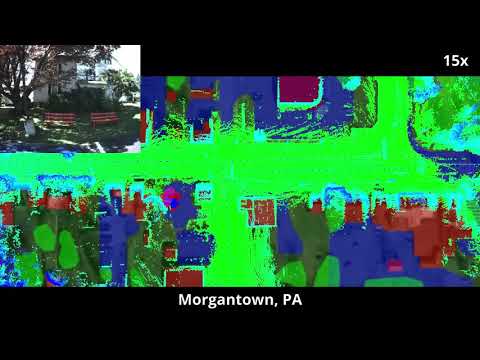
See also our accompanying video
Compilation
We release the localization portion of the system, which can be integrated with a LiDAR-based mapper of the user's choice. The system reqires ROS and should be built as a catkin package. We have tested with ROS Melodic and Ubuntu 18.04. Note that we require GCC 9 or greater as well as Intel TBB.
Datasets
Our datasets
We release our own datasets from around University City in Philadelphia and Morgantown, PA. They can be downloaded here. Ucity2 was taken several months after Ucity, and both follow the same path. These datasets are in rosbag format, including the following topics:
/lidar_rgb_calib/painted_pcis the semantically labelled motion-compensated pointcloud. Classes are encoded as a per-point color, with each channel equal to the class ID. Classes are based off of cityscapes and listed below./os1_cloud_node/imuis raw IMU data from the Ouster OS1-64./quad/front/image_color/compressedis a compressed RGB image from the forward-facing camera./subt/global_poseis the global pose estimate from UPSLAM./subt/integrated_poseis the integrated pose estimate from UPSLAM. This differs from the above in that it does not take into account loop closures, and is used as the motion prior for the localization filter.
Please note that UPSLAM odometry was generated purely based on LiDAR without semantics, and is provided to act as a loose motion prior. It should not be used as ground truth.
If you require access to the raw data for your work, please reach out directly at iandm (at) seas (dot) upenn (dot) edu.
KITTI
We provide a derivative of the excellent kitti2bag tool in the scripts directory, modified to use semantics from SemanticKITTI. To use this tool, you will need to download the raw synced + rectified data from KITTI as well as the SemanticKITTI data. Your final directory structure should look like
2011-09-30
  2011_09_30_drive_0033_sync
    image_00
      timestamps.txt
      data
    image_01
      timestamps.txt
      data
    image_02
      timestamps.txt
      data
    image_03
      timestamps.txt
      data
    labels
      000000.label
      000001.label
      ...
    oxts
      dataformat.txt
      timestamps.txt
      data
    velodyne_points
      timestamps_end.txt
      timestamps_start.txt
      timestamps.txt
      data
  calib_cam_to_cam.txt
  calib_imu_to_velo.txt
  calib_velo_to_cam.txt
You can then run ./kitti2bag.py -t 2011_09_30 -r 0033 raw_synced /path/to/kitti in order to generate a rosbag usable with our system.
Classes
| Class | Label |
|---|---|
| 2 | Building |
| 7 | Vegetation |
| 13 | Vehicle |
| 100 | Road/Parking Lot |
| 102 | Ground/Sidewalk |
| 255 | Unlabelled |
Usage
We provide a launch file for KITTI and for our datasets. To run, simply launch the appropriate launch file and play the bag. Note that when data has been modified, the system will take several minutes to regenerate the processed map TDF. Once this has been done once, and parameters are not changed, it will be cached. The system startup should look along the lines of
[ INFO] [1616266360.083650372]: Found cache, checking if parameters have changed
[ INFO] [1616266360.084357050]: No cache found, loading raster map
[ INFO] [1616266360.489371763]: Computing distance maps...
[ INFO] [1616266360.489428570]: maps generated
[ INFO] [1616266360.597603324]: transforming coord
[ INFO] [1616266360.641200529]: coord rotated
[ INFO] [1616266360.724551466]: Sample grid generated
[ INFO] [1616266385.379985385]: class 0 complete
[ INFO] [1616266439.390797168]: class 1 complete
[ INFO] [1616266532.004976919]: class 2 complete
[ INFO] [1616266573.041695479]: class 3 complete
[ INFO] [1616266605.901935236]: class 4 complete
[ INFO] [1616266700.533124618]: class 5 complete
[ INFO] [1616266700.537600570]: Rasterization complete
[ INFO] [1616266700.633949062]: maps generated
[ INFO] [1616266700.633990791]: transforming coord
[ INFO] [1616266700.634004336]: coord rotated
[ INFO] [1616266700.634596830]: maps generated
[ INFO] [1616266700.634608101]: transforming coord
[ INFO] [1616266700.634618110]: coord rotated
[ INFO] [1616266700.634666000]: Initializing particles...
[ INFO] [1616266700.710166543]: Particles initialized
[ INFO] [1616266700.745398596]: Setup complete
ROS Topics
/cross_view_slam/gt_poseInput, takes in ground truth localization if provided to draw on the map. Not used./cross_view_slam/pcInput, the pointwise-labelled pointcloud/cross_view_slam/motion_priorInput, the prior odometry (from some LiDAR odometry system)/cross_view_slam/mapOutput image of map with particles/cross_view_slam/scanOutput image visualization of flattened polar LiDAR scan/cross_view_slam/pose_estEstimated pose of the robot with uncertainty, not published until convergence/cross_view_slam/scaleEstimated scale of the map in px/m, not published until convergence
ROS Parameters
raster_resResolution to rasterize the svg at. 1 is typically fine.use_rasterLoad the map svg or raster images. If the map svg is loaded, raster images are automatically generated in the accompanying folder.map_pathPath to map file.svg_resResolution of the map in px/m. If not specified, the localizer will try to estimate.svg_origin_xOrigin of the map in pixel coordinates, x value. Used only for ground truth visualizationsvg_origin_yOrigin of the map in pixel coordinates, y value.use_motion_priorIf true, use the provided motion estimate. Otherwise, use 0 velocity prior.num_particlesNumber of particles to use in the filter.filter_pos_covMotion prior uncertainty in position.filter_theta_covMotion prior uncertainty in bearing.filter_regularizationGamma in the paper, see for more details.
Citation
If you find this work or datasets helpful, please cite
@ARTICLE{9361130,
author={I. D. {Miller} and A. {Cowley} and R. {Konkimalla} and S. S. {Shivakumar} and T. {Nguyen} and T. {Smith} and C. J. {Taylor} and V. {Kumar}},
journal={IEEE Robotics and Automation Letters},
title={Any Way You Look at It: Semantic Crossview Localization and Mapping With LiDAR},
year={2021},
volume={6},
number={2},
pages={2397-2404},
doi={10.1109/LRA.2021.3061332}}

 401 Dec 28, 2022
 175 Dec 29, 2022
 19 Dec 12, 2022
 157 Jan 06, 2023
 368 Dec 06, 2022
 260 Jan 05, 2023
 6 Dec 04, 2022
 44 Dec 07, 2022
 421 Jan 04, 2023
 127 Jan 04, 2023
 18 Aug 18, 2022
 128 Dec 24, 2022
 59 Dec 14, 2022
 14 Dec 28, 2022
 62 Dec 21, 2022
 1.1k Jan 03, 2023
 47 Dec 30, 2022
 26 Dec 25, 2022
 5 Jul 18, 2022
 28 Dec 04, 2021