WhatSoup
🍲
A web scraper that exports your entire WhatsApp chat history.
Table of Contents
Overview
Problem
- Exports are limited up to a maximum of 40,000 messages
- Exports skip the text portion of media-messages by replacing the entire message with
My favorite selfie of us 😻🐶🤳 - Exports are limited to a
.txtfile format
Solution
WhatSoup solves these problems by loading the entire chat history in a browser, scraping the chat messages (only text, no media), and exporting it to .txt, .csv, or .html file formats.
Example output:
WhatsApp Chat with Bob Ross.txt
02/14/2021, 02:04 PM - Eddy Harrington: Hey Bob 👋 Let's move to Signal!
02/14/2021, 02:05 PM - Bob Ross: You can do anything you want. This is your world.
02/15/2021, 08:30 AM - Eddy Harrington: How about we use WhatSoup 🍲 to backup our cherished chats?
02/15/2021, 08:30 AM - Bob Ross: However you think it should be, that’s exactly how it should be.
02/15/2021, 08:31 AM - Eddy Harrington: You're the best, Bob ❤
02/19/2021, 11:24 AM - Bob Ross:  My latest happy 🌲 painting for you.
Demo
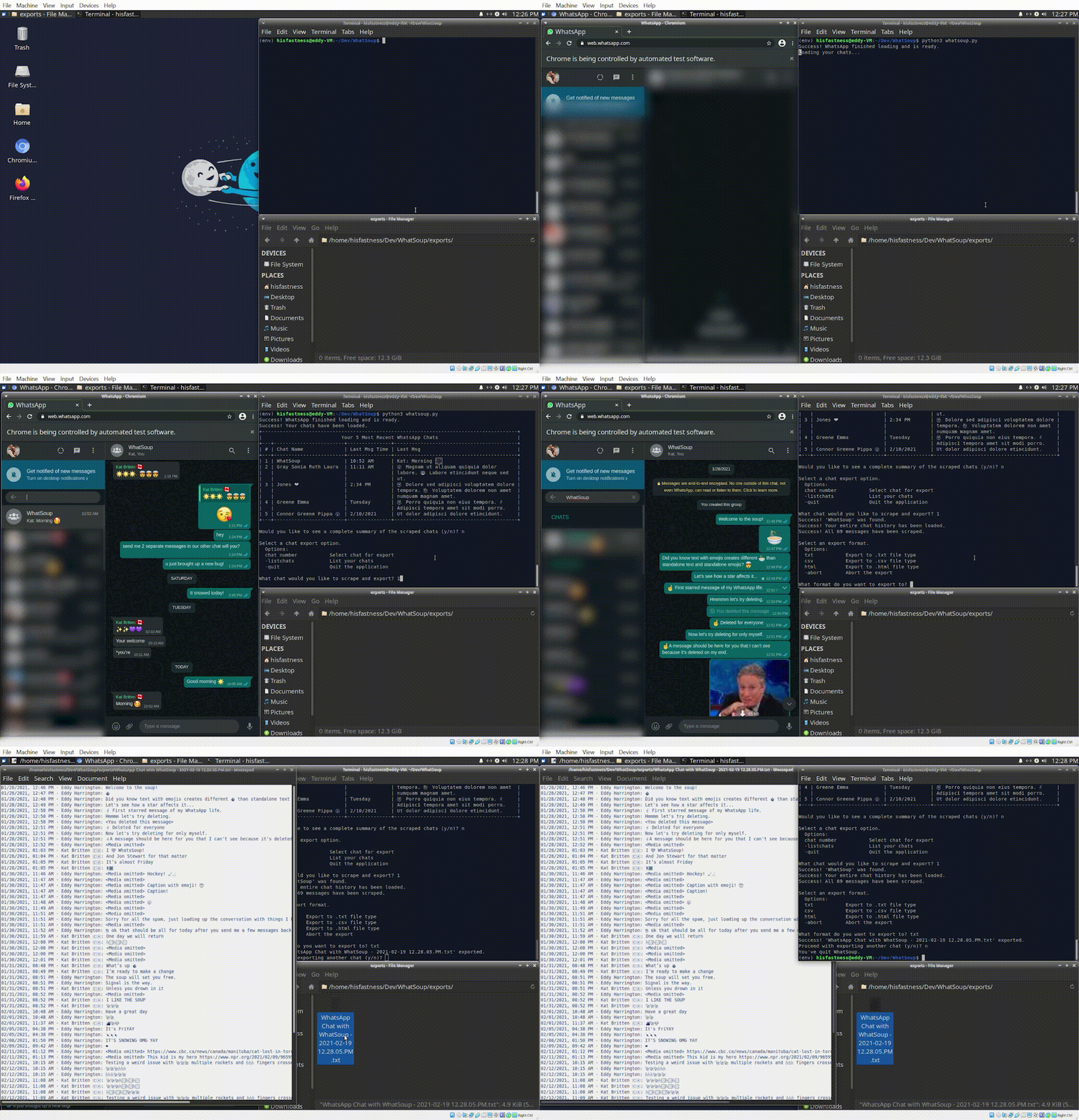
Prerequisites
- You have a WhatsApp account
- You have Chrome browser installed
- You have some familiarity with setting up and running Python scripts
- Your terminal supports unicode (UTF-8) characters (for chat emoji's)
Instructions
-
Make sure your WhatsApp chat settings are set to English language. This needs to be done on your phone (instructions here). You can change it back afterwards, but for now the script relies on certain HTML elements/attributes that contain English characters/words.
-
Clone the repo:
git clone https://github.com/eddyharrington/WhatSoup.git -
Create a virtual environment:
# Windows python -m venv env # Linux & Mac python3 -m venv env -
Activate the virtual environment:
# Windows env/Scripts/activate # Linux & Mac source env/bin/activate -
Install the dependencies:
# Windows pip install -r requirements.txt # Linux & Mac python3 -m pip install -r requirements.txt -
Setup your environment
-
Download ChromeDriver and extract it to a local folder (such as the
envfolder) -
Get your Chrome browser
Profile Pathby opening Chrome and enteringchrome://versioninto the URL bar -
Create an
.envfile with an entry forDRIVER_PATHandCHROME_PROFILEthat specify the directory paths for your ChromeDriver and your Chrome Profile from above steps:# Windows DRIVER_PATH = 'C:\path-to-your-driver\chromedriver.exe' CHROME_PROFILE = 'C:\Users\your-username\AppData\Local\Google\Chrome\User Data' # Linux & Mac DRIVER_PATH = '/Users/your-username/path-to-your-driver/chromedriver' CHROME_PROFILE = '/Users/your-username/Library/Application Support/Google/Chrome/Default'
-
Run the script
# Windows
python whatsoup.py

# Linux & Mac
python3 whatsoup.py
Note for Mac users: you may get blocked when trying to run the script the first time with a message about chromedriver not being from an identified developer. This is normal. Follow these instructions to grant chromedriver an exception, then re-run the script.
Frequently Asked Questions
Does it download pictures / media?
No.
How large of chats can I load/export?
The most demanding part of the process is loading the entire chat in the browser, in which performance heavily depends on how much memory your computer has and how well Chrome handles the large DOM load. For reference, my largest chat (~50k messages) uses about 10GB of RAM. If you load more than the current record let me know and add yourself to the leader board.
WhatSoup Largest Chat Leader Board
| # | Name | Date | Message Count | Time |
|---|---|---|---|---|
|
|
Eddy | 2021-02-28 | 47,550 | 28139 sec / 7.8 hrs |
|
|
? | ? | ? | ? |
|
|
? | ? | ? | ? |
How long does it take to load/export?
Depends on the chat size and how performant your computer is, however below is a ballpark range to expect. For large chats, I recommend turning your PC's sleep/power settings to OFF and running the script in the evening or before bed so it loads over night.
| # of msgs in chat history | Load time |
|---|---|
| 500 | 1 min |
| 5,000 | 12 min |
| 10,000 | 35 min |
| 25,000 | 3.5 hrs |
| 50,000 | 8 hrs |
Why is it so slow?!
Basically, browsers become easily bottlenecked when loading massive amounts of rich data in WhatsApp, which is a WebSocket application and is constantly sending/receiving information and changing the HTML/DOM.
I'm open to ideas but most of the things I tried didn't help performance:
- Chrome vs Firefox
❌ - Headless browsing
❌ - Disabling images
❌ - Removing elements from DOM
❌ - Changing 'experimental' browser settings to allocate more memory
❌
Can I...
-
Use Firefox instead of Chrome? Yes, not out of the box though. There are a few Selenium differences and nuances to get it working, which I can share if there's interest. TODO.
-
Use headless? Yes, but I only got this to work with Firefox and not Chrome.
-
Use WhatSoup to scrape a local WhatsApp HTML file? Yes, you'd just need to bypass a few functions from
main()and load the HTML file into Selenium's driver, then run the scraping/exporting functions like the below. If there's enough interest I can look into adding this to WhatSoup myself. TODO.# Load and scrape data from local HTML file def local_scrape(driver): driver.get('C:\your-WhatSoup-dir\source.html') scraped = scrape_chat(driver) scrape_is_exported("source", scraped) -
Contribute to WhatSoup? Please do!

 4 Dec 03, 2022
 1 Jan 31, 2022
 6 Dec 06, 2022
 129 Dec 14, 2022
 4 Nov 09, 2021
 15 May 17, 2022
 1 Dec 30, 2021
 19 Dec 12, 2022
 2 Jul 14, 2022
 16 Sep 17, 2022
 90 Feb 09, 2021
 3 Oct 21, 2021
 2 Apr 29, 2022
 692 Dec 22, 2022
 1 Jan 12, 2022
 11 Dec 11, 2022
 499 Dec 09, 2022
 4 Jun 02, 2022
 588 Dec 27, 2022