NCNN implementation of Real-ESRGAN. Real-ESRGAN aims at developing Practical Algorithms for General Image Restoration.

Overview

Real-ESRGAN ncnn Vulkan

CI License: MIT Open issue Closed issue

This project is the ncnn implementation of Real-ESRGAN. Real-ESRGAN ncnn Vulkan heavily borrows from realsr-ncnn-vulkan. Many thanks to nihui, ncnn and realsr-ncnn-vulkan 😁

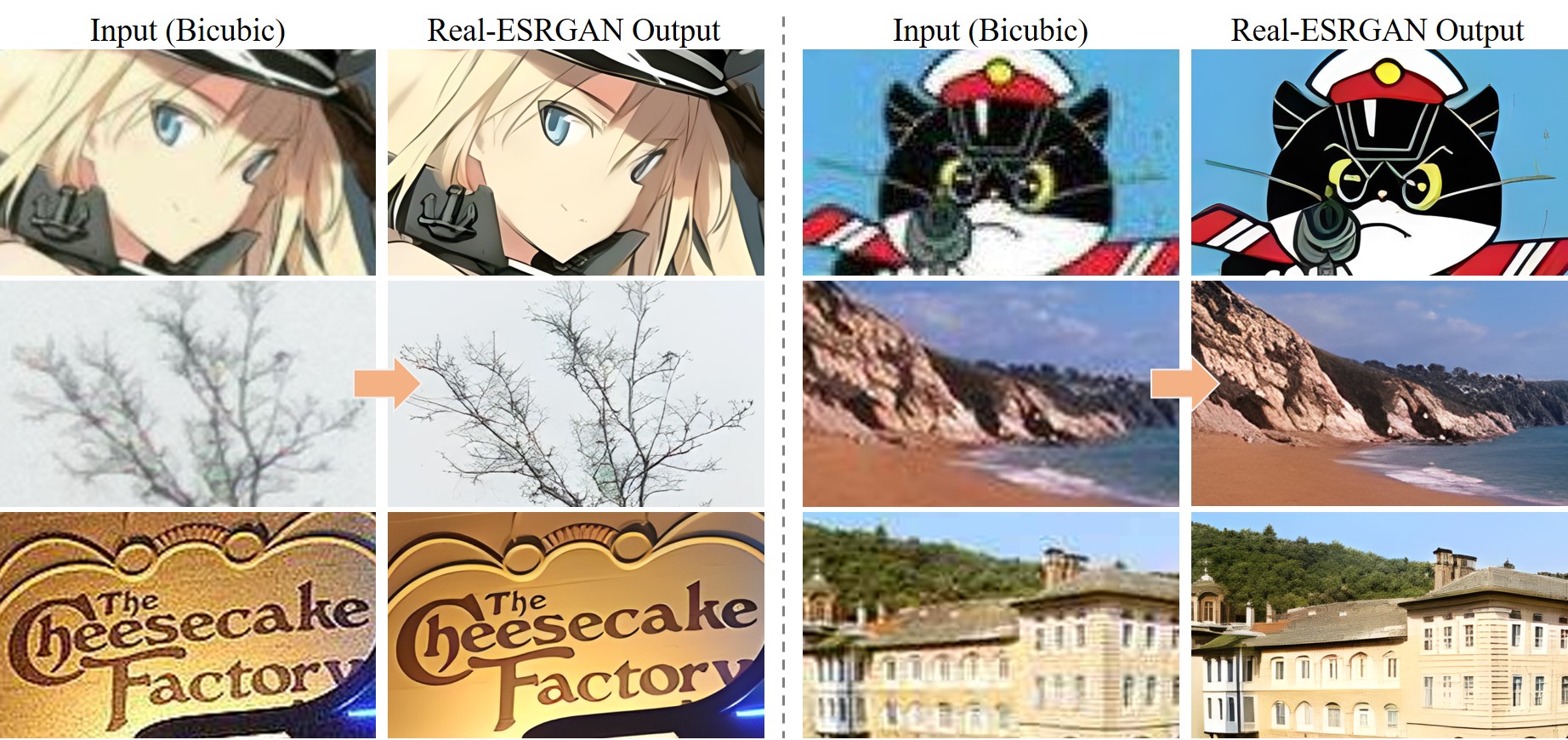
Real-ESRGAN aims at developing Practical Algorithms for General Image Restoration. We also optimize it for anime images.

Contents


If Real-ESRGAN is helpful in your photos/projects, please help to this repo or recommend it to your friends. Thanks 😊
Other recommended projects:
▶️ Real-ESRGAN: A practical algorithm for general image restoration
▶️ GFPGAN: A practical algorithm for real-world face restoration
▶️ BasicSR: An open-source image and video restoration toolbox
▶️ facexlib: A collection that provides useful face-relation functions.
▶️ HandyView: A PyQt5-based image viewer that is handy for view and comparison.

📖 Real-ESRGAN: Training Real-World Blind Super-Resolution with Pure Synthetic Data

[Paper]   [Project Page]   [Demo]
Xintao Wang, Liangbin Xie, Chao Dong, Ying Shan
Tencent ARC Lab; Shenzhen Institutes of Advanced Technology, Chinese Academy of Sciences

TODO List

  • Support further cheap arbitrary resize (e.g., bicubic, bilinear) for the model outputs
  • Bug: Some PCs will output black images
  • Add the guidance for ncnn model conversion
  • Support face restoration - GFPGAN

💻 Usages

Example Command

realesrgan-ncnn-vulkan.exe -i input.jpg -o output.png -n realesrgan-x4plus-anime

Full Usages

Usage: realesrgan-ncnn-vulkan.exe -i infile -o outfile [options]...

  -h                   show this help
  -v                   verbose output
  -i input-path        input image path (jpg/png/webp) or directory
  -o output-path       output image path (jpg/png/webp) or directory
  -s scale             upscale ratio (4, default=4)
  -t tile-size         tile size (>=32/0=auto, default=0) can be 0,0,0 for multi-gpu
  -m model-path        folder path to pre-trained models(default=models)
  -n model-name        model name (default=realesrgan-x4plus, can be realesrgan-x4plus | realesrgan-x4plus-anime | realesrnet-x4plus)
  -g gpu-id            gpu device to use (default=0) can be 0,1,2 for multi-gpu
  -j load:proc:save    thread count for load/proc/save (default=1:2:2) can be 1:2,2,2:2 for multi-gpu
  -x                   enable tta mode
  -f format            output image format (jpg/png/webp, default=ext/png)
  • input-path and output-path accept either file path or directory path
  • scale = scale level, 4 = upscale 4x
  • tile-size = tile size, use smaller value to reduce GPU memory usage, default selects automatically
  • load:proc:save = thread count for the three stages (image decoding + model upscaling + image encoding), using larger values may increase GPU usage and consume more GPU memory. You can tune this configuration with "4:4:4" for many small-size images, and "2:2:2" for large-size images. The default setting usually works fine for most situations. If you find that your GPU is hungry, try increasing thread count to achieve faster processing.
  • format = the format of the image to be output, png is better supported, however webp generally yields smaller file sizes, both are losslessly encoded

If you encounter crash or error, try to upgrade your GPU driver

🌏 Other Open-Source Code Used

📜 BibTeX

@InProceedings{wang2021realesrgan,
    author    = {Xintao Wang and Liangbin Xie and Chao Dong and Ying Shan},
    title     = {Real-ESRGAN: Training Real-World Blind Super-Resolution with Pure Synthetic Data},
    booktitle = {International Conference on Computer Vision Workshops (ICCVW)},
    date      = {2021}
}

📧 Contact

If you have any question, please email [email protected] or [email protected].

Comments
  • problem running on aws

    problem running on aws

    I downloaded the ubuntu zip on a g3s.xlarge and the result is a black image. Is the zip missing files?

    
    ./realesrgan-ncnn-vulkan-v0.2.0-ubuntu/realesrgan-ncnn-vulkan -i input.jpg -o out/output.jpg -n realesrgan-x4plus -s 4 
    
    [0 Tesla M60]  queueC=0[16]  queueG=0[16]  queueT=1[2]
    [0 Tesla M60]  bugsbn1=0  bugbilz=0  bugcopc=0  bugihfa=0
    [0 Tesla M60]  fp16-p/s/a=1/1/0  int8-p/s/a=1/1/1
    [0 Tesla M60]  subgroup=32  basic=1  vote=1  ballot=1  shuffle=1
    [1 llvmpipe (LLVM 12.0.0, 256 bits)]  queueC=0[1]  queueG=0[1]  queueT=0[1]
    [1 llvmpipe (LLVM 12.0.0, 256 bits)]  bugsbn1=0  bugbilz=0  bugcopc=0  bugihfa=0
    [1 llvmpipe (LLVM 12.0.0, 256 bits)]  fp16-p/s/a=1/1/0  int8-p/s/a=1/1/0
    [1 llvmpipe (LLVM 12.0.0, 256 bits)]  subgroup=8  basic=1  vote=1  ballot=1  shuffle=0
    fopen /home/ubuntu/realesrgan-ncnn-vulkan-v0.2.0-ubuntu/models/realesrgan-x4plus.param failed
    fopen /home/ubuntu/realesrgan-ncnn-vulkan-v0.2.0-ubuntu/models/realesrgan-x4plus.bin failed
    find_blob_index_by_name data failed
    Try
    find_blob_index_by_name output failed
    Try
    0.00%
    find_blob_index_by_name data failed
    Try
    find_blob_index_by_name output failed
    Try
    4.17%
    find_blob_index_by_name data failed
    Try
    find_blob_index_by_name output failed
    Try
    8.33%
    find_blob_index_by_name data failed
    Try
    find_blob_index_by_name output failed
    Try
    12.50%
    find_blob_index_by_name data failed
    Try
    find_blob_index_by_name output failed
    Try
    16.67%
    find_blob_index_by_name data failed
    Try
    find_blob_index_by_name output failed
    Try
    20.83%
    find_blob_index_by_name data failed
    Try
    find_blob_index_by_name output failed
    Try
    25.00%
    find_blob_index_by_name data failed
    Try
    find_blob_index_by_name output failed
    Try
    29.17%
    find_blob_index_by_name data failed
    Try
    find_blob_index_by_name output failed
    Try
    33.33%
    find_blob_index_by_name data failed
    Try
    find_blob_index_by_name output failed
    Try
    37.50%
    find_blob_index_by_name data failed
    Try
    find_blob_index_by_name output failed
    Try
    41.67%
    find_blob_index_by_name data failed
    Try
    find_blob_index_by_name output failed
    Try
    45.83%
    find_blob_index_by_name data failed
    Try
    find_blob_index_by_name output failed
    Try
    50.00%
    find_blob_index_by_name data failed
    Try
    find_blob_index_by_name output failed
    Try
    54.17%
    find_blob_index_by_name data failed
    Try
    find_blob_index_by_name output failed
    Try
    58.33%
    find_blob_index_by_name data failed
    Try
    find_blob_index_by_name output failed
    Try
    62.50%
    find_blob_index_by_name data failed
    Try
    find_blob_index_by_name output failed
    Try
    66.67%
    find_blob_index_by_name data failed
    Try
    find_blob_index_by_name output failed
    Try
    70.83%
    find_blob_index_by_name data failed
    Try
    find_blob_index_by_name output failed
    Try
    75.00%
    find_blob_index_by_name data failed
    Try
    find_blob_index_by_name output failed
    Try
    79.17%
    find_blob_index_by_name data failed
    Try
    find_blob_index_by_name output failed
    Try
    83.33%
    find_blob_index_by_name data failed
    Try
    find_blob_index_by_name output failed
    Try
    87.50%
    find_blob_index_by_name data failed
    Try
    find_blob_index_by_name output failed
    Try
    91.67%
    find_blob_index_by_name data failed
    Try
    find_blob_index_by_name output failed
    Try
    95.83%
    
    opened by kmulvey 2
  • How do I switch from integrated gpu to nvedia gpu

    How do I switch from integrated gpu to nvedia gpu

    [0 Intel(R) UHD Graphics 630] queueC=0[1] queueG=0[1] queueT=0[1] [0 Intel(R) UHD Graphics 630] bugsbn1=0 bugbilz=3 bugcopc=0 bugihfa=0 [0 Intel(R) UHD Graphics 630] fp16-p/s/a=1/1/1 int8-p/s/a=1/1/1 [0 Intel(R) UHD Graphics 630] subgroup=32 basic=1 vote=1 ballot=1 shuffle=1

    When upscaling images it only uses integrated gpu I want to use my gtx 1650 how do I switch this?

    opened by csAshish 0
  • in directory mode, option to skip if destination already exist

    in directory mode, option to skip if destination already exist

    if you stop the upscaler while processing a directory and you have to restart it, it will start from the beginning and overwrite existing files

    overwriting in file mode is fine but should be an option for direcotry mode ... so I propose a flag to disable overwrite and skip if exist

    opened by 6543 0
  • models: consider adding into README how to get them.

    models: consider adding into README how to get them.

    Hey,

    Please consider adding to README a section how to get the pre-trained model files. Currently you'd need to extract them from the following links

    • https://github.com/xinntao/Real-ESRGAN/releases/download/v0.2.5.0/realesrgan-ncnn-vulkan-20220424-ubuntu.zip
    • https://github.com/xinntao/Real-ESRGAN/releases/download/v0.2.5.0/realesr-animevideov3.pth
    • https://github.com/xinntao/Real-ESRGAN/releases/download/v0.2.5.0/realesr-general-x4v3.pth

    It took me a moment to figure out how to get a hold of them and I suspect many others would face similar challenge.

    opened by slashbeast 0
  • Segfault realesrnet-x4plus

    Segfault realesrnet-x4plus

    %  ./realesrgan-ncnn-vulkan -i FdLbqKcWIAAaCeY.jpeg  -o FdLbqKcWIAAaCeY.png -n realesrnet-x4plus
    zsh: segmentation fault  ./realesrgan-ncnn-vulkan -i FdLbqKcWIAAaCeY.jpeg -o FdLbqKcWIAAaCeY.png -n 
    
    opened by atomical 1
Owner
Xintao
Researcher at Tencent ARC Lab, (Applied Research Center)
Xintao
A object detecting neural network powered by the yolo architecture and leveraging the PyTorch framework and associated libraries.

Yolo-Powered-Detector A object detecting neural network powered by the yolo architecture and leveraging the PyTorch framework and associated libraries

Luke Wilson 1 Dec 03, 2021
EFENet: Reference-based Video Super-Resolution with Enhanced Flow Estimation

EFENet EFENet: Reference-based Video Super-Resolution with Enhanced Flow Estimation Code is a bit messy now. I woud clean up soon. For training the EF

Yaping Zhao 19 Nov 05, 2022
The authors' implementation of Unsupervised Adversarial Learning of 3D Human Pose from 2D Joint Locations

Unsupervised Adversarial Learning of 3D Human Pose from 2D Joint Locations This is the authors' implementation of Unsupervised Adversarial Learning of

Dwango Media Village 140 Dec 07, 2022
Paddle pit - Rethinking Spatial Dimensions of Vision Transformers

基于Paddle实现PiT ——Rethinking Spatial Dimensions of Vision Transformers,arxiv 官方原版代

Hongtao Wen 4 Jan 15, 2022
Put blind watermark into a text with python

text_blind_watermark Put blind watermark into a text. Can be used in Wechat dingding ... How to Use install pip install text_blind_watermark Alice Pu

郭飞 164 Dec 30, 2022
A high-level Python library for Quantum Natural Language Processing

lambeq About lambeq is a toolkit for quantum natural language processing (QNLP). Documentation: https://cqcl.github.io/lambeq/ User support: lambeq-su

Cambridge Quantum 315 Jan 01, 2023
A voice recognition assistant similar to amazon alexa, siri and google assistant.

kenyan-Siri Build an Artificial Assistant Full tutorial (video) To watch the tutorial, click on the image below Installation For windows users (run th

Alison Parker 3 Aug 19, 2022
Repository for the paper "Online Domain Adaptation for Occupancy Mapping", RSS 2020

RSS 2020 - Online Domain Adaptation for Occupancy Mapping Repository for the paper "Online Domain Adaptation for Occupancy Mapping", Robotics: Science

Anthony 26 Sep 22, 2022
Official PyTorch implementation of UACANet: Uncertainty Aware Context Attention for Polyp Segmentation

UACANet: Uncertainty Aware Context Attention for Polyp Segmentation Official pytorch implementation of UACANet: Uncertainty Aware Context Attention fo

Taehun Kim 85 Dec 14, 2022
Deconfounding Temporal Autoencoder: Estimating Treatment Effects over Time Using Noisy Proxies

Deconfounding Temporal Autoencoder (DTA) This is a repository for the paper "Deconfounding Temporal Autoencoder: Estimating Treatment Effects over Tim

Milan Kuzmanovic 3 Feb 04, 2022
Tensorboard for pytorch (and chainer, mxnet, numpy, ...)

tensorboardX Write TensorBoard events with simple function call. The current release (v2.3) is tested on anaconda3, with PyTorch 1.8.1 / torchvision 0

Tzu-Wei Huang 7.5k Dec 28, 2022
Pytorch implementation for the EMNLP 2020 (Findings) paper: Connecting the Dots: A Knowledgeable Path Generator for Commonsense Question Answering

Path-Generator-QA This is a Pytorch implementation for the EMNLP 2020 (Findings) paper: Connecting the Dots: A Knowledgeable Path Generator for Common

Peifeng Wang 33 Dec 05, 2022
[NeurIPS 2021] Garment4D: Garment Reconstruction from Point Cloud Sequences

Garment4D [PDF] | [OpenReview] | [Project Page] Overview This is the codebase for our NeurIPS 2021 paper Garment4D: Garment Reconstruction from Point

Fangzhou Hong 112 Dec 23, 2022
Network Pruning That Matters: A Case Study on Retraining Variants (ICLR 2021)

Network Pruning That Matters: A Case Study on Retraining Variants (ICLR 2021)

Duong H. Le 18 Jun 13, 2022
Randomizes the warps in a stock pokeemerald repo.

pokeemerald warp randomizer Randomizes the warps in a stock pokeemerald repo. Usage Instructions Install networkx and matplotlib via pip3 or similar.

Max Thomas 6 Mar 17, 2022
Adaptive Pyramid Context Network for Semantic Segmentation (APCNet CVPR'2019)

Adaptive Pyramid Context Network for Semantic Segmentation (APCNet CVPR'2019) Introduction Official implementation of Adaptive Pyramid Context Network

21 Nov 09, 2022
Malware Bypass Research using Reinforcement Learning

Malware Bypass Research using Reinforcement Learning

Bobby Filar 76 Dec 26, 2022
GEP (GDB Enhanced Prompt) - a GDB plug-in for GDB command prompt with fzf history search, fish-like autosuggestions, auto-completion with floating window, partial string matching in history, and more!

GEP (GDB Enhanced Prompt) GEP (GDB Enhanced Prompt) is a GDB plug-in which make your GDB command prompt more convenient and flexibility. Why I need th

Alan Li 23 Dec 21, 2022
Official Repo for ICCV2021 Paper: Learning to Regress Bodies from Images using Differentiable Semantic Rendering

[ICCV2021] Learning to Regress Bodies from Images using Differentiable Semantic Rendering Getting Started DSR has been implemented and tested on Ubunt

Sai Kumar Dwivedi 83 Nov 27, 2022
OpenFace – a state-of-the art tool intended for facial landmark detection, head pose estimation, facial action unit recognition, and eye-gaze estimation.

OpenFace 2.2.0: a facial behavior analysis toolkit Over the past few years, there has been an increased interest in automatic facial behavior analysis

Tadas Baltrusaitis 5.8k Dec 31, 2022
