



๐Ÿ”… Shapash makes Machine Learning models transparent and understandable by everyone

Overview

tests pypi downloads pyversion license doc

๐ŸŽ‰ What's new ?

Version New Feature Description Tutorial
1.6.x Explainability Quality Metrics
To help increase confidence in explainability methods, you can evaluate the relevance of your explainability using 3 metrics: Stability, Consistency and Compacity
1.5.x ACV Backend
A new way of estimating Shapley values using ACV. More info about ACV here.
1.4.x Groups of features
demo
You can now regroup features that share common properties together.
This option can be useful if your model has a lot of features.
1.3.x Shapash Report
demo
A standalone HTML report that constitutes a basis of an audit document.

๐Ÿ” Overview

Shapash is a Python library which aims to make machine learning interpretable and understandable by everyone. It provides several types of visualization that display explicit labels that everyone can understand.

Data Scientists can understand their models easily and share their results. End users can understand the decision proposed by a model using a summary of the most influential criteria.

Shapash also contributes to data science auditing by displaying usefull information about any model and data in a unique report.

๐Ÿค Contributors

๐Ÿ† Awards

๐Ÿ”ฅ Features

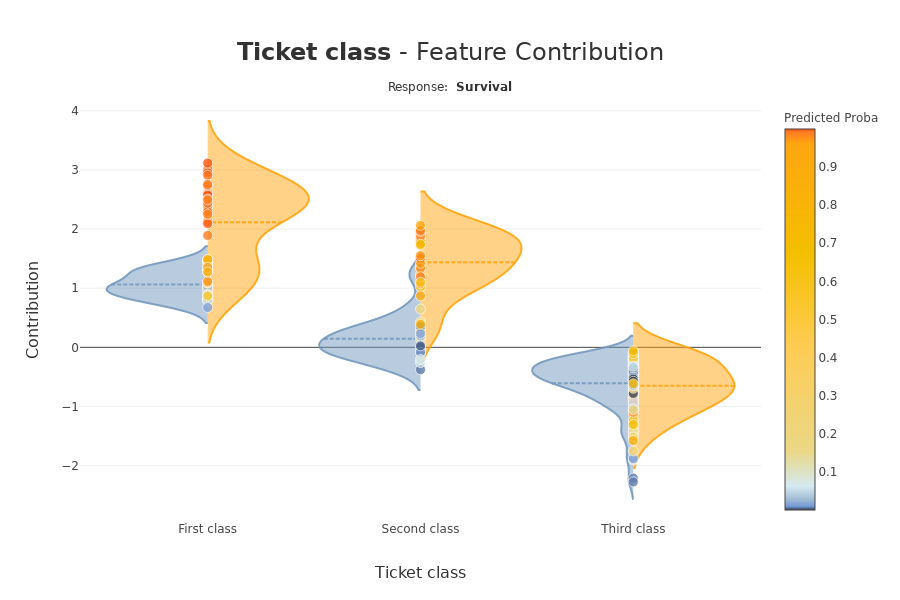
  • Display clear and understandable results: plots and outputs use explicit labels for each feature and its values

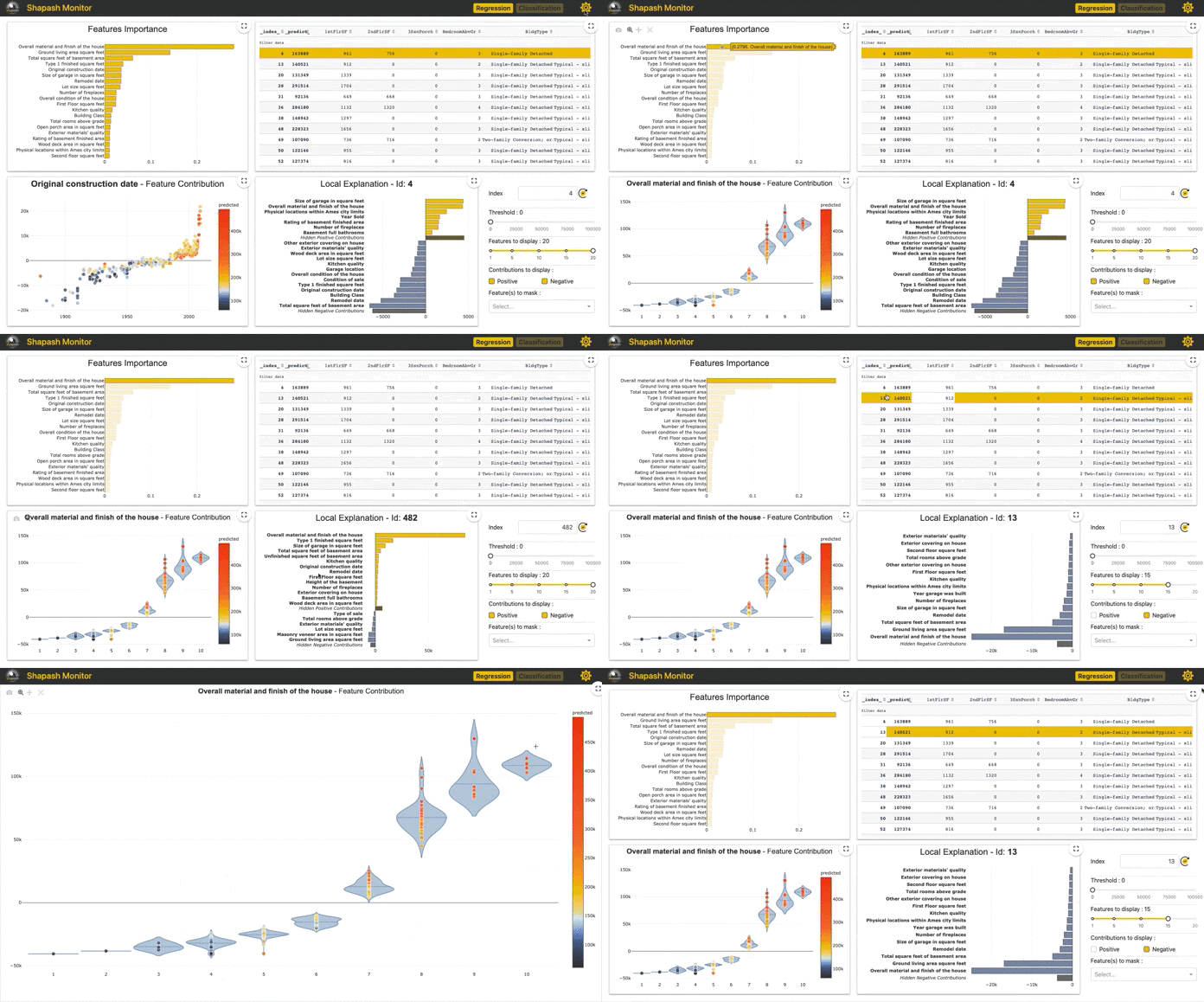
  • Allow Data Scientists to quickly understand their models by using a webapp to easily navigate between global and local explainability, and understand how the different features contribute: Live Demo Shapash-Monitor
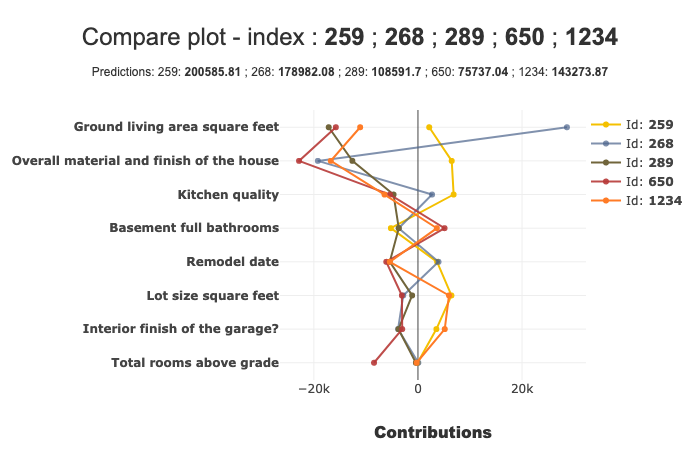
  • Summarize and export the local explanation

Shapash proposes a short and clear local explanation. It allows each user, whatever their Data background, to understand a local prediction of a supervised model thanks to a summarized and explicit explanation

  • Evaluate the quality of your explainability using different metrics

  • Easily share and discuss results with non-Data users

  • Deploy interpretability part of your project: From model training to deployment (API or Batch Mode)

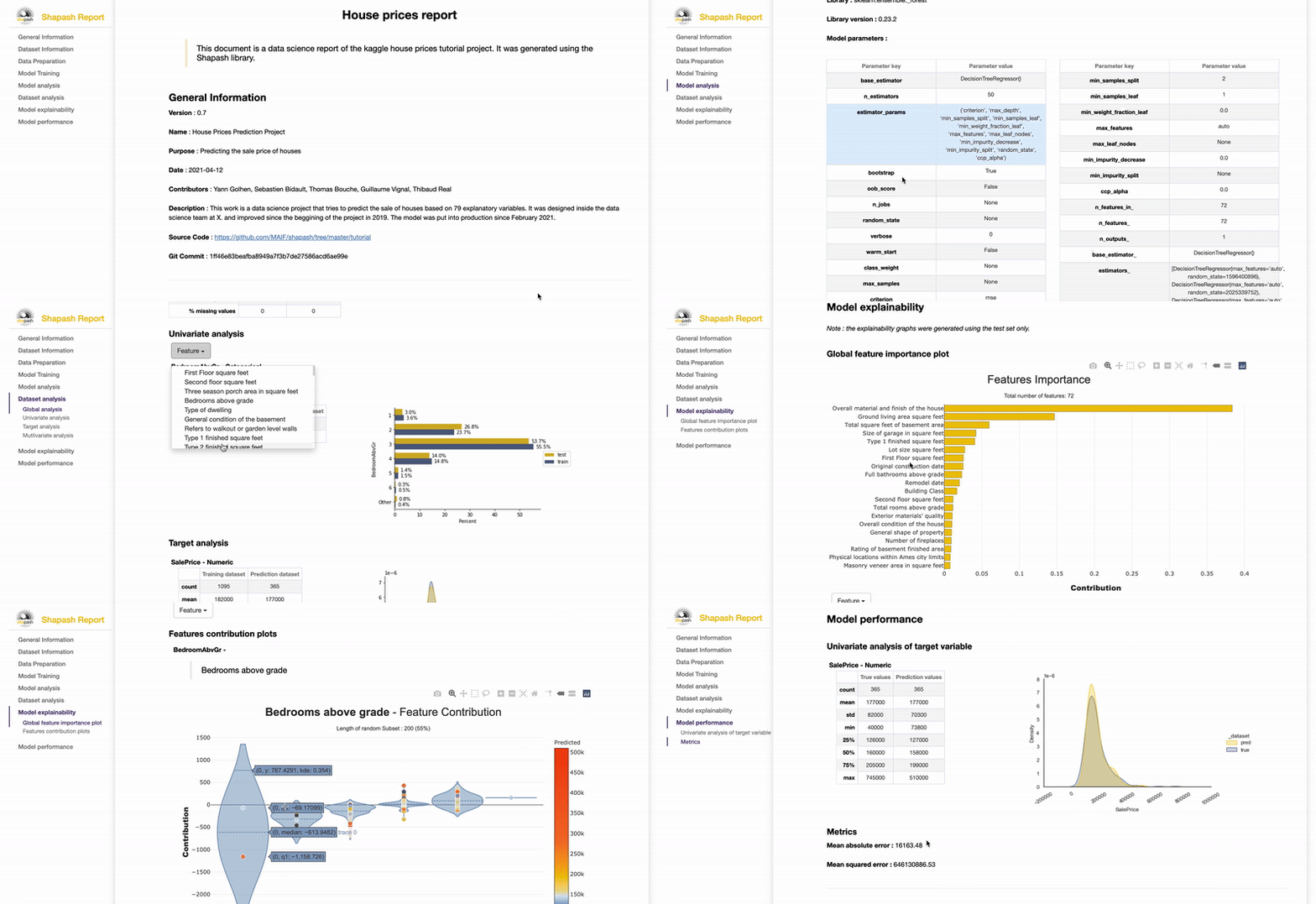
  • Contribute to the auditability of your model by generating a standalone HTML report of your projects. Report Example

We hope that this report will bring a valuable support to auditing models and data related to a better AI governance. Data Scientists can now deliver to anyone who is interested in their project a document that freezes different aspects of their work as a basis of an audit report. This document can be easily shared across teams (internal audit, DPO, risk, compliance...).
โš™๏ธ How Shapash works

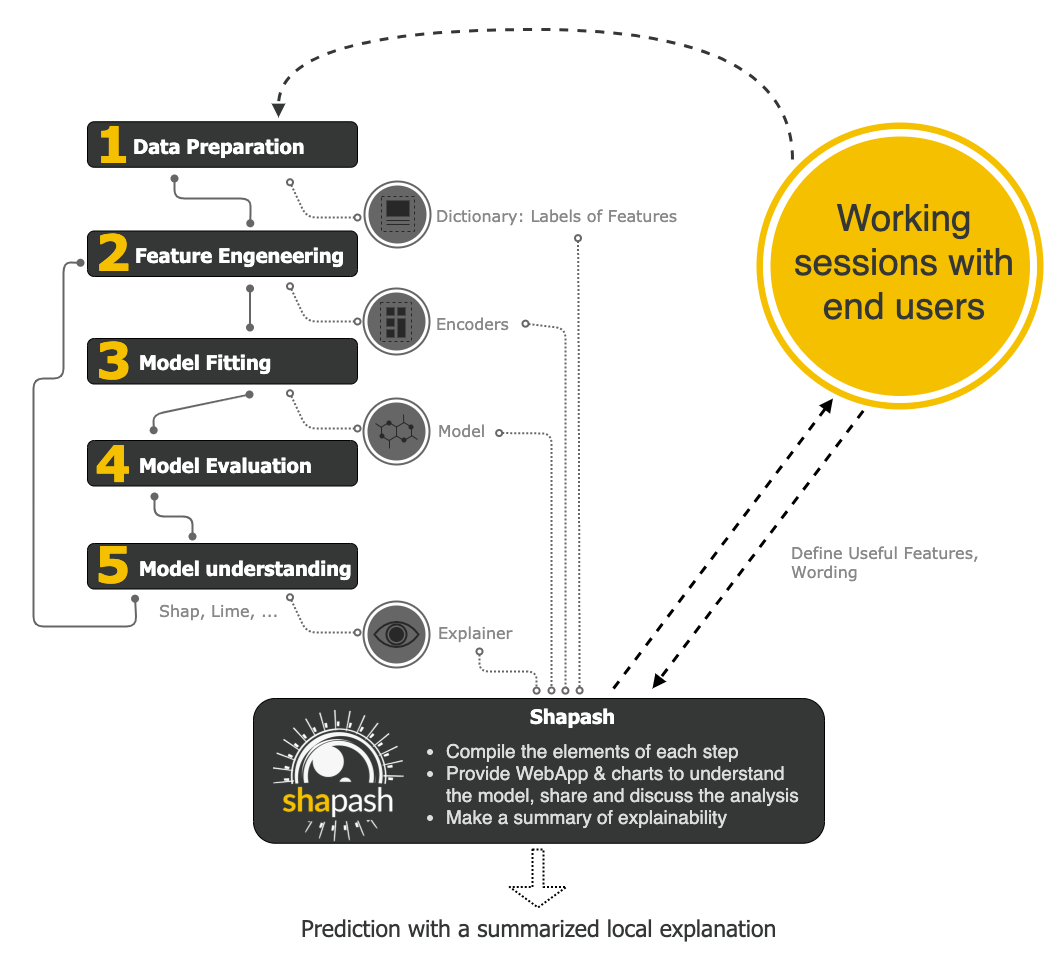
Shapash is an overlay package for libraries dedicated to the interpretability of models. It uses Shap or Lime backend to compute contributions. Shapash builds on the different steps necessary to build a machine learning model to make the results understandable
๐Ÿ›  Installation

Shapash is intended to work with Python versions 3.6 to 3.9. Installation can be done with pip:

pip install shapash

In order to generate the Shapash Report some extra requirements are needed. You can install these using the following command :

pip install shapash[report]

If you encounter compatibility issues you may check the corresponding section in the Shapash documentation here.

๐Ÿ• Quickstart

The 4 steps to display results:

  • Step 1: Declare SmartExplainer Object

    You can declare features dict here to specify the labels to display

from shapash.explainer.smart_explainer import SmartExplainer
xpl = SmartExplainer(features_dict=house_dict) # optional parameter
  • Step 2: Compile Model, Dataset, Encoders, ...

    There are 2 mandatory parameters in compile method: Model and Dataset

xpl.compile(
    x=Xtest,
    model=regressor,
    preprocessing=encoder, # Optional: compile step can use inverse_transform method
    y_pred=y_pred, # Optional
    postprocessing=postprocess # Optional: see tutorial postprocessing
)
  • Step 3: Display output

    There are several outputs and plots available. for example, you can launch the web app:

app = xpl.run_app()

Live Demo Shapash-Monitor

  • Step 4: Generate the Shapash Report

    This step allows to generate a standalone html report of your project using the different splits of your dataset and also the metrics you used:

xpl.generate_report(
    output_file='path/to/output/report.html',
    project_info_file='path/to/project_info.yml',
    x_train=Xtrain,
    y_train=ytrain,
    y_test=ytest,
    title_story="House prices report",
    title_description="""This document is a data science report of the kaggle house prices tutorial project.
        It was generated using the Shapash library.""",
    metrics=[{โ€˜nameโ€™: โ€˜MSEโ€™, โ€˜pathโ€™: โ€˜sklearn.metrics.mean_squared_errorโ€™}]
)

Report Example

  • Step 5: From training to deployment : SmartPredictor Object

    Shapash provides a SmartPredictor object to deploy the summary of local explanation for the operational needs. It is an object dedicated to deployment, lighter than SmartExplainer with additional consistency checks. SmartPredictor can be used with an API or in batch mode. It provides predictions, detailed or summarized local explainability using appropriate wording.

predictor = xpl.to_smartpredictor()

See the tutorial part to know how to use the SmartPredictor object

๐Ÿ“– Tutorials

This github repository offers a lot of tutorials to allow you to start more concretely in the use of Shapash.

More Precise Overview

More details about charts and plots

The different ways to use Encoders and Dictionaries

Better displaying data with postprocessing

How to use shapash with Shap, Lime or ACV

Evaluate the quality of your explainability

Generate the Shapash Report

Deploy local explainability in production

Comments
  • [QUESTION] - Imputers in ColumnTransformer preprocessing

    [QUESTION] - Imputers in ColumnTransformer preprocessing

    Description of Problem:

    I want to make use of a Imputer (SimpleImputer) inside column transformer. I don't see any compatibility with Imputers.

    Overview of the Solution:

    Not sure how to add it yet.

    Sorry but I don't see any issue with label question.

    opened by fjpa121197 6
  • Add support for Python 3.10

    Add support for Python 3.10

    Description of Problem: Currently only Python 3.6 to 3.9 seem to be officially supported.

    Overview of the Solution: Drop support for 3.6 which is EOL, add support of 3.10. Check dependencies, run tests, adapt GitHub workflow to 3.10, etc.

    opened by quassy 6
  • Problem with XGBoost contributions computation

    Problem with XGBoost contributions computation

    Code

    import numpy as np
    import pandas as pd
    
    import xgboost
    
    import shap
    from shapash.explainer.smart_explainer import SmartExplainer
    
    X,y = shap.datasets.nhanesi()
    X_display,y_display = shap.datasets.nhanesi(display=True) # human readable feature values
    y = np.array(y)
    X = X.drop('Unnamed: 0', axis=1)
    
    xgb_train = xgboost.DMatrix(X, label=y)
    
    params_train = {
        "eta": 0.002,
        "max_depth": 3,
        "objective": "survival:cox",
        "subsample": 0.5,
    }
    
    model = xgboost.train(params_train, xgb_train, num_boost_round=5)
    
    # Smart explainer creation
    xpl = SmartExplainer()
    xpl.compile(
        x=X,
        model=model
    )
    

    Error:

    ---------------------------------------------------------------------------
    ValueError                                Traceback (most recent call last)
    <ipython-input-23-8abc6cc3f74d> in <module>
         28 # Smart explainer creation
         29 xpl = SmartExplainer()
    ---> 30 xpl.compile(
         31     x=X,
         32     model=model,
    
    ~/.local/lib/python3.8/site-packages/shapash/explainer/smart_explainer.py in compile(self, x, model, explainer, contributions, y_pred, preprocessing, postprocessing)
        192             raise ValueError("You have to specify just one of these arguments: explainer, contributions")
        193         if contributions is None:
    --> 194             contributions, explainer = shap_contributions(model, self.x_init, self.check_explainer(explainer))
        195         adapt_contrib = self.adapt_contributions(contributions)
        196         self.state = self.choose_state(adapt_contrib)
    
    ~/.local/lib/python3.8/site-packages/shapash/utils/shap_backend.py in shap_contributions(model, x_df, explainer)
         55 
         56     if str(type(model)) not in list(sum((simple_tree_model,catboost_model,linear_model,svm_model),())):
    ---> 57         raise ValueError(
         58             """
         59             model not supported by shapash, please compute contributions
    
    ValueError: 
                model not supported by shapash, please compute contributions
                by yourself before using shapash
    

    Hint:

    str(type(model))
    "<class 'xgboost.core.Booster'>"
    

    Python version : 3.8

    Shapash version : 1.1.0 XGBoost version : 1.0.0

    Operating System : Linux

    bug shapash 1.1.0 
    opened by guillaume-vignal 4
  • Switch from SmartPredictor to SmartExplainer

    Switch from SmartPredictor to SmartExplainer

    Hi Team,

    Is it possible to generate local explanations on the new data added to SmartPredictor object? I went through all the tutorials and I understand that when we are satisfied with the explainability results given by Shapash, we can use the SmartPredictor object for deployment. But my question is how can we get local explanation chart after deployment on the new data that is coming in? I hope my question is clear.

    Thanks, Chetan

    enhancement shapash 1.2.0 
    opened by chetanambi 4
  • :bug: some navigation bugs in demo webapp (bugs not present in local webapp)

    :bug: some navigation bugs in demo webapp (bugs not present in local webapp)

    In this demo Webapp, there are some bugs when navigate : https://shapash-demo.ossbymaif.fr/ https://shapash-demo2.ossbymaif.fr/

    When there are filters and you click on features in "features importance", in contribution plot, some plots do not correspond anymore to the feature and selection.

    These errors are not reproducible on a local webapp, there must be a problem when deploying the exposed demos

    opened by ThomasBouche 3
  • Probability output

    Probability output

    Dear all, Many thanks for developing shapash, I have one question regarding the probability that is shown in the web app. Is it referring to the probability of the selected class or the probability of the positive class. If its the former, how someone can output the probability of the positive class.

    Best regards Nikos

    opened by npapan69 3
  • C extension was not built during install!

    C extension was not built during install!

    Hello,

    I try to reproduce tutorial01-Shapash-Overview-Launch-WebApp.ipynb with my own dataset and model (RandomForestClassifier) but I have this error C extension was not built during install! when I run the .compile.

    Thanks, Pauline.

    opened by paulineolivierMFG 3
  • explanation with lime backend returns 'lime_tabular' not defined error

    explanation with lime backend returns 'lime_tabular' not defined error

    Hello, I tried to build an explanation with lime backend but got the following error: My code:

    from shapash.explainer.smart_explainer import SmartExplainer
    import lime.lime_tabular
    xpl = SmartExplainer(model=rf, backend='lime')
    xpl.compile(x=X_i)
    

    =>

    File c:\Users\X\AppData\Local\Programs\Python\Python39\lib\site-packages\shapash\backend\lime_backend.py:39, in LimeBackend.run_explainer(self, x)
    ...
    ---> [39](file:///c%3A/Users/X/AppData/Local/Programs/Python/Python39/lib/site-packages/shapash/backend/lime_backend.py?line=38) explainer = lime_tabular.LimeTabularExplainer(
    ...
    
    NameError: name 'lime_tabular' is not defined
    

    I am using: Python version : 3.9.12 Lime version: 0.2.0.1

    Shapash version : 2.0.1

    Operating System : Windows 10

    Should I import or install a particular lime version to make it work? Thanks, Thomas

    opened by thlevy 2
  • SHAPASH support - Random forest binary classification

    SHAPASH support - Random forest binary classification

    Doesn't shapash support random forest for binary classification?

    When I run my code, I got the below error

    ValueError: 
                model not supported by shapash, please compute contributions
                by yourself before using shapash
    
    opened by SSMK-wq 2
  • Add option to suppress deprecation warnings in html report

    Add option to suppress deprecation warnings in html report

    Description of Problem:

    When generating the html report, a lot of deprecation warnings are present

    Overview of the Solution:

    One possible solution is to add an argument to the generate_report function of the SmartExplainer class, to give the option to suppress these warnings with this snippet:

    ` import warnings

    warnings.filterwarnings("ignore", category=DeprecationWarning) `

    opened by jlwdl 2
  • ImportError: Numba could not be imported.

    ImportError: Numba could not be imported.

    Python version : Python 3.8.3

    Shapash version : Version: 1.4.4

    Operating System : Windows 10

    ---------------------------------------------------------------------------
    ImportError                               Traceback (most recent call last)
    ~\AppData\Roaming\Python\Python38\site-packages\numba\core\typeconv\typeconv.py in <module>
          3     # Numba, if it fails to import, provide some feedback
    ----> 4     from numba.core.typeconv import _typeconv
          5 except ImportError as e:
    
    ImportError: DLL load failed while importing _typeconv: The specified module could not be found.
    
    During handling of the above exception, another exception occurred:
    
    ImportError                               Traceback (most recent call last)
    <ipython-input-11-9cd225270d78> in <module>
    ----> 1 from shapash.explainer.smart_explainer import SmartExplainer
          2 # xpl = SmartExplainer(features_dict=house_dict)
          3 
          4 # xpl.compile(
          5 #     x=Xtest,
    
    D:\installed_softwares\anaconda\lib\site-packages\shapash\explainer\smart_explainer.py in <module>
         14 from shapash.utils.utils import get_host_name
         15 from shapash.utils.threading import CustomThread
    ---> 16 from shapash.utils.shap_backend import shap_contributions, check_explainer, get_shap_interaction_values
         17 from shapash.utils.check import check_model, check_label_dict, check_ypred, check_contribution_object,\
         18     check_postprocessing, check_features_name
    
    D:\installed_softwares\anaconda\lib\site-packages\shapash\utils\shap_backend.py in <module>
         14 import pandas as pd
         15 import numpy as np
    ---> 16 import shap
         17 from shapash.utils.model_synoptic import simple_tree_model, catboost_model, linear_model, svm_model
         18 
    
    D:\installed_softwares\anaconda\lib\site-packages\shap\__init__.py in <module>
         10     warnings.warn("As of version 0.29.0 shap only supports Python 3 (not 2)!")
         11 
    ---> 12 from ._explanation import Explanation, Cohorts
         13 
         14 # explainers
    
    D:\installed_softwares\anaconda\lib\site-packages\shap\_explanation.py in <module>
         10 from slicer import Slicer, Alias, Obj
         11 # from ._order import Order
    ---> 12 from .utils._general import OpChain
         13 
         14 # slicer confuses pylint...
    
    D:\installed_softwares\anaconda\lib\site-packages\shap\utils\__init__.py in <module>
    ----> 1 from ._clustering import hclust_ordering, partition_tree, partition_tree_shuffle, delta_minimization_order, hclust
          2 from ._general import approximate_interactions, potential_interactions, sample, safe_isinstance, assert_import, record_import_error
          3 from ._general import shapley_coefficients, convert_name, format_value, ordinal_str, OpChain
          4 from ._show_progress import show_progress
          5 from ._masked_model import MaskedModel, make_masks
    
    D:\installed_softwares\anaconda\lib\site-packages\shap\utils\_clustering.py in <module>
          2 import scipy as sp
          3 from scipy.spatial.distance import pdist
    ----> 4 from numba import jit
          5 import sklearn
          6 import warnings
    
    ~\AppData\Roaming\Python\Python38\site-packages\numba\__init__.py in <module>
         22 
         23 # Re-export typeof
    ---> 24 from numba.misc.special import (
         25     typeof, prange, pndindex, gdb, gdb_breakpoint, gdb_init,
         26     literally, literal_unroll,
    
    ~\AppData\Roaming\Python\Python38\site-packages\numba\misc\special.py in <module>
          1 import numpy as np
          2 
    ----> 3 from numba.core.typing.typeof import typeof
          4 from numba.core.typing.asnumbatype import as_numba_type
          5 
    
    ~\AppData\Roaming\Python\Python38\site-packages\numba\core\typing\__init__.py in <module>
    ----> 1 from .context import BaseContext, Context
          2 from .templates import (signature, make_concrete_template, Signature,
          3                         fold_arguments)
    
    ~\AppData\Roaming\Python\Python38\site-packages\numba\core\typing\context.py in <module>
          9 import numba
         10 from numba.core import types, errors
    ---> 11 from numba.core.typeconv import Conversion, rules
         12 from numba.core.typing import templates
         13 from .typeof import typeof, Purpose
    
    ~\AppData\Roaming\Python\Python38\site-packages\numba\core\typeconv\rules.py in <module>
          1 import itertools
    ----> 2 from .typeconv import TypeManager, TypeCastingRules
          3 from numba.core import types
          4 
          5 
    
    ~\AppData\Roaming\Python\Python38\site-packages\numba\core\typeconv\typeconv.py in <module>
         15            "possible please include the following in your error report:\n\n"
         16            "sys.executable: %s\n")
    ---> 17     raise ImportError(msg % (url, reportme, str(e), sys.executable))
         18 
         19 from numba.core.typeconv import castgraph, Conversion
    
    ImportError: Numba could not be imported.
    If you are seeing this message and are undertaking Numba development work, you may need to re-run:
    
    python setup.py build_ext --inplace
    
    (Also, please check the development set up guide https://numba.pydata.org/numba-doc/latest/developer/contributing.html.)
    
    If you are not working on Numba development:
    
    Please report the error message and traceback, along with a minimal reproducer
    at: https://github.com/numba/numba/issues/new
    
    If more help is needed please feel free to speak to the Numba core developers
    directly at: https://gitter.im/numba/numba
    
    Thanks in advance for your help in improving Numba!
    
    The original error was: 'DLL load failed while importing _typeconv: The specified module could not be found.'
    --------------------------------------------------------------------------------
    If possible please include the following in your error report:
    
    sys.executable: D:\installed_softwares\anaconda\python.exe
    
    
    opened by avinash-mishra 2
  • Shapash Webapp displays incorrect plot when server process > 1

    Shapash Webapp displays incorrect plot when server process > 1

    Shapash Webapp displays incorrect plot when server process > 1

    In the case the webapp is exposed with processes > 1 in the uwsgi configuration, the app does not behave as expected. For instance:

    • the selection of a feature triggers the display of a subset
    • maximizing the feature selector plot change the selected feature
    • etc.

    Python version : 3.9

    Shapash version : tested on 2.2, may affect other versions

    Operating System : Any

    How to reproduce:

    app = xpl.smartapp.app
    app.run_server(debug=False, host="0.0.0.0", port=8080, processes=2, threaded=False)
    
    bug 
    opened by ThomasBouche 1
  • Using ACV algorithm to compute contributions for coalitions of features

    Using ACV algorithm to compute contributions for coalitions of features

    Description of Problem:

    Shapash can use ACV as a backend to compute feature contribution. ACV has the advantage of being able to directly compute shapley values for coalition of features. In that case, their are no individual contributions for the individual features, just one for the coalition

    Shapash already has a features_groups argument for the smart explainer that sum contributions of features for the group (as it should for SHAP or LIME backend). Nevertheless, the coalition property of ACV is not used in that case.

    Overview of the Solution:

    The feature_groups allows the user to group contributions by summing them but also to display individual contributions for the group (like in the webapp).

    If we use the feature_groups argument to compute contributions for coalitions, this won't be possible for ACV. To keep the app as it is, we should add a new argument (like "acv_feature_coalition") that can be used only with acv as a backend and used in the acv_tree algorithm in acv_backend.py.

    shapley_values = acvtree.shap_values(X, C=acv_feature_coalition)

    Also I would suggest letting the user choose between regular shapley values computed with the acvtree.shap_values and the active shapley values computed with acvtree.shap_values_acv_adap

    opened by cyrlemaire 1
  • Adding support for PyTorch models

    Adding support for PyTorch models

    Description of Problem:

    • PyTorch is a great multi-purpose neural network development framework.
    • Deep learning algorithms are getting easier to train, understand, deploy and manage and can be used with great efficiency in enterprise contexts.
    • SHAP values can be computed for neural nets and serve for model explainability purposes.

    Overview of the Solution:

    • Integrate the DeepLIFT algorithm (Deep SHAP), and the possibility to visualize the estimated values in the SHAPASH GUI.

    Examples:

    Blockers:

    • Not all explainability methods will be suitable, this is a limitation rather than a blocker

    Definition of Done:

    • PyTorch models trained on tabular data (regression or classification use cases) can be used with SHAPASH
    opened by corridordigital 0
  • Support MultiIndex in the Web App

    Support MultiIndex in the Web App

    First of all, thank you for the great library! Investigating shap values with it is pretty comfortable.

    Description of Problem: The Shapax App does not support DataFrames with MultiIndexes. MultiIndexes are useful for querying tables coming from other structured data formats. At the xpl.run_app() step an error occurs at https://github.com/MAIF/shapash/blob/master/shapash/webapp/smart_app.py#L149.

    Overview of the Solution: Use reset_index() instead of assigning the index to a column named index. If need be, store the names of the index columns for differentiating them from the remaining dataframe.

    Examples:

    Blockers:

    Definition of Done:

    opened by davibicudo 3
  • Question - Plot headings

    Question - Plot headings

    I was going through the documentation and came across the below plot and its header

    image

    Here, for the local explanation id = 3, we see that SHAPASH graph plots as header as

    Response: 1 - Proba = 0.2521

    This is confusing. Does it mean the model predicted probability for this record was 0.7479 (obtained by subtracting 1-0.2521)?

    Or is the model predicted probability of this class was 0.2521?

    Which is the probability that was predicted by the model that we build?

    and what does SHAPASH do here/why does it subtract from 1?

    opened by SSMK-wq 1
Releases(v2.2.0)
  • v2.2.0(Oct 25, 2022)

    These 2 new features are designed to select samples in the Webapp

    • With a new tab "Dataset Filter" to filter more easily with the characteristics of the features
    • With a graph that represents the "True values vs Predicted values"

    โœจ Features #389 Webapp: Improve the top menu for class selection #388 Create to tab which contains prediction picking graph and connexion with other graph https://github.com/MAIF/shapash/issues/387 add responsive titles, subtitles, axis titles and axis labels to each graph https://github.com/MAIF/shapash/issues/386 Add explanation button and popup https://github.com/MAIF/shapash/issues/385 Adapt the labels of graphs according to their size https://github.com/MAIF/shapash/issues/384 Add tab that contains dataset filters https://github.com/MAIF/shapash/issues/378 Adding a plot to the webapp and interactivity with other plots https://github.com/MAIF/shapash/issues/377 Add of a prediction error distribution graph

    Source code(tar.gz)
    Source code(zip)
  • v2.1.1(Sep 15, 2022)

  • v2.1.0(Sep 6, 2022)

    New support in Python version :arrow_up: Support to Python 3.10 #297 :arrow_down: Stop to support Python 3.6 #297

    Upgrade dependencies :arrow_up: scikit-learn>=0.24.0 #297 :arrow_up: acv-exp>=1.2.0 #297 :arrow_up: category_encoders>=2.2.2 #372

    Source code(tar.gz)
    Source code(zip)
  • v2.0.2(Aug 25, 2022)

    โœจ Features New feature #364 Pairwise comparison of Consistency : How are differences in contributions distributed across features ?

    Source code(tar.gz)
    Source code(zip)
  • v2.0.1(May 9, 2022)

  • v2.0.0(Apr 19, 2022)

    Features Refactoring attributes of compile methods and init. #347 Refactoring implementation for new backends #348, #346

    Other Features Upgrade Dash version : #343 Improve requirements in setup.py : #337

    Bug fixes Fix for Werkzeug compatibility : #342 Fix requirements for python 3.6 : #339

    Source code(tar.gz)
    Source code(zip)
  • v1.7.1(Mar 11, 2022)

    Features Give user possibility to change colour scheme of plots #290, #295

    Features

    • Fix ACV version : #298
    • Add ignore warnings to report : #303
    Source code(tar.gz)
    Source code(zip)
  • v1.6.1(Jan 14, 2022)

  • v1.6.0(Dec 6, 2021)

    Features Evaluate the relevance of your explainability using 3 metrics: Stability, Consistency and Compacity

    • Stability #234
    • Compacity #242
    • Consistency #252

    New backend added to Shapash : LIME #255

    Bug fixes

    • Multiple lime fixe (#263, #265, #267)
    • replace parameter for acv backend #262
    • fix remove files when generate report fail #250

    Internal

    • Update data loader with urldowload #269
    Source code(tar.gz)
    Source code(zip)
  • v1.5.0(Sep 27, 2021)

  • v1.4.4(Jul 19, 2021)

  • v1.4.2(Jun 18, 2021)

  • v1.4.1(Jun 18, 2021)

  • v1.4.0(Jun 16, 2021)

    • Groups of features compatible with:
      • Features importance plot (#188)
      • Contribution plot (#188)
      • Local plot (#207)
      • WebApp (#203)
      • SmartPredictor (#212)
    • New tutorial to illustrate how to use groups of features (#211)
    • New plot : correlation plot (#210) used in the Shapash report
    • Added compatibility with python version 3.9
    Source code(tar.gz)
    Source code(zip)
  • v1.3.2(Apr 15, 2021)

  • v1.3.1(Apr 13, 2021)

    • Standalone report (#137) Standalone HTML file that contains the following information :
      • General information about the project
      • Dataset description
      • Model library, parameters, and other specifications
      • Dataset analysis
      • Global explainability of the model
      • Model performance
    • Digit counter breaks on 0 (#156)
    • Switch from SmartPredictor to SmartExplainer (#132)
    Source code(tar.gz)
    Source code(zip)
  • v1.2.0(Mar 10, 2021)

    • WebApp Features: Title (#118), sort features in mask (#117), run app without prediction (#135)
    • Interaction plot: Plot (#124), calculation of top interactions (#120, #122)
    • BugFix: Xgboost (#127), Pickle (#131, #133)
    Source code(tar.gz)
    Source code(zip)
A Dataset of Python Challenges for AI Research

Python Programming Puzzles (P3) This repo contains a dataset of python programming puzzles which can be used to teach and evaluate an AI's programming

Microsoft 850 Dec 24, 2022
Points2Surf: Learning Implicit Surfaces from Point Clouds (ECCV 2020 Spotlight)

Points2Surf: Learning Implicit Surfaces from Point Clouds (ECCV 2020 Spotlight)

Philipp Erler 329 Jan 06, 2023
The official homepage of the (outdated) COCO-Stuff 10K dataset.

COCO-Stuff 10K dataset v1.1 (outdated) Holger Caesar, Jasper Uijlings, Vittorio Ferrari Overview Welcome to official homepage of the COCO-Stuff [1] da

Holger Caesar 263 Dec 11, 2022
Small little script to scrape, parse and check for active tor nodes. Can be used as proxies.

TorScrape TorScrape is a small but useful script made in python that scrapes a website for active tor nodes, parse the html and then save the nodes in

5 Dec 04, 2022
This is an implementation of Googles Yogi-Optimizer in Keras (tf.keras)

Yogi-Optimizer_Keras This is an implementation of Googles Yogi-Optimizer in Keras (tf.keras) The NeurIPS-Paper can be found here: http://papers.nips.c

14 Sep 13, 2022
[ICCV 2021] Official Tensorflow Implementation for "Single Image Defocus Deblurring Using Kernel-Sharing Parallel Atrous Convolutions"

KPAC: Kernel-Sharing Parallel Atrous Convolutional block This repository contains the official Tensorflow implementation of the following paper: Singl

Hyeongseok Son 50 Dec 29, 2022
You Only ๐Ÿ‘€ One Sequence

You Only ๐Ÿ‘€ One Sequence TL;DR: We study the transferability of the vanilla ViT pre-trained on mid-sized ImageNet-1k to the more challenging COCO obje

Hust Visual Learning Team 666 Jan 03, 2023
Certified Patch Robustness via Smoothed Vision Transformers

Certified Patch Robustness via Smoothed Vision Transformers This repository contains the code for replicating the results of our paper: Certified Patc

Madry Lab 35 Dec 14, 2022
The authors' implementation of Unsupervised Adversarial Learning of 3D Human Pose from 2D Joint Locations

Unsupervised Adversarial Learning of 3D Human Pose from 2D Joint Locations This is the authors' implementation of Unsupervised Adversarial Learning of

Dwango Media Village 140 Dec 07, 2022
[CoRL 2021] A robotics benchmark for cross-embodiment imitation.

x-magical x-magical is a benchmark extension of MAGICAL specifically geared towards cross-embodiment imitation. The tasks still provide the Demo/Test

Kevin Zakka 36 Nov 26, 2022
Unofficial implementation of One-Shot Free-View Neural Talking Head Synthesis

face-vid2vid Usage Dataset Preparation cd datasets wget https://yt-dl.org/downloads/latest/youtube-dl -O youtube-dl chmod a+rx youtube-dl python load_

worstcoder 68 Dec 30, 2022
The self-supervised goal reaching benchmark introduced in Discovering and Achieving Goals via World Models

Lexa-Benchmark Codebase for the self-supervised goal reaching benchmark introduced in 'Discovering and Achieving Goals via World Models'. Setup Create

1 Oct 14, 2021
We will release the code of "ConTNet: Why not use convolution and transformer at the same time?" in this repo

ConTNet Introduction ConTNet (Convlution-Tranformer Network) is proposed mainly in response to the following two issues: (1) ConvNets lack a large rec

93 Nov 08, 2022
Rethinking the Importance of Implementation Tricks in Multi-Agent Reinforcement Learning

RIIT Our open-source code for RIIT: Rethinking the Importance of Implementation Tricks in Multi-AgentReinforcement Learning. We implement and standard

405 Jan 06, 2023
Fast image augmentation library and an easy-to-use wrapper around other libraries

Albumentations Albumentations is a Python library for image augmentation. Image augmentation is used in deep learning and computer vision tasks to inc

11.4k Jan 09, 2023
Clockwork Convnets for Video Semantic Segmentation

Clockwork Convnets for Video Semantic Segmentation This is the reference implementation of arxiv:1608.03609: Clockwork Convnets for Video Semantic Seg

Evan Shelhamer 141 Nov 21, 2022
[NeurIPS 2021] Source code for the paper "Qu-ANTI-zation: Exploiting Neural Network Quantization for Achieving Adversarial Outcomes"

Qu-ANTI-zation This repository contains the code for reproducing the results of our paper: Qu-ANTI-zation: Exploiting Quantization Artifacts for Achie

Secure AI Systems Lab 8 Mar 26, 2022
One-Shot Neural Ensemble Architecture Search by Diversity-Guided Search Space Shrinking

One-Shot Neural Ensemble Architecture Search by Diversity-Guided Search Space Shrinking This is an official implementation for NEAS presented in CVPR

Multimedia Research 19 Sep 08, 2022
Pytorch implementation of ICASSP 2022 paper Attention Probe: Vision Transformer Distillation in the Wild

Attention Probe: Vision Transformer Distillation in the Wild Jiahao Wang, Mingdeng Cao, Shuwei Shi, Baoyuan Wu, Yujiu Yang In ICASSP 2022 This code is

IIGROUP 6 Sep 21, 2022
Real-Time Multi-Contact Model Predictive Control via ADMM

Here, you can find the code for the paper 'Real-Time Multi-Contact Model Predictive Control via ADMM'. Code is currently being cleared up and optimize

17 Dec 28, 2022