DouZero is a reinforcement learning framework for DouDizhu - 斗地主AI

Overview

[ICML 2021] DouZero: Mastering DouDizhu with Self-Play Deep Reinforcement Learning

Logo

Downloads Downloads Open In Colab

DouZero is a reinforcement learning framework for DouDizhu (斗地主), the most popular card game in China. It is a shedding-type game where the player’s objective is to empty one’s hand of all cards before other players. DouDizhu is a very challenging domain with competition, collaboration, imperfect information, large state space, and particularly a massive set of possible actions where the legal actions vary significantly from turn to turn. DouZero is developed by AI Platform, Kwai Inc. (快手).

Community:

  • Slack: Discuss in DouZero channel.
  • QQ Group: Join our QQ group 819204202. Password: douzeroqqgroup
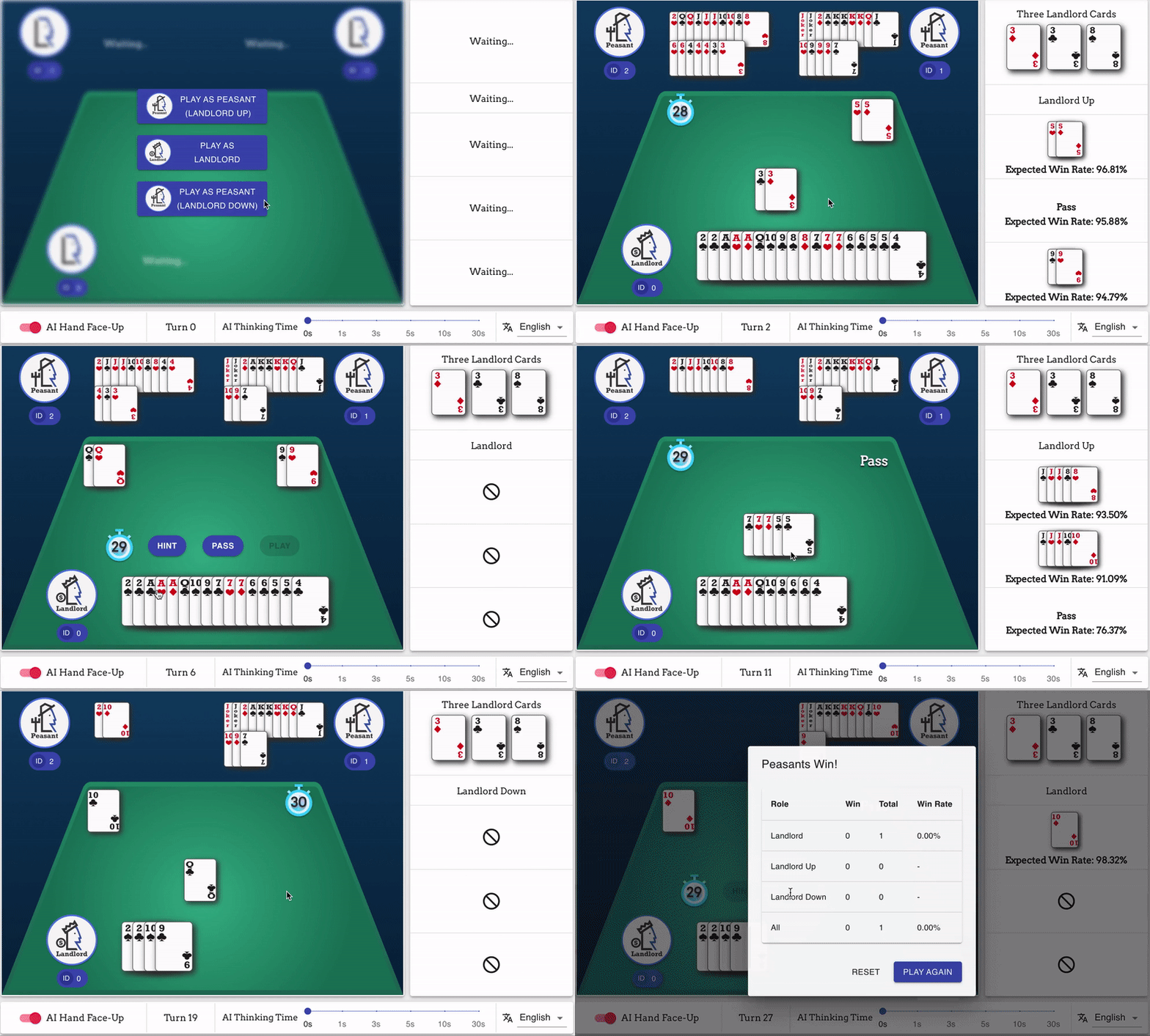
Demo

Cite this Work

For now, please cite our Arxiv version:

Zha, Daochen, et al. "DouZero: Mastering DouDizhu with Self-Play Deep Reinforcement Learning." arXiv preprint arXiv:2106.06135 (2021).

@article{zha2021douzero,
  title={DouZero: Mastering DouDizhu with Self-Play Deep Reinforcement Learning},
  author={Zha, Daochen and Xie, Jingru and Ma, Wenye and Zhang, Sheng and Lian, Xiangru and Hu, Xia and Liu, Ji},
  journal={arXiv preprint arXiv:2106.06135},
  year={2021}
}

What Makes DouDizhu Challenging?

In addition to the challenge of imperfect information, DouDizhu has huge state and action spaces. In particular, the action space of DouDizhu is 10^4 (see this table). Unfortunately, most reinforcement learning algorithms can only handle very small action spaces. Moreover, the players in DouDizhu need to both compete and cooperate with others in a partially-observable environment with limited communication, i.e., two Peasants players will play as a team to fight against the Landlord player. Modeling both competing and cooperation is an open research challenge.

In this work, we propose Deep Monte Carlo (DMC) algorithm with action encoding and parallel actors. This leads to a very simple yet surprisingly effective solution for DouDizhu. Please read our paper for more details.

Installation

The training code is designed for GPUs. Thus, you need to first install CUDA if you want to train models. You may refer to this guide. For evaluation, CUDA is optional and you can use CPU for evaluation.

First, clone the repo with

git clone https://github.com/kwai/DouZero.git

Make sure you have python 3.6+ installed. Install dependencies:

cd douzero
pip3 install -r requirements.txt

We recommend installing the stable version of DouZero with

pip3 install douzero

or install the up-to-date version (it could be not stable) with

pip3 install -e .

Training

We assume you have at least one GPU available. Run

python3 train.py

This will train DouZero on one GPU. To train DouZero on multiple GPUs. Use the following arguments.

  • --gpu_devices: what gpu devices are visible
  • --num_actors_devices: how many of the GPU deveices will be used for simulation, i.e., self-play
  • --num_actors: how many actor processes will be used for each device
  • --training_device: which device will be used for training DouZero

For example, if we have 4 GPUs, where we want to use the first 3 GPUs to have 15 actors each for simulating and the 4th GPU for training, we can run the following command:

python3 train.py --gpu_devices 0,1,2,3 --num_actors_devices 3 --num_actors 15 --training_device 3

Known issues for Windows system: You may encounter operation not supported error if you use a Windows system. This is because doing multiprocessing on CUDA tensors is not supported in Windows. However, our code extensively operates on the CUDA tensors since the code is optimized for GPUs. Thus, we recommend using a Linux server to train the models. Nonetheless, Windows users can still evaluate the models with multiple processes and run the demo locally. Please contact us if you find any solutions!

For more customized configuration of training, see the following optional arguments:

--xpid XPID           Experiment id (default: douzero)
--save_interval SAVE_INTERVAL
                      Time interval (in minutes) at which to save the model
--objective {adp,wp}  Use ADP or WP as reward (default: ADP)
--gpu_devices GPU_DEVICES
                      Which GPUs to be used for training
--num_actor_devices NUM_ACTOR_DEVICES
                      The number of devices used for simulation
--num_actors NUM_ACTORS
                      The number of actors for each simulation device
--training_device TRAINING_DEVICE
                      The index of the GPU used for training models
--load_model          Load an existing model
--disable_checkpoint  Disable saving checkpoint
--savedir SAVEDIR     Root dir where experiment data will be saved
--total_frames TOTAL_FRAMES
                      Total environment frames to train for
--exp_epsilon EXP_EPSILON
                      The probability for exploration
--batch_size BATCH_SIZE
                      Learner batch size
--unroll_length UNROLL_LENGTH
                      The unroll length (time dimension)
--num_buffers NUM_BUFFERS
                      Number of shared-memory buffers
--num_threads NUM_THREADS
                      Number learner threads
--max_grad_norm MAX_GRAD_NORM
                      Max norm of gradients
--learning_rate LEARNING_RATE
                      Learning rate
--alpha ALPHA         RMSProp smoothing constant
--momentum MOMENTUM   RMSProp momentum
--epsilon EPSILON     RMSProp epsilon

Evaluation

The evaluation can be performed with GPU or CPU (GPU will be much faster). Pretrained model is available at Google Drive or 百度网盘, 提取码: 4624. Put pre-trained weights in baselines/. The performance is evaluated through self-play. We have provided pre-trained models and some heuristics as baselines:

  • random: agents that play randomly (uniformly)
  • rlcard: the rule-based agent in RLCard
  • SL (baselines/sl/): the pre-trained deep agents on human data
  • DouZero-ADP (baselines/douzero_ADP/): the pretrained DouZero agents with Average Difference Points (ADP) as objective
  • DouZero-WP (baselines/douzero_WP/): the pretrained DouZero agents with Winning Percentage (WP) as objective

Step 1: Generate evaluation data

python3 generate_eval_data.py

Some important hyperparameters are as follows.

  • --output: where the pickled data will be saved
  • --num_games: how many random games will be generated, default 10000

Step 2: Self-Play

python3 evaluate.py

Some important hyperparameters are as follows.

  • --landlord: which agent will play as Landlord, which can be random, rlcard, or the path of the pre-trained model
  • --landlord_up: which agent will play as LandlordUp (the one plays before the Landlord), which can be random, rlcard, or the path of the pre-trained model
  • --landlord_down: which agent will play as LandlordDown (the one plays after the Landlord), which can be random, rlcard, or the path of the pre-trained model
  • --eval_data: the pickle file that contains evaluation data

For example, the following command evaluates DouZero-ADP in Landlord position against random agents

python3 evaluate.py --landlord baselines/douzero_ADP/landlord.ckpt --landlord_up random --landlord_down random

The following command evaluates DouZero-ADP in Peasants position against RLCard agents

python3 evaluate.py --landlord rlcard --landlord_up baselines/douzero_ADP/landlord_up.ckpt --landlord_down baselines/douzero_ADP/landlord_down.ckpt

By default, our model will be saved in douzero_checkpoints/douzero every half an hour. We provide a script to help you identify the most recent checkpoint. Run

sh get_most_recent.sh douzero_checkpoints/douzero/

The most recent model will be in most_recent_model.

Core Team

Acknowlegements

Comments
  • 执行loss.backward()几个小时报错out of memory

    执行loss.backward()几个小时报错out of memory

    应该出现了OOM,报错如下: Exception in thread batch-and-learn-1: Traceback (most recent call last): File "/usr/lib/python3.7/threading.py", line 917, in _bootstrap_inner self.run() File "/usr/lib/python3.7/threading.py", line 865, in run self._target(*self._args, **self._kwargs) File "/home/zzy/robot/DouZeroV2/douzero/dmc/dmc.py", line 238, in batch_and_learn _stats = learn(position, models, learner_model.get_model(position), batch, optimizers[position], flags, position_lock) File "/home/zzy/robot/DouZeroV2/douzero/dmc/dmc.py", line 101, in learn loss.backward() File "/home/zzy/.local/lib/python3.7/site-packages/torch/_tensor.py", line 396, in backward torch.autograd.backward(self, gradient, retain_graph, create_graph, inputs=inputs) File "/home/zzy/.local/lib/python3.7/site-packages/torch/autograd/__init__.py", line 175, in backward allow_unreachable=True, accumulate_grad=True) # Calls into the C++ engine to run the backward pass

    显存 2G,CUDA Version: 11.7, 启动参数已经调的比较小了: python3 train.py --gpu_devices 0 --load_model --batch_size 16 --num_actor_devices 1 --num_actors 1 --num_threads 1 --training_device 0

    opened by SvenNJ 7
  • 关于models.py 几个问题

    关于models.py 几个问题

    ` self.lstm = nn.LSTM(162, 128, batch_first=True)

    self.dense1 = nn.Linear(373 + 128, 512) # 输入501,输出 512 self.dense2 = nn.Linear(512, 512) self.dense3 = nn.Linear(512, 512) self.dense4 = nn.Linear(512, 512) self.dense5 = nn.Linear(512, 512) self.dense6 = nn.Linear(512, 1) `

    1、这个输入维度是162 ,我理解的是 z_batch 有 num_legal_actions行-5列-162个元素,也就是对应输入的162,不知道是不是这个意思 2、隐藏维度128 不清楚 有什么含义,可以随意设置吗 3、这里设计了6层全连接网路,不清楚 有什么含义,可以随意设置吗

    opened by SvenNJ 7
  • Why is the first GPU over-consumed?

    Why is the first GPU over-consumed?

    I run the code with the following command, spotting that there are 9 processes occupying the first GPU. Why would that be the case?

    python3 train.py --gpu_devices 0,1,2,3 --num_actor_devices 3 --num_actors 3 --training_device 3
    

    The initialization logs look fine to me image

    Here's a snapshot of the result of nvidia-smi

    image environment 
    opened by xlnwel 4
  • train.py 运行 After 0 (L:0 U:0 D:0) frames: @ 0.0 fps (avg@ 0.0 fps) (L:0.0 U:0.0 D:0.0)

    train.py 运行 After 0 (L:0 U:0 D:0) frames: @ 0.0 fps (avg@ 0.0 fps) (L:0.0 U:0.0 D:0.0)

    请问为什么训练模型时候的结果一直是0呢? Found log directory: douzero_checkpoints/douzero Saving arguments to douzero_checkpoints/douzero/meta.json Path to meta file already exists. Not overriding meta. Saving messages to douzero_checkpoints/douzero/out.log Path to message file already exists. New data will be appended. Saving logs data to douzero_checkpoints/douzero/logs.csv Saving logs' fields to douzero_checkpoints/douzero/fields.csv [INFO:13486 utils:118 2021-08-10 03:03:32,181] Device 0 Actor 0 started. [INFO:13498 utils:118 2021-08-10 03:03:37,035] Device 0 Actor 1 started. [INFO:13506 utils:118 2021-08-10 03:03:41,833] Device 0 Actor 2 started. [INFO:13514 utils:118 2021-08-10 03:03:54,821] Device 0 Actor 3 started. [INFO:13526 utils:118 2021-08-10 03:04:19,880] Device 0 Actor 4 started. [INFO:13468 dmc:194 2021-08-10 03:04:24,883] Saving checkpoint to douzero_checkpoints/douzero/model.tar [INFO:13468 dmc:243 2021-08-10 03:04:25,064] After 0 (L:0 U:0 D:0) frames: @ 0.0 fps (avg@ 0.0 fps) (L:0.0 U:0.0 D:0.0) Stats: {'loss_landlord': 0, 'loss_landlord_down': 0, 'loss_landlord_up': 0, 'mean_episode_return_landlord': 0, 'mean_episode_return_landlord_down': 0, 'mean_episode_return_landlord_up': 0} [INFO:13468 dmc:243 2021-08-10 03:04:30,069] After 0 (L:0 U:0 D:0) frames: @ 0.0 fps (avg@ 0.0 fps) (L:0.0 U:0.0 D:0.0) Stats: {'loss_landlord': 0, 'loss_landlord_down': 0, 'loss_landlord_up': 0, 'mean_episode_return_landlord': 0, 'mean_episode_return_landlord_down': 0, 'mean_episode_return_landlord_up': 0} [INFO:13468 dmc:243 2021-08-10 03:04:35,074] After 0 (L:0 U:0 D:0) frames: @ 0.0 fps (avg@ 0.0 fps) (L:0.0 U:0.0 D:0.0) Stats: {'loss_landlord': 0, 'loss_landlord_down': 0, 'loss_landlord_up': 0, 'mean_episode_return_landlord': 0, 'mean_episode_return_landlord_down': 0, 'mean_episode_return_landlord_up': 0} [INFO:13468 dmc:243 2021-08-10 03:04:40,080] After 0 (L:0 U:0 D:0) frames: @ 0.0 fps (avg@ 0.0 fps) (L:0.0 U:0.0 D:0.0) Stats: {'loss_landlord': 0, 'loss_landlord_down': 0, 'loss_landlord_up': 0, 'mean_episode_return_landlord': 0, 'mean_episode_return_landlord_down': 0, 'mean_episode_return_landlord_up': 0}

    opened by Roywaller 4
  • 有没有必要设置size变量

    有没有必要设置size变量

    为什么不直接用 len(obs_z_buf) ? 而且执行 position, obs, env_output = env.step(action) 后, position 指向下一个玩家,加1加错地方了 https://github.com/kwai/DouZero/blob/17a7452333e03f4d583feeedd0c4ea3250fc493f/douzero/dmc/utils.py#L142-L143

    opened by yffbit 3
  • SL模型的训练数据是如何实现和加载的?

    SL模型的训练数据是如何实现和加载的?

    你好,我这边在做斗地主的SL模型。因为数据量特别多,达到百万局以上。我想问下你们这边关于监督学习的的数据加载方式是什么样的? 我这边主要有两个想法:

    1. 将所有数据做出numpy格式,但这样就会个上百万个numpy文件,陷入IO瓶颈。
    2. 全部读入原始数据,一边编码,一边训练。 我想问下你们哪张方法更好,或者说有哪种更好的方法?谢谢
    question 
    opened by whiplash003 3
  • why use 'Lock' in

    why use 'Lock' in "get_batch()" while using queue to communication between threads

    The codes is in douzero.dmc.utils, line 5 to 52. I am confused about the usage of lock. To my knowledge, queue module can achieve thread synchronization, then why use Lock mechanism again. I don't know whether my question is clearly. Hope it's worthy. Yours sincerely.

    opened by huzhoudaxia 3
  • 策略调整可行性

    策略调整可行性

    目前是根据当前人的手牌、历史出牌、各玩家出牌历史、剩余数量以及 炸弹组合的,非常庞大的数据量,训练需要耗费非常久的时间。

    若调整为 当前人的手牌、下家手牌、上家手牌、最近一次出牌记录 来训练 会不会更快些,也就是大家都是明牌来打斗地主。

    LSTM这里 也不要 历史出牌记录来初始化了,直接按照上面的明牌元素,Linear还是保持6层,512大小

    最终反正都是按照牌局结束来奖励。

    想知道这种策略在 地主与农民 合作与对抗上面 是否有效

    opened by SvenNJ 2
  • why use multiple threads to execute the function

    why use multiple threads to execute the function "batch_and_learn" in dmc.py.

    In douzero.dmc.dmc, about line 168 to line 174, why use multiple threads to execute the function "batch_and_learn"? Wouldn't the algorithm run slower because the GIL of python? Hope for your answer. Thank you. Best regards.

    opened by huzhoudaxia 2
  • 新版本在Windows下仍然无法Train?

    新版本在Windows下仍然无法Train?

    Log如下

    `C:\Users\A\Downloads\DouZero-main>python train.py Found log directory: douzero_checkpoints\douzero Saving arguments to douzero_checkpoints\douzero/meta.json Path to meta file already exists. Not overriding meta. Saving messages to douzero_checkpoints\douzero/out.log Path to message file already exists. New data will be appended. Saving logs data to douzero_checkpoints\douzero/logs.csv Saving logs' fields to douzero_checkpoints\douzero/fields.csv THCudaCheck FAIL file=..\torch/csrc/generic/StorageSharing.cpp line=258 error=801 : operation not supported Traceback (most recent call last): File "train.py", line 8, in train(flags) File "C:\Users\A\Downloads\DouZero-main\douzero\dmc\dmc.py", line 138, in train actor.start() File "E:\Software\miniconda3\lib\multiprocessing\process.py", line 121, in start self._popen = self._Popen(self) File "E:\Software\miniconda3\lib\multiprocessing\context.py", line 327, in _Popen return Popen(process_obj) File "E:\Software\miniconda3\lib\multiprocessing\popen_spawn_win32.py", line 93, in init reduction.dump(process_obj, to_child) File "E:\Software\miniconda3\lib\multiprocessing\reduction.py", line 60, in dump ForkingPickler(file, protocol).dump(obj) File "E:\Software\miniconda3\lib\site-packages\torch\multiprocessing\reductions.py", line 247, in reduce_tensor event_sync_required) = storage.share_cuda() RuntimeError: cuda runtime error (801) : operation not supported at ..\torch/csrc/generic/StorageSharing.cpp:258

    C:\Users\A\Downloads\DouZero-main>Traceback (most recent call last): File "", line 1, in File "E:\Software\miniconda3\lib\multiprocessing\spawn.py", line 116, in spawn_main exitcode = _main(fd, parent_sentinel) File "E:\Software\miniconda3\lib\multiprocessing\spawn.py", line 126, in _main self = reduction.pickle.load(from_parent) EOFError: Ran out of input`

    opened by Vincentzyx 1
  • Error when fighting with RLCard in landlord_up position

    Error when fighting with RLCard in landlord_up position

    I run it with python3 evaluate.py --landlord rlcard --landlord_up baselines/douzero_ADP/landlord_up.ckpt --landlord_down baselines/douzero_ADP/landlord_down.ckpt and I get this error: Traceback (most recent call last): File "/DouZero-main/douzero/evaluation/rlcard_agent.py", line 62, in act the_type = CARD_TYPE[0][last_move][0][0] KeyError: '666777BR'

    opened by orange90 1
  • 求助,用CPU无法训练问题!!!

    求助,用CPU无法训练问题!!!

    --training_device 改为 CPU后 parser.add_argument('--training_device', default='cpu', type=str, help='The index of the GPU used for training models. cpu means using cpu')

    还是出现 AssertionError: CUDA not available. If you have GPUs, please specify the ID after --gpu_devices. Otherwise, please train with CPU with python3 train.py --actor_device_cpu --training_device cpu

    opened by BESTTENG 1
  • 为什么同样是4个GPU我的训练时候的FPS很低呢,基本都在2000左右

    为什么同样是4个GPU我的训练时候的FPS很低呢,基本都在2000左右

    [INFO:1052 dmc:233 2022-07-20 17:39:38,765] After 1632000 (L:556800 U:528000 D:547200) frames: @ 1918.7 fps (avg@ 2318.1 fps) (L:0.0 U:0.0 D:1918.7) Stats: {'loss_landlord': 1.9155352115631104, 'loss_landlord_down': 2.5349276065826416, 'loss_landlord_up': 2.1095376014709473, 'mean_episode_return_landlord': 0.08421196788549423, 'mean_episode_return_landlord_down': -0.08074238896369934, 'mean_episode_return_landlord_up': -0.06534682214260101} [INFO:1052 dmc:233 2022-07-20 17:39:43,769] After 1648000 (L:563200 U:537600 D:547200) frames: @ 3197.8 fps (avg@ 2398.1 fps) (L:1279.1 U:1918.7 D:0.0) Stats: {'loss_landlord': 2.3213179111480713, 'loss_landlord_down': 2.5349276065826416, 'loss_landlord_up': 2.6052844524383545, 'mean_episode_return_landlord': 0.09171878546476364, 'mean_episode_return_landlord_down': -0.08074238896369934, 'mean_episode_return_landlord_up': -0.08009536564350128} [INFO:1052 dmc:233 2022-07-20 17:39:48,773] After 1654400 (L:569600 U:537600 D:547200) frames: @ 1279.1 fps (avg@ 2398.1 fps) (L:1279.1 U:0.0 D:0.0) Stats: {'loss_landlord': 2.185067892074585, 'loss_landlord_down': 2.5349276065826416, 'loss_landlord_up': 2.6052844524383545, 'mean_episode_return_landlord': 0.09759927541017532, 'mean_episode_return_landlord_down': -0.08074238896369934, 'mean_episode_return_landlord_up': -0.08009536564350128} [INFO:1052 dmc:233 2022-07-20 17:39:53,779] After 1673600 (L:576000 U:540800 D:556800) frames: @ 3836.1 fps (avg@ 2344.8 fps) (L:1278.7 U:639.4 D:1918.1) Stats: {'loss_landlord': 1.77787184715271, 'loss_landlord_down': 2.7444241046905518, 'loss_landlord_up': 2.508575677871704, 'mean_episode_return_landlord': 0.10005713254213333, 'mean_episode_return_landlord_down': -0.09260766953229904, 'mean_episode_return_landlord_up': -0.08521360903978348} [INFO:1052 dmc:233 2022-07-20 17:39:58,781] After 1680000 (L:576000 U:547200 D:556800) frames: @ 1279.5 fps (avg@ 2398.1 fps) (L:0.0 U:1279.5 D:0.0) Stats: {'loss_landlord': 1.77787184715271, 'loss_landlord_down': 2.7444241046905518, 'loss_landlord_up': 2.264894723892212, 'mean_episode_return_landlord': 0.10005713254213333, 'mean_episode_return_landlord_down': -0.09260766953229904, 'mean_episode_return_landlord_up': -0.08965221047401428}

    +-----------------------------------------------------------------------------+ | NVIDIA-SMI 495.29.05 Driver Version: 495.29.05 CUDA Version: 11.5 | |-------------------------------+----------------------+----------------------+ | GPU Name Persistence-M| Bus-Id Disp.A | Volatile Uncorr. ECC | | Fan Temp Perf Pwr:Usage/Cap| Memory-Usage | GPU-Util Compute M. | | | | MIG M. | |===============================+======================+======================| | 0 NVIDIA A100-SXM... On | 00000000:0A:00.0 Off | 0 | | N/A 31C P0 96W / 400W | 66690MiB / 81251MiB | 99% Default | | | | Disabled | +-------------------------------+----------------------+----------------------+ | 1 NVIDIA A100-SXM... On | 00000000:45:00.0 Off | 0 | | N/A 32C P0 95W / 400W | 66704MiB / 81251MiB | 98% Default | | | | Disabled | +-------------------------------+----------------------+----------------------+ | 2 NVIDIA A100-SXM... On | 00000000:4B:00.0 Off | 0 | | N/A 34C P0 95W / 400W | 66700MiB / 81251MiB | 98% Default | | | | Disabled | +-------------------------------+----------------------+----------------------+ | 3 NVIDIA A100-SXM... On | 00000000:84:00.0 Off | 0 | | N/A 39C P0 66W / 400W | 2653MiB / 81251MiB | 2% Default | | | | Disabled | +-------------------------------+----------------------+----------------------+

    +-----------------------------------------------------------------------------+ | Processes: | | GPU GI CI PID Type Process name GPU Memory | | ID ID Usage | |=============================================================================| +-----------------------------------------------------------------------------+

    fps一直很低,偶尔会出现FPS0的情况 偶尔也会跳到5000.请问这是正常训练的速度吗

    opened by mfxiaosheng 1
Releases(1.1.0)
Owner
Kwai
Kuaishou Open Source
Kwai
Python rubik's cube solver

This program makes a 3D representation of a rubiks cube and solves it step by step.

Pablo QB 4 May 29, 2022
The official code for the ICCV-2021 paper "Speech Drives Templates: Co-Speech Gesture Synthesis with Learned Templates".

SpeechDrivesTemplates The official repo for the ICCV-2021 paper "Speech Drives Templates: Co-Speech Gesture Synthesis with Learned Templates". [arxiv

Qian Shenhan 53 Dec 23, 2022
Line based ATR Engine based on OCRopy

OCR Engine based on OCRopy and Kraken using python3. It is designed to both be easy to use from the command line but also be modular to be integrated

948 Dec 23, 2022
Distilling Knowledge via Knowledge Review, CVPR 2021

ReviewKD Distilling Knowledge via Knowledge Review Pengguang Chen, Shu Liu, Hengshuang Zhao, Jiaya Jia This project provides an implementation for the

DV Lab 194 Dec 28, 2022
The virtual calculator will be above the live streaming from your camera

The virtual calculator is above the live streaming from my camera usb , the program first detect my hand and in each frame calculate the distance between two finger ,if the distance is lower than the

gasbaoui mohammed al amine 5 Jul 01, 2022
Shape Detection - It's a shape detection project with OpenCV and Python.

Shape Detection It's a shape detection project with OpenCV and Python. Setup pip install opencv-python for doing AI things. pip install simpleaudio fo

1 Nov 26, 2022
Unofficial implementation of "TableNet: Deep Learning model for end-to-end Table detection and Tabular data extraction from Scanned Document Images"

TableNet Unofficial implementation of ICDAR 2019 paper : TableNet: Deep Learning model for end-to-end Table detection and Tabular data extraction from

Jainam Shah 243 Dec 30, 2022
Deskew is a command line tool for deskewing scanned text documents. It uses Hough transform to detect "text lines" in the image. As an output, you get an image rotated so that the lines are horizontal.

Deskew by Marek Mauder https://galfar.vevb.net/deskew https://github.com/galfar/deskew v1.30 2019-06-07 Overview Deskew is a command line tool for des

Marek Mauder 127 Dec 03, 2022
Official implementation of Character Region Awareness for Text Detection (CRAFT)

CRAFT: Character-Region Awareness For Text detection Official Pytorch implementation of CRAFT text detector | Paper | Pretrained Model | Supplementary

Clova AI Research 2.5k Jan 03, 2023
Ocular is a state-of-the-art historical OCR system.

Ocular Ocular is a state-of-the-art historical OCR system. Its primary features are: Unsupervised learning of unknown fonts: requires only document im

228 Dec 30, 2022
Python library to extract tabular data from images and scanned PDFs

Overview ExtractTable - API to extract tabular data from images and scanned PDFs The motivation is to make it easy for developers to extract tabular d

Org. Account 165 Dec 31, 2022
Run tesseract with the tesserocr bindings with @OCR-D's interfaces

ocrd_tesserocr Crop, deskew, segment into regions / tables / lines / words, or recognize with tesserocr Introduction This package offers OCR-D complia

OCR-D 38 Oct 14, 2022
A bot that extract text from images using the Tesseract OCR.

Text from image (OCR) @ocr_text_bot A simple bot to extract text from images. Usage What do I need? A AWS key configured locally, see here. NodeJS. I

Weverton Marques 4 Aug 06, 2021
This project modify tensorflow object detection api code to predict oriented bounding boxes. It can be used for scene text detection.

This is an oriented object detector based on tensorflow object detection API. Most of the code is not changed except for those related to the need of

Dafang He 30 Oct 22, 2022
Code for CVPR 2022 paper "Bailando: 3D dance generation via Actor-Critic GPT with Choreographic Memory"

Bailando Code for CVPR 2022 (oral) paper "Bailando: 3D dance generation via Actor-Critic GPT with Choreographic Memory" [Paper] | [Project Page] | [Vi

Li Siyao 237 Dec 29, 2022
Developed an AI-based system to control the mouse cursor using Python and OpenCV with the real-time camera.

Developed an AI-based system to control the mouse cursor using Python and OpenCV with the real-time camera. Fingertip location is mapped to RGB images to control the mouse cursor.

Ravi Sharma 71 Dec 20, 2022
PyTorch Re-Implementation of EAST: An Efficient and Accurate Scene Text Detector

Description This is a PyTorch Re-Implementation of EAST: An Efficient and Accurate Scene Text Detector. Only RBOX part is implemented. Using dice loss

365 Dec 20, 2022
轻量级公式 OCR 小工具:一键识别各类公式图片,并转换为 LaTeX 格式

QC-Formula | 青尘公式 OCR 介绍 轻量级开源公式 OCR 小工具:一键识别公式图片,并转换为 LaTeX 格式。 支持从 电脑本地 导入公式图片;(后续版本将支持直接从网页导入图片) 公式图片支持 .png / .jpg / .bmp,大小为 4M 以内均可; 支持印刷体及手写体,前

青尘工作室 26 Jan 07, 2023
"Very simple but works well" Computer Vision based ID verification solution provided by LibraX.

ID Verification by LibraX.ai This is the first free Identity verification in the market. LibraX.ai is an identity verification platform for developers

LibraX.ai 46 Dec 06, 2022
Scan the MRZ code of a passport and extract the firstname, lastname, passport number, nationality, date of birth, expiration date and personal numer.

PassportScanner Works with 2 and 3 line identity documents. What is this With PassportScanner you can use your camera to scan the MRZ code of a passpo

Edwin Vermeer 441 Dec 24, 2022